
Most businesses don’t struggle to get leads.
They struggle to convert them before they go cold.
Someone fills out a form. Maybe they get an email hours later. Maybe they get nothing at all. By then, they’ve already contacted someone else.
That’s the real problem.
The best CRM for lead automation doesn’t just store contacts. It removes delay. It creates immediate response, structured follow-up, and predictable movement through your pipeline.
If your current setup relies on manual follow-up, you’re losing deals you don’t even realise existed.
Quick Summary
• Lead automation is about speed, not storage
The faster you respond, the higher your conversion rate. Most CRMs fail here.
• All-in-one systems outperform stacked tools
When your CRM, messaging, and funnel live together, automation actually works without breaking.
• Email alone is no longer enough
SMS and instant response workflows consistently outperform email-only setups.
• The wrong CRM creates hidden inefficiencies
Too simple → missed follow-ups
Too complex → unused system
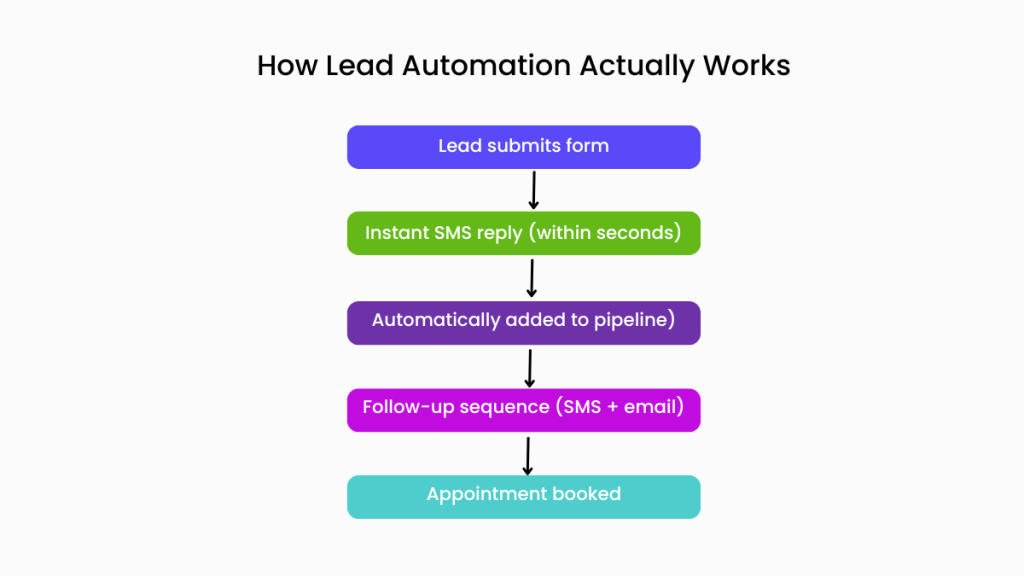
Most businesses don’t need a better CRM. They need a system that responds instantly and follows up without manual effort.
What Lead Automation Actually Looks Like (Real Example)
This is where most articles stay vague. So let’s make it concrete.
Imagine a lead submits a form on your website.
Here’s what should happen:
- Within 10–30 seconds
They receive an SMS:
“Hey, got your request. Want to book a time here?” - At the same time
They’re added to your pipeline as “New Lead” - If they don’t respond
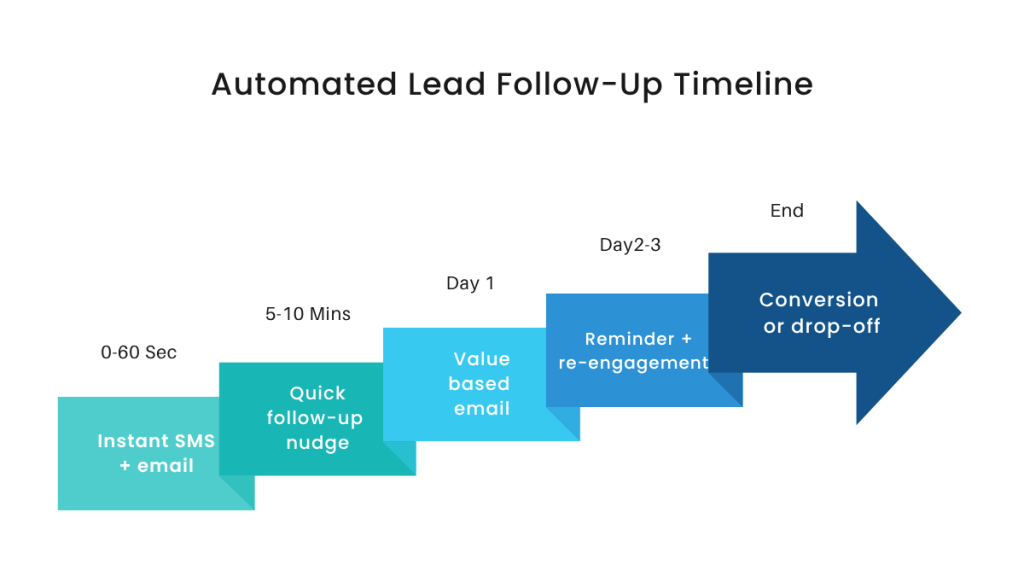
They get a follow-up:
- Day 1: SMS reminder
- Day 2: email
- Day 3: final message
- When they book
They automatically move to “Booked” - You only step in when needed
Not for every lead
That’s lead automation.
Most businesses don’t have this. They have:
- inbox chaos
- delayed responses
- forgotten leads
That’s why choosing the right CRM matters.
This is what real follow-up timing looks like when automation is set up properly
The Best CRM for Lead Automation (Actual Breakdown)
Not all CRMs are built for this level of automation.
Here’s how the main platforms compare when you look at real workflows, not just features.
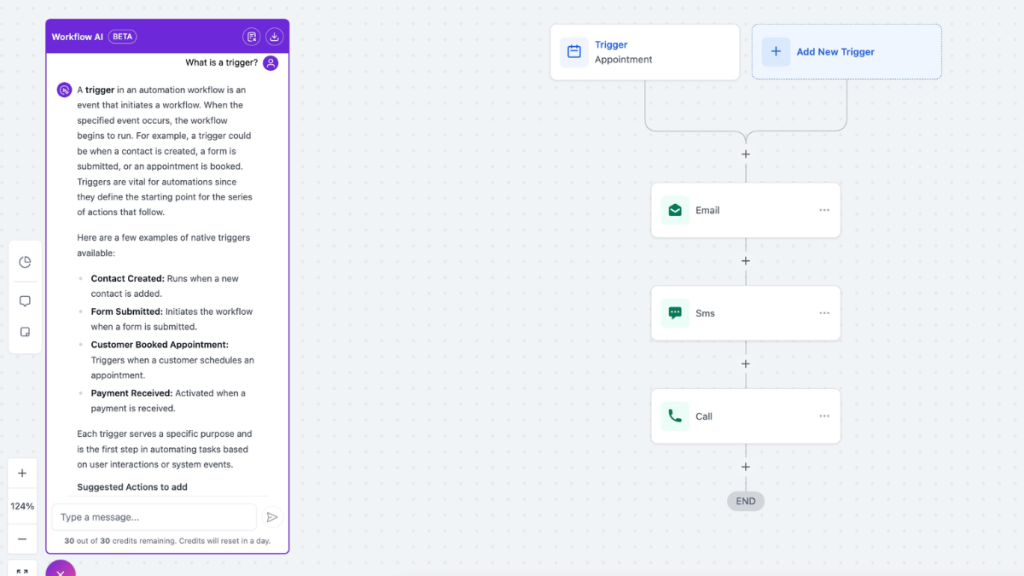
1. GoHighLevel – Best for full lead automation systems
Most CRMs stop at tracking leads. This is where full automation systems separate.
This is closest to a complete automation engine, not just a CRM.
It combines:
- pipelines
- SMS + email automation
- funnel builder
- booking system
In one place.
That matters because automation breaks when tools are disconnected.
With GoHighLevel, the workflow described above can be built inside one system without integrations.
If you’re serious about automation, you also need to understand the real GoHighLevel costs and hidden fees before committing:
This works best if:
✔ you generate leads consistently (ads, funnels, inbound)
✔ you want instant follow-up (SMS + email)
✔ you want to replace multiple tools
This is not ideal if:
✘ you only need a simple contact database
✘ you don’t want to build workflows
2. HubSpot – Best for structured, simple automation
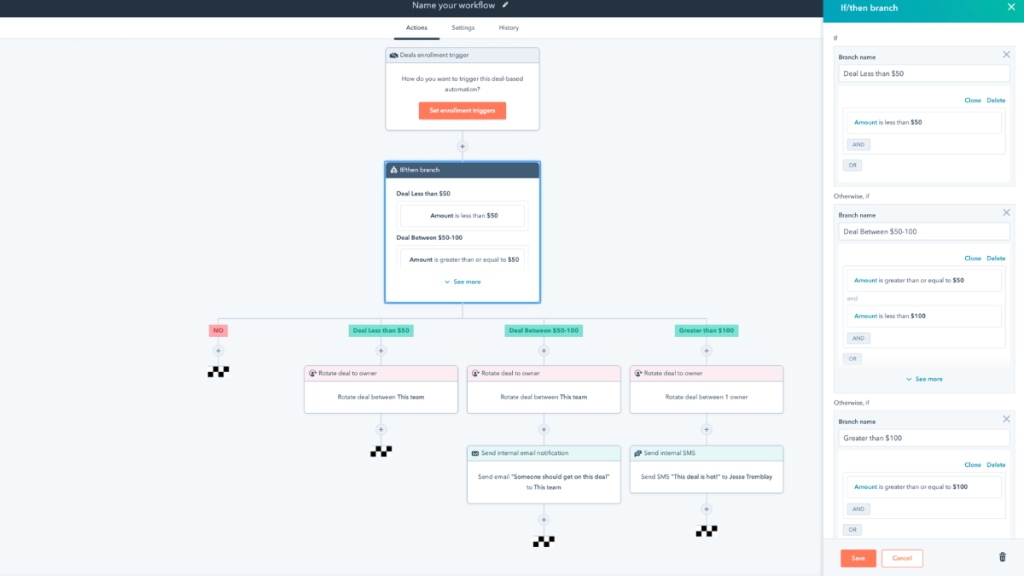
HubSpot is what most people start with.
It’s clean, intuitive, and works well for:
- tracking leads
- basic workflows
- sales pipelines
You can build automation, but it’s structured and limited compared to full systems.
The key trade-off is flexibility.
As your automation gets more advanced:
- you hit feature limits
- pricing increases quickly
- multi-channel automation becomes harder
This works best if:
✔ you want ease of use over flexibility
✔ your automation is mostly email-based
✔ you’re early-stage or team-focused
Avoid if:
✘ you need deep automation across SMS, funnels, and pipelines
✘ you want everything in one system
3. ActiveCampaign – Best for advanced email automation
ActiveCampaign is strong where others are weak: logic-based automation.
You can build:
- conditional flows
- behaviour-based triggers
- segmentation-heavy sequences
But it’s not a full lead system.
You still need:
- landing pages
- booking tools
- CRM structure
So your automation becomes fragmented.
This works best if:
✔ email is your main conversion channel
✔ you want advanced logic and segmentation
Avoid if:
✘ you want a complete lead system
✘ you rely on fast response channels like SMS
4. Zoho CRM – Best for budget-conscious setups
Zoho gives you automation at a lower price point.
It’s flexible and capable, but there’s a trade-off.
You’ll spend more time:
- configuring workflows
- figuring out the interface
- managing complexity
It’s not built for speed or simplicity.
This works best if:
✔ cost is your main constraint
✔ you’re comfortable configuring systems
Avoid if:
✘ you want fast setup and clean automation
✘ you value usability over flexibility
Comparison: Choosing the Right CRM
| Platform | Best For | Strength | Limitation |
|---|---|---|---|
| GoHighLevel | Full automation systems | All-in-one workflows | Learning curve |
| HubSpot | Simplicity & teams | Easy to use | Expensive at scale |
| ActiveCampaign | Email automation | Deep logic | Not all-in-one |
| Zoho CRM | Budget setups | Affordable | Less intuitive |
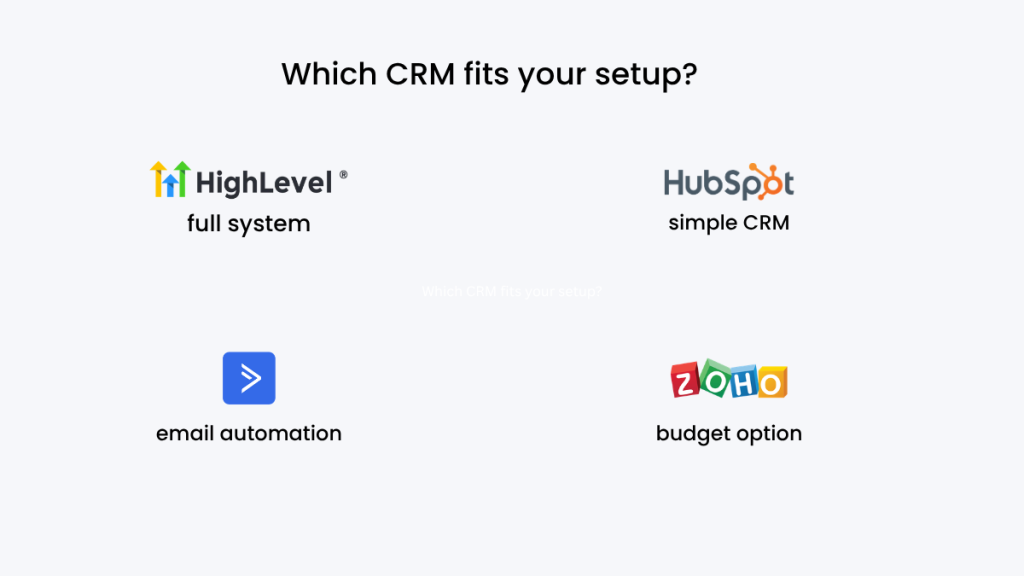
How to Choose (Based on Your Actual Setup)
Most businesses don’t need “the best CRM”.
They need the right level of automation.
If you run ads, funnels, or inbound leads:
You need instant response + pipeline automation
→ GoHighLevel fits best
If you want simple tracking and light automation:
→ HubSpot is enough
If your strategy is email-first:
→ ActiveCampaign makes sense
If budget is your priority:
→ Zoho is viable
If you’re still unsure how these tools fit into a wider automation setup, this guide on best automation tools for virtual assistants shows how these systems actually connect in real workflows:
Where GoHighLevel Wins (And Where It Doesn’t)
This is where most reviews become biased. So let’s be clear.
GoHighLevel wins when:
- speed-to-lead matters
- automation replaces manual work
- multiple tools are slowing you down
It loses when:
- you want plug-and-play simplicity
- you don’t need advanced workflows.
If you’re deciding between funnel-first tools and CRM-first systems, this GoHighLevel vs ClickFunnels comparison breaks down when each one actually makes sense.
- you don’t need advanced workflows.
Instead of juggling multiple tools, you can run your entire lead capture, follow-up, and conversion system in one place
The Reality Most CRM Reviews Skip
Most CRMs don’t solve lead automation.
They organise contacts.
That’s not the same thing.
Real automation requires:
- triggers
- timing
- multi-channel follow-up
- pipeline movement
Without that, you’re just storing leads… not converting them.
FAQ
What is the best CRM for lead automation?
It depends on your workflow. GoHighLevel is strongest for full automation systems, while HubSpot is better for simpler setups.
Do small businesses need CRM automation?
Yes, if you generate leads consistently. Without automation, response time kills conversions.
What’s more important: CRM or automation?
Automation. A CRM without automation is just a database.
Is email automation enough?
No. SMS and instant follow-up significantly increase response rates.
Suggested Reads
GoHighLevel hidden costs and real pricing – what you actually pay monthly
Best automation tools for virtual assistants – how full systems are built
GoHighLevel vs ClickFunnels comparison – when each platform makes sense
Final Verdict
The best CRM for lead automation isn’t about features.
It’s about what happens after a lead comes in.
If your system:
- responds instantly
- follows up automatically
- moves leads forward without effort
You win more deals.
If it doesn’t, you’re relying on timing, memory, and manual work.
That’s not scalable.
For simple setups, HubSpot works.
For email-first strategies, ActiveCampaign works.
But if you want a system that actually runs your lead flow end-to-end, GoHighLevel is the closest thing to a complete solution.
Not because it’s popular.
Because it actually does the job most CRMs claim to do.