
If you are looking for a CRM for sales teams in small businesses, the real problem usually is not “we need more software.” It is that leads sit too long, follow-up depends on whoever remembers, and nobody can see what is actually closing — let alone why it is not.
That is where a CRM helps. But only if you choose the right type.
A small sales team does not need an enterprise system with layers of admin, complicated reporting, and per-seat costs that balloon the moment you grow. What it needs is a tool that keeps leads organised, makes follow-up consistent, and automates the repetitive tasks that cause deals to go cold.
If you’re comparing tools, start with my full breakdown of the best CRM for small business.
This article compares four options that small UK sales teams actually use, explains where each one fits, and helps you decide which is worth your time.
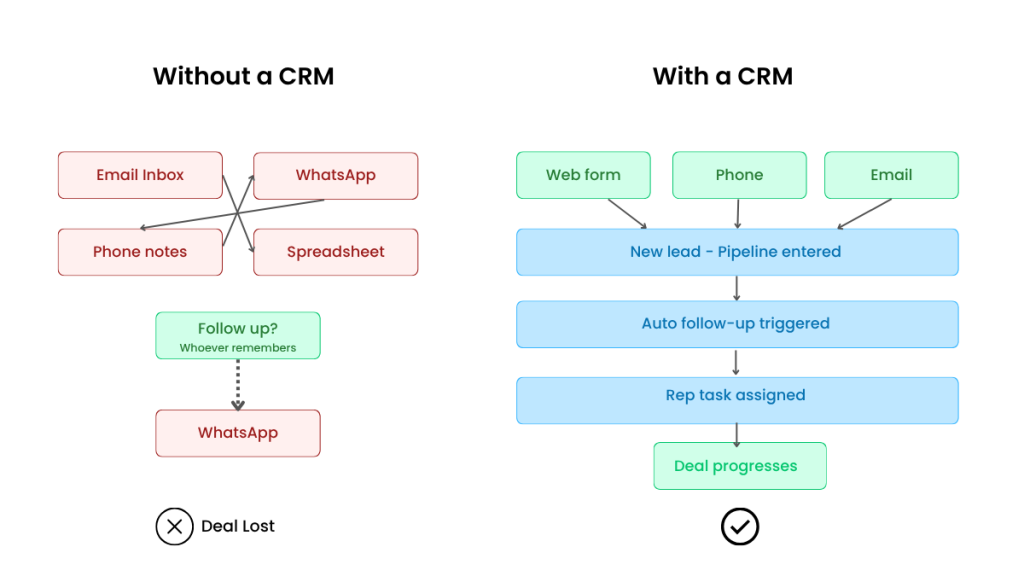
Most small teams don’t lose deals because of bad sales — they lose them because nobody follows up fast enough
Quick Summary
Pipedrive is the easiest starting point for teams that mainly want a clean, visible pipeline. Built around sales process management, straightforward to learn. Good when discipline and clarity are the priority. (Check current pricing at pipedrive.com.)
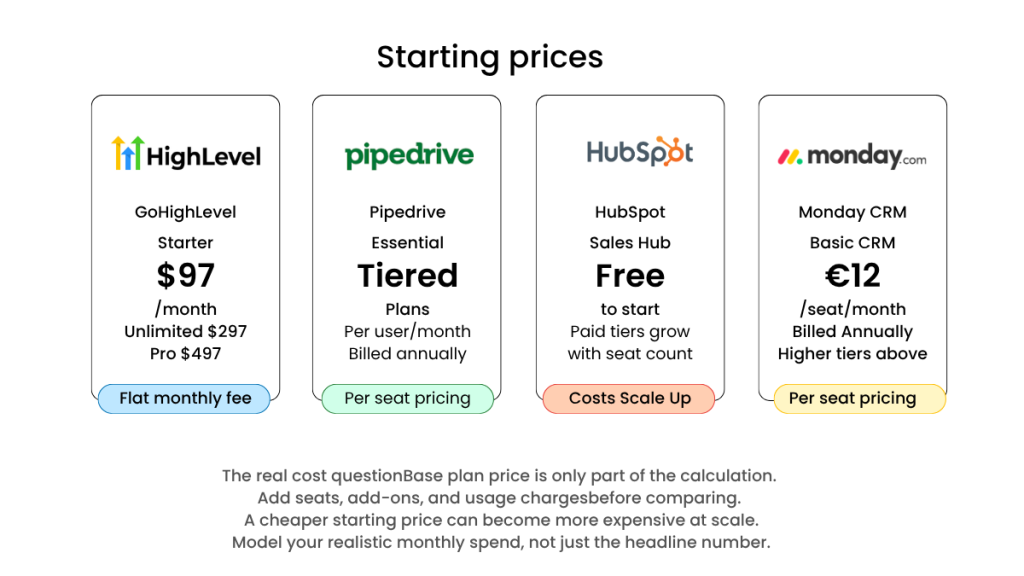
GoHighLevel is the stronger choice when your team needs more than contact storage — specifically follow-up automation, forms, funnels, and pipeline tracking in one place. Pricing starts at $97/month for Starter, $297/month for Unlimited, and $497/month for Pro. Some usage-based services such as messaging are charged separately via a wallet model. (Check current pricing at highlevel.com.)
HubSpot Sales Hub is the default choice for teams that want a well-known, scalable CRM. It starts free, but it gets expensive the moment your team actually relies on it. Good for businesses with growth plans and the budget to match. (Check current pricing at hubspot.com.)
monday CRM is flexible and visual, but that flexibility can get in the way if what you actually need is a clear sales pipeline. Pricing starts from around €12 per seat/month billed annually. (Check current pricing at monday.com.)
The non-obvious point: most small teams do not need more CRM features. They need faster response times and fewer dropped hand-offs. The right choice is not about brand. It is about where your sales process is currently failing.
What This Article Covers
This article is written for small UK businesses with a dedicated sales team — even a two-person setup — that want to stop losing leads between enquiry and follow-up.
It covers:
- Which CRM type suits a small sales team
- Where automation actually matters
- When a simple pipeline tool is enough
- When an all-in-one system makes more sense
It does not cover enterprise CRM rollouts, deep custom development, or agency reselling setups.
What Small Sales Teams Actually Need From a CRM
Most small businesses do not lose deals because they lack dashboards.
They lose deals because:
- Web enquiries are not followed up quickly enough
- Sales conversations are scattered across email, calls, WhatsApp, and forms
- Nobody can see what stage a lead is really at
- The team relies on memory instead of process
A good CRM for sales teams in small businesses should do four things well: show the pipeline clearly, make follow-up consistent, reduce manual admin, and fit the team without requiring a full-time CRM manager to keep it running.
That last point matters more than many owners realise. A tool can be genuinely powerful and still be the wrong choice if your team only uses 20% of it.
Comparison Table
| Tool | Best for | Starting price | Main trade-off |
|---|---|---|---|
| GoHighLevel | Teams needing CRM, automation, and lead handling in one place | $97/month (check current pricing) | Heavier to set up; not right if all you want is a simple pipeline |
| Pipedrive | Teams focused on straightforward pipeline management | Tiered plan pricing (check current pricing) | Broader automation needs add-ons or separate tools |
| HubSpot Sales Hub | Teams wanting a scalable, well-known CRM with room to grow | Free, then per-seat paid plans (check current pricing) | Starts cheap, gets expensive once your team actually relies on it |
| monday CRM | Teams wanting flexible, visual workflow management | ~€12/seat/month billed annually (check current pricing) | Flexibility becomes clutter if you just need a clear sales pipeline |
Option 1: GoHighLevel
GoHighLevel is not the most familiar name on this list. For many small service businesses, it is the most practical one.
That is especially true when the real issue is not pipeline visibility but slow, inconsistent follow-up — the gap between a lead arriving and someone actually making contact. That is where deals die, and a standard CRM will not fix it.
When GoHighLevel is the best fit
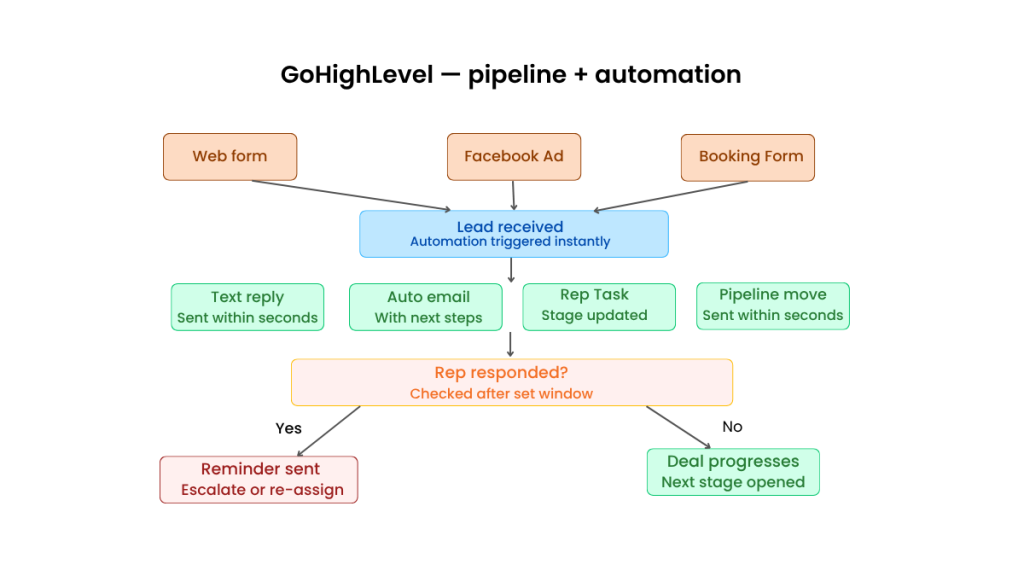
Consider a small business getting leads from its website, Facebook ads, and a booking form. The lead arrives. If nobody calls within ten minutes, the opportunity often dies. A standard CRM lets you see the lead. An automation-first system acts on it immediately.
That might mean:
- An instant text reply to acknowledge the enquiry
- An automated email with next steps
- A task assigned to a specific rep
- The lead moving into the pipeline the moment the form is submitted
- A reminder triggered if nobody has followed up within a set window
That is the difference between a CRM that stores leads and one that helps close them. If speed-to-lead is your biggest revenue leak, it is worth understanding the full picture of what automation can do before you choose — a good starting point is this breakdown of the [best CRM with automation for small businesses].
Who it is best for
- Local service businesses and appointment-led operations
- Small sales teams running lead forms with follow-up workflows
- Businesses consolidating several separate tools into one
- Teams that want sales and marketing connected rather than siloed
Who it is not for
- Teams that want a clean, lightweight pipeline with minimal setup
- Businesses already happy with their separate tools
- Teams with no capacity to configure the system properly at the start
The downside
GoHighLevel does a lot, and that means it requires upfront decisions. If your team wants something they can open and use within minutes, this will feel heavy. The platform also charges separately for some services — particularly messaging — through a usage-based wallet model. For UK small businesses, that means the real monthly cost can sit meaningfully above the headline plan price. Build that into your budget before you compare.
If follow-up automation is the priority for your team, the GoHighLevel pricing guide has a full breakdown of plans and what each one actually includes.
Option 2: Pipedrive
Pipedrive is built around one thing: managing deals and keeping the pipeline visible. That focus is its biggest strength and its clearest limitation.
For teams moving off spreadsheets and inboxes, it is often the cleanest upgrade available. The learning curve is low, adoption tends to be high, and the pipeline view gives managers clarity without needing to chase reps for updates.
When Pipedrive is the best fit
It works well when your sales process is roughly linear: enquiry comes in, rep follows up, deal moves through stages, manager wants visibility. If that describes your operation, a purpose-built pipeline tool is exactly what you need — and Pipedrive does it better than most.
Who it is best for
- Owner-led teams moving off spreadsheets
- Businesses with a straightforward sales process
- Teams where adoption matters more than feature depth
Who it is not for
- Teams wanting a proper all-in-one marketing and sales system
- Businesses relying on automated lead nurturing
- Teams trying to reduce their total number of tools
The downside
If you need broader automation, advanced nurturing, or a more unified customer journey, you will end up adding external tools. Some functionality — such as Campaigns — is a paid add-on rather than included in the base plan. That is not a flaw. It just means Pipedrive is the right tool when the problem is pipeline clarity, not business-wide automation.
Option 3: HubSpot Sales Hub
HubSpot is usually the default pick — and for good reason. It is polished, well-documented, and the broader ecosystem is genuinely extensive. The free tier means there is no commitment to getting started.
The problem is that HubSpot is often chosen for the wrong reasons. Name recognition is not a strategy.
For a small sales team, HubSpot makes sense if you already know you will grow into it — more hubs, more users, a proper marketing operation. If you are not building toward that, you will end up paying for a platform that is larger than your actual problem.
Who it is best for
- Growing teams with budget that matches their ambitions
- Businesses planning to invest in the broader HubSpot ecosystem over time
- Teams where internal buy-in matters and a familiar name helps adoption
Who it is not for
- Budget-sensitive small businesses that need results now
- Teams that will find per-seat pricing frustrating as headcount grows
- Businesses that mainly need fast, practical follow-up automation
The honest take
HubSpot starts cheap, then gets expensive the moment your team actually relies on it. That is not a reason to avoid it — it is a reason to go in with clear expectations. If you are still deciding between HubSpot and a lower-cost all-in-one system, it is worth reading a [breakdown of the main GoHighLevel alternatives] before you commit to a direction.
Option 4: monday CRM
monday CRM is flexible, visual, and genuinely useful for teams that want a workspace rather than a traditional sales tool.
But flexibility is only an advantage if you have the time and appetite to configure it. For a small sales team that just wants to know where their deals are, too many options can slow things down rather than speed them up.
If your sales process overlaps with operations or project delivery, monday CRM can work well. If you just need a clean pipeline, it is probably more than you need. (Pricing starts from around €12/seat/month billed annually — check current pricing at monday.com.)
So Which CRM Should a Small Sales Team Choose?
Here is the real decision.
If your team mainly needs a clean sales pipeline and adoption is the priority, Pipedrive is the right starting point.
If you want a well-known platform with room to scale, and you have the budget for it, HubSpot makes sense — but go in knowing the costs will grow.
If you want flexible workflow management that spans sales and operations, monday CRM is worth considering.
If your team is losing leads because follow-up is slow or patchy, and you want to stop stitching together separate tools, GoHighLevel is the strongest operational choice. Particularly for service businesses where speed-to-lead directly affects revenue.
The real question is not which CRM has the most features. It is which one fixes the specific part of your process that is currently costing you money.
A Practical UK Small Business Scenario
Picture a five-person sales team at a UK service business.
Leads come in from the website, Google Ads, and phone calls. One rep calls back quickly. Another waits until the afternoon. A third forgets unless prompted. Management can see enquiry volume, but not why conversion feels inconsistent.
The pipeline is not the problem. The response layer is.
In that scenario, Pipedrive gives you structure and visibility. HubSpot gives you a polished system with room to grow. monday CRM gives you workflow flexibility. GoHighLevel gives you all of that plus the automation to handle the response layer without relying on whoever happens to be paying attention.
If the revenue leak is speed-to-lead, the automation-first option usually creates the fastest improvement. The bottleneck is rarely bad salespeople. It is slow first contact — and if that resonates, the [missed call text back system] is worth reading next, because it addresses exactly that problem.
Three Downsides to Take Seriously Before You Choose
1. Setup effort
Every CRM looks easy in a demo. Real life is different. Pipelines, custom fields, ownership rules, reminders, and automations all require decisions. If nobody owns the setup process, a well-chosen CRM can become shelfware within a month.
2. Total cost, not just headline price
The cheapest-looking option is not always the cheapest. HubSpot’s seat model changes the maths quickly. Pipedrive’s add-on ecosystem adds up. GoHighLevel’s usage-based messaging charges can sit meaningfully above the headline plan. Always model your realistic monthly spend, not just the base plan price.
3. Complexity mismatch
A small business can buy too little CRM. It can also buy too much. If your team needs a reliable pipeline with reminders, an automation-heavy system may go largely unused. If your team needs instant lead handling, a lightweight sales tracker will not go far enough. Getting that match right matters more than brand recognition.
How to Choose Without Wasting Months
Three questions. Answer them honestly before you shortlist anything.
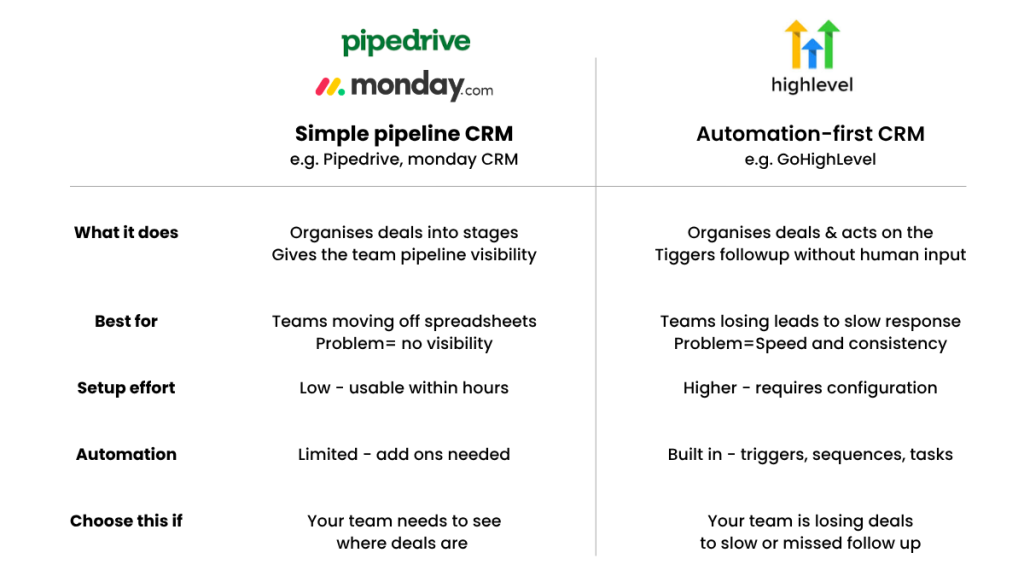
1. Do we need visibility, or do we need automation?
If nobody can see where deals are, start simpler. If leads go cold because follow-up is slow or missed, go automation-first.
2. Will the team actually use it?
The best CRM for sales teams in small businesses is the one the team adopts consistently. Sophisticated features do not matter if reps work around the system.
3. Are we replacing a tool, or fixing a workflow?
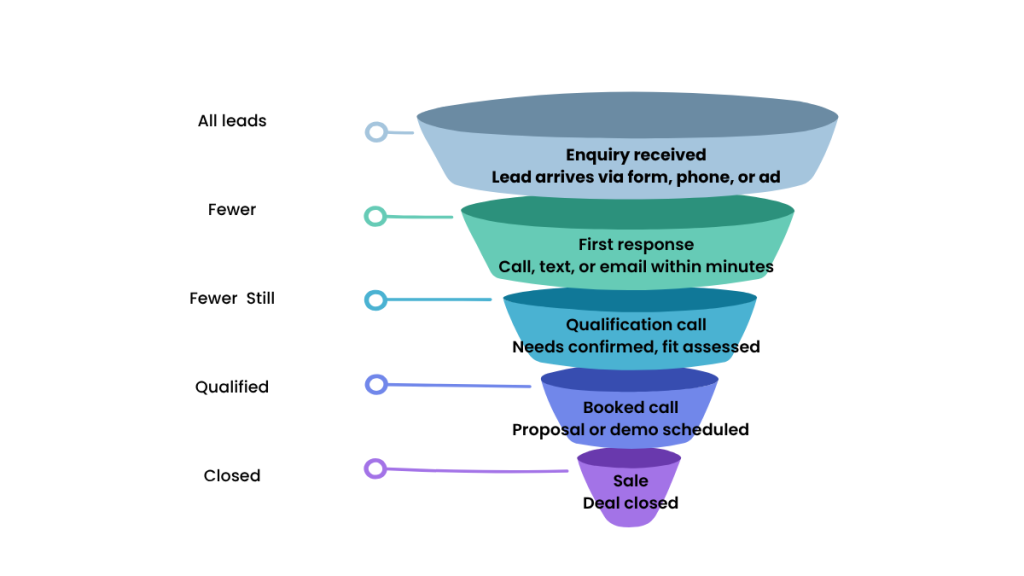
If you just need a CRM, several options will work. If you want to fix how leads move from enquiry to booked call to sale, your shortlist should narrow quickly — and that question should drive the decision.
FAQ
What is the best CRM for sales teams in small businesses?
It depends on where your process is breaking down. Pipedrive is the strongest option for simple pipeline management. GoHighLevel is the better choice when follow-up automation matters. HubSpot suits teams with growth plans and the budget for a larger platform. monday CRM works for teams that want flexible, visual workflows over a rigid sales structure.
Do small sales teams really need a CRM?
Yes, once leads are being missed, duplicated, or followed up inconsistently. A CRM gives you visibility and process. The right one also reduces admin and cuts response time — the two things that most directly affect whether leads convert.
Is GoHighLevel a good fit for a small sales team?
Yes, particularly for teams that need automation, lead capture, follow-up sequences, and pipeline tracking in one place. It is a poor fit if the only goal is a simple pipeline with minimal setup — in that case, Pipedrive is the cleaner choice.
Is HubSpot too expensive for small businesses?
It can be. The free tier is genuinely useful, but costs rise quickly once you need more users or more advanced functionality. If budget is tight and you mainly need practical follow-up automation, there are more economical options.
What is the easiest CRM for a small sales team to start with?
Pipedrive. It is built specifically around pipeline clarity and sales workflow, and most teams get value from it within days rather than weeks.
Suggested Reads
If you are still working through the decision, these are the most useful next reads:
- Understand what automation actually changes before you buy: [Best CRM With Automation for Small Businesses (2026)]
- Full cost breakdown before you commit: [GoHighLevel Pricing Explained (UK & US) — Is It Worth the Cost?]
- Comparing GoHighLevel against the alternatives: [Best GoHighLevel Alternatives (2026)]
- If slow first response is your main leak: [Missed Call Text Back System (2026)]
Final Verdict
For most small UK sales teams, the right CRM is not the most famous one. It is the one that matches your actual bottleneck.
If your team wants simple pipeline control, choose Pipedrive.
If you want a polished platform with room to scale and you can absorb the seat costs, choose HubSpot — but go in with clear budget expectations.
If you want flexible workflow management across sales and operations, monday CRM is worth a look.
If your team is losing leads because follow-up is slow, patchy, or spread across too many tools, GoHighLevel is the more practical choice. It is not the lightest option on this list, but it tends to solve the more expensive problem — the one that is quietly costing you revenue every week.