
Most small businesses don’t lose leads because of bad offers.
They lose them because nobody follows up properly.
A message comes in, someone replies once, then the lead disappears. No structure, no tracking, no second attempt.
A proper lead follow up system fixes this. It replaces guesswork with a repeatable process that quietly increases conversions without needing more traffic.
This guide shows you exactly how that system works, when to keep it simple, and when automation actually makes sense.
Quick Summary
✔ A lead follow up system is a process, not a tool
Most businesses jump to software before fixing the workflow.
✔ Speed beats perfection
The first response timing matters more than the wording.
✔ One follow-up is not enough
Most leads convert after multiple touchpoints.
✔ Automation removes inconsistency
It doesn’t replace thinking, it enforces the system.
✔ Not every business needs a CRM
For low lead volume, manual systems still work.
What a Lead Follow Up System Actually Means
A lead follow up system is simply a defined sequence of actions after someone enquires.
That includes:
• how fast you respond
• how many times you follow up
• what you say at each step
• when you stop
Most businesses don’t have this written down. Everything is reactive.
That’s why leads get lost.
The goal is not to “follow up more”.
The goal is to follow up consistently and predictably.
Step 1: Fix Your Response Speed First
Before you build anything else, fix this.
If a lead has to wait hours for a reply, your chances of converting them drop fast. Most small businesses think the message matters most. Usually, the timing matters first.
The goal is simple: reply within minutes, not hours.
This does not need to be a perfect answer. It just needs to acknowledge the enquiry and keep the conversation moving.
A simple first response works:
“Thanks for reaching out, just seen this. I’ll come back to you shortly with the next step.”
If your current setup makes that difficult, it usually means your follow-up process is too manual. That’s where the best CRM for small business can help by giving you one place to track enquiries, automate replies, and stop leads slipping through.
Missed Calls Need Their Own Follow-Up System
Lead response is not just about forms and messages. If someone calls and no one answers, that lead can disappear just as fast.
That’s why a missed call text back system is often one of the easiest wins for small businesses. It replies instantly, keeps the lead warm, and gives you a second chance to convert them.
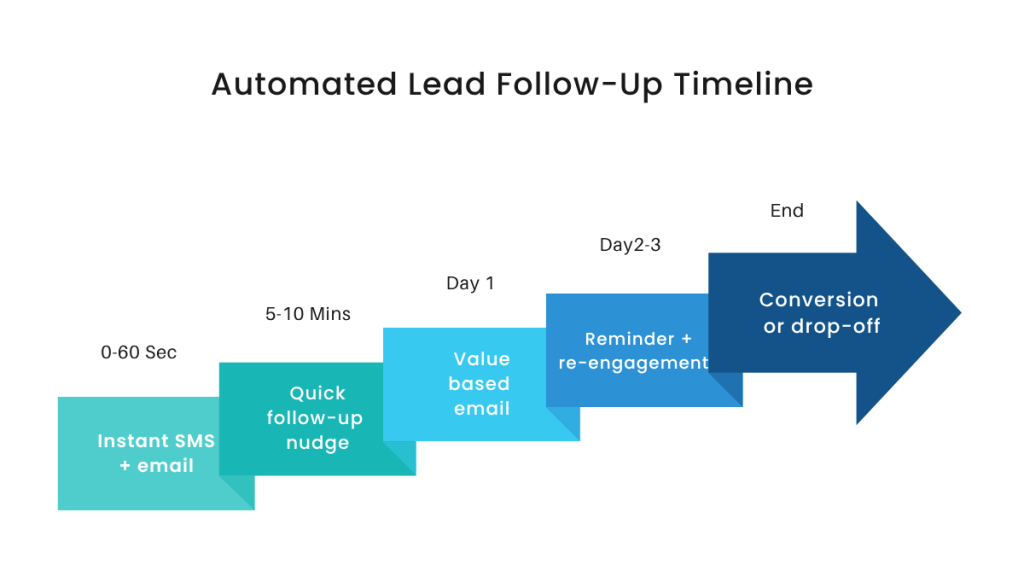
Step 2: Create a Simple Follow-Up Timeline
This is where your lead nurturing workflow starts to take shape.
Instead of relying on memory, you define the sequence.
| Day | Action |
|---|---|
| Day 0 | Immediate response |
| Day 1 | Follow-up message |
| Day 3 | Value or clarification |
| Day 5 | Reminder |
| Day 7 | Final follow-up |
This works because it removes decision fatigue.
You’re not asking:
“Should I follow up?”
You already know.
Most small businesses get this wrong by stopping too early.
Leads often convert after multiple interactions, not the first.
Step 3: Stop Sending Weak Follow-Ups
This is one of the biggest problems.
Most follow-ups sound like:
“Just checking in”
That doesn’t move anything forward.
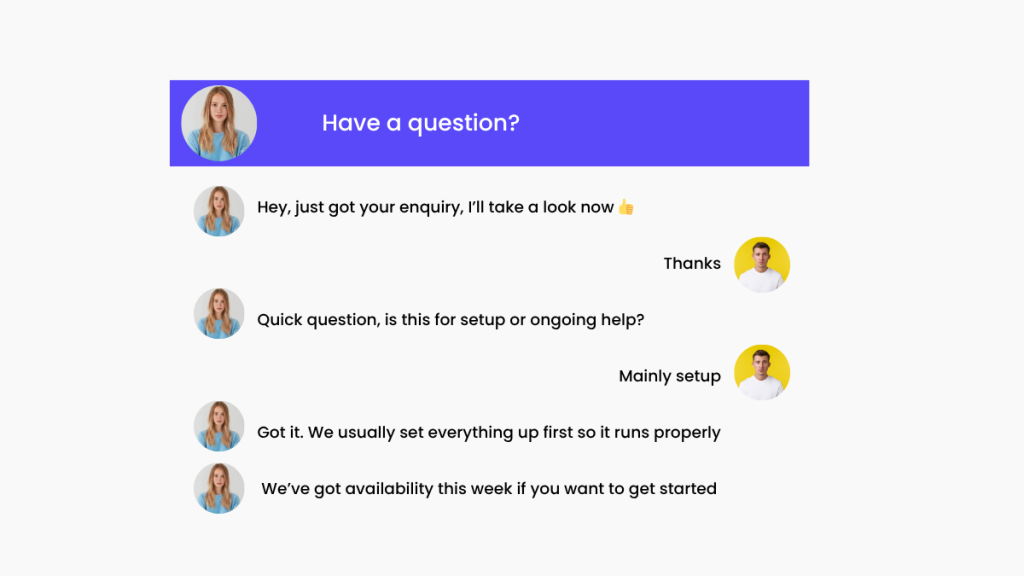
A better sales follow up process uses different angles:
• Clarification
“Did you want help with X or Y?”
• Direction
“Next step would be a quick call, does that work?”
• Value
“Here’s a quick example of how this works”
• Light urgency
“We’ve got availability this week if you’re still looking”
Each message should push the lead slightly closer to a decision.
Step 4: Decide What Happens to “Cold” Leads
Not every lead replies immediately.
That doesn’t mean they’re lost.
A proper system defines:
- when a lead becomes inactive
- when to re-engage
Example:
After your final follow-up, move them into a later sequence:
- 30 days → check-in
- 60 days → new offer
- 90 days → reactivation
This is where most businesses leak revenue. They treat “no reply” as “no interest”.
Step 5: Manual vs System vs Automation (This Is the Real Decision)
This is the part most guides ignore.
You don’t need automation by default. You need the right level of system.
Manual follow-up (works if…)
- low lead volume
- you can respond quickly
- you track everything reliably
This breaks down fast as volume increases.
Structured system (minimum standard)
- defined timeline
- repeatable messages
- basic tracking (spreadsheet or pipeline)
This is where most small businesses should start.
Automated system (use when…)
- leads are being missed
- follow-ups are inconsistent
- you want faster response times
- volume is increasing
This is where lead follow up software becomes useful.
This breakdown of automation tools for small businesses shows which tools genuinely save time and which ones just add unnecessary complexity.
Where CRM Tools Actually Fit
A CRM is not the system. It supports the system.
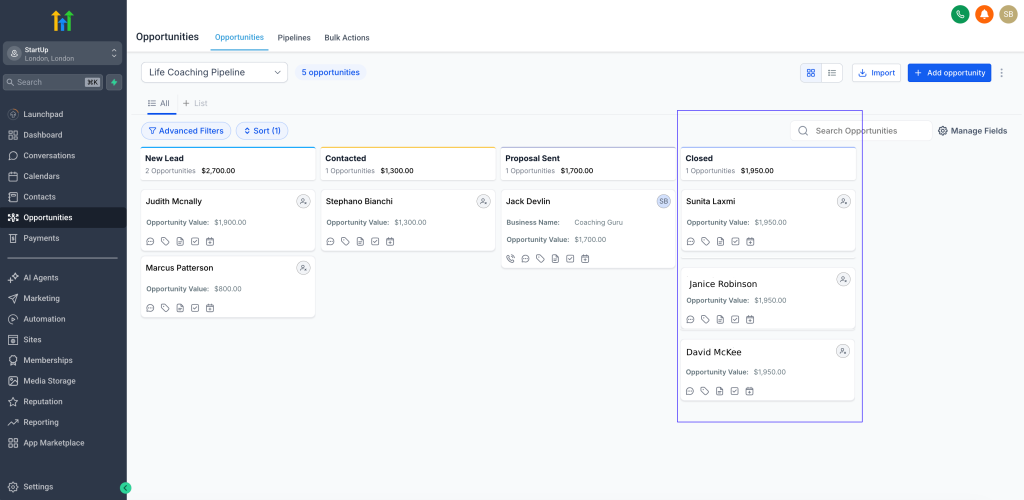
Tools like GoHighLevel are designed to handle:
- instant responses
- automated follow-ups
- pipeline tracking
- reminders and workflows
This works best when:
- you have consistent lead flow
- you want follow-ups happening automatically
- you don’t want to rely on memory
This is overkill if:
- you only get a few leads per week
- you prefer manual conversations
- you won’t actually use automation
If you already know you need automation, the easiest way to understand this properly is to test it yourself. You can try a simple follow-up workflow inside GoHighLevel and see how it actually runs in practice.
What a Simple Automated Lead Follow Up System Looks Like
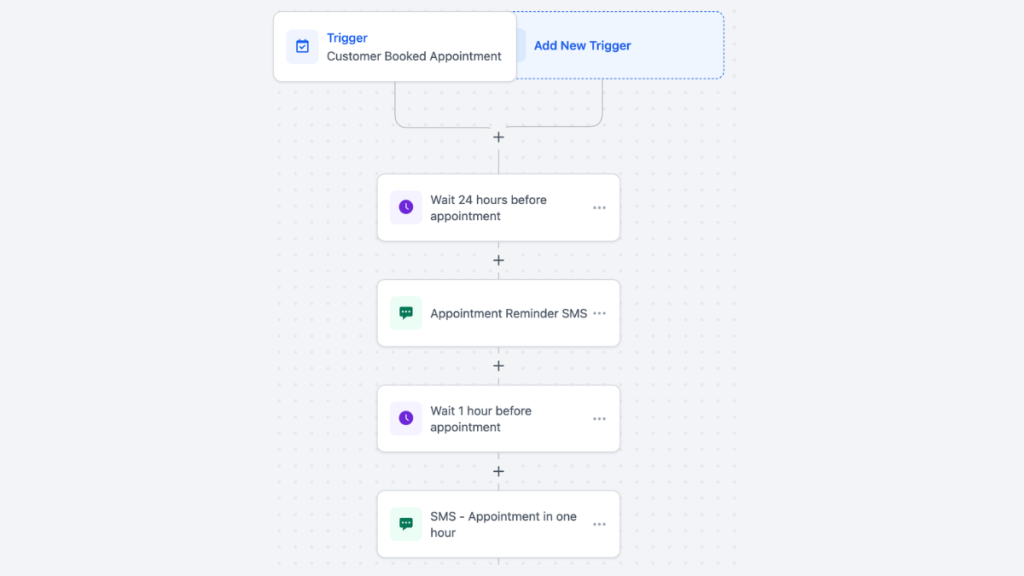
A practical setup looks like this:
- Lead comes in
- Instant response is sent
- Lead enters pipeline
- Follow-ups are scheduled automatically
- If no reply, sequence continues
- If reply, automation pauses
That’s it.
No complexity. Just consistency.
Common Mistakes That Break Follow-Up Systems
- No defined process
Everything depends on memory - Slow response times
Leads go cold before you reply - Only following up once
Most conversions happen later - Overcomplicating tools
Too many steps, nothing runs properly - Using software without a system
Tools amplify confusion if the process is unclear
FAQ
What is the best lead follow up system for small businesses?
The best system is one that is simple, repeatable, and fits your lead volume. For higher volume, automation tools help. For lower volume, a structured manual process is enough.
How many follow-ups should you send?
Typically 3 to 5. Fewer than that and you’ll lose opportunities.
Do I need a CRM for lead follow up?
Not always. You only need a CRM when manual tracking starts breaking down.
How fast should I respond to leads?
As fast as possible. Ideally within minutes.
What is a lead nurturing workflow?
It’s the sequence of follow-ups designed to move a lead toward a decision over time.
Suggested Reads
Best CRM tools → choosing the right system
Missed call follow-up → recover lost leads
Automation tools → what actually saves time
GoHighLevel pricing → when it’s worth it
Final Verdict
A lead follow up system is not complicated.
Most businesses just don’t have one.
Start with:
- fast response
- clear timeline
- better follow-ups
Only add automation when your system starts breaking down.
If you reach the point where consistency becomes the problem, a tool like GoHighLevel becomes useful.
Until then, the system matters more than the software.