
How to Follow Up With Leads Automatically
You’re getting leads… but they’re not turning into anything.
They fill out a form, maybe you reply once, then silence. No booking, no reply, no sale.
If you’re trying to figure out how to follow up with leads automatically, it’s usually because your current setup depends on you remembering to follow up. And that’s exactly why it breaks.
Leads don’t convert because they’re bad. They don’t convert because your follow-up isn’t consistent.
If your current setup can’t do this automatically, this is where you fix it.
Quick Summary: How This Works
| Key Area | Insight |
|---|---|
| Core Problem | Leads aren’t converting because follow-up depends on you, not a system |
| Quick Fix | Put every lead into an automated CRM sequence that responds instantly |
| System Flow | Capture lead → trigger instant response → run 5-day follow-up → move through pipeline |
| Best Tools | GoHighLevel for full automation, ClickFunnels for funnels, HubSpot for tracking |
| Key Advantage | Leads get contacted within seconds and consistently followed up without effort |
| Outcome | More booked calls without chasing or forgetting leads |
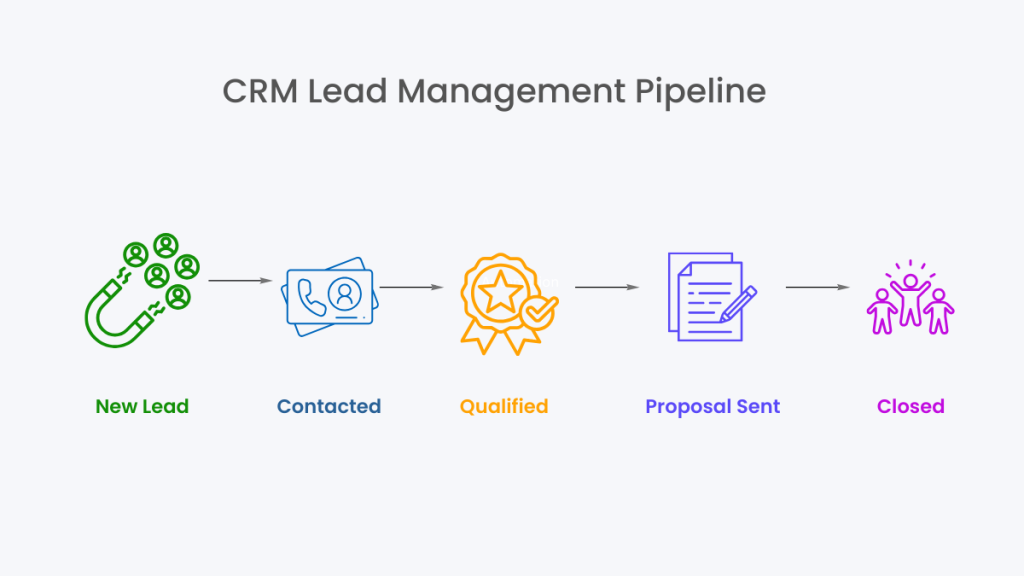
This is what your lead flow should look like once automation is set up
Early Software Overview (Top Tools)
If your follow-up is inconsistent, the issue isn’t effort. It’s your setup.
Here are the real options:
GoHighLevel
Best for businesses that want a complete system. It handles CRM, pipelines, SMS, email, and automation in one place. Ideal if you don’t want to rely on multiple disconnected tools.
ClickFunnels
Best for funnel-driven setups. Strong at capturing leads and triggering simple follow-up sequences tied to specific offers.
HubSpot CRM
Best for tracking and visibility. Works well if your priority is managing leads and reporting, but it requires more setup for advanced automation.
If your tools don’t talk to each other, your follow-up will always break at some point.
What Automated Follow-Up Actually Means
Automated follow-up isn’t complicated.
It’s just a system that responds and continues the conversation without you needing to step in every time.
When a lead comes in, three things should happen immediately:
✔ the lead gets a response
✔ the system continues follow-up if there’s no reply
✔ the lead is tracked so nothing gets missed
That’s the difference between manual follow-up and a real system.
Manual follow-up depends on you.
Automated follow-up removes that dependency completely.
The System, How to Follow Up With Leads Automatically
This is where things change.
You don’t need more effort. You need a system that runs without you.
Step 1, Lead Capture → CRM (Day 0)
When a lead comes in, it should go straight into your CRM.
Not your inbox.
If you’re manually tracking leads, you’re already creating delays. A structured setup like Best CRM With Automation for Small Businesses removes that problem completely.
Step 2, Instant Response (Within 60 Seconds)
This is where most conversions are won or lost.
Send:
- confirmation email
- SMS message
Example SMS:
“Hey, just saw your enquiry come through. We’ll reach out shortly. If you want to book now, here’s the link.”
This immediately positions you as responsive and organised.
Step 3, Follow-Up Sequence (Days 1–5)
Now the system takes over.
Day 1 (Email):
Subject: “Quick question about your enquiry”
Message:
“Just wanted to check what you’re looking to achieve so we can point you in the right direction.”
Day 2–3 (SMS or Email):
Reminder + reassurance
Address hesitation or confusion
Day 4–5 (Final Follow-Up):
Direct call to action
Prompt them to book or reply
If you’re using SMS here, setup matters more than most people realise. This is explained in GoHighLevel Hidden Costs (2026).
Step 4, Pipeline Movement
Every lead moves through stages:
- New
- Contacted
- Booked
- Closed
Each movement triggers the next action automatically.
This is what turns CRM lead management into a working system instead of a list of contacts.
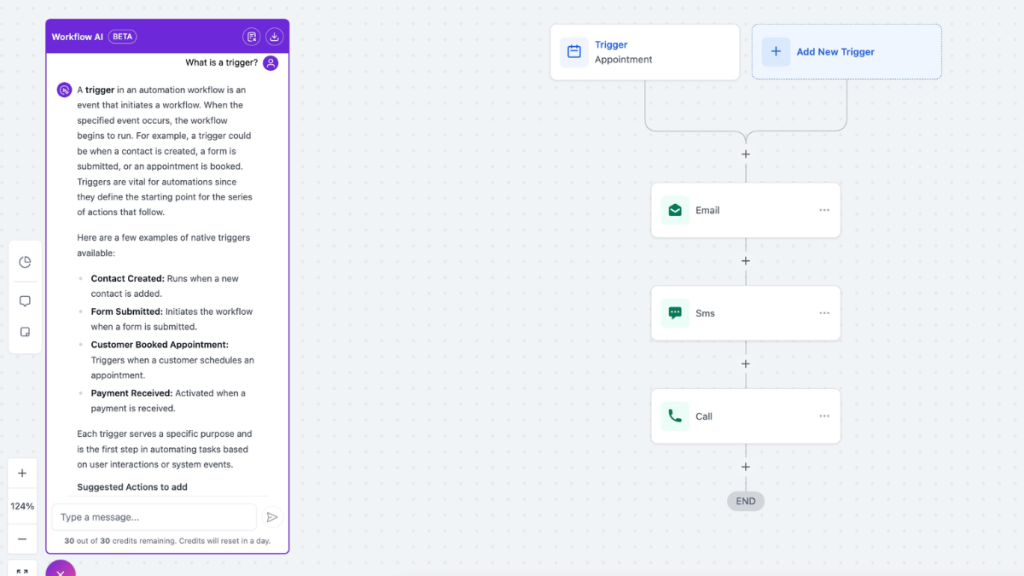
Step 5, Behaviour-Based Automation
The system reacts to what the lead does:
- opens email → follow-up triggered
- clicks link → moved to next stage
- books call → automation stops
This is where automation becomes responsive, not just scheduled.
This type of system is exactly what operators like Jordan Platten focus on, building processes that remove manual follow-up completely.
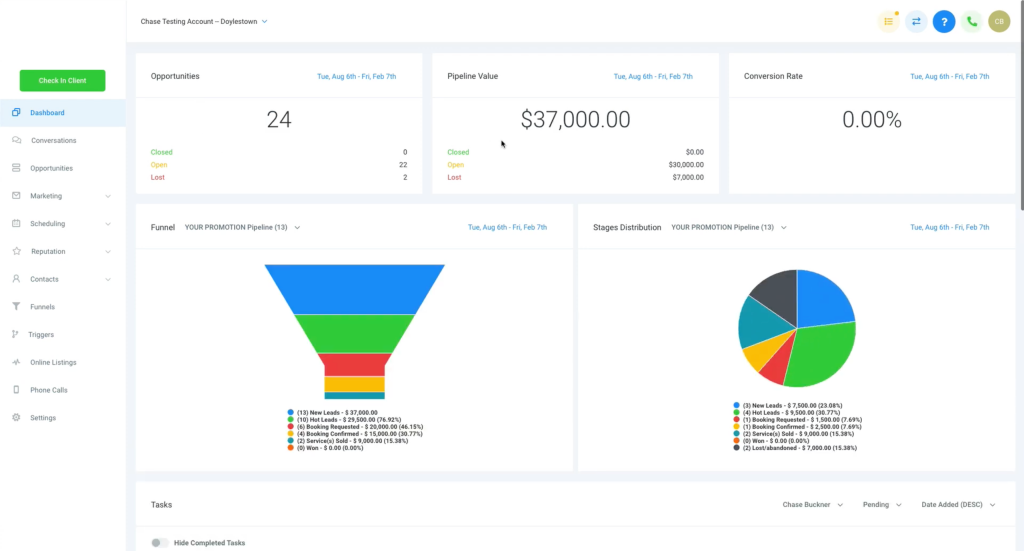
Real-World Example
A local service business runs ads.
A lead submits a form.
Here’s what happens:
- Lead enters CRM instantly
- SMS sent within 1 minute
- Email sequence begins automatically
- Follow-ups continue over 5 days
- Once booked, pipeline updates and messages stop
No manual chasing.
This is why systems like Missed Call Text Back System (2026) consistently outperform manual follow-up.
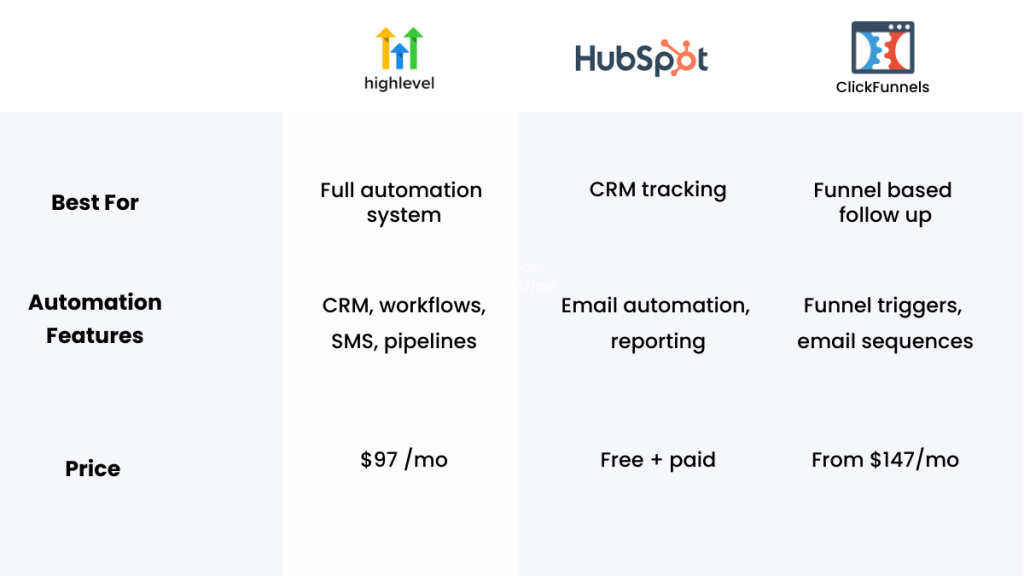
Software Comparison Table
| Platform | Best For | Automation Features | Pricing |
|---|---|---|---|
| GoHighLevel | Full automation system | CRM, workflows, SMS, pipelines | From $97/mo |
| ClickFunnels | Funnel-based follow-up | Funnel triggers, email sequences | From $147/mo |
| HubSpot | CRM tracking | Email automation, reporting | Free + paid |
Choosing the Right Tool
This decision is straightforward when you think in systems.
Use GoHighLevel if you want:
- a fully connected system
- automation across email, SMS, and pipeline
- minimal tool switching
Use ClickFunnels if you want:
- strong funnel-based lead capture
- simpler follow-up tied to offers
Use HubSpot if you want:
- structured CRM tracking
- reporting and visibility
If your issue is inconsistent follow-up, GoHighLevel solves it fastest because everything is connected.
If your current setup can’t do this automatically, this is where you fix it.
Why Most Follow-Up Systems Fail
Most businesses don’t fail because they ignore follow-up.
They fail because their system relies on them.
- no automation
- no pipeline tracking
- no behaviour triggers
- no consistency
That’s why leads slip through unnoticed.
This is also why many businesses move toward systems covered in Best Automation Tools for Virtual Assistants (Stop Doing Manual Work in 2026).
Software Reinforcement, What You Should Actually Use
At this point, the decision should be clear.
If you want a complete system that handles lead capture, follow-up, and pipeline management, GoHighLevel is the strongest option.
If you prefer funnel-driven lead capture with simpler automation, ClickFunnels works well.
If you want structured CRM tracking and reporting, HubSpot is a solid choice.
But if your goal is to stop losing leads because of inconsistent follow-up, an all-in-one system makes the most sense.
If your current setup can’t do this automatically, this is where you fix it.
FAQ
How do you follow up with leads automatically?
You use a CRM with automation workflows. Leads trigger messages based on timing and behaviour without manual input.
What is the best software for automated follow-up?
GoHighLevel is one of the most complete options because it combines CRM, automation, and messaging in one system.
How quickly should you follow up with leads?
Within minutes. The faster the response, the higher the chance of engagement.
How many follow-ups should you send?
Most systems use 5–7 touchpoints over several days to keep leads engaged.
Suggested Reads
If you want to improve your CRM setup, start with Best CRM for Virtual Assistants (UK/US) for a breakdown of pipeline structure.
To compare tools directly, read GoHighLevel vs ClickFunnels (2026) for use-case clarity.
For pricing details, see GoHighLevel Pricing Explained (UK & US) to understand real costs.