
Affiliate links – I earn a commission if you sign up through this page, at no extra cost to you. That’s exactly why the weaknesses below aren’t softened. If GoHighLevel isn’t right for your business, I’d rather you know before you start a trial
Most people start the GoHighLevel free trial, click around for a few days, and cancel without ever seeing what the platform can actually do.
Not because it doesn’t work. Because they didn’t test the right things.
The 30-day trial gives you access to the features included in the Starter plan. Usage-based services, paid add-ons, and features from higher plans are not automatically included. But GoHighLevel has a steep setup curve – most users spend the first three days just getting oriented. That leaves twenty-seven days to build, test, and make a real decision.
This particular link gets you 30 days on the Starter plan, not the standard 14, and it comes with a live coach-led Bootcamp alongside your trial. That combination is why this guide exists: to show you how to actually use both.
This guide shows you exactly what to do with those 30 days so you walk away with a clear answer: does this platform replace your current tools or not.
The fastest way to know if GoHighLevel is worth it isn’t reading reviews, it’s running your own contacts through it for a week and seeing what actually happens.
Key Takeaways
- HighLevel’s own trial is normally 14 days; this page links to HighLevel’s promotional Bootcamp offer, which currently runs 30 days
- This link signs you up on the Starter plan only. Want Unlimited or Agency Pro instead? Use the standard trial link or compare all three plans on HighLevel’s pricing page
- The subscription fee isn’t charged until the trial expires, but communication surcharges and other usage costs may still apply
- SMS, calls, and email are billed separately from day one
- Cancel before your trial expiry date inside Settings > Billing to avoid the monthly subscription charge. Usage costs already incurred will still apply
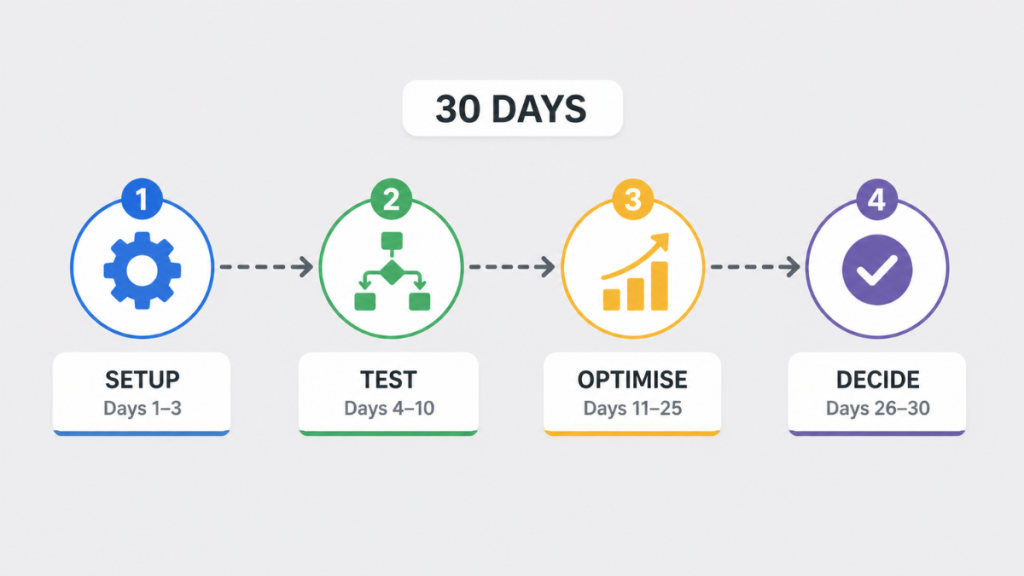
Why 30 Days Instead of 14?
The standard GoHighLevel trial on HighLevel’s main pricing page is 14 days. The 30-day version comes through HighLevel’s promotional Bootcamp offer, this page links to that offer. The extra time isn’t just a longer countdown, it’s tied to a live daily coaching bootcamp that runs alongside your trial (more on that below), so the 30 days lines up with actually getting set up with help rather than alone.
The extra 16 days matter more than they sound. GoHighLevel has a steep setup curve. Most users spend the first three to four days just getting oriented – connecting domains, configuring phone numbers, importing snapshots. On a 14-day trial that leaves less than ten days to actually test anything real.
With 30 days you have enough runway to build a working system, test it with consented contacts, and decide whether the monthly subscription is justified before the trial expires.
GoHighLevel Free Trial: The Basics
- Length: 30 days on the Starter plan
- Credit card: Required to start
- Cost after trial: $97/mo (~£77) on Starter. Want Unlimited ($297/mo, ~£235) or Agency Pro ($497/mo, ~£393)? Use the standard trial link or compare all three plans here
- Billing during the trial: The subscription fee is not charged until the trial expires. Communication surcharges and other usage costs may still apply
- Cancel: Anytime before your trial expiry date, shown in Settings > Billing
- Data after cancelling: Access to the platform stops on cancellation. HighLevel currently retains account data for 90 days for possible reactivation, but phone numbers and A2P registrations are deleted after 14 days, with charges potentially continuing during that window. Export contacts before cancelling
- Contract: No long-term contract
You don’t need to guess whether this works, you can test it with your own contacts in a few days.
What You Get With the Bootcamp
This trial link isn’t just a longer countdown, it comes with a live onboarding bootcamp.
You get a live, coach-led Zoom session (weekdays, 11am CT, under an hour) that walks you click-by-click through launching your business in GoHighLevel, plus breakout rooms in smaller groups so you’re not just watching, you’re building alongside a coach.
You also get five bonuses on top of the platform trial itself:
Lead Gen Playbook – a guide to setting up lead generation inside your account
5-Day Reviews Challenge – a done-for-you course on building an offer around requesting and collecting reviews
SaaSPreneur Playbook – HighLevel’s own course on launching a SaaS offer in a local market
HighLevel Launch Snapshot – a 1-click template you can deploy immediately instead of building from scratch
HighLevel Funnel – a ready-made funnel template included with signup
Your real cost isn’t the subscription.
It’s the leads you don’t convert.
If you’re missing enquiries or replying too late, your cost per customer rises fast.
This is where automation actually makes the pricing make sense.
Which Trial Should You Start?
The 30-day Bootcamp trial on this page signs you up on the Starter plan. That’s the right starting point if:
You are testing GHL for your own single business
You want to see if it replaces your CRM, booking system, and follow-up tools
You need no more than three sub-accounts
If you already know you need Unlimited ($297/mo) – running a marketing agency, managing multiple clients, needing more than three sub-accounts, white-label branding, or API access – or Agency Pro ($497/mo) for SaaS Mode, automated client account creation, or rebilling with markup, sign up through the standard trial link or compare all three plans on HighLevel’s pricing page instead.
How to Start the GoHighLevel Free Trial (Step by Step)
Starting takes under five minutes:
- Click the trial link on this page – this activates the 30-day version, not the standard 14-day offer
- Enter your name, email, and phone number
- You’ll be signed up on the Starter plan automatically. The monthly subscription fee is not charged until the trial expires, although usage-based charges may apply during the trial
- Enter your payment details
- Complete the onboarding wizard – connect your domain, set up your business profile
- If the onboarding process offers a suitable snapshot for your industry, review it before importing. Otherwise, start with a simple pipeline that matches your actual sales process, importing a random snapshot can create more clutter than value.
- Set a calendar reminder for day 29 – give yourself one day before the trial ends to make a clean decision
What the GoHighLevel Free Trial Includes
- SMS automation (usage and phone-number charges apply)
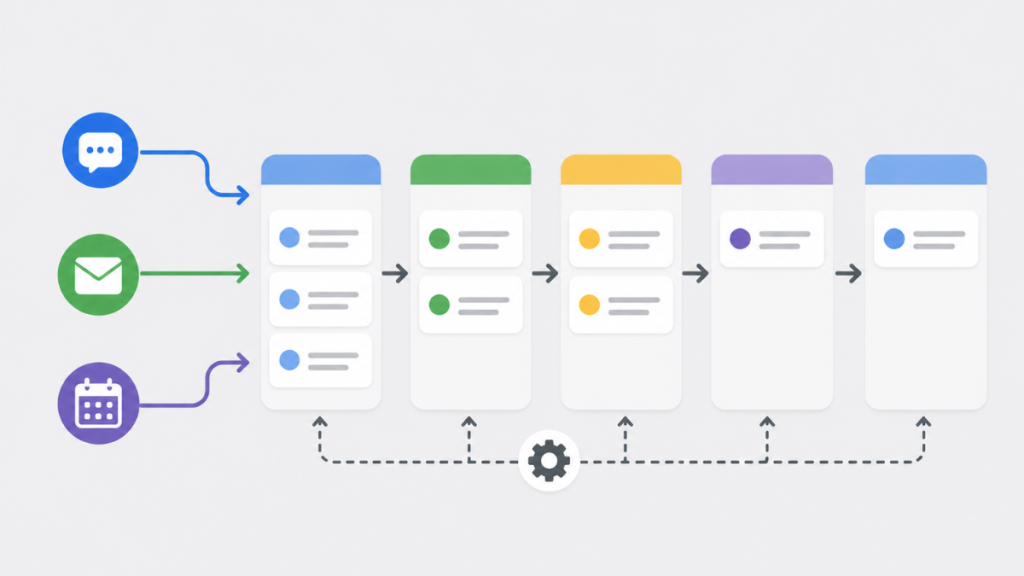
- CRM and pipeline management
- Landing pages and funnel builder
- Email automation and campaigns
- Appointment booking and calendars
- Automated workflows and triggers
- Forms and surveys
- Reputation management and review requests
- Reporting dashboards
- AI features are available within HighLevel, but availability, usage limits and charges vary by AI product. Check the current AI pricing and limits before testing high-volume AI features
There is no permanent free version. After 30 days you either move to a paid plan or your account is paused.
The Starter plan provides the core platform features listed above, but some AI products, premium actions, add-ons and usage-based services may have separate limits or charges. Paid add-ons and usage-based services are not included automatically.
Costs and Plan Limits During the Trial
- Phone, SMS, and email usage cost extra from day one, at standard GoHighLevel rates
- AI and Marketplace services may carry separate usage charges
- Feature access is set by the Starter plan on this link; upgrading later unlocks Unlimited or Agency Pro features
- Phone registration and messaging compliance requirements vary by country, confirm what applies to UK numbers during setup
The 30-Day Plan: What to Do Each Day
By the end of this 30-day trial, you should have a working system that captures leads, follows up automatically, and reduces the manual work involved in booking appointments.
This is the most important section of this guide. Most trial guides give you a vague checklist. This gives you a specific plan so you actually see whether GoHighLevel works for your business.
If the platform feels completely impossible to navigate by day 3, GoHighLevel may not be the right fit. Aim to complete the basic setup within the first three days.
Days 1-3: Setup
Day 1: Connect your domain, set up your business profile, and review the onboarding snapshot if one is offered. Configure your phone number now, not later. If you’re testing SMS, start any required registration on day one so it isn’t still processing later in the trial. This is exactly what the live Bootcamp session covers (weekdays, 11am CT), walking you through Text Marketing, Missed Call Text Back, Mobile App, Social Media Integrations, Google Business Chat, and Reputation and Reviews Management in under an hour with a coach. Attending on day 1 or 2 can shortcut this entire setup phase.
Day 2: Build out your pipeline stages to match how leads actually move through your business. Connect your calendar and set your booking availability. Add a small batch of consented contacts or realistic internal test contacts, rather than working with an empty CRM.
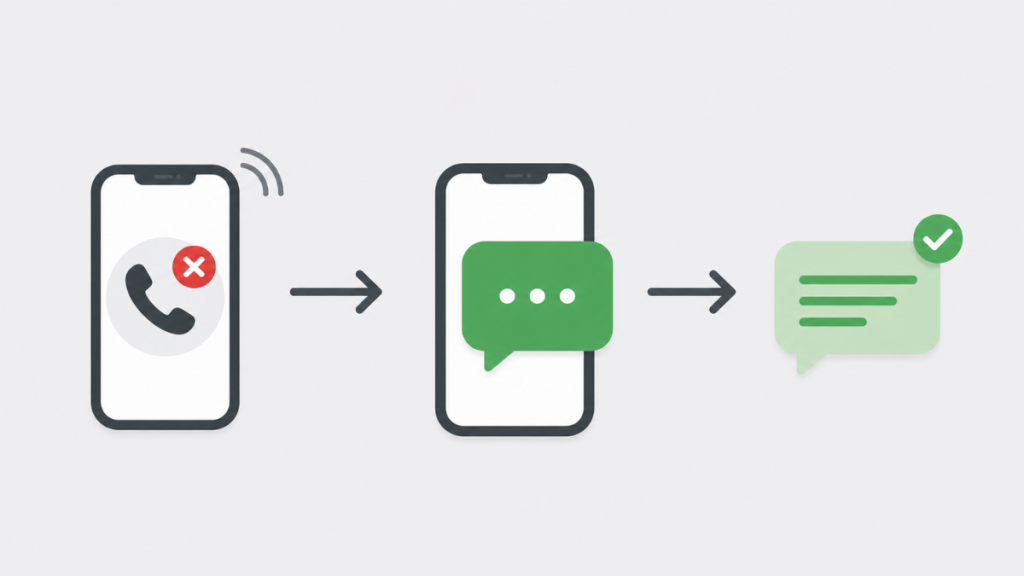
Day 3: Set up your first automation: a missed-call text-back workflow. This is usually the fastest way to see GoHighLevel do something a spreadsheet or basic CRM can’t. Send yourself a test missed call and confirm the auto-reply fires correctly.
Days 4-10: Test Real Workflows
This is where you find out whether GoHighLevel replaces your existing stack. Run these four workflows against consented contacts or realistic test contacts:
- Missed call text-back – confirm response time and message content feel right for your business
- Lead follow-up sequence – build a multi-step SMS/email sequence and check it doesn’t feel robotic or misfire on edge cases
- Appointment booking – send the booking link to a few real contacts and watch how the calendar, reminders, and confirmations behave end to end
- Review request automation – trigger a review request after a completed job or sale and check the timing and wording
Days 11–18: Stress Test
- Run higher volumes through your busiest workflow to see where it slows down or misfires
- Test what happens when a lead responds outside the expected flow (wrong answer, off-topic reply, opts out)
- Check mobile experience for both you and your leads, not just desktop
- Try the AI Employee tools on a batch of real enquiries and assess whether the responses are usable without heavy editing
- If you’ve gone Unlimited via the standard link instead, set up a second sub-account to see how the agency structure actually holds up with two clients running in parallel
Days 19–25: Optimise
- Tighten wording and timing on anything that underperformed during the stress test
- Clean up pipeline stages and automations you built early that no longer fit how you actually work
- Review your usage costs so far (SMS, email, AI) and project what a full month would cost at your real volume
- Decide whether Starter is still the right fit for you, or whether you’d need to upgrade to Unlimited or Agency Pro after the trial
Days 26–30: Make Your Decision
Day 29: Give yourself one full day before the trial ends to review everything. Compare your time saved and leads recovered against what you were losing before. Export your contacts and save screenshots, copies, or documentation of any important workflows and account assets before you decide, so nothing is lost regardless of what you choose.
Day 30: Make the call. If GoHighLevel replaced two or more of your existing tools and the automation held up under real use, continue on your chosen plan. If it didn’t, cancel through Settings > Billing before your trial expiry date to avoid being charged.
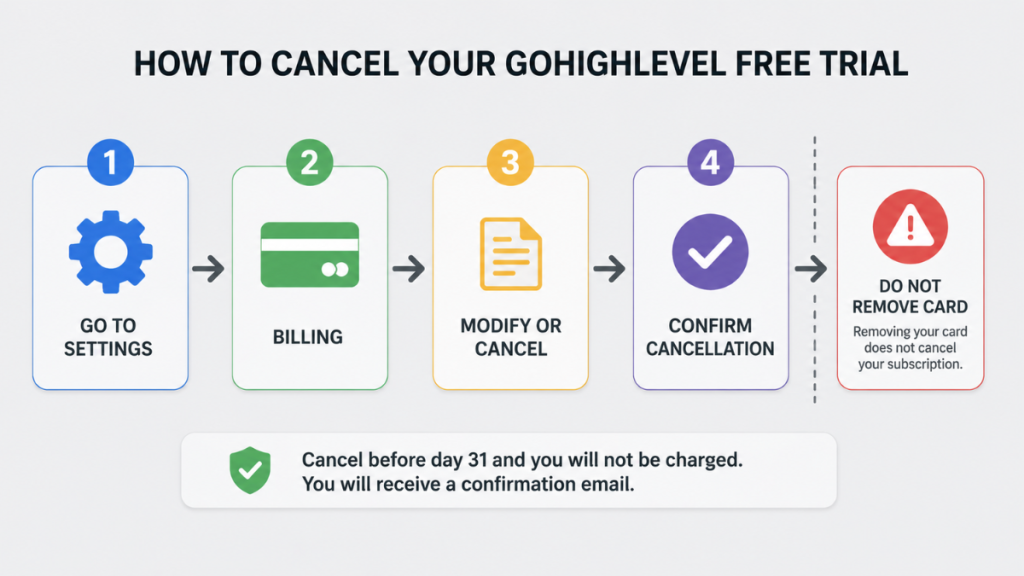
How to Cancel the GoHighLevel Free Trial
Cancelling is straightforward but there is one critical step people miss.
- Go to Settings inside your GHL account
- Click Billing
- Click “Want to Modify/Cancel Your Subscription?”
- Click “Show More,” then “Cancel Plan”
- Select a reason for cancelling
- Review the data-loss warning
- Confirm cancellation, you’ll receive a confirmation email
- You may be asked to submit feedback
Do not just remove your credit card. Card removal does not cancel the subscription. You must complete the cancellation flow.
Account access and automations stop on cancellation. HighLevel currently retains cancelled account data for 90 days for possible reactivation. Phone numbers and A2P registrations are deleted after 14 days, and number charges may continue during that period. Export your contacts and save screenshots, copies, or documentation of any important workflows and account assets before you decide.
What the Trial Does Not Include
A few things to know before you start:
SMS and phone usage cost extra. SMS is not included in the trial or the monthly plan. You pay per message via Twilio or LC Phone. UK SMS typically costs around 3.5p-4.5p per segment based on current published rates.
Email sending costs extra. HighLevel currently charges $0.675 per 1,000 emails, with separate charges for services such as email verification. Check current pricing before testing.
Phone registration and messaging compliance requirements vary by country. If you’re testing SMS from a UK number, this isn’t the same process as A2P 10DLC, which applies to US numbers, configure your UK number correctly during setup so messaging isn’t delayed.
Who the GoHighLevel Trial Is Actually For
The trial gives you the most value if you are:
A service business losing leads to slow response, plumbers, electricians, cleaners, salons, clinics. If leads come in and go cold because nobody follows up fast enough, the missed call text-back and automated follow-up workflows will show results within the first week of testing.
A marketing agency managing client campaigns. Test the sub-account structure and snapshot deployment during your trial.
A solo consultant or coach. Test whether GHL replaces your CRM, booking tool, and email platform in one subscription.
The trial is less useful if you are only curious about features. You need to commit to actually building something during the 30 days. If you treat it as a browse rather than a test, the trial ends without a useful answer.
If you are still comparing platforms before starting, see the best CRM for small business guide for a full comparison.
UK users should also review currency conversion, VAT, and country-specific phone and messaging costs. See the GoHighLevel UK pricing guide for the full breakdown.
Is the GoHighLevel Free Trial Worth Starting?
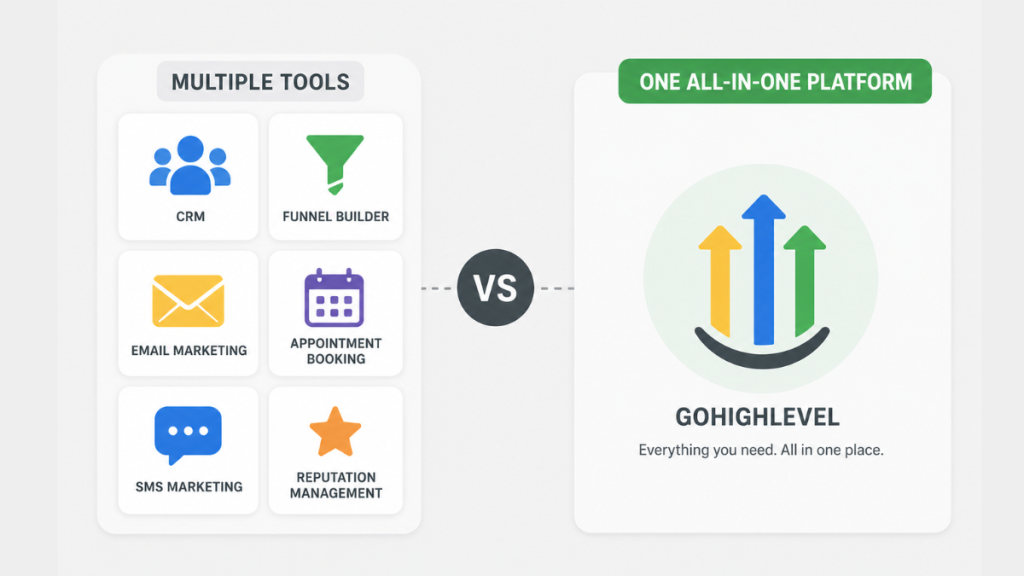
Yes – if you are currently paying for two or more of these separately: a CRM, a funnel builder, an email platform, an appointment booking tool, an SMS tool, or a review management tool.
GoHighLevel consolidates all of them. The trial tells you whether the consolidation actually works for your specific business model. No feature list or comparison guide can answer that as clearly as 30 days of real testing.
The businesses that get the most from the trial are the ones that treat day 1 as a real project start, not a feature exploration. Set up something real, run contacts through it, and you should have useful early evidence within the first week.
If you’re going to test it, do it properly – 30 days goes quickly if you don’t have a plan.
FAQ
How long is the GoHighLevel free trial?
HighLevel’s standard trial is 14 days. This page links to HighLevel’s promotional Bootcamp offer, which runs 30 days on the Starter plan and includes live coaching. Need Unlimited or Agency Pro? Use the standard trial link or compare all three plans here.
Do you need a credit card for the GoHighLevel free trial?
Yes. A credit card is required to start the trial. You will not be charged the monthly subscription fee until the trial expires, but communication surcharges and other usage costs may still apply during the trial.
Can you cancel the GoHighLevel free trial?
Yes. Cancel any time before your trial expiry date inside Settings > Billing > Modify/Cancel Subscription. Do not just remove your card, that does not cancel the subscription. Complete the full cancellation flow and you’ll receive a confirmation email.
What happens after the GoHighLevel free trial ends?
Your account converts to the $97/mo Starter plan automatically. If you signed up via the standard link on Unlimited instead, it converts to $297/mo.
Does GoHighLevel offer refunds after the trial?
No. GoHighLevel’s terms are generally non-refundable once the trial converts to a paid subscription, subject to applicable law. Cancel before the trial ends if you do not want to continue.
Is GoHighLevel good for UK businesses?
Yes, GoHighLevel works fully in the UK. Pricing is in USD so factor in exchange rates. UK phone numbers need separate configuration during setup, and UK SMS costs differ from US rates. See the GoHighLevel UK pricing guide for the full GBP breakdown.
Does GoHighLevel offer a 60 or 90-day free trial?
HighLevel’s standard trial is 14 days, while promotional offers can provide longer trials. This page’s Bootcamp offer provides 30 days on Starter.
Suggested Reads
GoHighLevel Pricing (2026) → How each tier works and what businesses actually pay in GBP
GoHighLevel Hidden Costs (2026) → SMS, phone, and usage fees that sit on top of any plan price
GoHighLevel Pros and Cons → When upgrading from $297 to $497 actually makes financial sense
GoHighLevel vs ClickFunnels (2026) → How the two platforms compare for agencies and service businesses