
Best CRM with automation for small businesses means more than storing contacts. The right system should capture leads, follow up automatically, book appointments, and track customer activity without manual work.
Many small businesses still rely on separate tools for email marketing, scheduling, pipelines, and follow-up. This creates gaps where leads get missed and response times slow down.
Modern CRM platforms combine these processes into automated workflows. That allows small teams to handle more enquiries without hiring extra staff.
This guide explains what to look for in a CRM with automation, which platforms are worth considering in 2026, and which one offers the best value for service-based businesses.
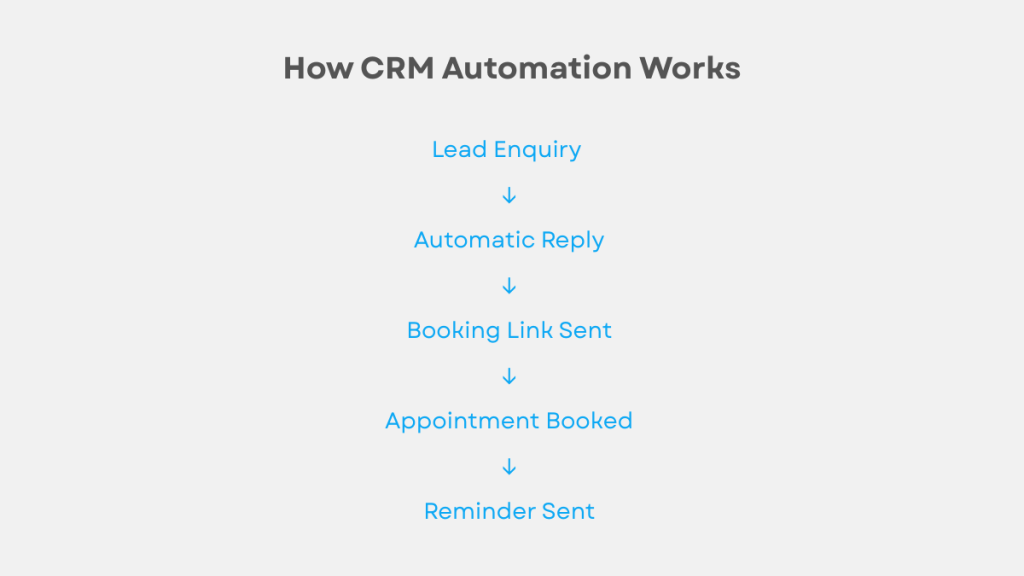
Here’s a simple example of how CRM automation typically works.
What Is a CRM With Automation?
CRM automation helps businesses automate follow-ups, pipelines and customer communication.
According to Salesforce, automation can significantly improve response time and lead conversion rates.
A CRM with automation manages customer relationships while automatically handling routine tasks that would otherwise be done manually.
Instead of tracking leads in spreadsheets or sending individual messages, automated workflows manage communication in the background.
Typical automation features include:
- Automatic follow-up after enquiries
- Appointment confirmations and reminders
- Lead nurturing emails or SMS
- Pipeline updates based on activity
- Task creation for team members
- Lead reactivation campaigns
For service businesses, automation often determines whether leads convert into customers.
Without it, response times become inconsistent and opportunities are lost.
Many businesses start with basic tools before moving to full automation systems. Here are some of the best automation tools for virtual assistants.
GoHighLevel offers a 14-day free trial.
Why Small Businesses Need CRM Automation
Most small businesses don’t struggle with lead generation.
They struggle with follow-up.
A typical situation looks like this:
A customer submits an enquiry form.
The business owner is busy.
The reply comes hours later.
The lead chooses a competitor.
Automation removes this delay.
Instead of waiting for someone to respond manually, the system can reply immediately, suggest booking times, and notify the business owner.
This turns missed enquiries into scheduled appointments.
For businesses that rely on booked calls or service requests, automation can make a measurable difference to revenue.
Key Features to Look For
Not all CRMs include real automation.
Some platforms only provide basic email sequences, while others allow full workflow automation across multiple channels.
Automated Lead Capture
Leads from forms, calls, or messages should automatically appear inside the CRM.
Manual data entry slows down response times and increases the chance of errors.
Workflow Automation
Workflows allow actions to trigger automatically.
Examples include:
- Sending SMS after form submission
- Moving leads between pipeline stages
- Assigning leads to staff members
- Triggering reminders
This is the feature that separates automation CRMs from traditional CRM systems.
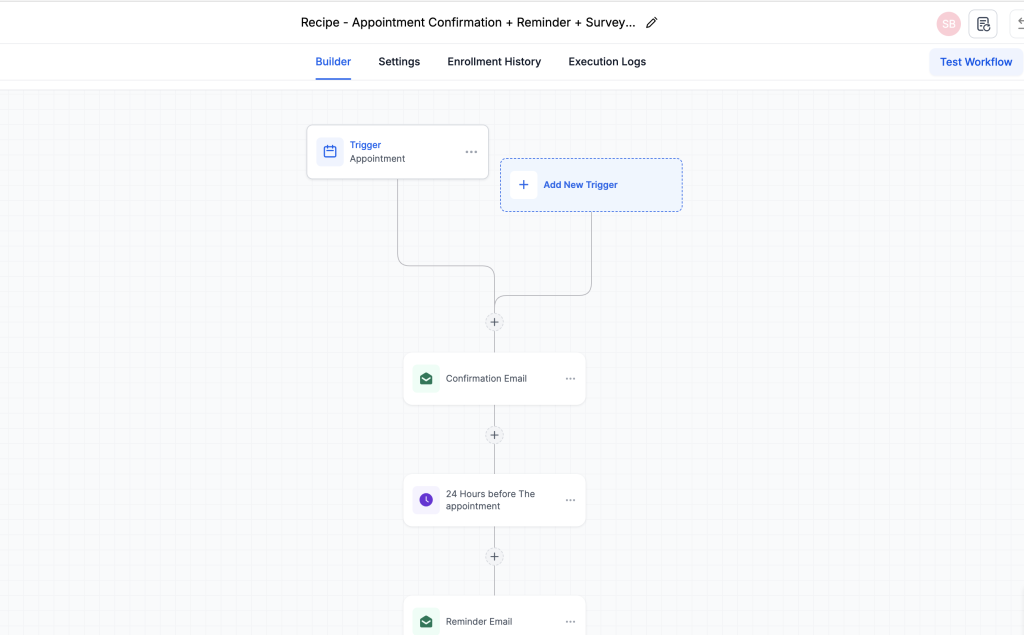
Appointment Automation
Scheduling automation is essential for service businesses.
This typically includes:
- Online booking pages
- Automatic confirmations
- Reminder messages
- Calendar syncing
Many small businesses rely on these features every day.
Best CRM With Automation Platforms (2026)
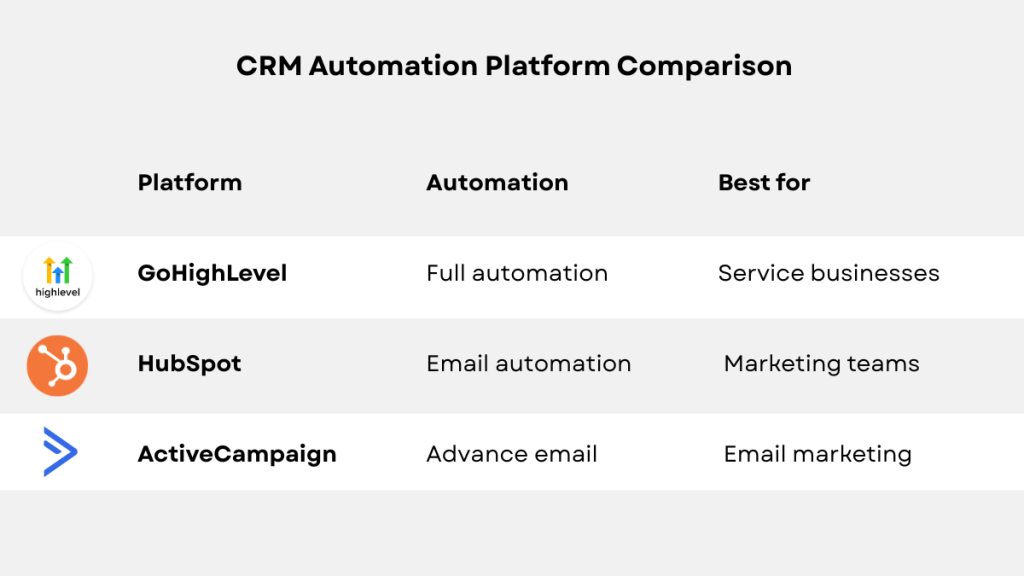
Several platforms offer CRM automation. The right choice depends on how much automation your business needs.
GoHighLevel
GoHighLevel is one of the most complete CRM automation platforms available for small businesses and agencies.
It combines CRM management, marketing automation, funnels, SMS messaging, and scheduling into one system.
Instead of connecting multiple tools together, everything runs inside a single platform.
Automation features include:
- Automated SMS follow-up
- Email workflows
- Pipeline automation
- Appointment reminders
- Lead tracking
- Reactivation campaigns
For businesses that rely on enquiries and appointments, these features can replace several separate tools.
If you’re comparing costs, see our full breakdown of how much GoHighLevel costs including usage fees.
For small service businesses that want one system to handle leads and follow-up automatically, GoHighLevel is usually the most complete option.
Start a 14-day GoHighLevel free trial.
HubSpot
HubSpot provides a well-known CRM with automation capabilities. You can explore their automation features on the official HubSpot website.
The platform includes strong pipeline management and email marketing features.
The free version includes basic CRM tools, while paid plans unlock automation workflows.
HubSpot works well for businesses focused primarily on email marketing and structured sales processes.
However, automation features become expensive as usage grows, especially for smaller teams.
ActiveCampaign
ActiveCampaign focuses heavily on marketing automation.
ActiveCampaign provides advanced automation workflows and email marketing features. Full details are available on the ActiveCampaign website.
The platform includes advanced automation workflows and detailed email marketing features.
This makes it suitable for businesses that rely mainly on email-based marketing rather than appointment booking or SMS follow-up.
For service businesses that depend on enquiries and scheduling, additional tools are often required.
Real Examples of CRM Automation in Action
Automation works best when it handles repetitive tasks consistently.
Example 1, Local Service Business
A potential customer submits a website enquiry.
The CRM immediately:
- Sends a confirmation message
- Offers available booking times
- Adds the lead to the pipeline
- Sends a reminder before the appointment
Without automation, these steps would require manual work.
Example 2, Consultants and Coaches
A visitor downloads a lead magnet or requests information.
The CRM can:
- Send a welcome message
- Deliver resources automatically
- Offer consultation times
- Send follow-up reminders
This creates a consistent experience for every lead.
Example 3, Agencies
Agencies often manage leads across multiple clients.
Automation allows agencies to:
- Track enquiries
- Trigger follow-up sequences
- Monitor pipelines
- Schedule appointments
This reduces manual administration and improves response times.
When a CRM With Automation Is Worth It
CRM automation usually makes sense when businesses rely on regular enquiries or appointments.
It tends to be worth it for:
- Agencies
- Consultants
- Coaches
- Local service businesses
Automation has the biggest impact where response time affects conversion rates.
For businesses with low enquiry volumes or simple processes, a basic CRM may be enough.
If you’re comparing platforms in more detail, see our GoHighLevel vs ClickFunnels comparison.
Final Thoughts
CRM automation allows small businesses to operate more efficiently without increasing staff workload.
Instead of manually managing enquiries and follow-up, automated workflows keep leads moving through the pipeline.
Several platforms offer automation features, but the right choice depends on how much automation your business requires.
For businesses that want a single system to manage leads, scheduling, and follow-up automatically, automation-focused platforms tend to deliver the most value.
Start a 14-day GoHighLevel free trial.