
Most virtual assistants don’t need the most complex CRM.
They need a system that helps them manage clients, track leads, and handle follow-up without things slipping through the cracks.
The best CRM for virtual assistants is usually the one that keeps everything organised as your workload grows.
Because once you start charging more than £25/hour (or $30/hour), expectations change.
Clients don’t just want tasks completed.
They expect organisation.
They expect follow-up.
They expect systems.
And that’s where most VAs hit a wall.
At first, spreadsheets, email folders, sticky notes, and calendar reminders work.
Until they don’t.
Leads get missed.
Follow-ups are delayed.
And suddenly a client is frustrated because someone who filled out a form three days ago never got a reply.
That’s the moment where “being organised” isn’t enough anymore.
You need a system.
That’s why CRM skills are one of the fastest ways to move from a basic VA to a higher-value automation-focused role.
In this guide, I’ll break down the best CRM options for virtual assistants in 2026 (UK and US), and which one makes sense depending on the type of clients you want to work with.
Because the best CRM isn’t the one with the most features.
It’s the one that helps you deliver consistent results.
If you want to see the platform most automation-focused VAs are moving towards, you can check GoHighLevel here.
Quick Summary
| Category | Key Takeaway |
|---|---|
| Best overall CRM | GoHighLevel is best for automation-focused VAs and higher-ticket clients |
| Best for beginners | Simple CRMs work for admin tasks but don’t scale well |
| Best for scaling | Automation CRMs allow VAs to offer systems, not just tasks |
| Biggest mistake | Using spreadsheets and manual follow-up for too long |
| Key decision factor | Choose based on the type of clients and services you want to offer |
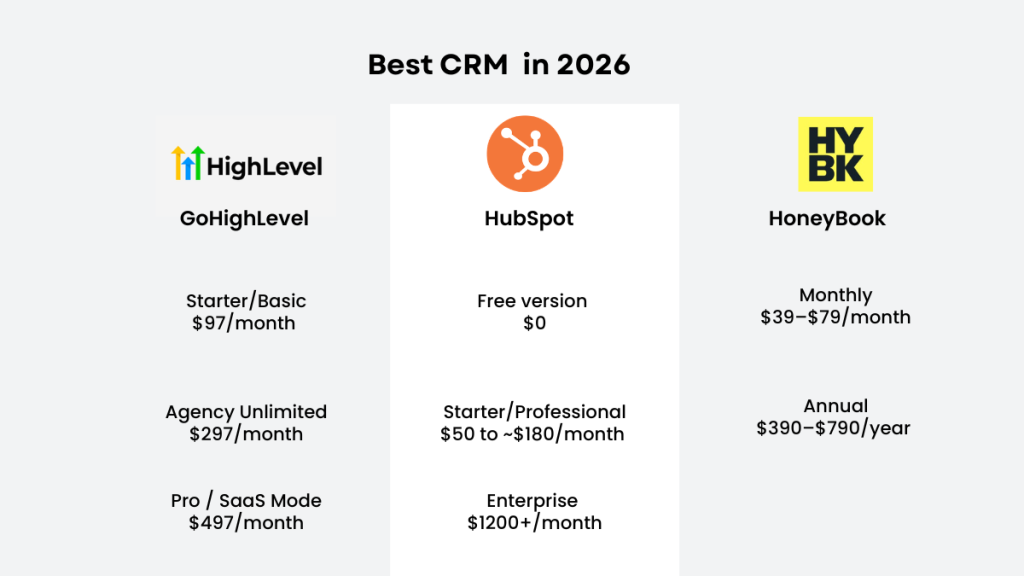
Quick Answer, What’s the Best CRM for Virtual Assistants?
GoHighLevel is the best CRM for virtual assistants who want higher-paying clients, because it combines CRM, automation, booking, and follow-up in one system.
If you want something simpler to start with, HubSpot is usually the easiest beginner CRM.
If your clients mainly need proposals and client management, HoneyBook can work well.
The real deciding factor is this:
Are you supporting a business that needs organisation, or a business that needs lead generation?
Because those are two very different systems.
What Makes a CRM “Good” for a VA?
Most CRM advice is written for business owners.
But VAs use CRMs differently.
A VA needs a system that makes them look like the organised person behind the business. Someone who keeps everything clean, updated, followed up, and moving forward.
Here’s what actually matters:
| Requirement | Why It Matters |
|---|---|
| Lead tracking | You can instantly answer where leads came from |
| Clear pipeline view | You can see bookings, drop-offs, and activity at a glance |
| Automation | Prevents slow follow-up and lost leads |
| Centralised communication | Keeps email, messages, and notes in one place |
| Scalability | Still works when leads grow from 10 to 200+ per month |
This is why basic CRM tools often stop being enough as a business grows.
How VAs Actually Use a CRM
Virtual assistants don’t just “store contacts.”
They use CRMs to manage and improve how a business runs.
| Use Case | What It Looks Like |
|---|---|
| Client pipelines | Tracking enquiries from first contact to booking |
| Lead tracking | Monitoring where leads come from and how they convert |
| Appointment systems | Managing bookings and reminders |
| Automation workflows | Sending follow-ups without manual work |
| Follow-up sequences | Keeping leads warm over time |
A CRM becomes far more valuable when it helps you offer systems, not just organisation.
This is where VAs start moving into higher-value work.
The Biggest Mistake VAs Make With CRMs
Most VAs choose a CRM based on what feels easy, not what actually delivers results.
And that makes sense. Nobody wants a complicated tool.
But here’s the problem:
They choose systems that help with organisation, when clients actually care about outcomes.
| Approach | Result |
|---|---|
| Organisation-focused | Saves time |
| Automation-focused | Generates revenue |
If you save a client 5 hours a week, that’s helpful.
But if you help them book 10 extra calls a month through automated follow-up, that’s valuable.
That’s the shift from assistant to systems operator.
And that’s when your pricing changes.
The Best CRM for Higher-Paying VA Clients
If your goal is to work with agencies, coaches, consultants, or service businesses that rely on leads, the best CRM is clear.
GoHighLevel (Best All-in-One CRM for Premium VAs)
GoHighLevel is not just a CRM.
It’s a full system for lead capture, follow-up, booking, pipelines, and client management.
This is the platform agencies use when they’re tired of managing multiple disconnected tools.
And it’s exactly why it works so well for VAs who want to earn more.
Because once you learn it, you’re no longer offering admin support.
You’re offering business infrastructure.
What GoHighLevel Handles (In One System)
| Function | What It Does |
|---|---|
| Lead capture | Collects leads from forms, ads, and landing pages |
| Automated follow-up | Sends email and SMS sequences automatically |
| Pipelines | Tracks lead status and next actions |
| Booking system | Manages appointments and reminders |
| Onboarding workflows | Automates client onboarding steps |
| Reporting dashboards | Shows performance and conversion data |
It’s the kind of platform that makes you look like a serious operator.
For a full pricing breakdown including SMS costs and UK considerations, see our GoHighLevel pricing explained guide.
What Makes a CRM “Good” for a VA?
Most CRM reviews are written for business owners.
But VAs use CRMs differently.
A VA needs a CRM that makes them look like the organised person behind the business. Someone who keeps everything clean, updated, followed-up, and moving forward.
Here’s what actually matters if you’re a VA.
A CRM should help you:
- Track leads without chaos
If a client asks “where did this lead come from?” you should be able to answer in seconds. - See what’s happening at a glance
You should know how many enquiries came in, how many booked calls happened, and where leads are dropping off. - Automate follow-up
If your client is paying for ads, the fastest way to lose trust is slow follow-up. Automation prevents that. - Keep client communication in one place
When everything is scattered across email, WhatsApp, DMs, and notes, it becomes impossible to manage. - Support growth
The CRM should still work when your client goes from 10 leads a month to 200.
This is why “basic CRM tools” often stop being enough once the business grows.
How VAs Actually Use a CRM” Section
Virtual assistants typically use a CRM for:
- Client pipelines
- Lead tracking
- Appointment systems
- Automation workflows
- Follow-up sequences
A CRM becomes more valuable when it helps you offer services instead of just managing contacts.
Automation-focused virtual assistants often use CRMs to build client systems rather than just store information.
This adds real-world relevance.The Biggest Mistake VAs Make With CRMs
Most VAs pick a CRM based on what feels easy not what is the best crm for virtual assistants.
And I get it. Nobody wants another complicated tool.
But the mistake is choosing a CRM that only helps with organisation, when what clients really want is results.
Here’s the difference:
If you save a client 5 hours a week, that’s helpful.
But if you help them book 10 extra calls a month because their follow-up is automated, that’s valuable.
That’s the shift from “assistant” to “systems operator”.
And once you make that shift, your pricing changes overnight.
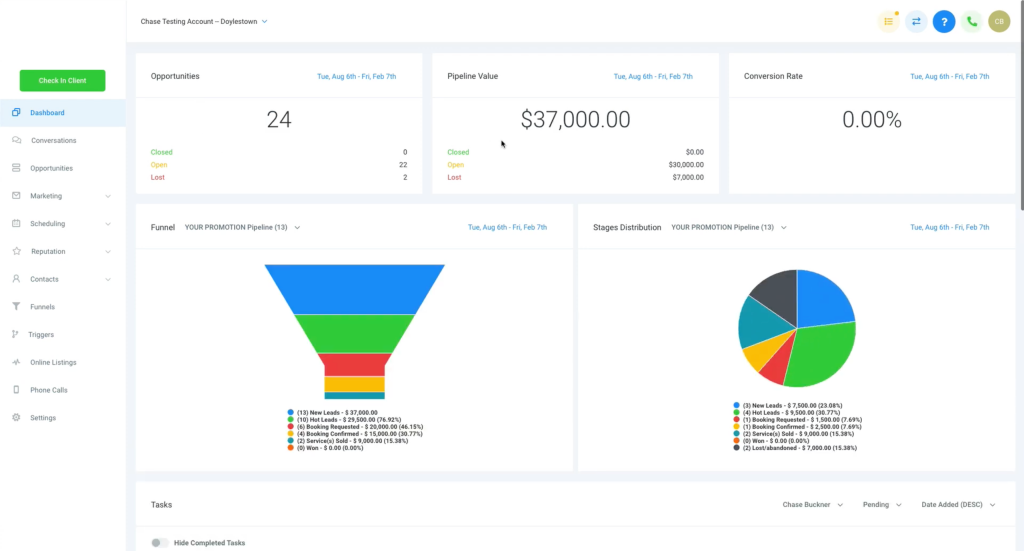
The Best CRM for Higher-Paying VA Clients (The Winner)
If your goal is to work with premium clients, agencies, coaches, consultants, or service businesses that rely on leads, then the best CRM is clear.
GoHighLevel (Best All-in-One CRM for Premium VAs)
GoHighLevel is not just a CRM.
It’s a full automation platform built around lead capture, follow-up, booking, pipelines, and client management.
It’s the CRM that agencies use when they’re tired of duct-taping five different tools together.
And this is exactly why it works so well for VAs who want to earn more.
Because once you learn it, you’re no longer offering “admin support”.
You’re offering business infrastructure.
Here’s what GoHighLevel helps you manage in one place:
Leads coming in from ads, forms, or landing pages.
Automatic follow-up by email and SMS.
Pipelines that show who is hot, who is cold, and who needs a call.
Booking calendars and appointment reminders.
Client onboarding workflows.
Dashboards showing performance.
It’s the kind of platform that makes you look like a serious operator.
For a full pricing breakdown including SMS and UK considerations, see our detailed cost guide.
What GoHighLevel is best for
GoHighLevel is best for VAs working with:
- coaches and consultants
- agencies
- local service businesses (dentists, med spas, roofers, etc.)
- lead generation businesses
- anyone running paid ads
- anyone losing leads because follow-up is slow
It’s also one of the best tools if you want to offer CRM setup packages and automation retainers.
The downside (because yes, there is one)
GoHighLevel has a learning curve.
It’s not difficult, but it’s not “plug and play” like a basic CRM.
If you’re the kind of VA who enjoys systems, it’s exciting.
If you want something simple, it can feel like too much at first.
But if your goal is premium clients, the learning curve is part of what makes it valuable. Because most VAs never learn tools like this.
That’s why the rates go up.
The Best Free CRM for Beginner VAs
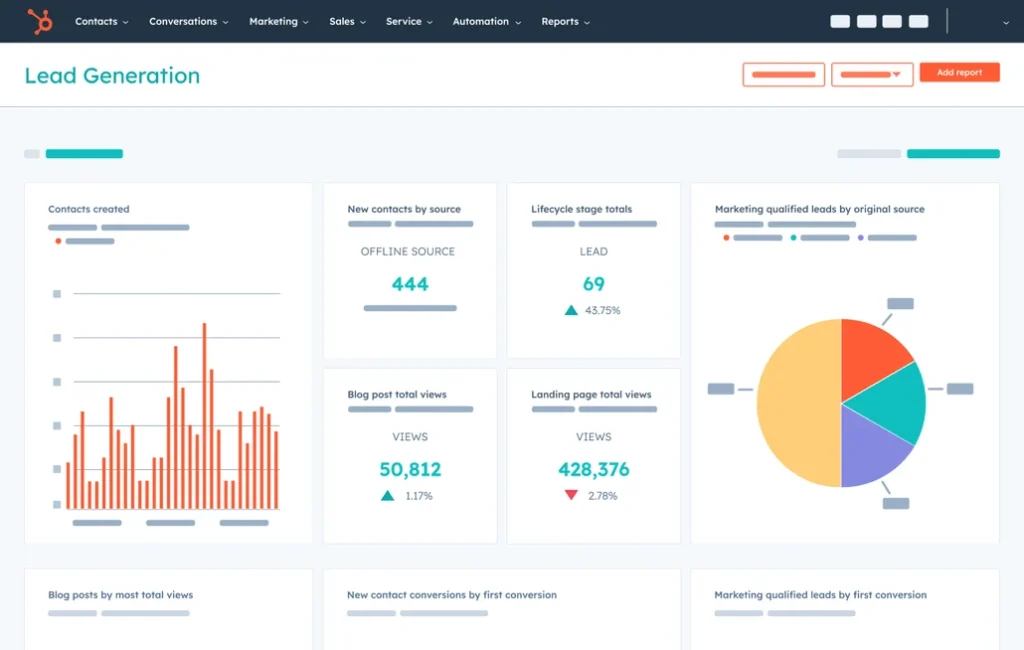
HubSpot (Best Free CRM for Simple Client Tracking)
HubSpot is the CRM most people start with because the free plan is genuinely useful.
If your client just needs:
- contact tracking
- deal stages
- basic pipeline visibility
- notes and activity tracking
HubSpot works.
And it’s simple. That’s the main advantage.
HubSpot is great if you’re working with clients who don’t need automation-heavy follow-up. For example, a small consultant with warm referrals, or a business where leads are managed manually.
But here’s the honest limitation:
HubSpot is a CRM first.
Automation is not its strongest point unless you upgrade and pay more.
So if your goal is “premium automation VA”, HubSpot is a stepping stone, not the final destination.
Still, if you want a CRM that feels clean, professional, and easy to learn, HubSpot is a good option.
You can see HubSpot’s CRM features here
The Best CRM for Creative Clients (Proposals + Client Experience)
HoneyBook (Best for Creatives, Designers, and Client Management)
HoneyBook is a slightly different type of CRM.
It’s less about lead conversion and more about client experience.
If you work with clients like:
- photographers
- wedding vendors
- designers
- copywriters
- brand strategists
- small creative studios
HoneyBook is often a great fit.
It focuses on things like proposals, contracts, invoices, and client workflows.
It makes clients look professional and polished, which is why creatives love it.
But it’s not an automation engine.
It won’t replace the kind of follow-up and pipeline systems you can build in GoHighLevel.
So the way I’d put it is:
HoneyBook is excellent for client management.
GoHighLevel is excellent for lead conversion systems.
They’re solving different problems.
The CRM Most VAs Should Avoid (Unless They Enjoy Pain)
WordPress + “Random Plugin CRM Tools” (Not Worth It)
Some VAs end up trying to build CRM systems through WordPress plugins.
Technically, you can do it.
But it usually becomes messy fast.
Plugins break. Updates conflict. Forms stop sending. Automations fail silently. And then you’re stuck troubleshooting something that should never have been built that way in the first place.
WordPress is brilliant for blogging and websites.
But it’s not a CRM platform.
If you want a real CRM, use a real CRM.
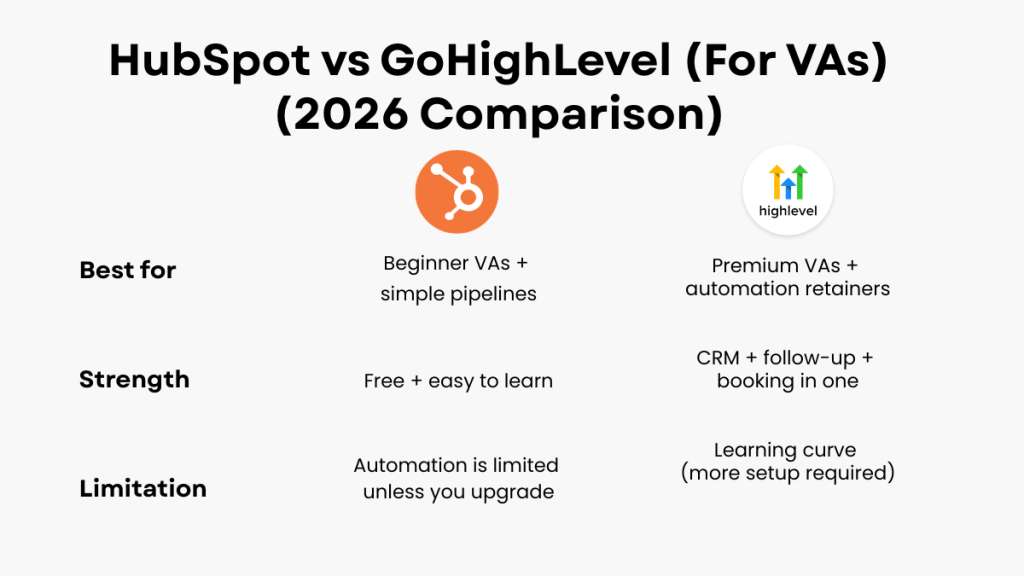
The Real Comparison, GoHighLevel vs HubSpot (For VAs)
| CRM | Typical Monthly Cost | Best For |
|---|---|---|
| GoHighLevel | $97+ | Automation services |
| HubSpot | Free–$50+ | Basic CRM |
| Zoho CRM | $14+ | Small businesses |
| ActiveCampaign | $39+ | Email automation |
This is the comparison that matters most.
Because most VAs are deciding between something simple (HubSpot) and something powerful (GoHighLevel).
Here’s the easiest way to understand it:
HubSpot is great when you want to track leads manually.
GoHighLevel is great when you want leads to be followed up automatically.
If you’re supporting a business where leads are coming from ads, funnels, or booking pages, GoHighLevel is the better long-term tool. GoHighLevel Pricing
If you’re supporting a smaller business with warm referrals and a simple pipeline, HubSpot is fine.
How Choosing the Right CRM Increases Your VA Rates
| What You Should Be Able to See | Why It Matters |
|---|---|
| Lead sources | Shows where enquiries come from |
| Booked calls | Tracks conversion performance |
| Campaign results | Helps optimise marketing |
| Drop-off points | Identifies what needs fixing |
The Fastest Way to Use a CRM to Get Higher-Paying Clients
If you want to attract better clients, don’t sell “CRM management.”
Sell outcomes.
| What Most VAs Say | What You Should Say |
|---|---|
| I manage your CRM | I build systems that capture and convert leads |
| I organise your leads | I make sure no enquiry gets missed |
| I update pipelines | I improve booking rates and follow-up speed |
That’s a completely different offer.
And it’s what clients actually pay for.
This is the same principle behind most automation setups (see the best automation tools for virtual assistants)
What I Recommend (If You’re a VA Reading This)
If you’re just starting out, begin with HubSpot.
Learn how pipelines work. Understand lead tracking. Get comfortable managing a simple CRM.
But don’t stop there.
Because higher-paying clients don’t want organisation.
They want systems.
And this is where GoHighLevel becomes valuable.
It allows you to manage leads, automate follow-up, and build complete client workflows in one place.
That’s why it keeps showing up in higher-ticket VA retainers.
This is why these systems show up in higher-ticket retainers (see virtual assistant monthly retainer packages)
Free Download, VA Blueprint Guide (How to Become a Premium Tech VA)
If you want to move from basic VA work into higher-paying automation packages, I created a simple guide that breaks down the exact offers, services, and pricing premium VAs use.
Download the VA Blueprint Guide
Final Verdict, Best CRM for Virtual Assistants in 2026
If you want the honest answer:
If you’re just trying to stay organised, HubSpot is enough.
But if you want to work with higher-paying clients, charge premium retainers, and offer automation-based services, GoHighLevel is the stronger option.
Because it doesn’t just store contacts.
It runs the system behind the business.
FAQs, Best CRM for Virtual Assistants
What is the best CRM for virtual assistants?
GoHighLevel is the best CRM for virtual assistants who want to offer automation services, manage pipelines, and help clients convert more leads. HubSpot is a strong beginner-friendly alternative.
Do virtual assistants really need a CRM?
If you’re working with clients who receive regular enquiries or bookings, yes. A CRM helps you track leads properly, follow up consistently, and present yourself more professionally.
Can I use GoHighLevel as a VA?
Yes. Many VAs use GoHighLevel to manage pipelines, automate follow-up, set up booking systems, and deliver automation retainers for clients.
Is HubSpot better than GoHighLevel?
HubSpot is easier to start with. GoHighLevel is better for automation, lead follow-up, and managing multiple client systems.
Suggested Reads
If you want to compare CRM options in more detail, our guide to Best CRM for Virtual Assistants breaks down which platform fits different types of VA work.
If you’re building higher-value services, Best Automation Tools for Virtual Assistants explains which systems help you move beyond admin support.
If your goal is to package this into a recurring offer, Virtual Assistant Monthly Retainer Packages shows how VAs turn systems work into monthly retainers.