
If you’re a virtual assistant trying to build a website in 2026, you’ve probably already realised something annoying.
Most “website advice” online is written for web designers.
Not VAs.
So you end up watching tutorials about themes, plugins, hosting, and page speed… when all you actually want is a clean website that makes clients trust you and book a call.
Because that’s the real point.
Not having a fancy website. Not having a blog. Not having a portfolio page that nobody reads.
The real point is having a website that attracts higher-paying clients and turns them into enquiries.
And the website builder you choose matters more than most VAs think.
Many VAs reach this level by learning high paying virtual assistant skills that businesses actually need.
Some platforms make it easy to look professional and automate everything. Others turn into a never-ending mess of logins, plugins, and broken forms.
This guide breaks down the best website builder for virtual assistants in 2026, which platforms are worth your time, and which ones are quietly wasting your hours.
Quick Answer, What’s the Best Website Builder for Virtual Assistants?
If you want the honest answer:
The best website builder for virtual assistants is the one that helps you generate leads and follow up automatically, not just display a portfolio.
| Platform | Best For | Limitation |
|---|---|---|
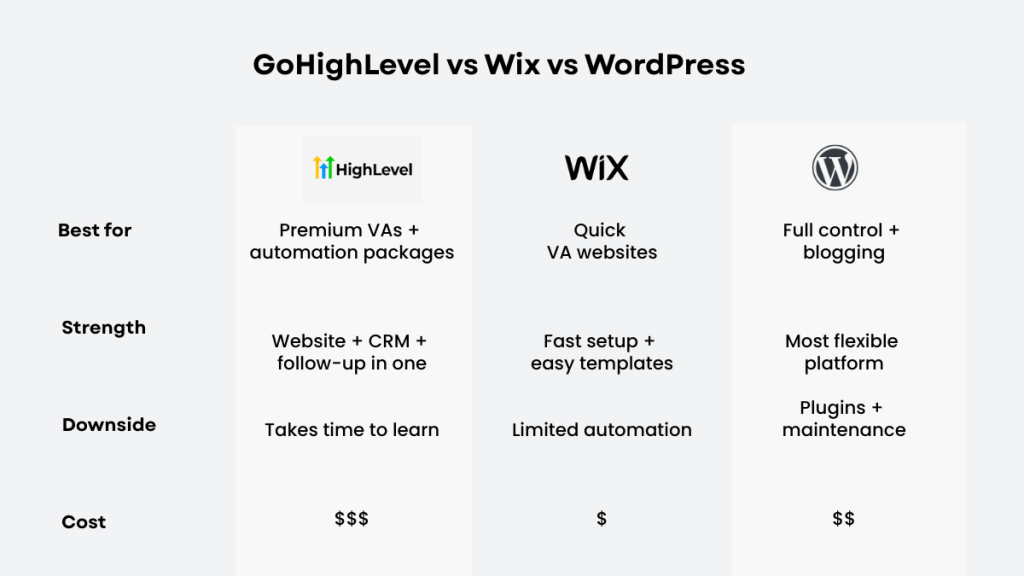
| GoHighLevel | Lead generation, automation, higher-paying clients | Learning curve |
| Wix / Squarespace | Simple websites, quick setup | Limited automation |
| WordPress | Full control and flexibility | Technical setup, maintenance |
If your goal is to attract higher-paying clients and build systems, GoHighLevel is the strongest option.
If you just need a clean online presence, Wix or Squarespace is easier.
WordPress is powerful, but it’s rarely the best choice for VAs who want simplicity.
The Problem With Most VA Websites (And Why They Don’t Convert)
A lot of virtual assistants build websites that look “nice” but don’t actually do anything.
They usually have a homepage, a services page, a contact form, maybe a blog, maybe a portfolio.
And that’s it.
The website becomes a digital business card. It sits there quietly, and the VA wonders why nobody is filling out the form.
The issue is simple.
Most VA websites don’t build trust fast enough.
They don’t make it obvious what problem you solve, who you help, and what the next step is. There’s no structure behind the scenes.
And even when someone does enquire, the lead goes cold because nothing happens afterwards.
No follow-up. No system.
In 2026, the VAs attracting higher-paying clients aren’t just building websites.
They’re building mini lead systems.
That means:
clear positioning
a strong CTA
a booking link
and follow-up automation
This is the same shift behind high paying virtual assistant skills. You move from tasks to systems.
Once you understand that, choosing a website builder becomes much easier.
What a Website Builder MUST Have If You Want Higher Paying VA Clients
Before we talk platforms, keep this practical.
A website builder is only worth using if it gives you these essentials.
1. Fast setup
If your site takes weeks to launch, you’re already delaying income.
2. A clean, professional design
You don’t need “unique branding.”
You need something that doesn’t look cheap.
Higher-paying clients judge fast.
3. A simple way to collect leads
Forms, booking calendars, and a clear enquiry flow are non-negotiable.
4. Easy editing
Your services will evolve.
Your site needs to adapt without hiring a developer.
5. Automation support
This is where most VAs get stuck.
Even if you don’t use automation today, you will later.
And once you start offering higher-value services, automation becomes part of your offer.
That’s exactly what allows you to move into Virtual Assistant Monthly Retainer Packages instead of charging hourly.
The Best Website Builders for Virtual Assistants (Ranked for 2026)
Here’s the honest answer.
There isn’t one perfect builder.
The best website builder depends on what kind of VA you want to be.
If you want higher-paying clients, your site needs to position you as a specialist.
If you want basic admin work, almost any builder will do.
But if we’re talking about real results, these are the strongest options.
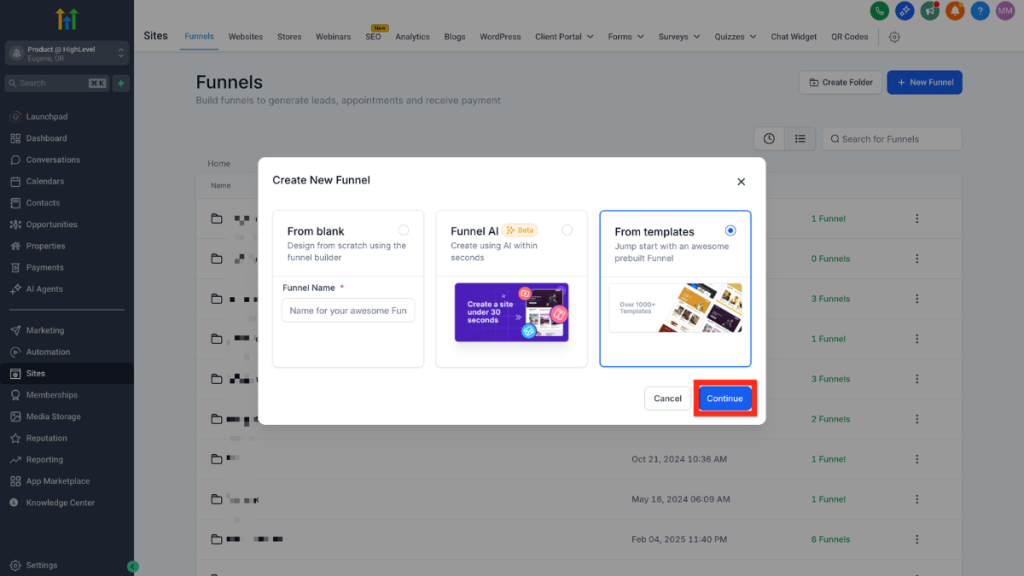
1. GoHighLevel (Best Website Builder for VAs Who Want Premium Clients)
Many VAs combine this with the Best CRM for Virtual Assistants to manage leads and follow-up properly.
GoHighLevel isn’t just a website builder.
It’s a full system.
You’re working with:
funnels
landing pages
forms
CRM pipelines
booking calendars
email marketing
automated follow-up
That’s what makes it different.
You’re not just building a site.
You’re building a system that:
captures leads
follows up automatically
books calls
tracks everything in one place
That’s exactly what higher-paying clients expect.
And it changes how you sell your services.
Instead of offering general VA support, you can position yourself around outcomes:
lead follow-up systems
booking automation
client onboarding flows
funnel builds
That’s where pricing increases.
Where GoHighLevel Beats Wix and WordPress
Everything connects.
You can create a landing page, capture a lead, trigger follow-up, send SMS, and move them through a pipeline without extra tools.
No Zapier. No plugin stack.
If you’re moving into automation or CRM-focused work, this is the most aligned platform.
Where GoHighLevel Can Feel Overkill
If your goal is just:
“I want a simple website online”
then yes, it can feel like more than you need.
There is a learning curve.
But if your goal is higher-paying clients and scalable systems, it’s one of the best tools you can learn.
2. Wix (Best for a Clean Website Fast)
Wix is popular for a reason.
| Feature | GoHighLevel | Wix |
|---|---|---|
| Lead capture | Built-in | Basic |
| Automation | Full | Limited |
| CRM | Included | None |
| Best for | High-ticket VA services | Simple websites |
That pushes it even closer to “HubSpot level”.
2. Wix (Best for a Clean Website Fast)
Wix is popular for a reason.
It’s simple, beginner-friendly, and you can build a clean, professional site quickly without touching anything technical.
If you’re a VA who just wants something live in a weekend, Wix does that well.
The templates are good enough for most service-based businesses, and you won’t get stuck figuring things out.
Where Wix works well
Wix fits VAs who want a straightforward setup.
A simple services page.
A portfolio.
A contact form.
If you’re offering general admin support, social media support, or entry-level VA services, that’s usually enough.
Where Wix breaks for higher-paying work
The limitation shows up when you try to grow.
Wix isn’t built around automation.
You can connect tools, but once you start adding CRM systems, follow-up sequences, booking flows, and onboarding processes, everything becomes fragmented.
You end up stitching tools together instead of running a system.
And that’s the difference between basic VA work and what’s explained in high paying virtual assistant skills.
3. Squarespace (Best for “Simple But Premium-Looking”)
Squarespace sits in a similar space to Wix, but it leans more toward design.
If you want a website that feels clean, minimal, and slightly more “premium”, Squarespace usually delivers that out of the box.
That’s why it’s popular with coaches, consultants, and creatives.
For VAs, it’s a good option if your priority is presentation rather than systems.
Where it fits
If your goal is:
A polished brand
A simple online presence
A clean services page
Squarespace does that well without much effort.
Where it falls short
Like Wix, it’s not built for full lead systems.
You can collect enquiries.
You can connect email tools.
But you’re still relying on external tools for CRM, automation, and follow-up.
And once you move into Virtual Assistant Monthly Retainer Packages, those systems become essential, not optional.
4. WordPress (Powerful, But Usually Overkill for VAs)
WordPress gets recommended everywhere because it can do anything.
And technically, that’s true.
But most VAs don’t need “anything”.
They need something that gets clients.
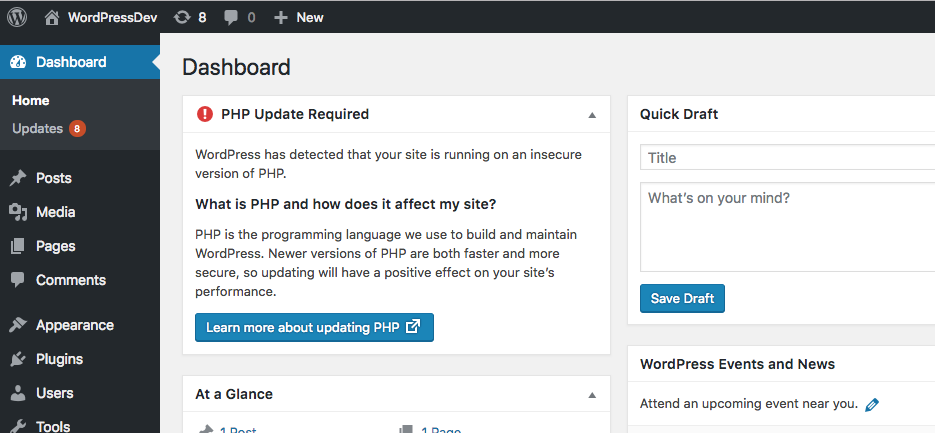
WordPress only makes sense if you’re comfortable managing the backend.
That means hosting, plugins, updates, and fixing things when they break.
The reality most people don’t say
You’ll spend time dealing with:
site maintenance
plugin conflicts
security updates
random bugs
performance issues
None of that helps you get clients.
Why it’s risky for VAs
The biggest issue isn’t capability.
It’s distraction.
You end up working on your website instead of your business.
And for most VAs, a website is not the business.
It’s a lead generator.
If the platform slows you down, it’s the wrong platform.
Most VAs eventually rely on proper systems anyway, which is why many end up using the best automation tools for virtual assistants alongside their website.
The Real Cost of a “Simple” WordPress Website
A lot of VAs choose WordPress because it looks cheap.
But the real cost isn’t hosting.
It’s time.
If you spend hours learning plugins, fixing layouts, connecting forms, and dealing with speed issues, you’ve already paid more than you think.
And none of that brings in clients.
If your goal is to get clients quickly, you want the path of least resistance.
That’s why most VAs end up choosing Wix, Squarespace, or moving toward systems like GoHighLevel instead.
The Best Website Builder for Virtual Assistants (My Real Recommendation)
If you want the honest answer, it’s simple.
If your goal is higher-paying clients and automation-based services:
GoHighLevel.
Because it doesn’t just give you a website. It gives you a full system behind it.
If you just want a clean, professional site with minimal effort:
Wix or Squarespace.
If you enjoy tech and want full control:
WordPress.
But this is the part most people miss.
The best website builder isn’t the one with the best templates.
It’s the one that supports lead capture, follow-up, and automation properly.
Because premium clients don’t pay for design.
They pay for systems.
The One Website Setup That Attracts Better Clients (Even if Your Design Isn’t Perfect)
Here’s what actually works.
If your website includes:
a clear headline that explains what you do
who you help
one focused service offer
a lead magnet
a booking link
and follow-up automation
you’ll outperform most VA websites.
Because most VAs build something that looks nice, but doesn’t guide people anywhere.
If your site makes it easy to take action, you’ll get better leads.
That’s what matters.
Why This Matters (And Why VAs Should Care)
This is where everything connects.
Your website builder isn’t just a design choice.
It’s a business model decision.
If you choose a platform that doesn’t support automation, you’ll eventually hit a ceiling. You’ll stay stuck offering admin work instead of moving into higher-value services.
But if you choose a platform built around systems, you can start offering things like:
CRM setup
lead capture systems
automated follow-up
onboarding workflows
appointment booking automation
That’s the shift behind high paying virtual assistant skills.
And it’s also why many VAs move into Virtual Assistant Monthly Retainer Packages once they start managing systems instead of tasks.
You don’t need 10 tools.
You need one system that businesses rely on.
Final Recommendation, Best Website Builder for Virtual Assistants
If you just want a clean website online quickly, Wix or Squarespace will do the job.
But if you want to attract higher-paying clients and offer more than basic admin work, you need more than a website.
You need a system.
That’s where GoHighLevel stands out.
It allows you to build pages, capture leads, automate follow-up, and manage everything in one place.
And that’s exactly what clients are paying for in 2026.
FAQ
What is the best website builder for virtual assistants?
Wix and Squarespace are the easiest starting points. But for VAs who want higher-paying clients and automation systems, GoHighLevel is the strongest all-in-one option.
Is WordPress good for virtual assistants?
WordPress is powerful, but it requires ongoing maintenance. It’s best suited to VAs who are comfortable managing plugins, hosting, and technical setup.
Do virtual assistants need a website in 2026?
Not strictly. But a website helps you build trust, show your offer clearly, and attract better clients. It also supports SEO if you’re publishing content.
Can GoHighLevel replace a website builder?
Yes. It includes landing pages, funnels, forms, booking calendars, and CRM functionality, so you don’t need separate tools.
Suggested Reads
If you’re building your VA setup properly, these will help you go deeper.
If you want to manage leads and clients properly, see Best CRM for Virtual Assistants
If you want to add automation behind your website, read Best Automation Tools for Virtual Assistants
And if you’re ready to turn this into a higher-value service, Virtual Assistant Monthly Retainer Packages shows how to structure it.