
Affiliate links – I earn a commission if you sign up through this page, at no extra cost to you. That’s exactly why the weaknesses below aren’t softened. If GoHighLevel isn’t right for your business, I’d rather you know before you start a trial
Most ClickFunnels beginner guides make it look simple. Build a funnel, turn on ads, watch leads pour in. In reality, most beginners struggle not with the tool itself but with understanding what to build, whether it is the right platform for their type of business, and what happens when the $97 monthly bill arrives and the funnel is still not converting.
This guide skips the hype. It covers what ClickFunnels actually does, how much it really costs, what your first funnel should look like as a service business, and – honestly – when GoHighLevel is the better starting point.
Key Takeaways
- ClickFunnels is a funnel builder – it creates focused lead capture pages that convert better than general websites for paid traffic
- The Startup plan costs $97 per month ($81 per month billed annually) with a 14-day free trial
- ClickFunnels is not free – there is no permanent free plan
- The AI Smart Funnel Builder is genuinely useful for beginners – it generates funnel structure and copy based on your offer
- For service businesses, a two-page lead capture funnel is all you need to start
- ClickFunnels works best once you have a traffic source running – without ads it is just a page sitting online
- Service businesses needing SMS follow-up, booking, and CRM from day one are usually better starting with GoHighLevel
What is ClickFunnels and What Does It Actually Do?
ClickFunnels is a sales funnel builder. It replaces a traditional website with a focused sequence of pages designed to move a visitor toward one specific action – usually filling in a form, booking a call, or making a purchase.
The core idea is simple. When someone clicks your Google ad for “emergency plumber London” and lands on your homepage, they can go anywhere. They might click your about page, read a blog post, browse your services, and leave without contacting you. A funnel removes all of that. The visitor arrives on one page with one offer and one form. There is nowhere else to go. Fill in the form or leave.
This focused structure is why funnels consistently convert better than general websites for paid traffic. The visitor is pushed toward a single decision rather than being given twenty options and hoping they pick the right one.
In 2026 ClickFunnels has expanded significantly beyond a basic funnel builder. The platform now includes a website builder, email marketing tools, a CRM, course hosting, e-commerce capabilities, and community features. For a beginner service business, most of this is irrelevant. What matters is the funnel builder, the templates, and the email automation – and those are what this guide focuses on.
How Does ClickFunnels Work?
ClickFunnels works by building a sequence of web pages connected together, where each page has a single purpose and pushes the visitor toward the next step.
A basic service business funnel built in ClickFunnels works like this:
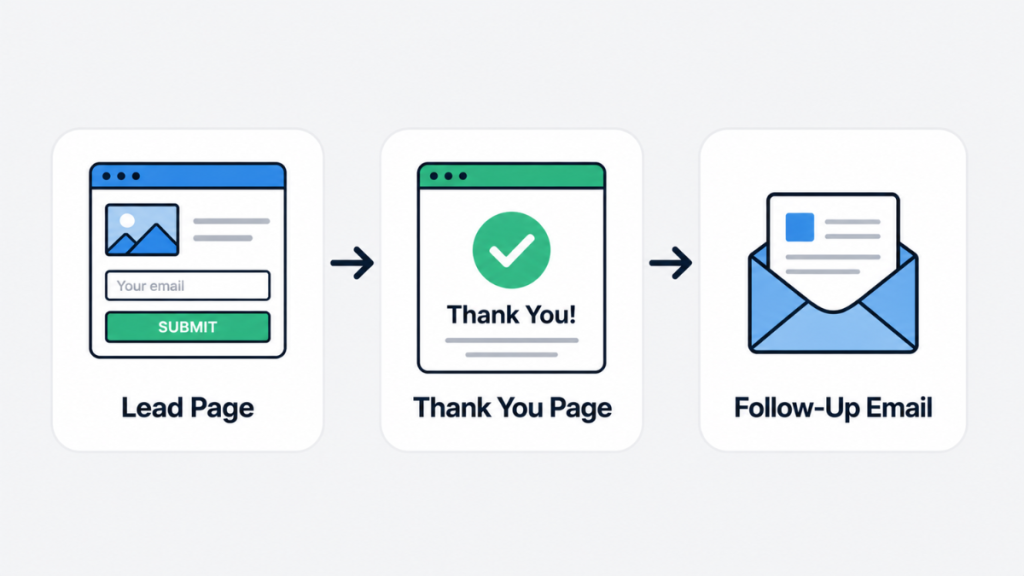
Step 1 – The lead capture page. Someone clicks your ad and arrives on a focused page. There is a headline that names your service and your area, three to five bullet points about what you offer, and a simple form asking for name, phone number, and a brief description of what they need. One button: Get My Free Quote. No navigation menu. No links to other pages. One offer, one form, one decision.
Step 2 – The thank you page. The visitor submits the form and arrives here. It confirms you have received their request, gives your direct phone number in case they want to call immediately, and sets a clear expectation – “We will be in touch within the hour.”
Step 3 – The automated follow-up email. ClickFunnels triggers this automatically when the form is submitted. Subject line: “Thanks – we will call you shortly.” Body: confirmation of the request, your direct number, one question about their timeline.
That is a complete beginner funnel. Two pages and one automated email. The conversion happens on the phone call that follows, not inside the funnel itself. Everything after that is optimisation – testing different headlines, adjusting the form fields, improving the follow-up sequence.
The drag-and-drop editor makes building these pages accessible for beginners. You click a section, edit the text, change an image, and save. No code required at any point. Most people can get a basic funnel live within an afternoon using a template.
What Are the Steps of a Sales Funnel?
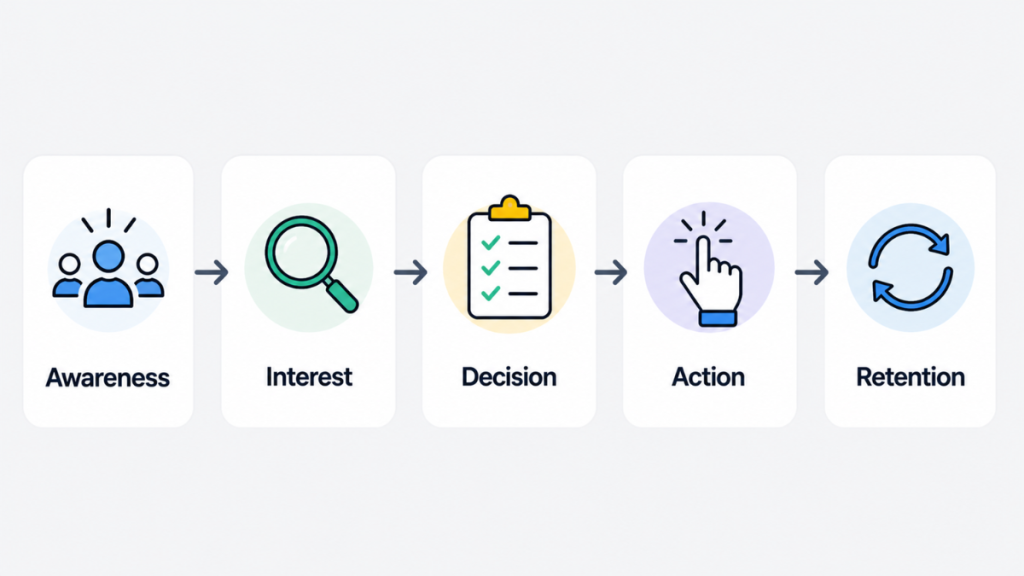
Understanding the five stages of a sales funnel helps you build one that actually works rather than just copying a template without understanding why each page exists.
Stage 1 – Awareness. The potential customer becomes aware your business exists. For most service businesses this happens through a Google ad, a Facebook ad, or a referral. They click through to your funnel.
Stage 2 – Interest. The lead capture page creates interest by immediately addressing what the visitor is looking for. The headline, the bullet points, and the offer all work together to keep the visitor on the page long enough to fill in the form.
Stage 3 – Decision. The visitor decides whether to submit the form. This is where your headline and offer either work or do not. A specific, relevant offer converts. A generic one does not. “Same-day boiler repair in Manchester” converts better than “plumbing and heating services.”
Stage 4 – Action. The visitor submits the form and becomes a lead. The thank you page and the automated follow-up email both reinforce the decision they just made and set expectations for what happens next.
Stage 5 – Retention. For service businesses this happens off the funnel – it is the phone call, the job, and the follow-up that turns a one-time customer into a repeat client. The funnel’s job ends when the lead comes in. Your service quality takes over from there.
Knowing these stages makes it easier to diagnose why a funnel is not working. If visitors are arriving but not filling in the form, the problem is Stage 2 or 3 – your headline or offer is not connecting. If leads are coming in but not converting to jobs, the problem is Stage 5 – your follow-up process.
Is ClickFunnels Easy for Beginners?
Yes, with one important caveat.
What is genuinely easy:
Picking a template, editing the text and images, connecting a domain, and publishing. The drag-and-drop editor is intuitive once you understand that pages are built in sections, rows, and elements. You click something, edit it, save, and move on. No code required at any point.
The AI Smart Funnel Builder – one of the most significant additions to the platform in recent updates – is particularly useful for beginners. Instead of starting from a blank template, you answer a series of questions about your business, your offer, and your target customer. ClickFunnels generates a complete funnel structure including page layouts, suggested headlines, and email copy based on your answers. For a service business building their first funnel, this removes the most common sticking point – not knowing what to write or how to structure the pages.
The generated output is a starting point, not a finished product. You will need to customise the headlines to reflect your specific service and location, adjust the form fields to match what information you actually need, and rewrite the email copy in your own voice. But having a structure to work from is significantly faster than starting from scratch.
What trips beginners up:
Not the tool – the strategy. What do you put on the page? What headline makes someone fill in the form rather than leaving? What happens after they submit it? How quickly do you follow up? These are marketing questions, not software questions, and ClickFunnels does not answer them for you.
This is where most beginners get stuck. They spend days in the page editor tweaking fonts and colours when the real problem is that the headline is not specific enough or the offer is not compelling. The platform is easy. Knowing what to say is the harder part.
How Much Does ClickFunnels Cost?
This is one of the most searched questions about ClickFunnels and one that most beginner guides answer vaguely. Here are the actual numbers.
Startup plan – $97 per month (approximately £79). This is the plan most beginners start with. It includes 20 funnels, 100 pages, 10,000 contacts, and one user seat. For a service business running one or two lead generation funnels this is more than enough capacity.
Startup plan billed annually – approximately $81 per month ($972 per year). The annual billing option saves around 27% but requires paying upfront for the full year. For a beginner who has not yet tested whether ClickFunnels works for their business, the monthly plan is the lower-risk starting point.
Pro plan – $297 per month. This includes unlimited funnels, unlimited pages, unlimited contacts, five websites, nine custom domains, and the Backpack affiliate management system. The vast majority of service businesses never need this plan.
Free trial – 14 days. Both plans include a 14-day free trial. You need a credit card to start. Cancel before day 14 and you will not be charged. ClickFunnels also offers a 30-day money-back guarantee after the trial period ends, which effectively gives you up to 44 days to evaluate the platform before committing financially.
Is ClickFunnels free? No. There is no permanent free plan. The 14-day trial is the only way to use the platform without paying. Anyone claiming ClickFunnels is free is referring to the trial period only.
Why are ClickFunnels so expensive? At $97 per month, ClickFunnels costs more than basic landing page tools. The justification is that it replaces multiple tools – hosting, email automation, checkout, and funnel building – in a single subscription. For service businesses that only need lead capture rather than the full e-commerce and course hosting features, this consolidation argument is less compelling. Our ClickFunnels hidden costs guide covers what you actually pay beyond the subscription including Stripe fees and third-party integrations.
ClickFunnels is currently offering 3 months of their Pro plan for $99 – that is $591 of access for $99. If you are serious about testing funnels properly rather than rushing through a 14-day trial, this deal gives you significantly more time to build, test, and optimise before deciding whether to continue.
What Your First Funnel Should Look Like as a Service Business
This is where most ClickFunnels beginner guides go wrong. They describe complex multi-step funnels with upsells, downsells, order bumps, and webinar registration pages. For a service business generating local leads, none of that is relevant or necessary.
Your first funnel has two pages.
Page one – the lead capture page:
The headline names your service and your location specifically. Not “plumbing services” but “Same-Day Boiler Repair in South Manchester.” The more specific the headline, the higher the conversion rate.
Below the headline, three to five bullet points cover what the visitor gets – your response time, what types of jobs you cover, your guarantee or credentials, and any relevant trust signals like how long you have been trading or how many jobs you have completed.
The form asks for name, phone number, and a brief description of the job. Keep the form short. Every additional field reduces the number of people who complete it. For most service businesses, those three fields are all you need to qualify the lead and call them back.
One button below the form: Get My Free Quote. Or Get a Callback Today. Or Book Your Free Survey. The button text should reflect exactly what happens next.
No navigation menu. No links to other pages. No social media icons. Nothing that gives the visitor a reason to click away before filling in the form.
Page two – the thank you page:
Confirm you have received the request. Give your direct phone number prominently in case they want to call immediately rather than waiting for you to call them. Set a clear expectation about response time – “We will call you within the hour during business hours.”
If you want to add anything beyond this, a short paragraph about what happens next is useful. Not a hard sell. Just clarity about the process.
The follow-up email:
This fires automatically when the form is submitted. Keep it short. Subject line confirming their request has been received, your direct contact number, and one question that helps you prepare for the call – “What is the best time to reach you today?”
That is your complete beginner funnel. The conversion happens on the phone call. The funnel’s job is to get you the lead – nothing more.
[IMAGE PLACEHOLDER – Location: after this section | File name: clickfunnels-beginner-funnel-structure.png | Alt tag: two page beginner funnel structure for service businesses showing lead capture page and thank you page | Prompt: flat illustration of two connected web page layouts showing a lead form page and a thank you page with arrows between them, no people or figures, devices and icons only, light grey background, clean minimal style]
What You Need Before You Start Building
The funnel itself is the easy part. These are the things that determine whether it actually generates leads once it is live.
A specific offer. “Emergency plumber” or “same-day boiler service” is a specific offer. “General plumbing and heating services” is not. The more tightly you define the service, the location, and the type of customer, the better your funnel will perform. Vague offers produce vague results.
A traffic source. A funnel with no visitors does nothing. Most service businesses use Google Search ads to drive traffic to their first funnel – targeting job-specific keywords in their area. Budget a minimum of £300 to £500 per month for ads before you expect consistent leads. Without paid traffic, ClickFunnels is just a page sitting online with nobody seeing it. Organic traffic from SEO takes months to build. Social media traffic is unpredictable for service businesses. Paid search gives you control over exactly who sees your funnel and when.
Time to test. Your first funnel will not convert at the rate you want immediately. That is normal and expected. Plan to run it for four to six weeks before making significant changes. Look at what percentage of visitors are filling in the form – this is your conversion rate. Industry average for a service business lead capture page is between 15% and 30%. If you are below that, the headline or offer is the first thing to change. Test one element at a time.
Budget clarity. ClickFunnels costs $97 per month. Add your ad spend on top. If your average job value is £400 and you convert one in eight leads into a job, you need to know what each lead is worth and what you can afford to pay per click before you can judge whether the funnel is working or not.
The One Resource That Makes ClickFunnels Actually Work
The biggest mistake beginners make with ClickFunnels is treating it as a marketing strategy rather than a tool that executes one. The platform builds the funnel. It does not tell you what offer to put in it, how to write a headline that converts, or where to find customers willing to pay for your service.
A 30-day intensive program that walks you through building and launching your first funnel from scratch. Each day includes a specific mission that builds toward a complete, live funnel by the end of the 30 days. For complete beginners who want structured guidance rather than figuring it out alone, this is the fastest way to go from no funnel to a working one. The daily accountability structure is what most people say made the difference between a funnel that actually launched and one that sat half-built in their dashboard for months.
It covers the strategy side – offer creation, headline writing, and how to structure a funnel that converts – while ClickFunnels handles the technical execution.
Join the One Funnel Away Challenge
How to Build Your First Funnel in ClickFunnels: Day One
Once you have signed up for the trial, here is what to do on day one to get a funnel live as quickly as possible.
Step 1 – Use the Smart Funnel Builder. From your dashboard, open the Funnels section and select Create Funnel. Choose the Smart Funnel Builder option. Answer the questions about your business type, your offer, and your target customer. Let the AI generate your initial funnel structure. This gives you a starting point with page layouts and suggested copy already in place.
Step 2 – Customise the lead capture page. Replace the generated headline with your specific service and location. Edit the bullet points to reflect your actual offer. Update the form to ask only for the fields you genuinely need. Replace the button text with something specific to your service.
Step 3 – Customise the thank you page. Add your direct phone number prominently. Set a clear response time expectation. Remove any upsell or additional offer that the template may have included – keep it simple for your first funnel.
Step 4 – Set up the follow-up email. In the funnel settings, connect an email automation sequence. Write one short email that confirms the request, gives your phone number, and asks one qualifying question. Set it to fire immediately when the form is submitted.
Step 5 – Connect your domain. In account settings, connect your business domain or subdomain to the funnel. This makes the URL look professional and builds trust with visitors.
Step 6 – Test everything before going live. Submit a test form and confirm the thank you page loads correctly and the automated email arrives in your inbox. Check the funnel on a mobile device – the majority of service business leads come from mobile searches.
Step 7 – Connect your traffic source. Add the funnel URL to your Google ad campaign as the destination URL. Set your ad targeting to the specific service keywords and geographic area you want to cover.
The whole process from signing up to having a live funnel connected to ads takes most people one to two days. The AI builder significantly reduces the time spent on page one, which is where most beginners get stuck.
Is ClickFunnels Worth It for Beginners?
For a service business that wants to test paid traffic with a focused lead capture page, ClickFunnels is a strong starting point. The templates work, the editor is accessible, and the AI Smart Funnel Builder removes most of the initial setup friction.
The mistake most beginners make is paying for ClickFunnels before they have a traffic plan in place. If you do not have a Google ads budget ready to go, the $97 monthly subscription runs for months while the funnel sits online with no visitors. Sort your traffic source before you build the funnel.
ClickFunnels also becomes limiting fairly quickly for service businesses that need more than a lead capture page. The moment you need SMS follow-up, automated appointment booking, missed-call text back, or a CRM to track your leads through to jobs – ClickFunnels does not cover these natively. You need to connect additional tools, which adds cost and complexity.
The honest verdict: ClickFunnels is worth it if you have a traffic source and only need a funnel. It becomes expensive and limited if you need the full lead management system that most service businesses eventually require. For a full breakdown of what you pay across different scenarios, see our ClickFunnels pricing guide.
Is ClickFunnels Better Than GoHighLevel for Service Businesses?
This is the question most beginners eventually arrive at, and it is the one most affiliate guides avoid answering honestly because they only promote one platform.
The straight answer is that it depends on what you need from day one.
ClickFunnels is the better starting point if:
- You want to build one clean lead capture funnel quickly without a steep learning curve
- You already have a CRM or are comfortable managing leads manually in the early stages
- You want to test paid traffic with the simplest possible setup
- Your business does not yet need SMS automation, appointment booking, or missed-call follow-up
GoHighLevel is the better starting point if:
- You want funnels plus CRM, SMS, automated booking, and missed-call text back in one platform from day one
- You do not want to connect multiple tools together as your business grows
- You are comfortable with a slightly longer setup time in exchange for a more complete system
- You know from the start that you will need to automate the full lead follow-up process
The practical difference for a service business beginner: ClickFunnels is faster to launch your first funnel. GoHighLevel takes longer to set up but means you never need to migrate to a different system later when you outgrow ClickFunnels’ lead management capabilities.
If you know from day one that you need SMS follow-up and booking automation – and most service businesses do – starting with GoHighLevel means learning one platform instead of two. Our GoHighLevel vs ClickFunnels comparison covers both platforms side by side in detail.
Can ClickFunnels Replace Your Website?
Yes and no.
For paid traffic campaigns, a ClickFunnels funnel outperforms a traditional website almost every time. The focused structure removes distractions and pushes visitors toward a single action. For this specific use case – sending ad traffic to a lead capture page – ClickFunnels is more effective than a general website.
For everything else a website does, ClickFunnels is not a replacement. A traditional website serves different purposes – it ranks in organic search, provides comprehensive information about your services, builds credibility through content, and acts as a long-term digital asset. A funnel does none of these things well.
The most effective approach for most service businesses is to use both. A website built on WordPress handles your organic presence and SEO. A ClickFunnels funnel handles your paid traffic campaigns. The two tools serve different purposes and work better together than either does alone.
Beginner Rating: ClickFunnels for Service Businesses
| Area | Score | Notes |
|---|---|---|
| Ease of setup | 8/10 | AI builder and templates make it fast to launch |
| Funnel builder quality | 9/10 | Best in class for focused lead capture pages |
| Value at $97 per month | 6/10 | Only worth it once paid traffic is running |
| Features for service businesses | 5/10 | Missing SMS, booking, and missed-call automation |
| Beginner friendliness | 8/10 | Platform is easy – strategy is the hard part |
| Overall for service business beginners | 7/10 | Strong starting point for funnels, limited as a complete system |
Final Thoughts
ClickFunnels for beginners is genuinely accessible. The AI Smart Funnel Builder, the templates, and the drag-and-drop editor mean most people can get a functional lead capture funnel live without technical help. The platform does what it is designed to do well.
The limitations show up quickly for service businesses. The moment you need to track leads through to booked jobs, send automated SMS follow-ups, or manage missed calls – ClickFunnels needs additional tools alongside it. That adds cost and complexity that some businesses would rather avoid from the start.
The honest starting point: if you have a clear offer, a paid traffic budget, and want the fastest path to a live funnel, start with ClickFunnels. If you know you need the full lead management system from day one, start with GoHighLevel and build your funnel there instead.
Either way, the funnel itself is not the hard part. Knowing what to put in it and having a traffic source ready to send visitors through it – that is where the work actually is.
Start with ClickFunnels if you want a simple funnel fast:
Start with GoHighLevel if you want the full system from day one:
FAQ
Is ClickFunnels good for beginners? Yes – the AI Smart Funnel Builder and template library make it accessible without technical skills. The challenge for most beginners is not the platform but knowing what offer and messaging to put in the funnel. The tool is easy. The strategy takes more work.
How much does ClickFunnels cost? The Startup plan costs $97 per month or approximately $81 per month billed annually. There is a 14-day free trial on both plans. There is no permanent free plan.
Is ClickFunnels free to use? No. ClickFunnels offers a 14-day free trial but requires a credit card. After the trial, the minimum plan is $97 per month. A 30-day money-back guarantee applies after the trial ends.
What are the steps of a sales funnel? The five stages are awareness, interest, decision, action, and retention. For a service business funnel, awareness comes from your ad, interest from your lead capture page, decision from your headline and offer, action from the form submission, and retention from your service quality and follow-up.
How do you make money with ClickFunnels? For service businesses, you make money by driving paid traffic to a lead capture funnel, converting visitors into enquiries, and closing those enquiries into jobs over the phone. ClickFunnels does not generate revenue on its own – it captures the leads. Your sales process converts them.
Is ClickFunnels better than Shopify? For service businesses, neither is the right comparison. Shopify is an e-commerce platform for selling physical products. ClickFunnels is a funnel builder for capturing leads and selling digital products or services. They serve different purposes for different business types.
What is an alternative to ClickFunnels? For service businesses, GoHighLevel is the most relevant alternative because it combines funnel building with CRM, SMS automation, appointment booking, and missed-call follow-up in a single platform. See our GoHighLevel vs ClickFunnels comparison for a detailed breakdown. For a broader look at ClickFunnels alternatives, our is ClickFunnels worth it guide covers the main options.
Can ClickFunnels replace your website? For paid traffic campaigns, yes – a funnel converts better than a general website. For organic search, SEO, and long-term digital presence, no. Most service businesses benefit from using both – a WordPress website for organic traffic and a ClickFunnels funnel for paid campaigns.
Suggested Reads
ClickFunnels Pricing (2026) – exact plan costs, annual vs monthly billing, and what is included at each tier
ClickFunnels Hidden Costs – what you actually pay beyond the $97 subscription
Is ClickFunnels Worth It? – honest verdict for service businesses
GoHighLevel vs ClickFunnels – side by side comparison for service businesses
GoHighLevel Free Trial – how to test the full CRM and funnel system before committing