
Affiliate links – I earn a commission if you sign up through this page, at no extra cost to you. That’s exactly why the weaknesses below aren’t softened. If GoHighLevel isn’t right for your business, I’d rather you know before you start a trial
Most people start the ClickFunnels free trial, click around for a few days, and never actually test whether it works for their business. Not because the tool doesn’t work — but because they don’t test the right things.
This guide covers exactly what to test during the ClickFunnels free trial, what a service business should build during those 14 days, and how to know by day 10 whether it is worth staying — or whether you would be better served by a platform that includes the full system from the start.
Key takeaways
- 14-day free trial with full access to all features on your chosen plan
- Credit card required to start — no charge if you cancel before day 14
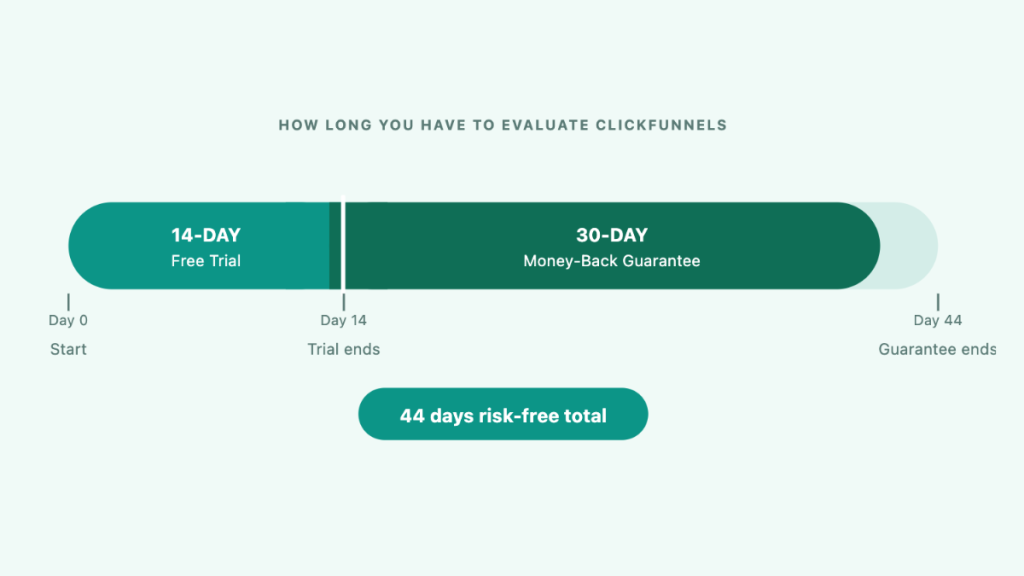
- 30-day money-back guarantee after the trial ends — 44 days total risk-free
- You can build real funnels, collect real leads, and take real payments during the trial
- Your funnels are saved if you cancel but go offline until you reactivate
- GoHighLevel also offers a 14-day free trial at the same $97/month price point — worth comparing before you commit
What the ClickFunnels Free Trial Includes
The ClickFunnels free trial gives you full access to whichever plan you sign up on. On the Launch plan ($97/month) you get:
- Unlimited funnel and page building
- Drag-and-drop page editor
- Up to 10,000 contacts
- 50,000 emails per month
- 5 custom domains
- A/B split testing
- Email automation and workflows
- Checkout pages with order bumps and upsells
- Group onboarding calls
- AI writing tools
There are no feature restrictions during the trial — you get exactly what paying customers get. This means you can build a complete lead capture funnel, connect your domain, set up a follow-up email sequence, and test it with real traffic during the 14 days.
The one thing you cannot do during the trial is collect payments through your own Stripe account without the 1% surcharge. To avoid this, use ClickFunnels’ native Payments AI processor during the trial period. Worth noting: this also means you will not see the full cost of using ClickFunnels during the trial — transaction fees and integration costs only appear once you move to a paid plan. See the ClickFunnels hidden costs guide before committing.
Which Plan Should You Choose for the Trial?
Most service businesses should start on the Launch plan. Here is what each plan includes during the trial:
Which Plan Should You Choose for the Trial?
Most service businesses should start on the Launch plan. Here is what each plan includes during the trial:
| Feature | Launch ($97/mo) | Scale ($197/mo) | Optimize ($297/mo) |
|---|---|---|---|
| Funnels | Unlimited | Unlimited | Unlimited |
| Contacts | 10,000 | 75,000 | 150,000 |
| Emails/month | 50,000 | 300,000 | 750,000 |
| Team members | 2 | 5 | 10 |
| Workspaces | 1 | 5 | 10 |
| Custom domains | 5 | Unlimited | Unlimited |
| Courses | 3 | 6 | 10 |
| Support | Standard (email) | Priority + live chat | Priority + live chat |
| API access | ❌ | ✅ | ✅ |
For a plumber, electrician, salon, or clinic just testing their first funnel, the Launch plan at $97/month gives you everything you need. The Scale and Optimize plans are relevant if you are running multiple brands or need to manage a large contact list from day one — neither applies to most service business beginners.
The key upgrade trigger is the 10,000 contact limit on Launch. If you are already running a large email list alongside your funnel, start on Scale. Otherwise Launch is the right call.
How to Start the ClickFunnels Free Trial
- Click the free trial link and choose your plan — Launch at $97/month is the right starting point for most service businesses
- Enter your name, email address, and create a password
- Add your billing details — your card will not be charged until day 15 if you do not cancel
- Complete the setup screens or skip to your dashboard
- Check your welcome email — it contains onboarding resources and group call details
The signup process takes under five minutes. You will land in your ClickFunnels dashboard immediately and can start building straight away.
You do not need to buy a custom domain to start. ClickFunnels provides a free subdomain in the format yourbusiness.myclickfunnels.com that you can use during the trial. Connect your own domain later once you decide to stay.
Alternative: 3 Months for $99
If you would rather skip the trial uncertainty and commit at a lower cost, ClickFunnels occasionally offers 3 months of access for $99 — roughly $33/month. This gives you more time to test without the pressure of a 14-day deadline. Check the current ClickFunnels pricing page to see if this deal is currently available. If it is, it is worth considering over the standard trial for service businesses that want a proper run at testing paid traffic results.
What a Service Business Should Test During the 14 Days
This is where most free trial guides go wrong — they tell you to “explore the platform” rather than telling you exactly what to do. For a plumber, electrician, salon, or clinic, here is a specific plan for your 14 days.
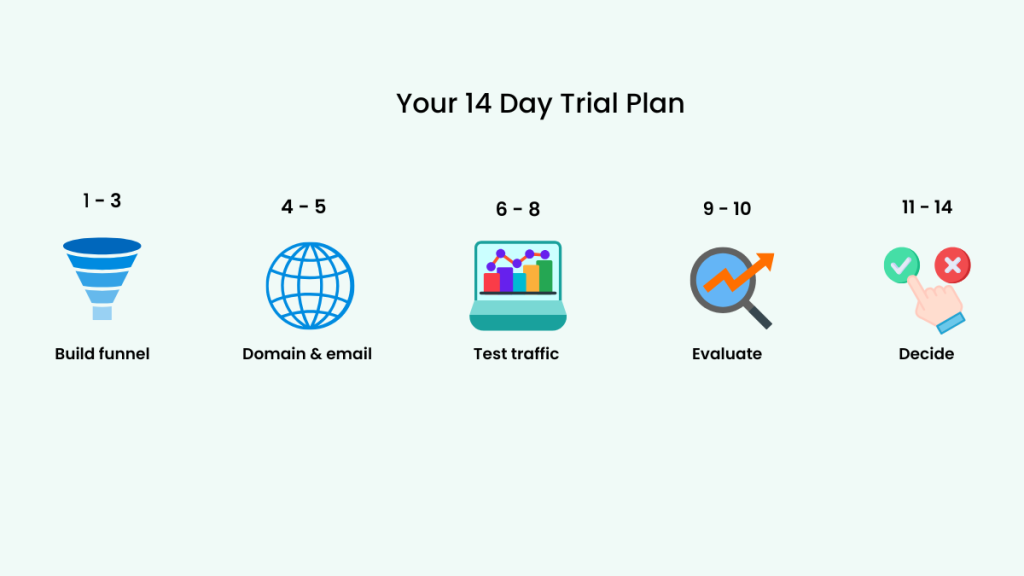
Days 1–3: Build your first funnel
Pick a lead generation template and edit it for your service. Your goal is a two-page funnel: a quote request page and a thank you page. Replace the headline with your service and location. Replace the form fields with name, phone number, and job description. Remove everything that is not the form and the button.
Do not spend more than three days on this. A simple funnel that is live beats a perfect funnel that is still being built.
Days 4–5: Connect your domain and set up your follow-up email
Connect a custom domain so the funnel URL looks professional. Set up one automated email that fires when someone submits the form — a simple confirmation with your phone number and a response time promise.
Days 6–8: Send test traffic
Run a small Google ads campaign — £30–£50 is enough to generate a handful of clicks. Send that traffic to your funnel. Check that the form submits correctly, the thank you page loads, and the follow-up email arrives. Fix anything that does not work.
Days 9–10: Evaluate honestly
By day 10 you should have enough data to make a decision. Ask yourself three questions:
- Did the funnel load and work without errors every time?
- Did the follow-up email arrive quickly and correctly?
- Is the page editor something I can maintain myself going forward?
If the answers are yes, ClickFunnels is likely worth the subscription. If you encountered bugs, slow loading, or confusing settings you could not resolve, factor that into your decision before day 14. The ClickFunnels review covers known reliability issues in detail.
Days 11–14: Decide
If you are staying: choose your plan and let the trial roll into a paid subscription. Annual billing saves approximately 17%.
If you are leaving: cancel before day 14 from Workspace Settings → Billing → Manage Subscription. Your funnels will be saved but will go offline. If you change your mind within 30 days of the trial ending, the money-back guarantee still applies.
What Not to Do During the Trial
Most people waste the trial period making avoidable mistakes. These are the most common ones for service businesses.
Do not try to learn every feature. ClickFunnels has a lot of tools — courses, communities, ecommerce, membership sites. None of these are relevant to a plumber or electrician. Exploring them wastes trial days. Focus only on the funnel builder, the page editor, and the email automation.
Do not spend more than three days building your first page. Perfectionism kills trials. A simple page with a clear headline, a short form, and a submit button is enough to test whether ClickFunnels is right for you. You can refine the design later once you know you are staying.
Do not start the trial without a clear offer. The most common reason service businesses cancel is that they do not know what to put on the funnel. Before you start the trial, decide on one specific service — boiler installations, one-day bathroom renovations, hair colour treatments — and write a one-sentence description of what the customer gets when they enquire. That sentence becomes your headline.
Do not skip the onboarding calls. Group onboarding calls are included on all plans and are genuinely useful. Join one in the first three days — they will save you hours of confusion with the platform setup.
Do not wait until day 13 to test cancellation. If you decide you are not staying, cancel by day 12 at the latest. Leaving it until the last day creates unnecessary stress and risk of being charged.
What Happens When the Free Trial Ends
If you take no action, your card is charged on day 15 at the plan rate you selected during signup. Your funnels remain live and your contacts stay in your account.
If you cancel before day 14, your account is deactivated. Your funnels are saved in your account but go offline — they will not be visible to visitors. If you reactivate later, they come back online immediately.
If you cancel after the trial but within 30 days, the money-back guarantee applies. Contact ClickFunnels support and request a refund — this is straightforward and no penalty applies.
You can change plans during the trial without losing trial time. Upgrading or downgrading does not reset your 14 days.
How to Cancel the ClickFunnels Free Trial (Step by Step)
If you decide ClickFunnels is not right for your business, cancel before day 14. Here is exactly how:
- Log into your ClickFunnels account
- Click Workspace Settings in the bottom left of your dashboard
- Select Billing from the left-hand menu
- Click the three dots next to your subscription information
- Select Manage Subscription
- Find Cancel Subscription in small text beneath your plan details
- Follow the cancellation prompts — ClickFunnels will ask why you are leaving
- Click the final cancellation button to confirm
Once cancelled you will still have access to the platform until your trial expires. Your funnels are saved but go offline at that point.
If ClickFunnels offers you a deal during the cancellation process — a discounted month or an extended trial — it is worth evaluating before you confirm. These offers are not always available but do appear occasionally.
If you need more time before deciding, contact ClickFunnels support directly and ask for a trial extension. This is not guaranteed, but support agents can sometimes grant additional days if you explain your situation. Get through to a human agent rather than the chatbot — the chatbot cannot approve extensions.
If you have already been charged and want a refund, contact ClickFunnels support within 30 days of the charge. The money-back guarantee is straightforward — state that you want to cancel and request a refund, and the team will process it.
Should You Trial ClickFunnels or GoHighLevel?
This is the question most free trial pages avoid because they are only affiliated with one platform. For a service business, it is the most important question to answer before you start a trial.
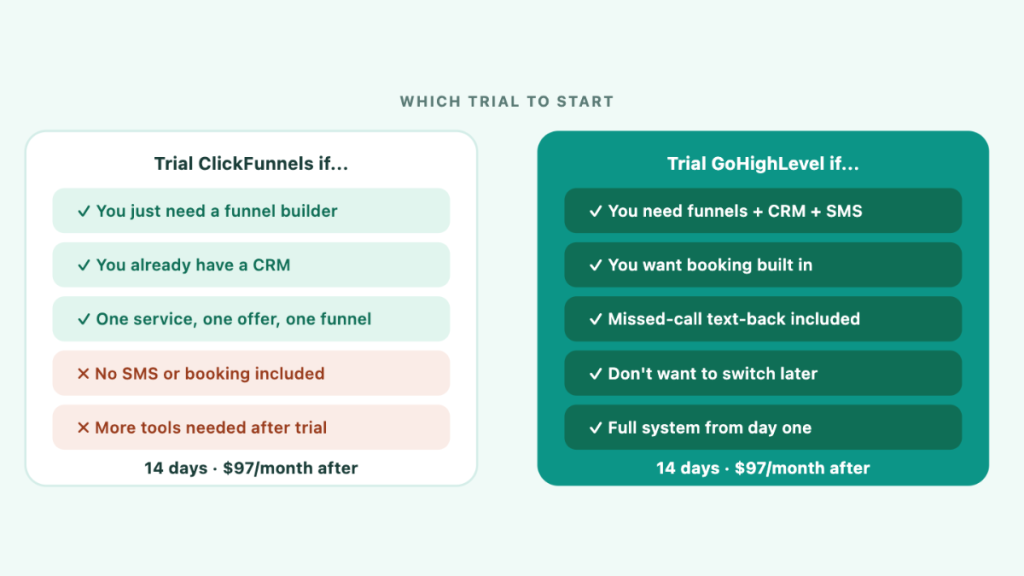
Trial ClickFunnels if:
- You want to test a focused funnel builder quickly
- You already have a CRM and just need lead capture pages
- Your business model is simple — one service, one offer, one funnel
- You want the cleanest, fastest funnel building experience
Trial GoHighLevel instead if:
- You need funnels plus CRM, SMS, appointment booking, and missed-call automation in one system
- You do not want to add separate tools for follow-up and booking
- You are willing to spend a few more days on setup in exchange for a more complete system
Both platforms offer a 14-day free trial at the same $97/month starting price. If you are unsure, you can trial both — start with ClickFunnels for the funnel builder experience, then trial GoHighLevel to compare the full system. See the GoHighLevel vs ClickFunnels comparison for a full feature breakdown before you decide.
Is 14 Days Enough to Evaluate ClickFunnels?
Yes — if you have a clear offer ready to go.
The 14 days is enough time to build a funnel, connect a domain, set up a follow-up email, run a small amount of test traffic, and make an informed decision. Most service businesses know within the first week whether the platform suits them.
The trial feels short when you spend the first few days learning what a funnel is rather than building one. If you arrive with a clear service offer and a basic plan for what to build, 14 days is more than enough.
If you need more time, the 30-day money-back guarantee gives you a further 30 days after the trial. That is 44 days total — enough for even the busiest business owner to make a proper evaluation.
ClickFunnels Free Trial FAQ
Is a credit card required for the ClickFunnels free trial? Yes. A credit card is required to start the trial. You will not be charged if you cancel before day 14. ClickFunnels takes the card to ensure a smooth transition to a paid plan if you decide to stay.
Can I build real funnels and collect real leads during the trial? Yes. The trial gives full access to all features. You can build live funnels, collect real leads, and even take payments during the 14 days.
What happens to my funnels if I cancel? Your funnels are saved in your account but go offline. They will not be visible to visitors until you reactivate your subscription. No data is deleted.
Can I get a 30-day free trial of ClickFunnels? The standard trial is 14 days. After the trial ends, a 30-day money-back guarantee applies — giving you 44 days total risk-free. Some affiliates claim to offer extended trials through special links — the standard trial available here is 14 days.
Which plan should I choose for the free trial? For most service businesses the Launch plan at $97/month is the right starting point. It includes everything you need to build and test a lead capture funnel during the trial period.
Can I cancel the trial easily? Yes. Go to Workspace Settings → Billing → Manage Subscription → Cancel Subscription. No phone calls, no retention team. Cancel any time before day 14 and you will not be charged.
Can I change my plan during the trial? Yes. You can upgrade or downgrade during the trial without losing any trial time. Your 14 days continues regardless of plan changes. If you upgrade, you will be charged the higher plan rate when the trial ends unless you cancel first.
Can I pause my ClickFunnels account instead of cancelling? Yes. ClickFunnels offers a pause option that retains your account and all your funnels for $17/month. Important: while paused, your funnels go into a dormant state — a banner appears on your pages and your customers cannot access them either. Pausing is useful if you want to keep your data saved without paying the full subscription, but it does not keep your funnels live. The pause takes effect at the end of your current billing cycle, not immediately.
What happens if I forget to cancel before day 14? Your card will be charged on day 15 at your plan rate. The 30-day money-back guarantee applies from this point — contact support within 30 days and request a refund. Set a calendar reminder on day 12 to avoid being caught out.
Is ClickFunnels worth it after the free trial? For service businesses running paid ads to a lead capture funnel, yes — if that is your primary use case. If you need CRM, SMS, booking, and missed-call automation as well, the total monthly cost once integrations are added may make GoHighLevel a better long-term fit. See the full ClickFunnels review for an honest verdict.
The real value of the ClickFunnels free trial is not building a funnel — it is seeing whether that funnel actually generates leads. If you do not test it with real traffic during the 14 days, you will not know whether the platform is worth paying for. Build the page, run the traffic, and let the results decide.
Start your ClickFunnels 14-day free trial:
Credit card required. Cancel before day 14 to avoid charges. 30-day money-back guarantee applies after the trial ends.
Want to compare before you decide?
Same starting price. Includes funnels, CRM, SMS, booking, and missed-call automation in one system.
Suggested Reads
ClickFunnels Review (2026) → Honest verdict including bugs, scores, and service business gaps
ClickFunnels Pricing (2026) → Full plan breakdown with monthly and annual costs
ClickFunnels Hidden Costs (2026) → What you actually pay beyond the subscription
GoHighLevel vs ClickFunnels → Side-by-side comparison for service businesses