
A CRM for coaching business helps manage leads, clients, appointments, and automation in one system.
If your coaching program gave you a business dashboard or CRM system, you probably think it’s a custom platform built just for their students.
Most people do.
Then the free year ends.
And suddenly the system costs $300–$400 per month to keep using.
At that point most coaching business owners start asking the same question:
Do I really need to pay this much to run my business?
In many cases, the answer is no.
Most coaching dashboard systems are not proprietary platforms. They’re usually built on software like GoHighLevel with templates and training added on top.
That means the same type of system can often be run independently for a much lower monthly cost.
Understanding how these CRM systems for coaching businesses actually work makes it much easier to decide what to do before renewing.
Many coaches choose GoHighLevel after comparing the GoHighLevel pricing explained and understanding what each plan includes.
This platform is one of the most commonly used CRM systems for coaching businesses.
CRM for Coaching Business Platform
If you want a simple step-by-step coaching CRM setup, download the checklist below.
Download the Coaching CRM Setup Checklist
What a Coaching CRM Dashboard Looks Like
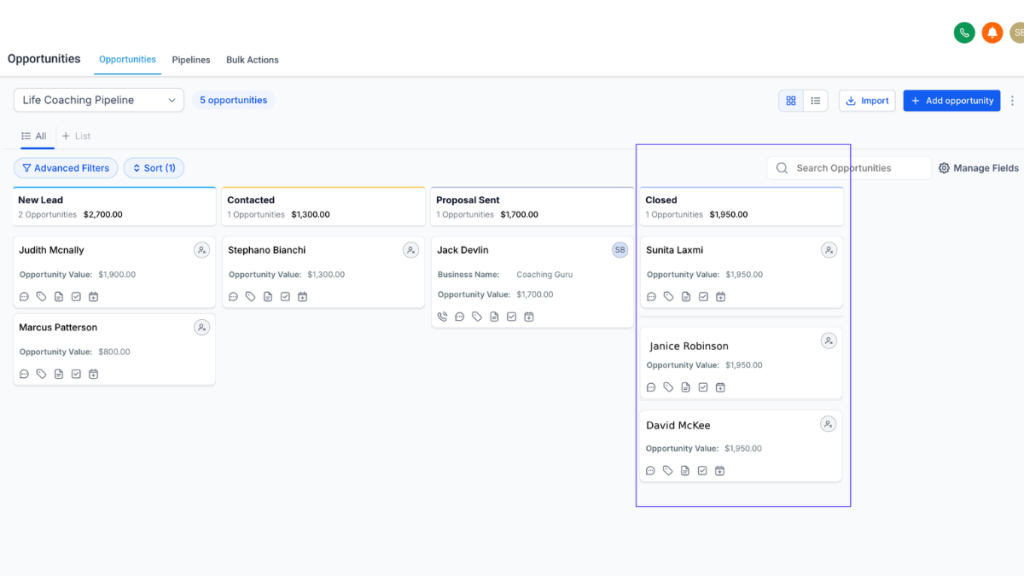
A coaching CRM dashboard shows your leads, clients, appointments, messages, and automations in one system instead of separate tools.
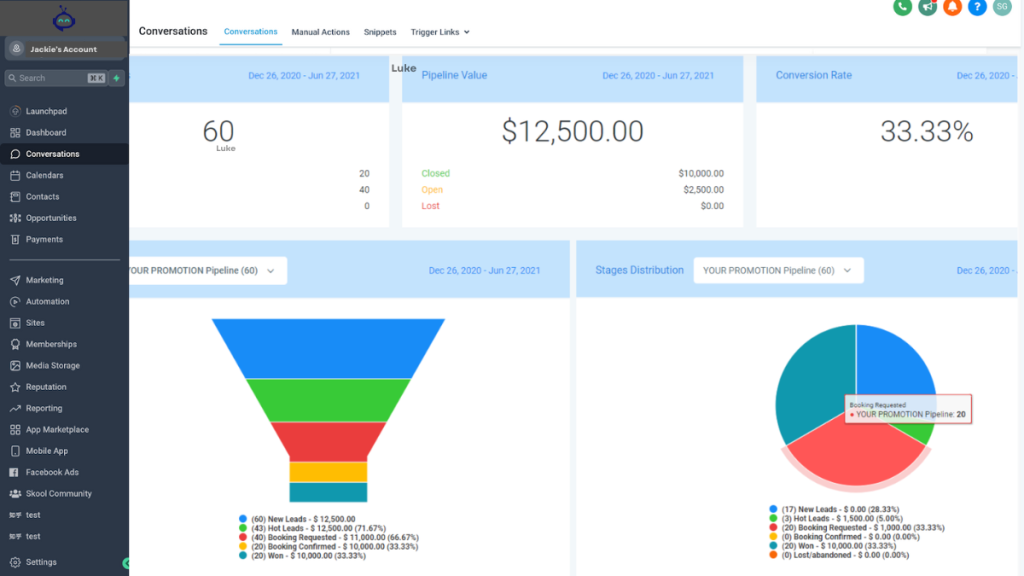
A coaching dashboard is basically one screen that shows your whole coaching business.
Instead of using:
- Email tool
- Calendar tool
- Notes
- Spreadsheets
- Messaging apps
Everything appears in one place.
Most coaching dashboards include:
1. Leads and clients
You see:
- New enquiries
- Booked calls
- Active clients
- Past clients
Usually in a list or pipeline view.
2. Appointment calendar
You normally see:
- Discovery calls
- Coaching sessions
- Follow-ups
You can click a client and see their history.
Example:
- Booked call → notes → sessions → payments
All connected.
3. Conversations
Most dashboards include a message area showing:
- Emails
- SMS
- Website messages
All tied to the client record.
So instead of searching your inbox, you open the client profile.
This is why many coaches eventually move to a CRM for coaching business instead of relying on separate tools and disconnected apps.
If you want a real example of what coaches mean by a “system dashboard,” see this coaching business system dashboard walkthrough.
Client Pipeline View
This is usually the core of a coaching dashboard.
You see clients moving through stages like:
- New lead
- Call booked
- Proposal sent
- Client active
- Completed
Each card represents a person.
You drag them across as they move forward.
This replaces spreadsheets.
Automation Workflows Inside the Dashboard
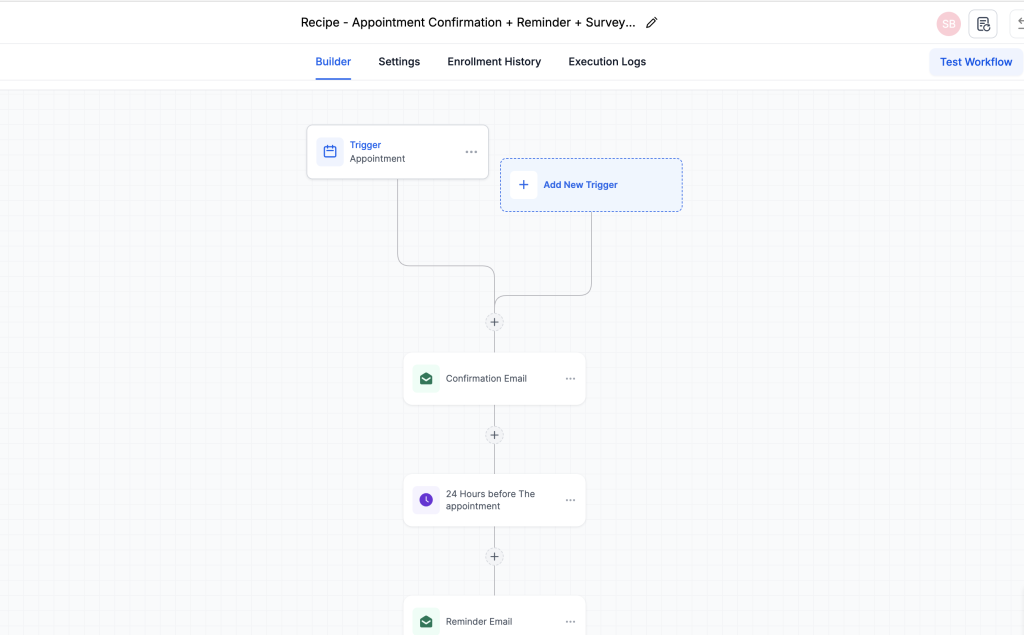
Behind the dashboard are automations.
Typical coaching automations:
Someone books a call →
- Confirmation email sent
- Reminder sent
- Follow-up sent
- Onboarding email sent
You set it once.
The dashboard tracks everything.
Many coaching businesses switch after realising how much time they lose managing separate tools and systems, which is where platforms like GoHighLevel become useful. Before choosing a plan, it’s worth understanding the GoHighLevel hidden costs involved.
The Simple Way to Picture It
Think of a coaching dashboard as:
Client list + calendar + messages + automation + notes
All on one system.
Most coaches don’t start with one.
They usually piece together:
- Calendly
- Gmail
- Spreadsheets
- Notion
The dashboard replaces that mess.
Who This Type of CRM Works Best For
A CRM for coaching business works best for coaches who are booking calls regularly, following up with leads, and managing multiple clients at once. If you’re only working with a few clients, simple tools may be enough, but once enquiries and sessions increase, a dashboard system becomes much easier to manage.
How Coaches Run the Same System for Less
How Coaches Run the Same System for Less
Many coaching business owners continue paying $300–£400 per month because they assume the platform only exists inside the coaching program.
In reality, many coaching dashboards are built on GoHighLevel, a marketing automation platform used by agencies and coaching businesses.
Running your own account usually includes:
- Website and landing pages
- Funnels
- Booking calendars
- Lead tracking
- Client records
- Email automation
- SMS messaging
- Payment forms
- Course hosting and member areas
- Automation workflows
- Contracts and forms
- Digital signatures
For many coaching businesses this provides the same type of system without the high monthly cost of a managed coaching platform.
If you want to see how running your own system works, the easiest place to start is opening your own accounting your own system works, the easiest place to start is opening your own account:
See a Real Coaching CRM Dashboard
Most Coaching CRM Systems Are Built on White-Label Software
Many coaching CRM systems are built on white-label platforms.
This allows coaching companies to:
- Brand the software as their own
- Provide templates and automations
- Manage user accounts
- Offer training and support
From the outside it looks like a proprietary system.
Behind the scenes it usually works like standard coaching client management software used by thousands of businesses.
This is a normal and widely used model.
It allows coaching programs to give students a working system without requiring technical setup.
For beginners, that structure can be extremely helpful.
Why Coaching Dashboard Systems Feel Proprietary
One reason many people believe their system is unique is the way coaching dashboard platforms are presented.
The login page is branded.
The training refers to it as an internal system.
The dashboards use custom names.
Sometimes the colours and styling are changed.
But the underlying structure often stays the same.
Many coaching dashboards include features like:
- Contact records
- Pipelines
- Calendars
- Automation workflows
- Funnels and landing pages
Even when the colours or branding look different, the layout and tools are often identical to standard CRM platforms.
This is a common feature of white-label software.
Why Coaching Programs Include CRM Software
Bundled coaching business software removes a lot of early complexity.
Instead of building a system from scratch, students start with:
- A working dashboard
- Pre-built templates
- Automated follow-ups
- Booking systems
- Client tracking
For someone starting a coaching business, this can save a lot of time.
That’s why many coaching programs include a “free year” or included access period to their coaching CRM system.
The real decision usually comes later.
The Reality of Coaching Software Pricing
When the included access period ends, continued use usually requires a monthly subscription.
For many programs this means paying for continued access to the coaching business software, templates, and managed account.
In some cases ongoing access can be around $300–$400 per month, depending on what is included.
This is often the point where coaching business owners start researching:
- CRM for coaching business options
- Coaching software pricing
- Coaching CRM alternatives
- Best coaching business software
These are sensible questions once the initial learning phase is finished.
Monthly costs vary depending on the plan and usage, so it helps to review the GoHighLevel hidden costs before committing.
The cost of a CRM for coaching business often ends up lower than paying for multiple tools separately.
Most Coaching CRM Systems Are Not Exclusive
One thing many coaching business owners discover later is that their coaching CRM system is usually not exclusive software.
Instead it is typically:
- A white-label platform
- With templates added
- With training included
- With custom branding
That doesn’t reduce the value of the training.
But it does mean the underlying coaching business software is usually available independently outside the coaching program.
Understanding this gives you more flexibility when deciding what to do next.
Running Your Own Coaching CRM System
Some coaching business owners prefer staying inside their program’s system.
Others eventually decide to run their own CRM for coaching business operations once they understand how everything works.
Running your own account usually provides:
- Full control of your system
- Direct account ownership
- Independent billing
- Custom configuration
Some coaching businesses prefer the support and structure of a managed system.
Others prefer independence once the learning phase is complete.
Platforms like GoHighLevel allow coaching businesses to run their own CRM system directly without being tied to a managed coaching platform.
Run Your Coaching Business From One Dashboard
Before You Renew Your Coaching Business Software
If your included access period is ending, it’s worth stepping back and reviewing how you actually use your coaching business software.
Questions worth asking include:
- Which features do I actually use?
- Do I rely on the templates?
- Do I need ongoing support?
- Would running my own system make more sense?
Making a clear decision now is usually better than renewing automatically.
A coaching dashboard is basically one screen that shows your whole coaching business.
Instead of using separate tools for email, scheduling, notes, spreadsheets, and messaging, everything sits inside one system.
Many coaches start with separate tools like a website builder, booking software, email marketing, and spreadsheets. A typical setup might include a website platform, a booking tool, and an email service, which can easily add up to £50–£150 per month before automation is even included.
A simple CRM for coaching business makes it easier to manage clients and automation without switching between tools.
If you’re comparing platforms, this guide to the best CRM for virtual assistants explains how these systems work in real businesses.
Start a Coaching CRM 14 Days Free Trial
Final Thoughts
A good CRM for coaching business management can make running a coaching business much easier.
That’s why so many coaching programs include dashboard systems and automation tools.
But most coaching business software is built on standard platforms rather than completely custom technology.
Understanding how coaching CRM systems work gives you more options.
Many coaching businesses eventually move from managed coaching platforms to running their own system independently.
If you want to explore how that works, you can try the platform directly.
Recommended Reading
GoHighLevel hidden costs
GoHighLevel pricing explained
Coaching website templates
Appointment booking software
Best CRM for virtual assistants