
Affiliate links – I earn a commission if you sign up through this page, at no extra cost to you. That’s exactly why the weaknesses below aren’t softened. If GoHighLevel isn’t right for your business, I’d rather you know before you start a trial
Most guides to the best CRM for marketing agencies treat all agencies the same. They are not. A solo freelancer managing twelve retainer clients needs something completely different from a twenty-person agency running white-label campaigns for fifty local businesses. A content agency that lives in Gmail has different requirements from a paid ads agency running automation sequences across multiple client accounts.
The wrong CRM creates more work than it saves. Contacts from different clients mix together. There is no way to separate reporting by account. Automation built for one company breaks when applied across multiple clients simultaneously. Agencies lose an estimated 15 to 20 percent of billable hours to manual data entry and context switching between disconnected tools – and most of that comes from using a CRM built for a different type of business.
This guide ranks the best CRM for marketing agencies by agency type, covers ten platforms in detail with honest pricing, and gives you a clear decision framework so you can identify the right tool for how your agency actually operates.
Key Takeaways
- Agencies have fundamentally different CRM needs from single businesses – multi-client architecture, sub-accounts, white labelling, and flat-rate pricing matter in ways they do not for standard buyers
- GoHighLevel is the strongest option for agencies managing multiple clients, building white-label SaaS revenue, or running automation across many accounts simultaneously
- ClickFunnels suits agencies building lead generation funnels for clients or running their own client acquisition through paid traffic
- HubSpot suits large inbound-focused agencies with budget for paid plans – the free plan is capable but automation requires significant upgrade cost
- Pipedrive is a clean sales pipeline tool – strong for new business tracking but weak on marketing automation for multi-client management
- Per-seat pricing punishes growing agencies – flat-rate platforms align better with the agency business model
- The best CRM depends on whether you are managing clients internally, reselling software access to them, or building funnels for them
Platform Scores at a Glance
| Platform | Multi-client | White Label | Automation | Pricing Model | Agency Score |
|---|---|---|---|---|---|
| GoHighLevel | Yes – sub-accounts | Yes – full | Advanced | Flat rate | 9/10 |
| ClickFunnels | No | No | Moderate | Flat rate | 7/10 |
| HubSpot | Limited | No | Strong | Per seat | 7/10 |
| Pipedrive | No | No | Basic | Per seat | 6/10 |
| ActiveCampaign | No | No | Strong | Per contact | 6/10 |
| Zoho CRM | Limited | No | Advanced | Per seat | 6/10 |
| Monday.com | No | No | Moderate | Per seat | 5/10 |
| Keap | No | No | Moderate | Flat rate | 5/10 |
| Salesforce | Limited | No | Advanced | Per seat | 5/10 |
| Nimble | No | No | Basic | Per seat | 4/10 |
What Makes Agency CRM Different From Standard CRM
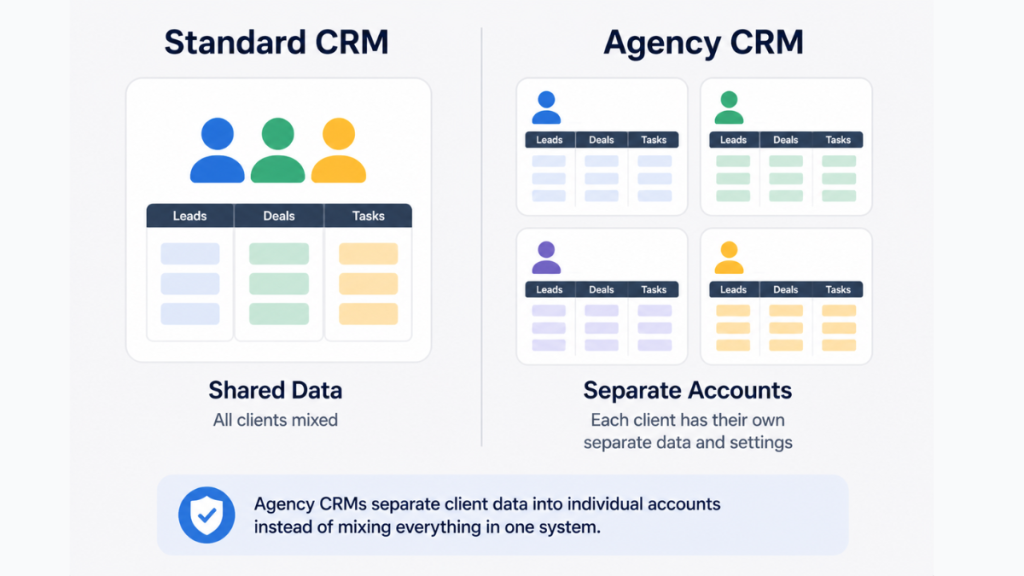
Most CRM software is built for a single business managing its own sales pipeline. Marketing agencies have a fundamentally different problem – they manage multiple clients simultaneously, each with their own contacts, campaigns, pipelines, and reporting requirements.
A CRM that works perfectly for a SaaS company breaks down quickly in a multi-client agency context. The problems appear fast. Contacts from different clients mix in one account. There is no clean separation of data. Pipelines and automations cannot be replicated across accounts without rebuilding from scratch. Reporting shows everything together rather than per client.
The features that matter most for agencies are different from what standard business buyers need.
Multi-client architecture. Agencies managing ten, fifty, or two hundred client accounts need the CRM to isolate each client’s data into a separate workspace. Contacts, deals, campaigns, and reporting should never overlap between clients. Platforms with sub-account structures handle this natively. Most standard CRMs do not.
White label capability. Agencies that resell marketing services often need to present dashboards, reports, and login portals under their own brand. True white labelling means custom domains, branded login pages, and no CRM vendor branding visible to clients. Very few platforms offer this at all.
Automation that scales across accounts. Agency workflows – client onboarding sequences, monthly reporting, review request campaigns, follow-up sequences – need to be built once and deployed across all client accounts. Standard CRMs require manual rebuilding for every new client.
Pricing that scales with clients not seats. Per-seat pricing punishes agencies that grow their client roster. Every account manager added costs more. Flat-rate platforms that charge by platform access rather than user count align much better with how agencies actually grow.
Client reporting. Agencies need to produce performance reports for clients regularly. A CRM that centralises campaign data, lead activity, and pipeline metrics makes this faster. One that stores everything in one undifferentiated account makes it nearly impossible.
1. GoHighLevel – Best for Multi-Client Agencies and White-Label SaaS
Agency score: 9/10
GoHighLevel was built from the ground up for the leading CRM for marketing agencies. Every feature reflects the reality of managing multiple clients simultaneously rather than being adapted from a single-business tool.
The sub-account structure is the core advantage. Each client gets their own isolated environment – their own CRM pipeline, contacts, automations, forms, calendars, and reporting. Nothing bleeds across accounts. You manage everything from a single agency dashboard but each client sees only their own data.
For agencies that want to resell software, the white label capability allows you to rebrand the entire platform under your own name, domain, and logo. Clients log into your branded portal. GoHighLevel is completely invisible. This creates a SaaS revenue stream on top of your service delivery. Our GoHighLevel SaaS mode guide covers exactly how this works and the margin math at different client volumes.
The automation depth is the strongest of any platform in this comparison. Workflows trigger across SMS, email, voice, and chat simultaneously. Missed call text back, automated appointment booking, lead follow-up sequences, and review request campaigns all run without manual intervention. Build the automation once using Snapshots and deploy it across every client account in minutes.
Real use case: A local SEO agency managing fifty dental clients uses GoHighLevel to automate appointment booking, missed call follow-up, and review requests across all fifty accounts from a single dashboard. Each dentist logs into a branded portal showing their own leads and messages. The agency charges each client $297 per month for platform access, generating $14,850 monthly in SaaS revenue against a $497 platform cost.
GoHighLevel Pricing
| Plan | Monthly Cost | What You Get |
|---|---|---|
| Starter | $97 | Single business, full CRM and automation |
| Agency Unlimited | $297 | Unlimited sub-accounts, white label branding |
| Agency Pro | $497 | Full SaaS mode, automated client billing |
White label: Yes – full platform rebranding Multi-client: Yes – native sub-accounts Automation: Advanced – SMS, email, voice, AI Free trial: 14 days
Best for: Agencies managing five or more clients, agencies building white-label SaaS revenue, agencies running high-volume lead generation for local businesses.
Not ideal for: Solo operators needing a simple contact database, agencies that only need internal pipeline tracking.
For a full cost breakdown including SMS and email usage fees see our GoHighLevel pricing guide.
2. ClickFunnels – Best for Agencies Building Client Funnels
Agency score: 7/10
ClickFunnels is not a traditional CRM but it belongs in this comparison because many marketing agencies use it as their primary client acquisition and lead generation tool – either for their own agency growth or building funnels on behalf of clients.
For agencies whose core service is building high-converting lead funnels for clients – local service businesses, coaches, course creators, or e-commerce brands – ClickFunnels provides the funnel builder, landing page templates, email automation, and checkout tools in a single platform.
The 2026 AI Funnel Builder generates complete funnel structures including page layouts and suggested copy based on your inputs, which significantly speeds up agency delivery for clients. The template library covers most common agency use cases – lead capture, webinar registration, product launches, and service enquiries.
Where ClickFunnels differs from GoHighLevel is scope. It does not have sub-account architecture for separating client data, no white label capability, and limited CRM functionality compared to dedicated CRM platforms. Agencies use it for funnel delivery rather than client relationship management.
Real use case: A digital marketing agency builds lead capture funnels for local service businesses – plumbers, electricians, and cleaning companies. They use ClickFunnels to build and host client funnels at $97 per month while managing the client relationships and reporting in a separate CRM. They charge clients $500 per month for funnel management, making the tool cost negligible relative to revenue.
ClickFunnels Pricing
| Plan | Monthly Cost | What You Get |
|---|---|---|
| Startup | $97 | 20 funnels, 100 pages, 10,000 contacts |
| Pro | $297 | Unlimited funnels, pages, and contacts |
| 3 Months for $99 | $33/month effective | Pro plan at heavily discounted rate |
White label: No Multi-client: No – one account, manage client funnels within it Automation: Moderate – email sequences and basic workflows Free trial: 14 days
Best for: Agencies whose primary service is building lead generation funnels, agencies managing paid traffic campaigns for clients, agencies using ClickFunnels for their own client acquisition.
Not ideal for: Agencies needing multi-client CRM management, agencies wanting white label or sub-account separation.
For a full breakdown of what ClickFunnels includes and where it falls short see our ClickFunnels review.
3. HubSpot CRM – Best for Large Inbound-Focused Agencies
Agency score: 7/10
HubSpot is the most widely recognised CRM platform globally and the default choice for agencies built around content marketing, inbound lead generation, and SEO. Its free plan provides genuinely useful functionality – contact management, deal pipelines, email tracking, meeting scheduling, and basic reporting.
The platform excels at connecting marketing and sales data. If your agency runs inbound campaigns for clients and needs to track which content, ads, or campaigns generated which leads, HubSpot’s attribution reporting is the strongest in this comparison. The integration ecosystem of over 1,000 native connections means it works with virtually every marketing tool in use.
The honest limitation is cost. The free plan is capable but the moment you need automation sequences, advanced reporting, or multiple pipelines, you are looking at the Professional tier which starts at $890 per month. This catches many agencies off guard when they outgrow the free plan.
HubSpot also has no true multi-client sub-account architecture at standard pricing. Managing multiple clients requires either separate HubSpot accounts per client – each at $890 per month for Professional – or careful workspace management that gets messy quickly.
Real use case: A fifteen-person content marketing agency uses HubSpot Professional to manage its own new business pipeline, track inbound leads from its blog, and attribute client wins to specific content campaigns. They do not use it for client-facing tools – each client has their own separate tools for that.
HubSpot Pricing
| Plan | Monthly Cost | What You Get |
|---|---|---|
| Free | $0 | Basic CRM, 2,000 email sends, limited automation |
| Starter | $20/seat | Basic automation, email marketing |
| Professional | $890/month | Full automation, multi-pipeline, reporting |
| Enterprise | $3,600/month | Advanced reporting, custom objects |
White label: No Multi-client: No – one portal, all clients mixed Automation: Strong at Professional and above Free trial: Free plan available, no time limit
Best for: Large agencies with dedicated operations teams, agencies built on inbound marketing, agencies needing deep attribution reporting and a large integration ecosystem.
Not ideal for: Agencies managing many clients simultaneously, budget-conscious agencies that will hit the free plan ceiling quickly.
For a direct comparison with GoHighLevel see our GoHighLevel vs HubSpot guide.
4. Pipedrive – Best for Agencies Tracking Their Own New Business Pipeline
Agency score: 6/10
Pipedrive is a sales-first CRM built around visual pipeline management. Its kanban-style interface makes it easy to see every active deal, move opportunities between stages, and track activity across the sales team. It is the cleanest and fastest to learn of any platform in this comparison.
For agencies with a dedicated business development function – teams actively pitching new clients, tracking proposals, and managing a new business pipeline – Pipedrive provides exactly what they need without unnecessary complexity.
The limitation for agencies is significant. Pipedrive is a sales CRM, not a marketing automation platform. It has no multi-client sub-account management, no white label capability, and its automation is limited to basic workflow triggers. If you are using Pipedrive to manage your agency’s own new business pipeline rather than managing client marketing, it works well. If you need to run automation across multiple client accounts, it falls short immediately.
Real use case: A boutique PR agency uses Pipedrive to track new business enquiries from first contact through proposal to signed contract. The sales team of three manages their own pipeline in Pipedrive while client work is managed in separate project management tools.
Pipedrive Pricing
| Plan | Per Seat/Month | What You Get |
|---|---|---|
| Essential | $14.90 | Basic pipeline, contact management |
| Advanced | $34.90 | Automations, email sequences |
| Professional | $49.90 | Full reporting, AI features |
| Power | $64.90 | Project management add-on |
| Enterprise | $99 | Advanced permissions, unlimited features |
White label: No Multi-client: No Automation: Basic to moderate depending on plan Free trial: 14 days
Best for: Agencies with a clear new business development function that primarily need deal tracking and sales pipeline visibility.
Not ideal for: Agencies needing multi-client management or marketing automation for client campaigns.
See our Pipedrive pricing UK guide for current costs in GBP.
5. ActiveCampaign – Best for Email-First Agencies
Agency score: 6/10
ActiveCampaign combines CRM functionality with some of the strongest email marketing automation at this price point. Its conditional logic, behaviour-based triggers, and segmentation capabilities are more sophisticated than most alternatives, making it a strong choice for agencies whose primary service is email marketing or email-driven lead nurturing.
The automation builder allows complex multi-step sequences based on specific contact behaviours – email opens, link clicks, website visits, and purchase history. For agencies running broadcast email campaigns or building nurture sequences for clients, ActiveCampaign covers those needs effectively.
The limitation is that it has no sub-account architecture, no white label capability, and managing multiple client accounts requires separate accounts per client which adds significant cost.
Real use case: An email marketing agency manages email campaigns for ten e-commerce brands in the same niche. They use one ActiveCampaign account to build and test sequences, then replicate the best performers across client accounts. Each client account is separate, adding $49 per month per client at the Plus plan.
ActiveCampaign Pricing
| Plan | Monthly (1,000 contacts) | What You Get |
|---|---|---|
| Starter | $15 | Basic automation, no CRM |
| Plus | $49 | CRM, lead scoring, landing pages |
| Professional | $79 | Predictive sending, attribution |
| Enterprise | Custom | Custom reporting, dedicated support |
White label: No Multi-client: Separate accounts required per client Automation: Best in class for email sequences Free trial: 14 days
Best for: Agencies specialising in email marketing, agencies running complex lead nurturing sequences, agencies needing advanced segmentation and behaviour-based automation.
Not ideal for: Agencies managing multiple clients from one account, agencies that need white label or sub-account features.
6. Zoho CRM – Best Budget Option for Agencies Needing Customisation
Agency score: 6/10
Zoho CRM offers one of the most extensive feature sets in this comparison at a price point that significantly undercuts HubSpot. It includes sales pipelines, marketing automation, lead scoring, workflow rules, and a broad integration library starting from $14 per user per month.
The platform’s strength is customisation. Agencies with specific workflow requirements – unusual pipeline stages, complex approval processes, or highly specific data fields – can configure Zoho to match those needs. The Zia AI assistant provides lead scoring and anomaly detection that helps prioritise which opportunities to focus on.
The honest limitation is complexity. Zoho’s interface is functional but dated compared to newer platforms, and the learning curve for getting full value from the automation features is steep. Agencies without a dedicated CRM administrator often find that Zoho’s potential goes unrealised because the configuration overhead is too high.
Zoho CRM Pricing
| Plan | Per Seat/Month | What You Get |
|---|---|---|
| Free | $0 | 3 users, 5,000 records |
| Standard | $14 | Automation, scoring, workflows |
| Professional | $23 | Inventory, Google Ads integration |
| Enterprise | $40 | AI, advanced analytics |
| Ultimate | $52 | Enhanced storage, premium support |
White label: No Multi-client: Limited – no native sub-accounts Automation: Advanced with configuration Free trial: 15 days
Best for: Budget-conscious agencies with specific workflow customisation needs, agencies with a team member who can own the CRM configuration.
Not ideal for: Agencies that need fast setup, clean interface, or multi-client management out of the box.
7. Monday.com – Best for Agencies Combining CRM and Project Management
Agency score: 5/10
Monday.com is a project management platform that added CRM functionality rather than a CRM that added project management. This makes it the right fit for a specific type of agency – one where client delivery is as important as new business development and where the handoff from won deal to active project needs to be seamless.
When a deal closes in Monday CRM, it can immediately transition to a project workspace with tasks, timelines, and team assignments already populated. For agencies managing both the sales relationship and the project delivery in the same tool, this integration is genuinely useful.
The CRM component is less mature than dedicated platforms. Pipeline customisation, automation depth, and reporting are less developed than HubSpot or GoHighLevel. Monday also requires a minimum three-seat purchase which adds to the baseline cost for small teams.
Monday.com Pricing
| Plan | Per Seat/Month | What You Get |
|---|---|---|
| Basic | $9 | Boards only, no automations |
| Standard | $12 | Automations and integrations |
| Pro | $19 | Time tracking, private boards |
| Enterprise | Custom | Advanced security, reporting |
White label: No Multi-client: No – board-level separation only Automation: Moderate – status triggers and notifications Free trial: 14 days, minimum 3 seats
Best for: Creative or content agencies where project delivery and CRM need to live in the same workspace.
Not ideal for: Agencies needing multi-client automation or marketing-specific CRM features.
8. Keap – Best for Solo Agency Operators
Agency score: 5/10
Keap is designed for solo operators and very small service businesses that need CRM, email automation, invoicing, and appointment booking without enterprise complexity. For a freelancer transitioning to an agency model or a one-person consultancy managing a handful of retainer clients, Keap covers the essentials at a manageable price point.
The automation includes email sequences, lead capture forms, appointment scheduling, and invoice generation. It is not built for multi-client management or white labelling but for agencies at the very earliest stage needing a single system to replace scattered tools.
Keap Pricing
| Plan | Monthly Cost | What You Get |
|---|---|---|
| Pro | $159 | 1,500 contacts, 2 users, automation |
| Max | $229 | 2,500 contacts, 3 users, advanced features |
White label: No Multi-client: No Automation: Moderate – email, SMS, appointments Free trial: 14 days
Best for: Solo agency operators and freelancers managing fewer than ten clients who need an all-in-one system without complexity.
Not ideal for: Growing agencies managing multiple clients or needing advanced automation.
9. Salesforce – Best for Large Enterprise Agencies
Agency score: 5/10
Salesforce is the most powerful CRM in this comparison and also the most complex and expensive. For large agencies managing enterprise clients with complex sales cycles, custom reporting requirements, and dedicated CRM administrators, Salesforce covers capabilities that no other platform can match.
For most marketing agencies however, Salesforce is overkill. The implementation cost, ongoing administration requirement, and per-seat pricing make it prohibitive for agencies under fifty people. It has no white label capability and no native multi-client sub-account structure.
Salesforce Pricing
| Plan | Per Seat/Month | What You Get |
|---|---|---|
| Starter Suite | $25 | Basic CRM, limited automation |
| Pro Suite | $100 | Full CRM, pipeline management |
| Enterprise | $165 | Advanced customisation, API access |
| Unlimited | $330 | Full platform, premium support |
White label: No Multi-client: No – requires custom configuration Automation: Advanced with significant setup Free trial: 30 days
Best for: Large agencies managing enterprise clients with complex sales processes and dedicated CRM administrators.
Not ideal for: Small to mid-size agencies, agencies without dedicated CRM support, budget-conscious teams.
10. Nimble – Best for Relationship-Focused Boutique Agencies
Agency score: 4/10
Nimble is a lightweight CRM focused on contact management and relationship tracking. It integrates with Google Workspace and Microsoft 365, pulling contact data automatically from email and calendar to reduce manual data entry.
For small boutique agencies where personal relationships are the primary business driver – PR firms, event agencies, executive search consultancies – Nimble provides a clean contact history without the complexity of a full CRM platform.
It has no automation depth, no multi-client capability, and no white label features. It is the simplest option in this comparison and suits a specific narrow use case.
Nimble Pricing
| Plan | Per Seat/Month | What You Get |
|---|---|---|
| Business | $24.90 | Unlimited contacts, pipelines, social enrichment |
White label: No Multi-client: No Automation: Basic – reminders and follow-up alerts only Free trial: 14 days
Best for: Boutique agencies where personal relationship management is the primary need and simplicity is valued over features.
Not ideal for: Agencies needing automation, multi-client management, or any advanced CRM functionality.
How to Choose the Right CRM for Your Agency
Choosing a CRM for marketing agencies comes down to three questions rather than a feature checklist. The wrong answer to any one of them sends you toward the wrong platform regardless of how good the reviews are.
Are you managing multiple clients from one platform?
If yes, you need sub-account architecture. GoHighLevel is the only platform in this comparison that handles this natively at an affordable price point. HubSpot can work but requires a separate $890 per month portal per client. Everything else requires workarounds that get messy quickly.
Do you need to white label the platform for clients?
If you want clients to log in to a branded portal under your name, only GoHighLevel offers true white labelling in this comparison. This is a decisive factor for agencies building SaaS revenue streams alongside their service delivery. Our GoHighLevel white label CRM guide covers exactly how this works.
What is your primary service – managing client relationships, building funnels, or running email campaigns?
If you are managing client relationships across multiple accounts, GoHighLevel. If you are building lead generation funnels for clients, ClickFunnels or GoHighLevel depending on whether you need CRM alongside the funnels. If you are running email campaigns, ActiveCampaign. If you are tracking your own new business pipeline, Pipedrive or HubSpot.
Essential Features to Look for in an Agency CRM
Regardless of which platform you choose, these are the features that matter most for marketing agency workflows.
Multi-pipeline management. Agencies often run different pipelines simultaneously – new business, client renewals, upsell opportunities, and project delivery. The CRM needs to support multiple distinct pipelines without mixing them.
Automation workflows. Manual follow-up does not scale across multiple clients. The CRM should trigger automated emails, SMS messages, and task assignments based on lead behaviour, pipeline stage changes, and time delays. For a deeper look at how automation works across platforms see our best CRM for lead automation guide.
Client reporting. The ability to generate or automate performance reports per client saves significant time each month. Look for platforms where reporting can be filtered or segmented by client rather than showing everything in one undifferentiated view.
Integration with marketing tools. Agencies use Facebook Ads, Google Ads, email platforms, and analytics tools. The CRM should connect to these natively or through Zapier so lead data flows in automatically.
Free trial availability. All ten platforms in this comparison offer free trials or free plans. Never commit to a platform without testing it in a live scenario with real client data first.
Pricing that scales with your model. Per-seat pricing works when your headcount is stable. If you are adding client accounts faster than you are adding staff, flat-rate platforms like GoHighLevel are significantly more cost-effective at scale.
What is the Purpose of a CRM for a Digital Marketing Agency?
A CRM serves two distinct purposes for a marketing agency, and understanding both clarifies which platform you actually need.
The first purpose is managing the agency’s own new business pipeline – tracking inbound enquiries, proposals in progress, and client acquisition conversations. This is the standard CRM use case and most platforms cover it adequately.
The second purpose is managing client marketing systems – running automation campaigns, tracking leads, and reporting performance on behalf of clients. This is the agency-specific use case that most standard CRMs handle poorly.
The best CRM for your agency depends on which of these purposes is primary. If it is the first, Pipedrive or HubSpot are strong choices. If it is the second, GoHighLevel is significantly better suited. If both matter simultaneously, GoHighLevel handles both in ways no other platform in this comparison can match at a comparable price. Our GoHighLevel for marketing agencies guide covers how agencies specifically use the platform.
Final Thoughts
The best CRM for marketing agencies depends entirely on your agency model, not on which platform has the most features or the highest G2 score.
GoHighLevel wins for agencies managing multiple clients simultaneously, building white-label SaaS revenue, or running automation at scale. The flat pricing, sub-account architecture, and white label capability address the specific operational challenges agencies face in ways no other platform in this comparison does at this price point.
ClickFunnels wins for agencies whose core service is building lead generation funnels – either for their own client acquisition or building and managing funnels on behalf of clients.
HubSpot wins for large inbound agencies with the budget for paid plans and a dedicated ops team to manage it. Pipedrive wins for agencies with a clear new business pipeline function. ActiveCampaign wins for email-first agencies. Zoho wins for budget-conscious agencies with customisation needs. Monday wins for agencies where project delivery and sales live in the same workspace.
The platform that gets used consistently by your team will always outperform the theoretically superior platform that sits unused after the first month. Start with a free trial on whichever platform fits your agency type from this guide and test it with real data before committing.
For agencies managing multiple clients or building white-label SaaS revenue:
For agencies building lead generation funnels for clients:
FAQ
What is the best CRM for marketing agencies? GoHighLevel is the best CRM for marketing agencies managing multiple clients because of its sub-account architecture, white label capability, and automation depth. HubSpot suits large inbound-focused agencies with bigger budgets. Pipedrive suits agencies primarily tracking their own new business pipeline. ClickFunnels suits agencies whose core service is building lead generation funnels.
What is the purpose of a CRM for marketing agencies? A CRM for a digital marketing agency serves two purposes – managing the agency’s own new business pipeline and managing client marketing systems including automation, lead tracking, and performance reporting. The right platform depends on which of these is your primary use case.
Do marketing agencies need CRM software? Yes. Agencies managing multiple clients, tracking proposals, and running follow-up campaigns cannot do so reliably through email, spreadsheets, and memory as the client roster grows. A CRM centralises client data, automates follow-ups, and provides the visibility needed to manage multiple accounts simultaneously.
Which CRM providers offer free trials for marketing agencies? GoHighLevel offers a 14-day free trial. HubSpot offers a free plan with no time limit. Pipedrive offers a 14-day free trial. Zoho CRM offers a 15-day free trial. ActiveCampaign offers a 14-day free trial. Monday.com offers a 14-day trial. ClickFunnels offers a 14-day free trial. Salesforce offers a 30-day free trial. Keap offers a 14-day free trial. Nimble offers a 14-day free trial.
What CRM features matter most for agencies? The most important features for marketing agencies are multi-client or sub-account management, automation workflows, client reporting, integration with marketing tools, and pricing that scales with clients rather than users. White label capability matters for agencies reselling software access to clients.
Is HubSpot good for marketing agencies? HubSpot suits large inbound-focused agencies with budget for paid plans. The free plan covers basic needs but the Professional tier starts at $890 per month – a jump that catches many agencies off guard. Agencies that hit the automation ceiling of the free plan face a steep upgrade cost.
What is the difference between a CRM for marketing agencies and a standard CRM? An agency CRM needs multi-client architecture to separate client data, white label capability for branded client portals, automation that scales across multiple accounts, and flat-rate pricing rather than per-seat pricing. Standard CRMs are built for single businesses and lack these features.
Can GoHighLevel be used as a CRM for marketing agencies? Yes. GoHighLevel was originally designed for marketing agencies and remains the strongest option for agencies managing multiple clients. Its sub-account structure, white label branding, Snapshot replication, and automation depth address the specific operational challenges agencies face. See our GoHighLevel for marketing agencies guide for how agencies specifically use the platform.
Is ClickFunnels useful for marketing agencies? Yes for agencies whose core service is building lead generation funnels. ClickFunnels provides the funnel builder, templates, email automation, and checkout tools that agencies need to build and deliver client funnels. It is not a multi-client CRM but works alongside a CRM for marketing agencies focused on funnel delivery.
Suggested Reads
GoHighLevel for Marketing Agencies – how agencies specifically use GHL for client management and SaaS revenue
GoHighLevel SaaS Mode – how to build white-label SaaS revenue alongside your agency services
GoHighLevel vs HubSpot – detailed comparison of the two most popular platforms for agencies
GoHighLevel White Label CRM – how to set up branded client portals under your own domain
Best CRM for Lead Automation – how automation works across different CRM platforms