
Affiliate links – I earn a commission if you sign up through this page, at no extra cost to you. That’s exactly why the weaknesses below aren’t softened. If GoHighLevel isn’t right for your business, I’d rather you know before you start a trial
CRM automation software does one thing that manual follow-up cannot – it responds to every lead instantly, every time, regardless of whether you’re available.
For service businesses, that matters more than almost any other feature. A plumber on a job, a salon owner with a client, a consultant on a call – none of them can stop what they’re doing to reply to every enquiry. Without automation, those leads go cold. With it, every enquiry gets an immediate response and a structured follow-up sequence that runs without any manual input.
This guide compares the best CRM automation software in 2026 for service businesses – honest on features, honest on costs, and clear on which platform suits which situation.
Key Takeaways
- Research shows up to 25% of lost leads can be recovered with better CRM workflows – most service businesses are losing revenue they don’t know about
- 75% of businesses don’t fully use their CRM – choosing the right platform matters less than choosing one that matches how you actually work
- HubSpot’s free plan is a starting point, not a destination – automation is locked behind paid tiers that escalate quickly
- GoHighLevel combines CRM, SMS, email, booking and pipeline in one platform – the strongest fit for inbound service businesses
- Most CRM platforms are built for sales teams managing outbound pipelines – service businesses need something different
- The first business to respond to an enquiry wins the deal in most cases – speed is the single most important variable
What CRM Automation Software Actually Does
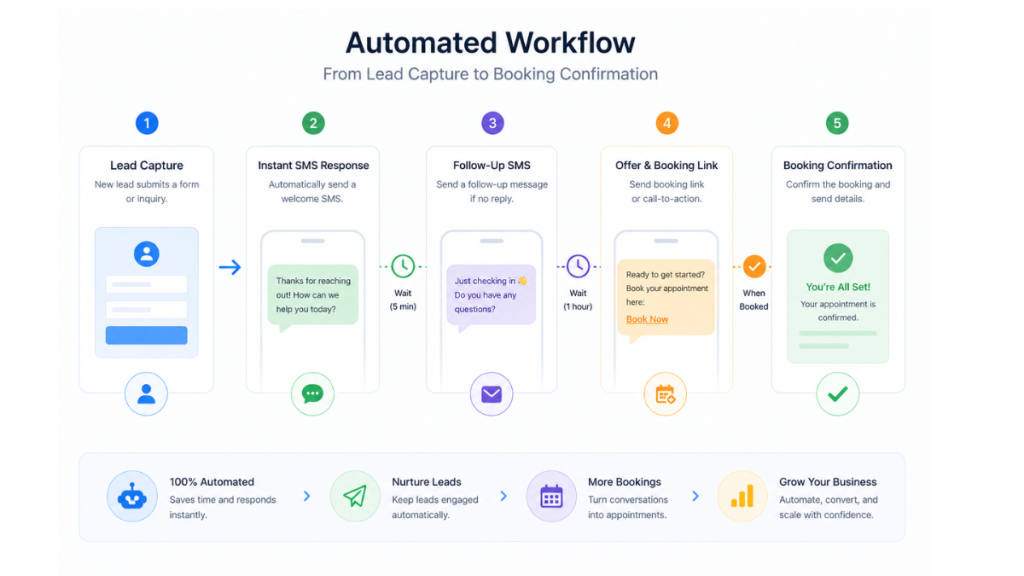
CRM automation software automates the tasks that happen after a lead comes in. Instead of someone manually sending a reply, updating a pipeline stage, or remembering to follow up three days later, the CRM handles all of that automatically based on rules you set once.
For a service business the automation that matters most is speed of response. When someone fills in your contact form at 7pm, calls and gets no answer, or sends a message through your Google Business Profile, your CRM automation software should respond within seconds – not the next morning when you check your inbox.
The platforms that do this well combine four things in one place: lead capture, instant response, structured follow-up sequences, and pipeline visibility. When those four things run inside one system, leads stop falling through the cracks. When they’re spread across separate tools that don’t connect properly, the gaps are where revenue disappears.
The Difference Between Sales CRMs and Service Business CRMs
Most CRM guides are written for sales teams. They cover outbound prospecting, deal stages, forecasting, and quota tracking. That is not what a service business needs.
A service business gets inbound leads – from Google, from referrals, from ads, from word of mouth. The job of the CRM is not to help a rep prospect for new leads. It is to make sure every inbound enquiry gets handled immediately and followed up consistently until it converts or is disqualified.
That distinction matters when choosing CRM automation software because some platforms are built around the outbound sales motion and bolt automation on as an afterthought. Others are built around automation first, with pipelines and contact management supporting the follow-up system rather than the other way around.
For service businesses, automation-first platforms consistently outperform sales-first platforms because they are designed to handle exactly the problem service businesses have – too many inbound leads and not enough time to respond to all of them manually.
Best CRM Automation Software in 2026 – Honest Comparison
GoHighLevel – Best for inbound service businesses wanting full automation
GoHighLevel is the strongest fit for service businesses that generate inbound leads and need fast response, structured follow-up, and pipeline visibility in one platform.
It combines CRM pipelines, SMS and email automation, missed call text-back, booking calendars, review requests, and AI conversation handling in a single dashboard. For a service business that currently pays for separate tools – a booking system, an email platform, an SMS service, a CRM – GoHighLevel replaces all of them.
What it does particularly well for service businesses is the missed call text-back. When a call goes unanswered, an automated SMS fires within 15 seconds. The lead stays alive while you finish the job. That single feature recovers revenue most service businesses don’t even know they’re losing.
Honest trade-offs:
- Learning curve is real – the platform is broad and takes time to configure properly
- Usage fees for SMS, email and AI are billed separately on top of the subscription
- Not built for job scheduling, dispatching or invoicing – trades businesses still need Jobber or similar alongside it
- Starter plan at $97/month – not the cheapest starting point
Best for: Salons, clinics, consultants, cleaners, trades businesses, any service business getting regular inbound enquiries that need instant response and follow-up automation.
HubSpot – Best free starting point, but automation costs escalate fast
HubSpot’s free CRM is the most generous entry point in the market. You get unlimited contacts, deal pipelines, email tracking, a meeting scheduler, and basic reporting at no cost.
The honest reality is that HubSpot’s free plan is a foundation, not a destination. Automation, email sequences, and meaningful reporting are locked behind paid tiers. The Marketing Hub starts at £45/month and scales significantly from there. For a service business that needs SMS automation, missed call handling, and multi-step follow-up sequences, HubSpot becomes expensive quickly compared to all-in-one platforms.
Honest trade-offs:
- Free plan genuinely useful for basic contact management and pipeline tracking
- SMS automation not available on lower tiers
- Costs escalate fast once you need real automation features
- Better suited for larger teams with dedicated marketing and sales functions than solo operators or small service businesses
Best for: Businesses moving off spreadsheets who want a free starting point before committing to a paid platform.
ActiveCampaign – Best for email-driven follow-up sequences
ActiveCampaign is built around email automation. Its workflow builder is one of the most capable on the market for creating complex email sequences with behavioural triggers, segmentation, and conditional logic.
For service businesses whose follow-up is primarily email-based, ActiveCampaign is a strong option. It starts at $39/month for the Starter plan.
Honest trade-offs:
- Strong on email, weaker on SMS and phone automation
- Not an all-in-one platform – still need separate tools for booking, SMS, and pipeline management
- Better for businesses with longer nurture cycles than those needing instant SMS response to missed calls
Best for: Service businesses with email-heavy follow-up processes and longer sales cycles.
Zoho CRM – Best for affordability and flexibility
Zoho CRM starts at $14 per user per month and offers solid automation features at a lower price point than most competitors. Workflow rules, lead scoring, and pipeline automation are all available on paid plans.
The Zoho ecosystem is an advantage if you’re already using other Zoho tools – the CRM integrates natively with Zoho Campaigns for email, Zoho Bookings for appointments, and Zoho Desk for customer service.
Honest trade-offs:
- Interface can feel complex compared to more streamlined platforms
- Email marketing automation requires the separate Zoho Campaigns app
- Less suited for businesses needing advanced SMS automation or missed call follow-up
- Pricing per user adds up for growing teams
Best for: Budget-conscious service businesses wanting solid CRM features without committing to higher-priced all-in-one platforms.
Pipedrive – Best for visual pipeline management
Pipedrive is built around visual sales pipelines. It is simple, clean, and easy for any team member to use from day one. Basic automation features handle activity reminders, deal stage updates, and simple follow-up triggers.
Honest trade-offs:
- Automation capabilities are more limited than marketing-focused platforms
- No native SMS automation or missed call handling
- Better for teams managing outbound pipelines than inbound service enquiries
- Starts at $14.90 per user per month
Best for: Service businesses with a structured sales process who want clean pipeline visibility without complexity.
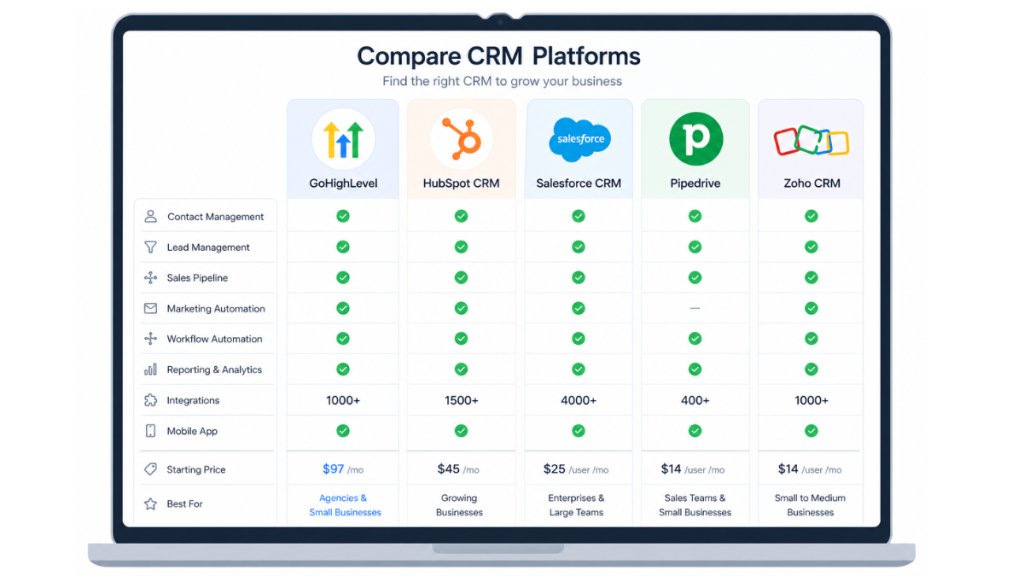
CRM Automation Software Comparison Table
| Platform | Best For | SMS Automation | Missed Call Handling | Starting Price |
|---|---|---|---|---|
| GoHighLevel | Inbound service businesses | Yes – native | Yes – built in | $97/month |
| HubSpot | Free starting point | Paid tiers only | No native | Free / £45+ |
| ActiveCampaign | Email automation | Limited | No | $39/month |
| Zoho CRM | Affordable CRM | Via integrations | No | $14/user |
| Pipedrive | Pipeline management | No | No | $14.90/user |
What to Look For in CRM Automation Software for Service Businesses
Not every CRM feature matters equally for a service business. These are the ones that do.
Instant response automation. The CRM should respond to every inbound enquiry within seconds – not minutes, not hours. If the platform can’t trigger an SMS or email automatically within 60 seconds of a form submission or missed call, leads will go cold before you respond manually.
Missed call text-back. For any service business that takes calls, this is non-negotiable. When a call goes unanswered, an automatic SMS should fire immediately. This alone recovers leads that would otherwise be permanently lost.
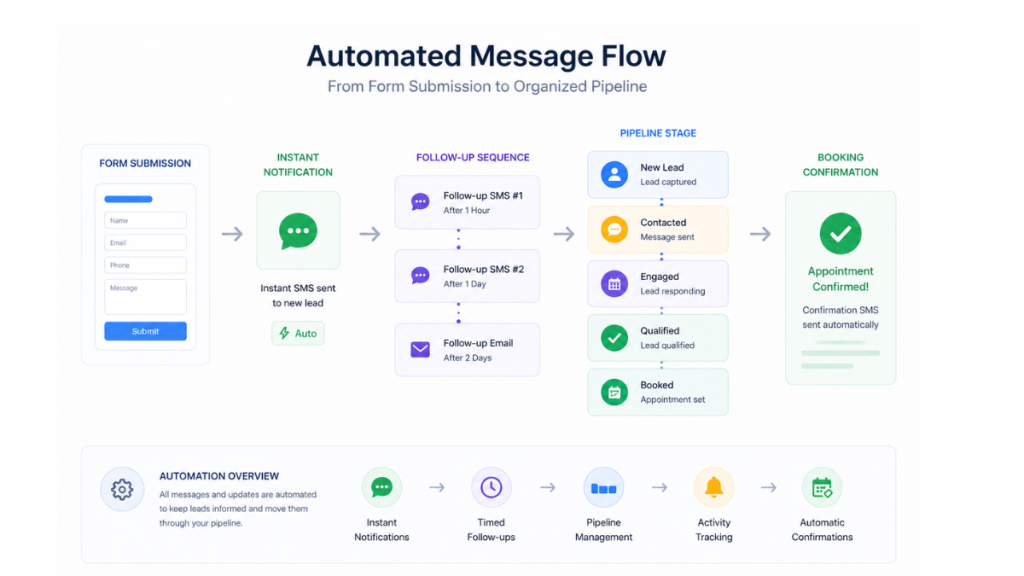
Multi-step follow-up sequences. A single automated reply is not enough. The CRM should run a structured follow-up sequence over several days – stopping automatically when the lead replies or books.
Pipeline visibility. You need to see exactly where every lead is at any given moment – who just came in, who has been contacted, who has booked, who has gone cold. Without this, leads disappear without explanation.
All-in-one vs integration-dependent. Every tool you add creates a potential failure point. A CRM that handles messaging, booking, and automation natively is more reliable than one that depends on Zapier connections to other platforms.
Why Most Service Businesses Lose Leads Before CRM Automation
The pattern is consistent across service businesses of every type. A lead comes in. The business is busy. The reply is delayed by hours. By the time someone responds, the lead has already booked with a competitor who responded first.
This is not a staffing problem. It is a systems problem. The business without CRM automation is always reacting. The business with it is always responding – instantly, consistently, regardless of how busy the day is.
Research shows that the first business to respond to an enquiry wins the deal in most cases. For service businesses where multiple competitors show up in the same Google search, response speed is often the only meaningful differentiator between winning and losing a job.
CRM automation software removes response speed as a variable. Every lead gets the same instant response, the same follow-up sequence, the same pipeline tracking – whether it came in at 9am on a Monday or 9pm on a Sunday.
For a full breakdown of how to set up that follow-up system, see the automated lead follow up system guide.
The Real Cost of CRM Automation Software
Most CRM guides show headline pricing. The real cost is different.
GoHighLevel: $97/month base, plus SMS usage, email usage, AI features and VAT. Realistic monthly total for a typical service business is £95-120/month all in. One recovered job covers the cost.
HubSpot: Free to start, but meaningful automation starts at £45/month and scales to £800+ per month for comparable features to all-in-one platforms. The free plan is genuinely useful but limited.
ActiveCampaign: From $39/month. Stays affordable if you only need email automation. Costs rise as contacts and features increase.
Zoho CRM: From $14 per user per month. Affordable for small teams but email marketing requires a separate Zoho Campaigns subscription.
Pipedrive: From $14.90 per user per month. Stays affordable but requires additional tools for SMS, email marketing and booking.
For a full breakdown of GoHighLevel costs including SMS, email and AI usage fees, see the GoHighLevel pricing guide and the GoHighLevel hidden costs guide.
Which CRM Automation Software Is Right for Your Service Business
Choose GoHighLevel if you generate regular inbound enquiries, miss calls while you’re working, and want one platform to handle response, follow-up, booking and pipeline tracking without stitching tools together.
Choose HubSpot if you’re moving off spreadsheets, want a free starting point, and don’t yet need SMS automation or missed call handling.
Choose ActiveCampaign if your follow-up is primarily email-based and you have a longer nurture cycle before leads convert.
Choose Zoho CRM if you want solid automation features at a lower price point and are comfortable with a slightly more complex setup.
Choose Pipedrive if your priority is clean pipeline visibility and you manage a structured sales process with a small team.
For most service businesses generating inbound leads, GoHighLevel is the clearest fit. Not because it is the cheapest or the simplest, but because it is built specifically for the problem service businesses have – instant response, consistent follow-up, and full pipeline visibility in one place.
FAQ
What is CRM automation software? CRM automation software automatically handles tasks like responding to leads, sending follow-up messages, updating pipeline stages and booking appointments – removing the need for manual input at every step.
Which CRM automation software is best for service businesses? GoHighLevel is the strongest fit for service businesses needing instant response, SMS automation and missed call handling in one platform. HubSpot is the best free starting point for businesses not yet ready to commit to a paid platform.
Does CRM automation software replace staff? No – it removes repetitive manual tasks so staff can focus on higher-value work. It handles initial response and follow-up automatically but complex conversations and relationship building still benefit from human involvement.
How much does CRM automation software cost? Pricing ranges from free (HubSpot basic) to $97/month (GoHighLevel Starter) to $297/month (GoHighLevel Unlimited). The real cost includes usage fees for SMS, email and AI features – always budget above the headline price.
Can small service businesses use CRM automation software? Yes – automation is most valuable for small service businesses because they can’t afford to lose leads to slow response. Even a basic automated response and follow-up sequence makes a significant difference to conversion rates.
Do I need technical skills to set up CRM automation? Most modern CRM automation platforms are no-code. GoHighLevel, HubSpot and ActiveCampaign all use visual workflow builders. Expect a few hours of setup time rather than technical development work.
Suggested Reads
Automated Lead Follow Up System – how to build a full follow-up system that runs without manual input
GoHighLevel for Local Service Businesses – how the full GoHighLevel platform works for trades and service businesses
GoHighLevel Missed Call Text Back – the single highest ROI automation for service businesses
GoHighLevel Pricing UK – full cost breakdown in GBP including SMS, VAT and usage fees
Best CRM for Small Business UK – broader CRM comparison for UK small businesses