
What Is the Best CRM for Organising Customer Data?
If you’re looking for the best CRM for organising customer data, the solution isn’t more spreadsheets. It’s a system that actually tracks and manages your leads.
Most small businesses don’t have a lead problem.
They have a customer data problem.
Leads are spread across spreadsheets, inboxes, and notes. Follow-ups get missed, and you lose track of who’s ready to buy.
If you’re trying to organise customer data for your small business, the solution isn’t more effort. It’s a better system.
Quick Summary
- Spreadsheets fail once you have multiple leads and conversations happening at the same time. You lose visibility fast.
- A CRM gives you one place to store, track, and manage every contact. No more guessing.
- The key is a simple structure. Pipeline, tags, and automated follow-ups. Nothing complex.
- Once set up properly, you stop missing leads and start converting more of them.
- Tools like GoHighLevel bring everything into one system so you’re not juggling apps.
Why Spreadsheets Stop Working
Spreadsheets are fine when you have five leads.
They break when you have:
- Conversations across email, WhatsApp, and forms
- Multiple stages (new lead, contacted, booked, paid)
- Follow-ups you need to remember
The problem isn’t the spreadsheet itself. It’s that it can’t track activity or trigger action.
You end up with:
- Rows of data but no idea what to do next
- Leads sitting there with no follow-up
- Missed opportunities you don’t even realise you lost
That’s where most small businesses get stuck.
What a CRM Actually Does (In Simple Terms)
A CRM isn’t complicated.
It just replaces the chaos with structure.
Instead of storing contacts in random places, everything sits in one system where you can:
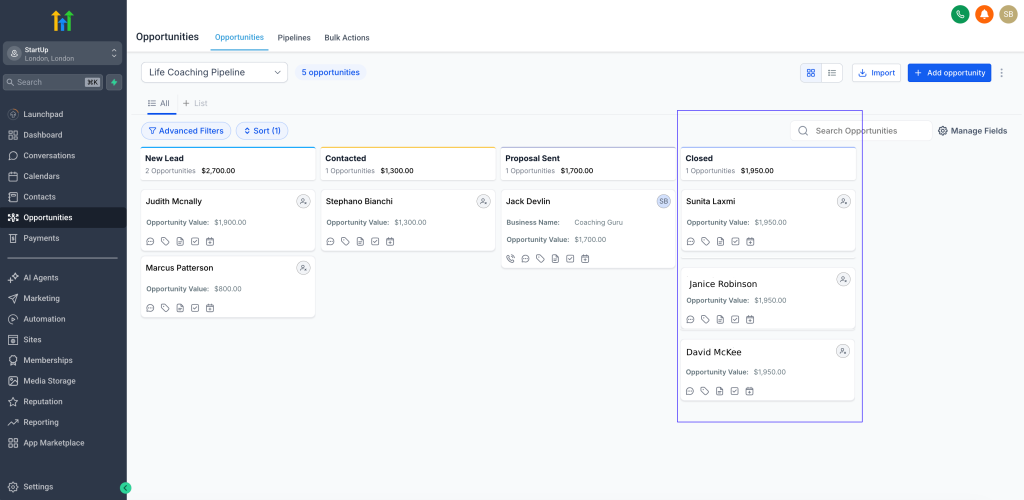
- See every lead in one pipeline
- Track where they are in your process
- Store messages, notes, and history
- Trigger follow-ups automatically
You’re not guessing anymore. You can actually see your business moving.
This is what allows you to actually organise customer data properly instead of just storing it.
The Simple System That Works
You don’t need a complex setup.
Most small businesses only need three things.
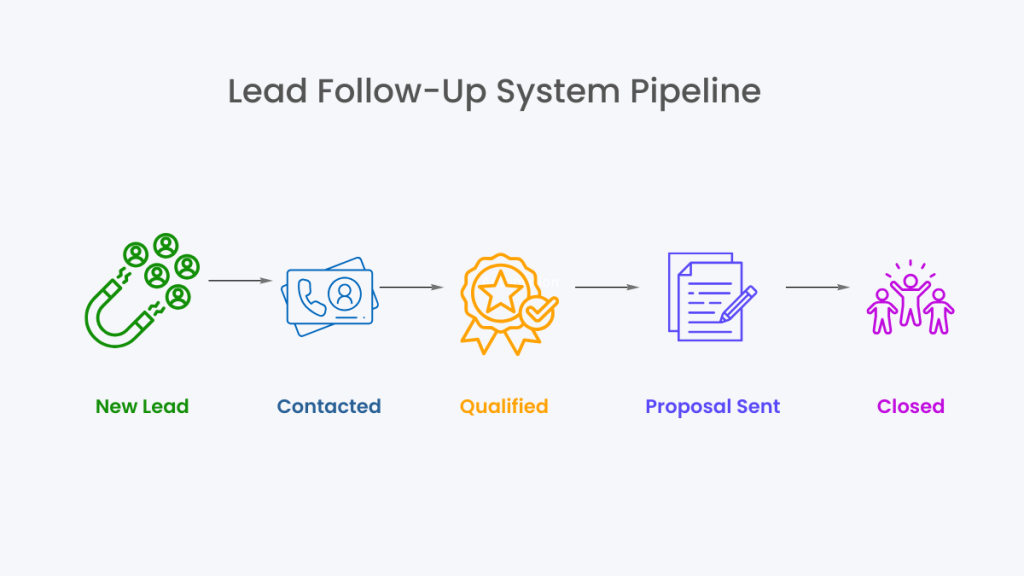
1. A Pipeline
This is where your leads live.
Example:
- New Lead
- Contacted
- Booked
- Paid
Each contact moves through this. That’s it.
2. Tags (Organisation Without Mess)
Tags help you group people without overcomplicating things.
For example:
- Facebook Lead
- Website Enquiry
- High Value
- Needs Follow-Up
Now instead of searching through rows, you can instantly filter your data.
3. Automated Follow-Ups
This is where most people lose money.
You forget to reply. Or you reply too late.
A simple follow-up system fixes that:
- Day 1: Send message
- Day 2: Reminder
- Day 3: Final nudge
Once it’s set up, it runs in the background.
No chasing. No forgetting.
This is where most small businesses move from manually tracking data to actually controlling their pipeline.
Unlike tools like HubSpot or Airtable, which focus more on storing and organising data, systems like GoHighLevel are built for lead tracking and follow-up.
It’s how small businesses actually organise customer data once they move beyond spreadsheets.
What This Looks Like in Practice
Choosing the best CRM for organising customer data isn’t about features. It’s about having a system that actually handles follow-ups and lead tracking.
A new lead comes in.
Instead of writing it in a spreadsheet, it goes straight into your CRM.
- It appears in your pipeline under “New Lead”
- It’s automatically tagged based on where it came from
- A follow-up message is sent instantly
- If they don’t reply, the system continues following up
You don’t have to think about it.
You just manage the conversations that matter.
The Tool That Actually Makes This Work
You can try to stitch this together using multiple tools.
Most people do:
- Spreadsheet for contacts
- Email tool for follow-ups
- Booking tool for appointments
That’s where things get messy again.
This is why tools like GoHighLevel work better.
It puts everything in one place:
- CRM
- Pipeline tracking
- Email + SMS follow-up
- Booking system
- Automation
So instead of managing tools, you’re managing your leads.
A Simple Way to Set This Up Without Multiple Tools
At this point, you could try to build this system using separate tools.
A spreadsheet for contacts, an email tool for follow-ups, and a booking system for appointments.
That works, but it quickly becomes messy again. Data ends up in different places, follow-ups fall through, and you’re back to manually tracking everything.
This is why many small businesses switch to an all-in-one system like GoHighLevel.
It combines:
- Contact management
- Pipeline tracking
- Automated follow-ups
- Booking and communication
All in one place, so your customer data stays organised without extra work.
Why This Matters More Than You Think
Most small businesses don’t have a lead problem.
They have a lead management problem.
Leads come in.
They just don’t get handled properly.
When you organise your customer data properly:
- You stop losing leads
- You respond faster
- You convert more without extra traffic
It’s one of the highest ROI changes you can make.
Final Decision
If you’re still using spreadsheets to organise customer data, you’re already at the point where it’s costing you leads.
You don’t need a complex system.
You just need a simple structure that actually runs.
Start with:
- A pipeline
- Basic tagging
- Automated follow-ups
Then use a tool that keeps it all in one place.
FAQ
Can a small business use a CRM without technical skills?
Yes. Most modern CRMs are designed for non-technical users. You only need a basic setup to get results.
What is the best way to organise customer data?
Using a CRM with a simple pipeline and follow-up system. Spreadsheets don’t scale once leads increase.
Is GoHighLevel good for small businesses?
Yes, especially for service businesses that rely on leads, bookings, and follow-ups.
Do I need multiple tools or just one?
You can use multiple tools, but an all-in-one system is easier to manage and usually more effective.
Suggested Reads
If you’re setting up a system to organise customer data for your small business, these guides will help you take the next step:
- Best CRM with Automation → how to choose a system that replaces spreadsheets completely
- GoHighLevel Pricing → understand the real monthly cost before switching
- Best Automation Tools for Virtual Assistants → useful if you plan to offer this as a service
- GoHighLevel vs ClickFunnels → compare platforms for lead management and funnels
- Missed Call Text Back System → simple automation that captures leads you’re currently losing