
Most service businesses start tracking enquiries in spreadsheets.
At first it works. A few leads arrive through the website. Someone replies to emails manually. Sales conversations are easy to manage.
Then lead volume increases.
Suddenly the team is chasing messages across email, social media, and phone calls. Follow-ups are delayed. Prospects lose interest. Deals disappear.
This is exactly where CRM automation software becomes critical.
Instead of manually tracking every conversation, CRM automation tools capture leads, trigger follow-ups, and guide prospects through the sales process automatically.
If you’re still evaluating platform costs before choosing software, our guide to CRM Pricing (2026): How Much CRM Software Actually Costs explains what businesses typically pay for CRM systems.
Quick Summary
Choosing the right CRM automation software depends on how your business generates and nurtures leads.
GoHighLevel
Best automation CRM for businesses running marketing funnels and lead generation campaigns.
HubSpot CRM
Best beginner CRM with free tools and entry-level automation features.
Zoho CRM
Best affordable CRM with customizable automation workflows.
ActiveCampaign
Best CRM for email marketing and automation campaigns.
Pipedrive
Best CRM for sales teams managing pipelines and deal stages.
Each platform can manage contacts. But automation-focused CRMs go further by capturing leads and triggering follow-ups automatically.
What Is CRM Automation Software?
CRM automation software is designed to automate repetitive sales and marketing tasks inside a customer relationship management system.
Instead of manually responding to every enquiry, automation tools can trigger actions automatically.
Examples include:
automatic follow-up emails
lead routing to sales teams
appointment reminders
pipeline updates
marketing campaign triggers
According to Salesforce, CRM systems help businesses streamline interactions with prospects and customers while improving sales productivity.
Automation takes that concept further.
Instead of just storing customer data, the CRM actively manages communication with leads.
If you’re comparing CRM tools in general, the article Compare CRM Software explains how different platforms approach automation and sales management.
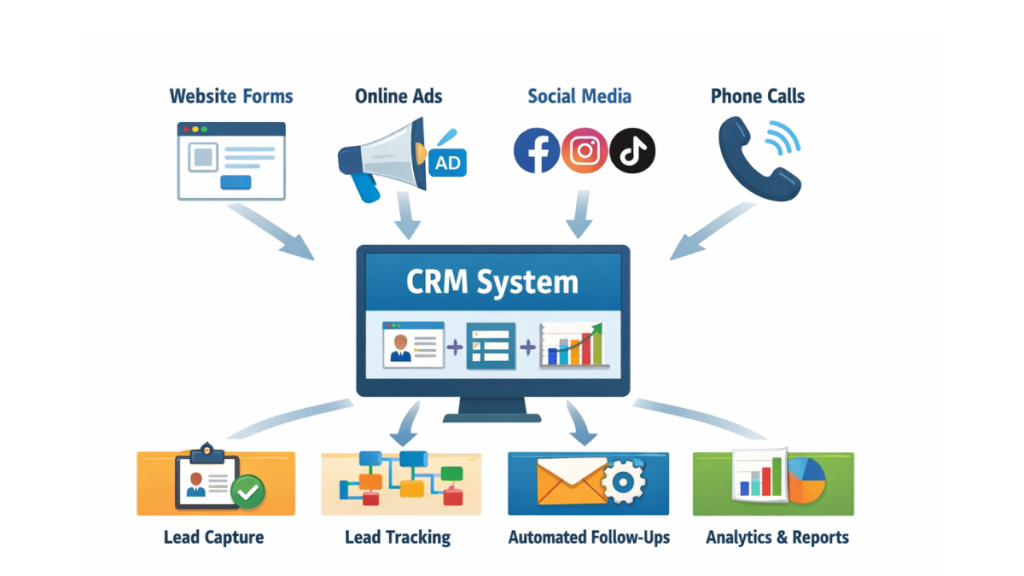
Why Businesses Need CRM Automation
Most companies don’t lose leads because they lack traffic.
They lose leads because they fail to follow up consistently.
Imagine this scenario.
A potential customer submits a form on your website.
Without automation:
• someone must manually send a reply
• schedule a consultation
• update the sales pipeline
If the team is busy, the response may take hours.
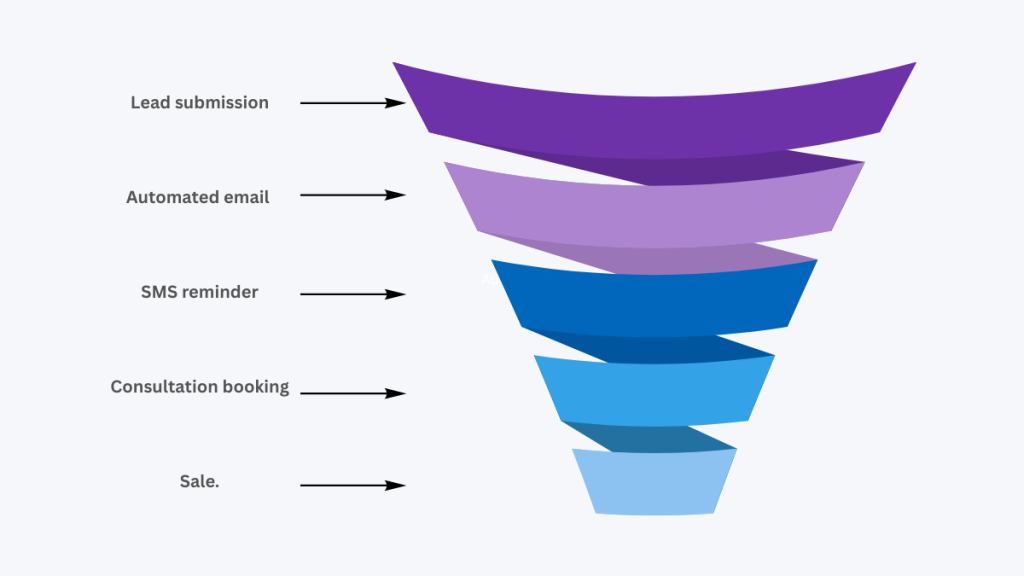
With CRM automation software, the system can instantly:
send a confirmation email
send a text message
schedule an appointment
assign the lead to a salesperson
The lead receives a response within seconds.
That speed dramatically increases the chance of conversion.
Features That Make CRM Automation Powerful
Not all CRMs offer strong automation.
Some platforms only track contacts.
The best CRM automation software includes tools designed to streamline lead management.
Workflow Automation
Automation workflows allow CRMs to trigger actions based on user behavior.
For example:
If a prospect fills out a form → send a welcome email.
If a prospect clicks a pricing page → notify the sales team.
These workflows help businesses respond faster without manual effort.
Lead Scoring
Lead scoring ranks prospects based on their likelihood to convert.
Signals might include:
email engagement
website visits
form submissions
High-value leads are prioritised automatically.
Marketing Campaign Automation
Some CRM platforms integrate marketing automation features.
These allow businesses to create automated sequences including:
email nurturing campaigns
SMS follow-ups
lead nurturing funnels
This keeps prospects engaged throughout the buying process.
Best CRM Automation Software (2026)
Several CRM platforms offer powerful automation tools.
Below are some of the most widely used options.
GoHighLevel
GoHighLevel focuses heavily on automation and lead generation.
It combines several tools normally used separately:
CRM pipelines
email marketing
SMS automation
landing pages
appointment scheduling
Because everything runs inside one platform, businesses can automate large portions of their lead generation process.
Companies using funnel-based marketing often choose this type of CRM.
HubSpot CRM
HubSpot is one of the most popular CRMs available.
Its free plan includes basic features such as:
contact management
pipeline tracking
email integration
Automation features become more powerful in the paid tiers.
This makes HubSpot a good entry point for businesses transitioning from spreadsheets to CRM software.
Zoho CRM
Zoho CRM is known for affordability and flexibility.
Automation features include:
workflow automation
lead assignment rules
analytics dashboards
custom automation triggers
Zoho works particularly well for businesses already using other Zoho apps.
ActiveCampaign
ActiveCampaign is a hybrid CRM and marketing automation platform.
It focuses heavily on:
email automation
behavior-based marketing campaigns
advanced customer segmentation
For businesses that rely on email marketing to nurture leads, this type of CRM can be extremely powerful.
Pipedrive
Pipedrive focuses on sales pipeline management.
Instead of complex marketing tools, it emphasises simplicity and visual deal tracking.
Automation features help move deals through pipeline stages and trigger follow-ups when actions occur.
For sales teams managing many deals simultaneously, this approach works well.
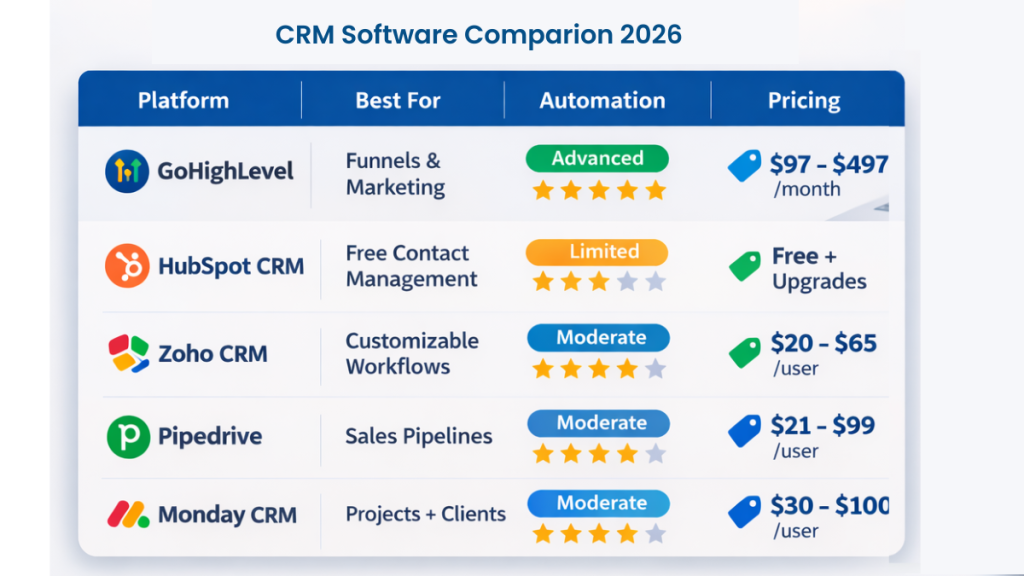
CRM Automation Software Comparison
| Platform | Best For | Automation | Pricing |
|---|---|---|---|
| GoHighLevel | Marketing funnels | Advanced | $97–$497 |
| HubSpot | Starter CRM | Basic | Free / Paid tiers |
| Zoho CRM | Affordable CRM | Moderate | $20–$65 |
| ActiveCampaign | Email automation | Advanced | $29–$149 |
| Pipedrive | Sales pipelines | Moderate | $21–$99 |
Each tool offers different strengths, so the best CRM automation software depends on how your business captures and manages leads.
When CRM Automation Becomes Essential
Manual lead management works for small teams with limited enquiries.
But once lead volume increases, automation becomes essential.
Automation ensures every prospect receives immediate follow-up.
It also reduces repetitive tasks for sales teams.
Instead of manually sending reminders or tracking pipeline updates, the CRM handles these tasks automatically.
If you’re researching simpler systems first, our article Best Free CRM for Small Business explains which platforms offer entry-level automation features.
Choosing the Right CRM Automation Software
Before selecting a CRM, consider how your business handles lead generation.
Ask yourself:
Where do leads come from?
How quickly do you follow up with prospects?
Do you need marketing automation or just pipeline tracking?
The best CRM automation software integrates directly with your lead sources and automates follow-ups without requiring manual input.
For businesses running online marketing campaigns, automation often becomes the backbone of the entire sales process.
Conclusion
The right CRM automation software does far more than store contacts.
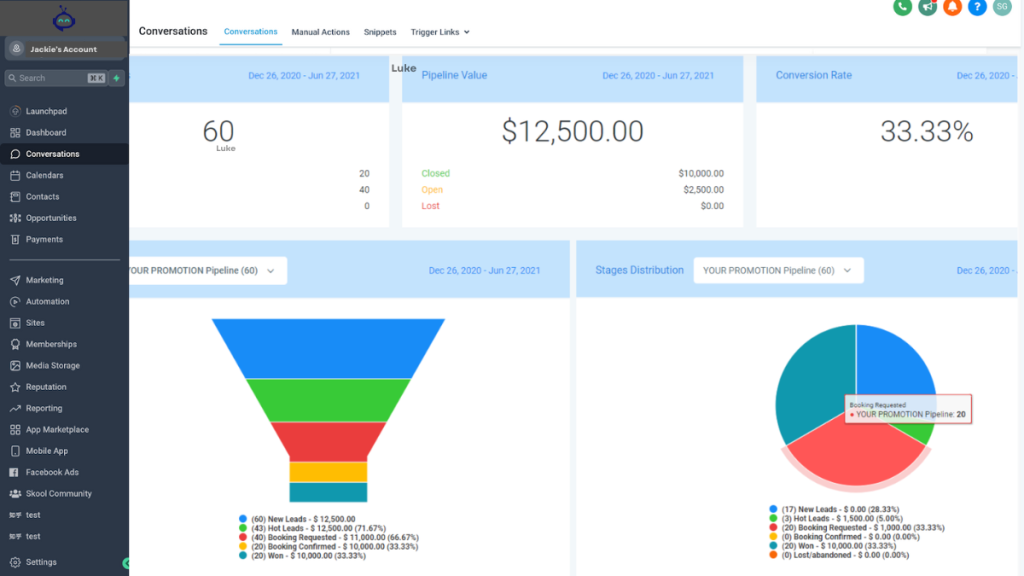
It captures leads, triggers follow-ups, and manages the entire sales pipeline automatically.
Basic CRMs help organize conversations.
Automation-focused platforms go further by responding to prospects instantly and guiding them toward conversion.
For businesses generating leads online, this automation can dramatically improve response speed and conversion rates.
When every enquiry receives immediate follow-up, the CRM becomes one of the most valuable tools in your marketing stack.
FAQ
What is CRM automation software?
CRM automation software automates tasks such as follow-up emails, lead assignment, and pipeline updates so businesses can manage leads more efficiently.
Which CRM has the best automation features?
Automation-focused CRMs include platforms that combine marketing automation, pipelines, and communication tools to streamline lead management.
Can CRM software automate follow-ups?
Yes. Many CRM systems can automatically send emails, SMS reminders, and notifications when prospects take specific actions.
Is CRM automation useful for small businesses?
Yes. Automation helps small businesses respond to leads quickly and manage growing lead volumes without increasing manual work.
Suggested Reads
CRM Pricing (2026): How Much CRM Software Actually Costs
Best CRM Software for Small Business (2026)
Compare CRM Software: Which Platform Is Best?
CRM for Lead Generation (2026): Tools That Capture Leads
Best Free CRM for Small Business