
Affiliate links – I earn a commission if you sign up through this page, at no extra cost to you. That’s exactly why the weaknesses below aren’t softened. If GoHighLevel isn’t right for your business, I’d rather you know before you start a trial
Quick Verdict
Quick Verdict: GoHighLevel is the strongest all-in-one CRM for lead generation – it captures leads, triggers instant follow-ups, and manages pipelines in one system from $97/month. For email-focused nurturing, ActiveCampaign. For free contact management, HubSpot.
Key Takeaways
- The best CRM for lead generation captures leads from multiple sources and automates follow-up instantly
- GoHighLevel is the strongest all-in-one option for service businesses needing CRM, automation and booking in one place
- Pipedrive suits businesses that want a simple visual pipeline without the complexity of full automation
- HubSpot’s free plan is a solid starting point but automation features require paid upgrades
- ActiveCampaign leads on email-driven nurture sequences for businesses with longer sales cycles
- Speed of response is the single biggest factor in lead conversion – the right CRM automates this completely
Most businesses don’t lose leads because of bad marketing.
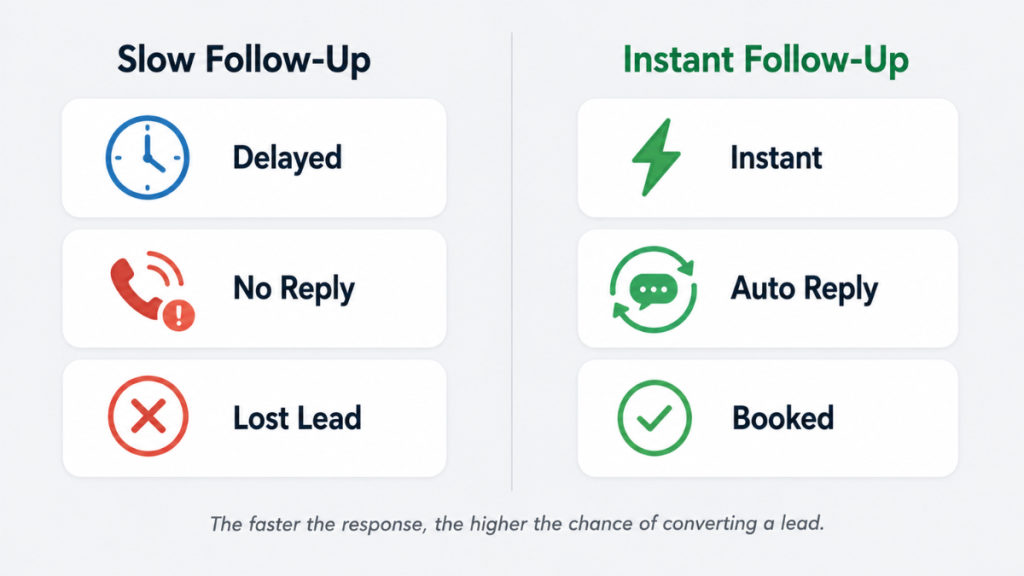
They lose them because nobody follows up fast enough.
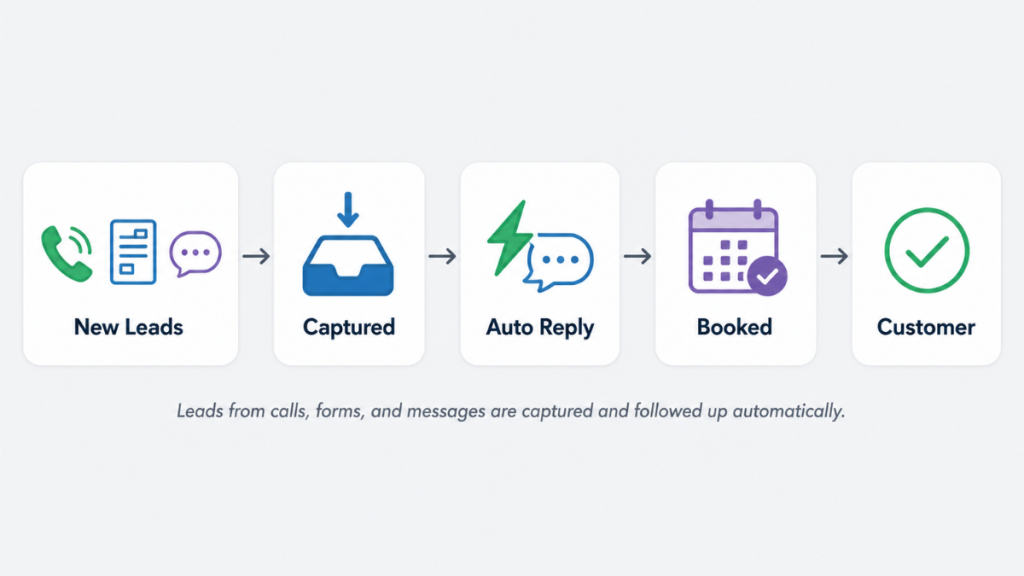
A potential customer fills in a form, calls your number, or sends a message. You’re busy. The reply comes hours later. They’ve already moved on.
The right CRM for lead generation fixes this. It captures every enquiry automatically, organises it into a pipeline, and triggers follow-up without anyone having to remember.
This guide covers the best platforms in 2026, ranked specifically for service businesses that rely on enquiries, bookings, and fast response times.
Your real cost isn’t the subscription.
It’s the leads you don’t convert.
If you’re missing enquiries or replying too late, your cost per customer rises fast.
This is where automation actually makes the pricing make sense.
What Makes a Good CRM for Lead Generation?
Not all CRMs handle lead generation the same way.
Some are built for storing contacts. Others are built for capturing, tracking, and converting them.
For service businesses, the difference matters. You need a system that:
- Captures leads from forms, calls, ads, and messages automatically
- Organises every enquiry into a clear pipeline
- Triggers follow-up the moment a lead comes in
- Books appointments without back and forth
- Sends reminders so nothing gets forgotten
Without these features, leads sit in inboxes and spreadsheets. Follow-ups get delayed. Revenue is lost.
The platforms below are ranked on how well they solve these problems specifically for service businesses.
For a broader look at how pipelines work in practice, see our guide to lead management systems for service businesses.
What to Look for in a CRM for Lead Generation – Full Checklist
Before choosing any platform run through these criteria. The right CRM for lead generation needs to tick most of these boxes for a service business.
- Automatic lead capture – does it pull leads from forms, calls, ads, and messages into one place without manual entry?
- Instant response capability – can it send an automated SMS or email within seconds of a lead arriving, not just notify a human?
- Multi-channel follow-up – does it handle both SMS and email natively, or does it require third-party integrations?
- Stop-on-reply trigger – does the follow-up sequence stop automatically when a lead responds?
- Pipeline visibility – can you see every lead’s status at a glance without checking your inbox?
- Booking integration – can leads book appointments directly from an automated message?
- Mobile app – can you manage leads from your phone between jobs?
- GDPR compliance – does it support consent mechanisms and data retention policies for UK businesses?
- UK phone number support – does it support +44 numbers for SMS and calls natively?
- Transparent pricing – are usage costs for SMS and email clearly documented before you sign up?
GoHighLevel ticks every box on this list natively. HubSpot and Pipedrive tick most but require paid upgrades or third-party tools for SMS and instant response. ActiveCampaign ticks the email-related boxes but not SMS or phone.
The Best CRMs for Lead Generation in 2026
1. GoHighLevel – Best for Service Businesses That Need Full Automation
GoHighLevel is the most complete CRM for lead generation available to service businesses in 2026.
It does not just store leads. It captures them, follows them up automatically, books appointments, and sends reminders – all from one platform.
For businesses that generate leads through ads, forms, or calls and need fast automated response, nothing comes close.
Who it is for
Electricians, cleaners, salon owners, landscapers, roofers – any service business generating leads online that needs automation to handle follow-up without manual work.
Key features
- Missed call text back – texts any caller automatically within seconds if you cannot answer
- Automated follow-up sequences – email and SMS triggered the moment a lead comes in
- Booking calendar – leads book directly without back and forth calls
- Pipeline management – every lead tracked from first contact to booked job
- Reputation management – Google review requests sent automatically after every job
- AI Employee – handles inbound calls and books appointments 24/7
Pricing
- Starter: $97/month – CRM, pipelines, automation, SMS, email, booking calendar
- Unlimited: $297/month – everything in Starter plus unlimited sub-accounts
- Pro: $497/month – everything in Unlimited plus SaaS reselling
Realistic all-in cost for a UK sole trader: £95-120/month including VAT and moderate SMS usage.
Usage fees apply on top. SMS, email sends, and phone calls are billed separately. For a typical service business budget £40-£80/month on top of the subscription. See our full GoHighLevel pricing UK and US breakdown for the complete picture.
Pros
- Replaces 5-6 separate tools in one platform
- Missed call text back alone recovers leads most businesses never knew they lost
- Flat rate pricing with no per-user fees
Cons
- Steep learning curve – budget 2-4 weeks to get operational
- UK users need identity verification before SMS features go live
- Email deliverability needs configuration before sending campaigns
Honest verdict
If your business relies on inbound enquiries and fast follow-up, GoHighLevel is the strongest option on this list. The setup takes time. Once it is running, it works without you.
See our full GoHighLevel pros and cons breakdown for a detailed assessment.
2. Pipedrive – Best for Simple Visual Pipeline Management
Pipedrive does one thing exceptionally well. It gives you a clear visual pipeline so you always know where every lead stands.
It is not trying to replace your email tool, your booking system, or your SMS platform. It is focused entirely on making sure leads move through your sales process without falling through the cracks.
For service businesses that want simple and fast without the complexity of full automation, Pipedrive is the right choice.
Who it is for
Service businesses with a straightforward sales process – quote, follow-up, close. Teams that want a CRM they can learn in a day and use consistently.
Key features
- Visual drag and drop pipeline – move leads between stages instantly
- Activity reminders – never miss a follow-up
- Email integration – log conversations automatically
- LeadBooster add-on – chatbot, web forms, and live chat for lead capture
- Web Visitors add-on – see which companies are browsing your site
- Mobile app – manage leads on the go between jobs
Pricing
- Essential: $14.90/user/month
- Advanced: $27.90/user/month
- Professional: $49.90/user/month
- 14-day free trial available
Realistic all-in cost for a UK sole trader: £20-30/month on Essential plan plus any add-on costs.
LeadBooster is an additional cost at $32.50/company/month. See our Pipedrive review UK for a full breakdown of what UK businesses actually pay.
Pros
- Easiest CRM on this list to set up and use from day one
- Visual pipeline gives instant clarity on where every lead stands
- Transparent pricing with no surprises
Cons
- Limited native automation compared to GoHighLevel
- Key lead capture features require paid add-ons
- No built-in SMS or missed call text back
Honest verdict
Pipedrive is the right choice if you want a CRM that your team will actually use. It does not automate everything but it organises everything clearly. If you need full automation GoHighLevel is the stronger option.
3. HubSpot – Best Free Starting Point
HubSpot is the most widely used CRM in the world. Its free plan is genuinely useful and one of the most generous on the market.
For service businesses just starting to organise their leads, HubSpot gives you a solid foundation without any upfront cost.
The limitation is that automation – the feature that actually recovers leads and drives conversion – is locked behind paid plans that can become expensive quickly.
Who it is for
Service businesses in the early stages of building a lead management process. Teams that want to start for free and upgrade later.
Key features
- Free CRM with contact management and basic pipelines
- Email tracking and logging
- Meeting scheduling links
- Web forms and chatbot on free plan
- Automated sequences and workflows on paid plans
- Reporting and analytics dashboards
Pricing
- Free CRM – genuinely useful for basic lead management
- Starter: from $20/user/month
- Professional: from $100/user/month
- Enterprise: from $150/user/month
Advanced automation requires Professional tier. Costs scale significantly as contacts and users grow.
Realistic all-in cost: Free to start. Professional tier works out to approximately £780+/month – significant jump from free.
Pros
- Free plan is the most generous on the market
- Easy to use with a clean intuitive interface
- Strong reporting even on lower plans
Cons
- Automation features are locked behind expensive paid tiers
- Costs escalate fast as your contact list grows
- Not built for SMS follow-up or missed call recovery
Honest verdict
HubSpot is a great place to start. If your business grows and you need automation, SMS follow-up, and booking – you will outgrow the free plan quickly and the paid tiers become expensive. At that point GoHighLevel becomes the better value option for service businesses.
4. ActiveCampaign – Best for Email-Driven Lead Nurture
ActiveCampaign is the strongest platform on this list for businesses that rely heavily on email sequences to nurture leads over time.
If your sales cycle is longer – quotes that take weeks to convert, leads that need multiple touchpoints before booking – ActiveCampaign’s automation builder handles this better than any other platform here.
Who it is for
Service businesses with longer sales cycles where leads need nurturing over weeks before converting. Businesses that rely primarily on email rather than SMS or calls for follow-up.
Key features
- Visual automation builder – the most powerful on this list for email sequences
- Lead scoring – prioritise leads based on behaviour and engagement
- Conditional content – personalise emails based on lead actions
- CRM pipeline with deal tracking
- Site tracking – trigger automations based on pages visited
- SMS messaging available on higher plans
Pricing
- Sales Plus: from $23/user/month – includes CRM and basic automation
- Marketing Lite: from $15/month – email automation without CRM
- Bundled plans available combining marketing and sales features
Pricing is contact-based and scales as your list grows. See our guide to automated lead follow up systems to understand how email automation fits into a full lead management setup.
Realistic all-in cost for a UK business: £15-25/month on entry plan but SMS requires additional spend.
Pros
- Best in class email automation builder
- Lead scoring helps prioritise which leads to focus on
- Scales well as your contact list grows
Cons
- Less suited to businesses relying on SMS or call-based follow-up
- More complex to set up than Pipedrive or HubSpot
- Not an all-in-one solution – you still need separate booking and SMS tools
Honest verdict
ActiveCampaign is the right choice if email is your primary follow-up channel. For service businesses that need SMS, missed call text back, and booking automation in one place, GoHighLevel covers more ground.
5. Freshsales – Good All-Rounder for Small Teams
Freshsales combines CRM, email, phone, and basic automation in one platform at a competitive price point.
Its free plan supports up to three users making it accessible for very small service businesses just starting out.
Who it is for: Small service business teams wanting an affordable all-in-one option with built-in calling.
Key features: Built-in phone and email, AI lead scoring via Freddy AI, visual pipeline, workflow automation, mobile app.
Pricing: Free plan for up to 3 users. Paid plans from $15/user/month. 21-day free trial available.
Verdict: A solid mid-range option. Not as powerful as GoHighLevel for automation but easier to set up and cheaper to start. Worth considering if budget is a primary concern and your follow-up needs are straightforward.
6. Keap – Built for Service Business Client Management
Keap combines CRM, email and SMS marketing, invoicing, and appointment scheduling in one platform specifically designed for service-based small businesses.
Who it is for: Small service businesses that want CRM plus billing and scheduling in one system without stitching tools together.
Key features: Visual campaign builder, automated follow-up sequences, appointment scheduling, invoicing and payment collection, email and SMS marketing.
Pricing: From $159/month for 2 users and 1,500 contacts. 14-day free trial available. No permanent free plan.
Verdict: Keap covers a lot of ground for service businesses. The price point is higher than most alternatives and there is no free plan. GoHighLevel covers similar territory at $97/month with more automation depth. Worth comparing directly if billing and CRM in one system is a priority.
CRM for Lead Generation – Quick Comparison
| Platform | Best For | Automation | Pricing From | Free Trial |
|---|---|---|---|---|
| GoHighLevel | Service businesses needing full automation | Advanced | $97/month | 14 days |
| Pipedrive | Simple visual pipeline management | Basic | $14.90/user/month | 14 days |
| HubSpot | Free starting point | Limited on free | Free plan available | Free tier |
| ActiveCampaign | Email-driven lead nurture | Advanced email | $15/month | 14 days |
| Freshsales | Small teams on a budget | Moderate | Free for 3 users | 21 days |
| Keap | Service business all-in-one | Good | $159/month | 14 days |
UK-Specific Considerations Before Choosing
Most CRM comparison guides are written for US businesses. UK service businesses face four additional factors worth checking before committing to any platform.
VAT on USD pricing. GoHighLevel, ActiveCampaign, and most US-based platforms charge in USD and add 20% VAT on top for UK businesses. A $97/month plan costs approximately £77 converted plus £15 VAT – roughly £92/month before usage fees. Always calculate the GBP all-in cost before comparing.
UK SMS compliance. Sending SMS to UK mobile numbers requires correct configuration of your sending number and opt-in consent from recipients. GoHighLevel supports UK +44 numbers through its LC Phone system. Most other platforms on this list require third-party SMS providers for UK delivery. Verify UK SMS support before committing.
GDPR requirements. If you are collecting enquiries from UK residents you need consent mechanisms, clear privacy notices, and data retention policies in place. Check what each platform provides out of the box versus what you need to configure yourself. GoHighLevel supports GDPR-compliant setups but does not configure them automatically.
Exchange rate fluctuation. USD-priced platforms will vary in GBP cost month to month. Budget at the higher end of the current conversion range to avoid surprises.
How to Choose the Right CRM for Lead Generation
The right CRM depends on how your business generates and handles leads.
Ask yourself three questions before deciding.
Where do your leads come from? If leads come from calls, forms, and ads – you need a CRM with automatic capture from multiple sources. GoHighLevel and HubSpot handle this well. Pipedrive requires add-ons for lead capture.
How fast do you need to follow up? If speed is critical – and for most service businesses it is – you need automation that triggers the moment a lead comes in. GoHighLevel’s missed call text back and automated sequences are built exactly for this. See how automated lead follow-up systems work in practice.
How complex is your sales process? Simple process – quote and close – Pipedrive. Longer nurture cycle with email sequences – ActiveCampaign. Full automation with booking and SMS – GoHighLevel.
For businesses that are losing leads from their website the answer is almost always a CRM with automated follow-up rather than a better lead generation strategy.
What Most Service Businesses Get Wrong About Lead Generation
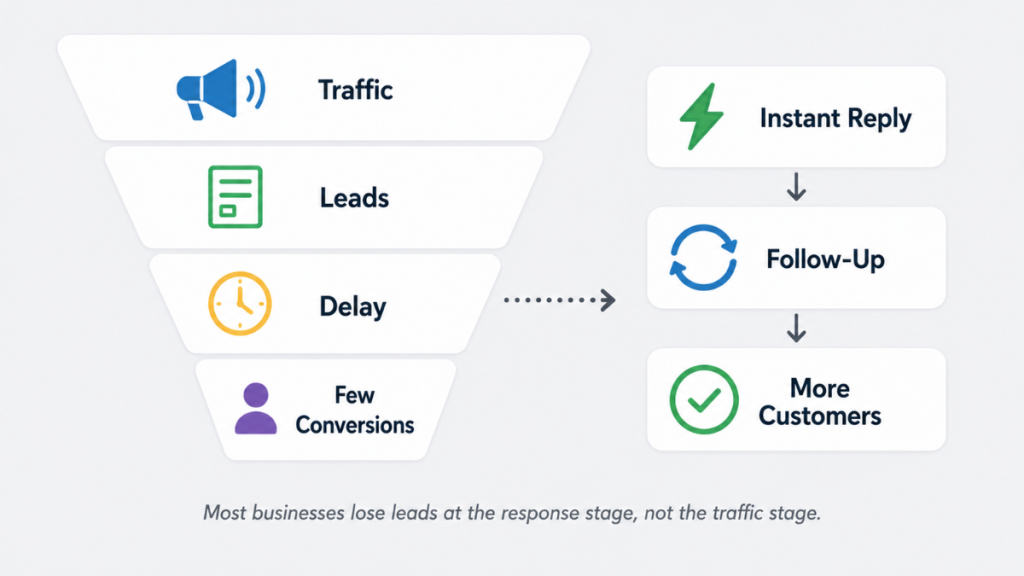
Most service businesses think they have a lead generation problem.
They spend more on ads. They redesign their website. They post more on social media.
The real problem is usually response time.
Studies consistently show that leads contacted within five minutes are dramatically more likely to convert than those contacted an hour later. In competitive local markets that window is often minutes not hours.
A CRM with automation solves this without adding headcount. The system responds instantly. Every time. Without anyone having to remember.
For service businesses this is where the return on investment is clearest. See our guide to lead response time for small businesses for the full picture on why speed matters.
Who This Page Is Not For
If you already have a working lead capture system and just need pipeline tracking, Pipedrive is a simpler fit. If you are a large enterprise with a dedicated sales ops team, Salesforce will suit you better. This guide focuses on small and service businesses generating inbound leads.
FAQs
What is the best CRM for lead generation? For service businesses in 2026 GoHighLevel is the strongest option. It captures leads automatically, triggers follow-up via SMS and email instantly, handles booking, and manages the full pipeline in one platform. For businesses wanting a simpler starting point HubSpot’s free plan is a solid entry point.
Can a CRM generate leads automatically? A CRM does not generate leads but it captures and follows up on them automatically. It collects enquiries from forms, calls, ads, and messages and triggers instant responses so no lead goes unanswered.
What CRM is best for small service businesses? GoHighLevel for businesses needing full automation and booking in one system. Pipedrive for businesses wanting a simple visual pipeline. HubSpot for businesses starting out on a budget.
How does CRM automation help with lead generation? Automation ensures every lead gets an instant response regardless of when they enquire. Missed call text back, automated email sequences, and follow-up reminders mean no lead is forgotten and response times stay fast even when the business owner is busy. See our full guide to the best CRM with lead automation for a detailed breakdown.
Is GoHighLevel good for lead generation? Yes. GoHighLevel combines lead capture, automated follow-up, booking, SMS, and pipeline management in one platform. For service businesses generating leads online it is one of the most complete options available. See our GoHighLevel for local service businesses guide for specific use cases.
What is the cheapest CRM for lead generation? HubSpot offers a genuinely useful free CRM. Freshsales has a free plan for up to three users. Pipedrive starts at $14.90/user/month. GoHighLevel starts at $97/month but replaces multiple tools so total cost is often lower than running separate systems.
Suggested Reads
GoHighLevel Pricing (2026) → Full cost breakdown in GBP including SMS and hidden fees
Pipedrive Pricing UK → Full GBP breakdown for UK businesses considering Pipedrive
Automatic Lead Follow-Up System → How to build a follow-up system that runs without you
Lead Follow-Up Software → Tools compared for small service businesses
Best CRM for Small Business UK → Broader comparison if you are still deciding