
Affiliate links – I earn a commission if you sign up through this page, at no extra cost to you. That’s exactly why the weaknesses below aren’t softened. If GoHighLevel isn’t right for your business, I’d rather you know before you start a trial
Most consultants lose clients not because they lack expertise, but because their systems let them down. A discovery call happens, a proposal goes out, and then the follow-up gets buried under client work. Three weeks later the prospect has hired someone else.
A CRM for consultants fixes this. It centralises every client conversation, tracks where each prospect sits in your pipeline, automates follow-ups, and makes sure no opportunity goes cold because you were too busy delivering for existing clients.
This guide covers what to look for in a consulting CRM, which platforms work best depending on your situation, and how to set up a system that keeps your pipeline moving without adding to your workload.
Key Takeaways
- 91% of businesses with more than 11 employees already use CRM software according to industry research – independent consultants are increasingly following the same path
- The biggest consulting pipeline problem is not generating leads – it is following up consistently after the first conversation
- Solo consultants and small consultancy firms need different CRM features than large enterprise sales teams
- Discovery call management, proposal tracking, and automated follow-up are the three features that matter most for consultants
- GoHighLevel, HubSpot, and Pipedrive are the most commonly used platforms across consulting businesses of different sizes
- Affordable CRM options exist for small consultancy firms – you do not need an enterprise system to manage a consulting pipeline effectively
What is a CRM for Consultants?
A CRM for consultants is software that helps you manage client relationships, track active opportunities, and automate the follow-up process so nothing falls through the cracks.
Unlike CRM tools built for large sales teams moving high volumes of deals, a consulting CRM focuses on a smaller number of higher-value relationships. The emphasis is on managing the full client journey – from the first enquiry through to a signed engagement and ongoing relationship – rather than processing hundreds of low-value leads.
For most consultants, the CRM needs to handle three things well. First, it needs to track every active prospect and show you clearly where each one sits in your pipeline. Second, it needs to automate the follow-up work that gets neglected when client delivery takes over. Third, it needs to store the full history of every conversation so you can pick up any relationship without having to go back through old emails to remember what was discussed.
The platforms that do this well for consulting businesses are different from the ones built for product sales or retail. Consultants need a system that supports relationship-driven selling, not transaction processing.
Why Consultants Need a CRM System
Consulting is a relationship business. Most work comes through referrals, repeat clients, and warm introductions rather than cold outreach campaigns. This means every relationship matters and every conversation needs to be tracked properly.
Without a CRM, most consultants end up managing their pipeline through a combination of email threads, calendar reminders, and memory. This works when the business is small and enquiries are infrequent. It stops working the moment the pipeline grows beyond what one person can hold in their head.
The specific problems consultants run into without a CRM are consistent across the research:
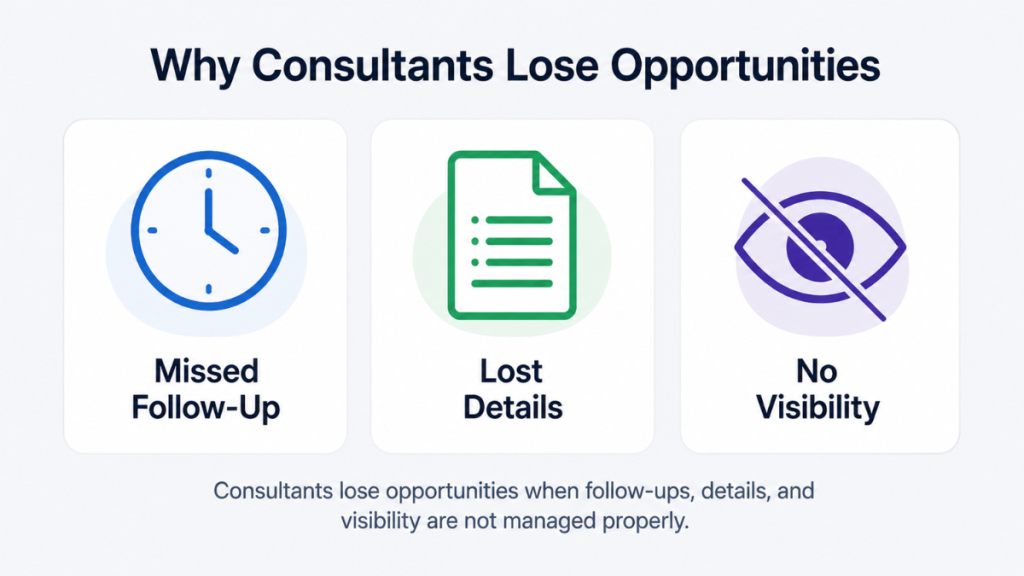
Missed follow-ups. A prospect says they need to discuss budget internally and will come back to you. Two weeks pass. You mean to follow up but client delivery takes over. The prospect goes quiet and eventually hires someone else. This happens constantly in consulting businesses without automated follow-up systems in place.
Lost proposal history. When a prospect comes back six months after an initial conversation, remembering the details of what was discussed requires searching through old email chains. A CRM stores everything against the contact record so you have the full context immediately.
No pipeline visibility. Without a structured pipeline, it is impossible to know accurately how many active opportunities you have, what they are worth, or when revenue is likely to close. This makes forecasting guesswork.
Inconsistent client experience. When clients feel like they have to re-explain their situation every time they speak to you, trust erodes. A CRM ensures you always have the context you need to make every conversation feel personal and informed.
For a deeper look at how CRM pipelines work in practice, our guide to CRM pipeline management explains how to structure your stages and automate movement between them.
How to Choose a CRM System for Consulting Businesses
Choosing the right CRM depends on the size of your consulting practice, how you generate new business, and how much automation you want in the system.
Solo consultants and independent practitioners typically need a lightweight system that tracks relationships, manages a small pipeline, and sends automated follow-ups without requiring significant setup time. Complexity is the enemy here. A CRM that takes weeks to configure and requires ongoing maintenance will not get used consistently.
Small consultancy firms with two to ten people need a system that supports collaboration – multiple team members should be able to see the same pipeline, log activity against shared contacts, and pick up relationships without losing context when someone is unavailable.
Consultancy firms with specialist service delivery – those that move from a won deal straight into a project delivery phase – often benefit from a CRM that connects the sales pipeline to delivery management. When a deal closes, the client information and project scope should transfer automatically rather than being re-entered into a separate system.
The features that matter most regardless of firm size are:
Discovery call and meeting management. Consultants live in their calendars. A CRM that integrates booking tools so prospects can schedule discovery calls directly removes friction and captures the lead automatically at the point of booking.
Proposal tracking. Knowing when a prospect has opened your proposal, how many times they have viewed it, and when they last looked at it gives you the information needed to time your follow-up effectively.
Automated follow-up sequences. When a proposal goes out and there is no response after 48 hours, the CRM should trigger a follow-up automatically. This is the single biggest improvement most consulting businesses can make to their conversion rate.
Contact and conversation history. Every email, call, meeting note, and document should sit against the client record so anyone in the team can pick up the relationship with full context.
Top CRM Features Consultants Should Look For
Not every CRM is built with consulting workflows in mind. Many are designed for high-volume sales teams where the priority is moving large numbers of deals through a pipeline quickly. Consulting is different – you are managing fewer, higher-value relationships over longer timeframes.
When evaluating a CRM for your consulting business, these are the features worth prioritising:
Visual pipeline with customisable stages. Your consulting pipeline stages are different from a product sales pipeline. You need stages like initial enquiry, discovery call booked, proposal sent, follow-up, and engagement confirmed. The CRM should let you define your own stages rather than forcing you into a generic template.
Automated follow-up workflows. The follow-up is where most consulting businesses lose work. A CRM that triggers automated emails or SMS messages when a prospect has not responded to a proposal within a set timeframe removes the reliance on memory.
Calendar and booking integration. When a prospect wants to book a discovery call, they should be able to do so directly from a link without back-and-forth scheduling emails. The booking should automatically create a contact record and trigger the first stage of your pipeline.
Email tracking. Knowing when a prospect has opened an email or clicked a link tells you who is actively engaged and helps you prioritise your outreach.
Mobile access. Consultants are frequently working from client sites, travelling between meetings, or working remotely. The CRM needs to work properly on a phone so you can log notes and check contact history on the go.
Affordable pricing for small practices. Many consultants are solo operators or small teams. Enterprise CRM pricing is not appropriate. There are effective platforms available at $14 to $97 per month that cover everything an independent consultant or small consultancy needs.
Best CRM for Independent Consultants
Independent consultants have different requirements from consulting firms. The priority is simplicity, speed of setup, and automation that runs without ongoing management. You do not have a team to maintain a complex system – it needs to work for one person.
GoHighLevel is the strongest all-in-one option for independent consultants who want CRM, automated follow-ups, appointment booking, and pipeline management in a single platform. The setup takes time initially but once running it handles the entire client acquisition process automatically – from the first enquiry through to a confirmed engagement – without manual intervention at each step.
For an independent consultant charging premium rates, the ability to respond instantly to enquiries with automated messages, book discovery calls automatically, and follow up on proposals without lifting a finger is a significant competitive advantage. Our GoHighLevel pricing breakdown covers what each plan includes and the actual cost in both UK and US markets.
Pipedrive is the right choice if your main need is a clean visual pipeline without complex automation. It is fast to set up, easy to use consistently, and gives you a clear view of every active opportunity. If you are generating leads primarily through referrals and word of mouth rather than inbound marketing, Pipedrive covers the essentials well. See our Pipedrive pricing UK guide for current costs.
HubSpot is a solid free starting point for consultants who are new to CRM. The free plan includes contact management, a basic pipeline, meeting scheduling, and email tracking. The limitation is that automation features require paid plans, and HubSpot’s pricing increases steeply as you add contacts and features.
CRM for Coaches and Consultants
Coaches and consultants share similar business models – both rely on discovery calls, proposals or intake conversations, and follow-up to convert prospects into paying clients. The CRM requirements overlap significantly.
The main difference is that coaches often have higher enquiry volumes from lower-ticket offers, while consultants typically have fewer enquiries from higher-ticket engagements. This affects which features matter most.
For coaches and consultants working at higher price points with longer sales cycles, automated follow-up is critical. A prospect who is considering a significant investment in consulting or coaching services often needs multiple touchpoints before making a decision. A CRM that manages this process automatically – sending relevant follow-up content, checking in at the right intervals, and making it easy for the prospect to book when they are ready – converts significantly more enquiries than manual follow-up.
GoHighLevel handles this particularly well because it combines CRM pipelines with email and SMS automation in a single system. Rather than connecting a CRM to a separate email marketing tool, everything runs from one platform. For a comparison of how it stacks up against the most common alternative, our GoHighLevel vs HubSpot guide covers the key differences.
How a CRM Benefits a Solo Consultant’s Workflow
The practical difference a CRM makes to a solo consultant’s day-to-day workflow is significant. Here is what changes when the right system is in place:
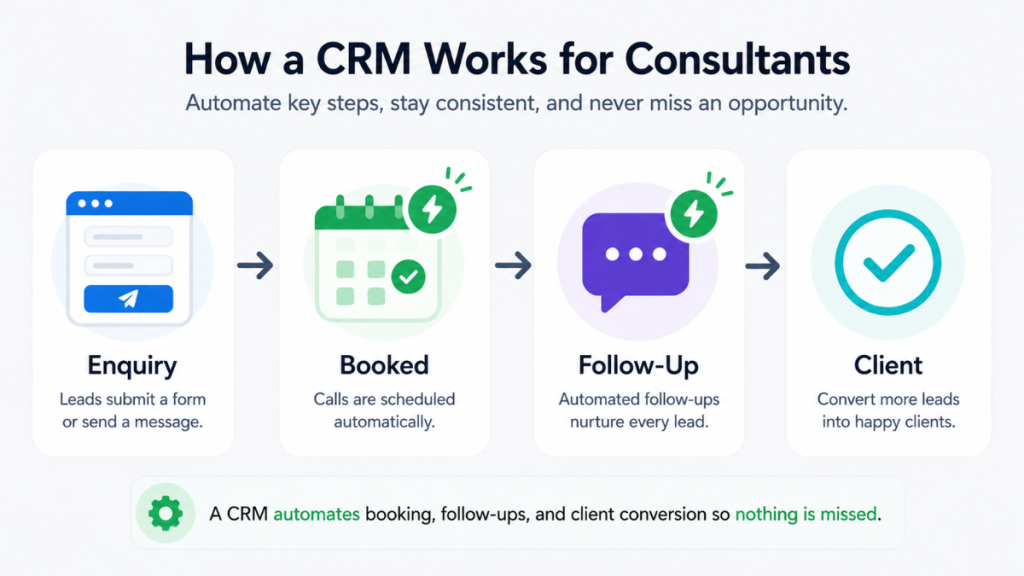
Enquiries are captured automatically. Instead of manually recording every inbound enquiry, the CRM captures contact details from your website form, booking page, or lead magnet and adds them to the pipeline immediately. Nothing gets lost because you were in a client meeting when it came in.
Discovery calls are booked without back-and-forth. A booking link in your email signature or on your website lets prospects schedule directly into your calendar. The CRM creates the contact record, sends a confirmation, and adds a reminder automatically.
Proposals trigger follow-up sequences. When a proposal goes out, a follow-up sequence starts automatically. If the prospect opens the email but does not respond, a follow-up message goes out after 48 hours. If there is still no response, another touchpoint fires a few days later. This runs without you having to remember to do it.
Contact history is always available. Before any meeting or call, you can review the full history of every interaction with that contact. What was discussed, what was proposed, what objections came up, what was agreed. This makes every conversation more productive and makes clients feel remembered and valued.
Pipeline is always accurate. At any point you can see exactly how many active opportunities you have, where each one sits, and what the next action is. This turns revenue forecasting from guesswork into a reasonably accurate picture.
For consultants currently managing their pipeline through email and memory, this shift is usually the single biggest operational improvement available. Our guide on automatic lead follow-up systems explains how to build the follow-up process in detail.
Affordable CRM Software for Small Consultancy Firms
Small consultancy firms do not need enterprise CRM systems. The platforms designed for large organisations are over-engineered for a team of two to ten people and priced accordingly.
The most cost-effective options for small consultancy firms in 2026 are:
GoHighLevel at $97 per month covers CRM pipelines, automation workflows, SMS and email follow-ups, appointment booking, and funnel building in a single subscription. For a consultancy generating consistent enquiries and wanting to automate the full client acquisition process, this represents strong value compared to paying for separate tools for each function.
Pipedrive from $14.90 per user per month gives you a clean visual pipeline, email integration, and activity tracking at a low entry cost. It works well for small teams that primarily need deal tracking and contact management without complex automation.
HubSpot free plan provides basic CRM functionality at no cost. For a small consultancy just getting started with structured client management, the free plan covers enough to make a meaningful difference before committing to a paid platform.
The key principle when choosing for a small firm is to start with what you will actually use consistently rather than the most feature-rich option. A simple CRM used every day outperforms a complex system that sits unused after the initial setup. For a broader comparison of CRM options for small businesses, our best CRM for small business guide covers the main platforms side by side.
CRM Platforms for Professional Services Companies
Consultancy sits within the broader professional services category alongside law firms, accountancies, recruitment agencies, and similar businesses. CRM requirements across professional services share common themes – relationship management over transaction processing, longer sales cycles, and the importance of reputation and referral.
The platforms that work best across professional services are those that balance relationship tracking with pipeline management and automation. The enterprise tools like Salesforce are powerful but require dedicated administrators and significant budget. For most professional services firms under 50 people, a mid-market platform covers all the requirements at a fraction of the cost.
GoHighLevel, HubSpot, and Pipedrive all have strong track records across professional services businesses. The right choice comes down to how much automation you want in the system and what your team will use consistently.
For consultancies that manage ongoing client relationships alongside new business development, a CRM that supports both pipeline management and client retention is more valuable than one focused purely on deal closing. Tracking renewal conversations, monitoring client satisfaction, and managing upsell opportunities all benefit from having everything in one system. Our guide to CRM for service businesses covers how service-based businesses structure their client management systems.
[IMAGE PLACEHOLDER – Location: after this section | File name: crm-professional-services-comparison.png | Alt tag: CRM platform comparison for professional services and consultancy businesses | Prompt: flat illustration of a comparison table with platform icons and feature checkmarks, no people or figures, icons and objects only, light grey background, clean minimal style]
Setting Up a CRM for Your Consulting Business
Getting the CRM set up correctly from the start determines whether you will use it consistently. Here is a practical approach for consultants setting up a CRM for the first time:
Step 1 – Define your pipeline stages. Map out the actual stages a prospect moves through in your consulting business. A typical consulting pipeline looks like this – new enquiry, discovery call booked, discovery call completed, proposal sent, follow-up, engagement confirmed. Keep it to five or six stages maximum.
Step 2 – Set up your lead capture. Connect your website contact form and booking page to the CRM so every enquiry enters the system automatically. If you use a lead magnet or content download, connect that too.
Step 3 – Build your follow-up sequences. Create automated email sequences for each key stage. At minimum, set up a follow-up sequence that triggers when a proposal has been sent but not responded to within 48 hours.
Step 4 – Import existing contacts. Bring in your current client list, active prospects, and past clients. Every relationship you have belongs in the system.
Step 5 – Commit to daily use. Open the pipeline every morning, review which leads need attention, and keep every record up to date. The CRM is only as useful as the data inside it.
Final Thoughts
A CRM for consultants is not about adding complexity to your business. It is about removing the reliance on memory and manual effort from your client acquisition process so you can focus on the work you are actually paid to do.
The consultants who convert the most enquiries into clients are not necessarily the best at their craft. They are the ones who respond fastest, follow up most consistently, and make every prospect feel remembered and valued throughout the process. A well-configured CRM does all of this automatically.
For independent consultants and small consultancy firms, the right platform is one you will use every day – simple enough to maintain without dedicated support, powerful enough to automate the follow-up work that currently falls through the cracks.
GoHighLevel suits consultants who want automation across the full pipeline. Pipedrive suits those who primarily need clear deal tracking. HubSpot is the right free starting point for consultants new to structured CRM.
Whichever platform you choose, the improvement over spreadsheets and email management is immediate and significant.
FAQ
What is the best CRM for consultants? The best CRM for consultants depends on the size of your practice and how much automation you need. GoHighLevel suits consultants wanting an all-in-one system with automated follow-ups and booking. Pipedrive suits those who primarily need visual pipeline management. HubSpot is a strong free starting point.
Do independent consultants need a CRM? Yes. Even solo consultants benefit from CRM software because it tracks every active opportunity, automates follow-ups, and stores the full history of every client conversation – all things that become impossible to manage reliably through email and memory as the pipeline grows.
What are the 4 types of CRM systems? The four types are operational, analytical, collaborative, and strategic. Most consultants need an operational CRM that automates sales processes, manages pipelines, and tracks client interactions. Analytical and collaborative CRM features become more relevant as the consultancy grows.
What CRM features matter most for consultants? The most important features for consultants are visual pipeline management, automated follow-up sequences, discovery call booking integration, email tracking, and contact history. Proposal tracking is also valuable for consultancies with longer sales cycles.
How can a CRM benefit a solo consultant’s workflow? A CRM benefits solo consultants by capturing enquiries automatically, booking discovery calls without scheduling back-and-forth, triggering follow-up sequences after proposals go out, and maintaining full contact history so every conversation is informed and personalised.
Is there affordable CRM software for small consultancy firms? Yes. HubSpot offers a free plan with basic CRM features. Pipedrive starts from $14.90 per user per month. GoHighLevel at $97 per month covers CRM, automation, and booking tools in one platform – cost-effective for consultancies generating consistent enquiries.
What is the difference between CRM for consultants and CRM for sales teams? Sales team CRMs are built for high-volume deal processing with large numbers of contacts moving through the pipeline quickly. Consulting CRMs focus on fewer, higher-value relationships over longer timeframes, with emphasis on relationship history, proposal tracking, and consistent follow-up rather than transaction volume.
Suggested Reads
CRM Pipeline Management – how to structure your pipeline stages and automate lead movement
Automatic Lead Follow-Up System – how to build a follow-up sequence that runs without manual effort
GoHighLevel vs HubSpot – detailed comparison of the two most popular platforms for service businesses
Best CRM for Small Business UK – platform comparison for small businesses starting out with CRM
Pipedrive Pricing UK – current plan costs and what is included at each tier