
Affiliate links – I earn a commission if you sign up through this page, at no extra cost to you. That’s exactly why the weaknesses below aren’t softened. If GoHighLevel isn’t right for your business, I’d rather you know before you start a trial
Most small businesses lose leads not because they lack enquiries, but because nothing is tracking what happens after the first contact. A lead comes in through a website form or a phone call, someone means to follow up, and three days later the opportunity has gone cold.
CRM pipeline management is the system that stops this from happening. It organises every lead into defined stages, shows you exactly where each opportunity sits, and triggers follow-up actions automatically so nothing gets forgotten.
This guide explains what CRM pipeline management is, how it works in practice for service businesses, what the key stages look like, how automation changes the results, and which platforms handle it best in 2026.
Key Takeaways
- CRM pipeline management tracks leads from first enquiry through to closed job in a single system
- Companies with structured pipelines achieve up to 15% higher revenue growth according to Harvard Business Review research
- Service businesses need four to six pipeline stages – not the eight to ten that enterprise sales teams use
- Automation is what separates a pipeline that converts leads from one that simply organises them
- GoHighLevel, Pipedrive, and HubSpot are the most widely used tools for small business pipeline management
- The biggest pipeline mistakes are too many stages, no automation on follow-up, and not recording why leads are lost
What is CRM Pipeline Management?
CRM pipeline management is the process of tracking potential customers through defined stages of a sales process, from the moment they first make contact to the point they become a paying client.
A CRM pipeline gives you a visual view of every active lead your business is currently working on. Instead of relying on memory, sticky notes, or a spreadsheet to remember who needs a callback or which quote is still waiting for a response, the CRM organises everything in one place and shows you the full picture at a glance.
Each lead sits at a specific stage in the pipeline. As they progress – from initial enquiry through to a confirmed booking or closed deal – they move through the stages. The CRM records every interaction, triggers follow-up actions automatically, and flags any lead that has been sitting at the same stage too long without activity.
For service businesses, this is particularly valuable. A plumber or electrician managing ten enquiries at once cannot rely on memory alone. A pipeline makes sure every opportunity is visible and every follow-up happens on time.
What is CRM and Pipeline Management?
These two terms are closely linked but refer to different things.
A CRM, which stands for customer relationship management, is the software that stores your contacts, records interactions, and tracks the history of every conversation with a lead or customer. It is the database at the centre of your sales process.
Pipeline management is the process of moving contacts through your sales stages systematically. It is the practice of deciding where each lead sits, what needs to happen next, and how to keep opportunities moving toward a closed deal.
When the two work together, the CRM stores the information and the pipeline provides the structure. A lead enters the CRM when they first make contact. Pipeline management determines which stage they sit at, what automated actions fire, and who is responsible for the next step.
Most modern CRM platforms combine both in a single system. You do not need separate tools. The CRM holds the contact data, and the pipeline view shows you where every lead sits in your sales process at any given time.
What is Pipeline Management in Sales?
Pipeline management in sales is the practice of tracking every active sales opportunity through defined stages, from the first contact with a potential customer to the moment the deal is won or lost.
It helps businesses in three specific ways. First, it creates visibility – you can see exactly how many active opportunities you have and where each one sits. Second, it enables forecasting – by knowing how many leads are at each stage and your average conversion rate, you can estimate future revenue more accurately. Third, it identifies problems – if leads are consistently dropping out at the same stage, pipeline data tells you where the process is breaking down.
For small service businesses, pipeline management in sales is less about forecasting and more about consistency. The main value is making sure every enquiry gets followed up properly and no opportunity is forgotten because the team got busy.
What Does Pipeline Mean in a Company?
In a business context, a pipeline represents all the active sales opportunities a company is currently working on, organised by how far along each one is in the sales process.
Think of it as a visual map of your potential revenue. Every lead that has expressed interest in your service sits somewhere in the pipeline. Some are brand new enquiries at the very start. Others are at the quote stage waiting for a decision. A few are almost ready to close.
The pipeline gives you a single view of all of these simultaneously. Instead of asking your team what is happening with each lead, you can see the answer in the CRM. This is what people mean when they say a business has a strong or weak pipeline – they are describing how many active opportunities exist and how well they are being managed.
What is a Business Pipeline?
A business pipeline is the complete sequence of stages a potential customer moves through from first contact to becoming a paying client.
Every business has a pipeline whether they formalise it or not. The difference is whether that pipeline is structured and visible, or scattered across emails, voicemails, and memory.
A formalised business pipeline, managed through a CRM, makes the process consistent. Every lead follows the same path. Every stage has defined actions. Every follow-up is tracked. This is what converts a reactive business that chases leads manually into one that has a repeatable system for converting enquiries into revenue.
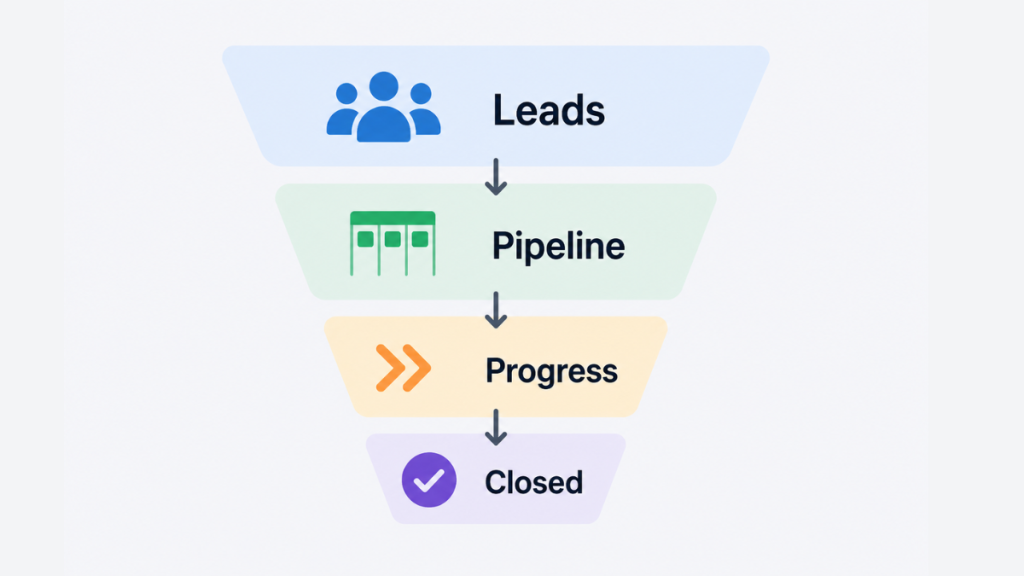
Why Most Service Businesses Struggle Without CRM Pipeline Management
A plumber, electrician, cleaner, or salon typically receives enquiries through phone calls, website contact forms, Facebook messages, and word of mouth referrals. Without a pipeline, those leads land in completely different places – a missed call log, an email inbox, a WhatsApp thread – and there is no central system connecting them.
The result is inconsistent follow-up. Some leads get called back the same day. Others are forgotten for a week. When the business gets busy with existing jobs, new enquiries slip through entirely. The owner does not even know how many potential jobs were lost because there was no system recording them.
This is not a people problem. It is a systems problem. The business does not have a bad team – it has no structure for managing leads after the first contact.
CRM pipeline management solves this directly. Every enquiry enters the system at stage one regardless of where it came from. The pipeline assigns it a stage, triggers an immediate response, and creates a task for the next action. Nothing relies on someone remembering to follow up.
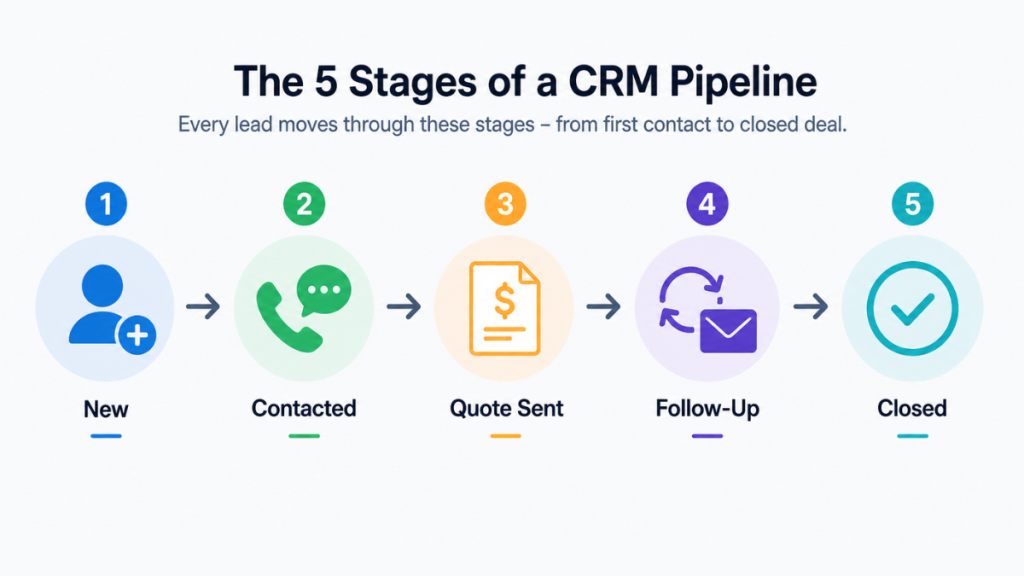
What Are the 5 Stages of a CRM Pipeline?
Most pipeline frameworks are written for large B2B sales teams and include eight or more stages covering complex enterprise sales cycles. Service businesses need something far simpler. A five-stage pipeline covers everything a trades or service business actually needs.
Stage 1 – New Enquiry
The lead enters the CRM. This could come from a website form submission, a phone call logged manually by a team member, an automated capture from a Facebook ad, or a missed call that triggers an automated text back. The moment a lead exists, it needs a home in the pipeline. No lead should sit in an inbox or a voicemail without being recorded in the system.
Stage 2 – Contacted
First contact has been made. Either an automated SMS or email has gone out immediately, or a team member has called the lead directly. The important thing at this stage is speed. Research consistently shows that responding to a new enquiry within five minutes dramatically increases the chance of conversion compared to waiting several hours. A CRM with automation handles this instantly regardless of when the enquiry arrives.
Stage 3 – Quote Sent
A price or proposal has been shared with the lead. This is where many service businesses lose deals through slow or non-existent follow-up. A quote goes out, the lead does not respond immediately, and without an automated follow-up sequence the opportunity quietly dies. The pipeline should trigger a follow-up automatically if there is no response within 48 hours.
Stage 4 – Follow-Up
The lead has received the quote but has not yet made a decision. The pipeline manages this stage through an automated sequence – typically a combination of SMS and email spread across three to five days. The messages address common objections, reinforce the value of the service, and make it easy for the lead to confirm the booking. Without automation, this stage is where most businesses give up too early.
Stage 5 – Closed
The lead either becomes a paying customer or the opportunity is marked as lost. Both outcomes should be recorded. When a deal is won, the pipeline can trigger onboarding actions such as a confirmation message, a booking reminder, or an invoice. When a deal is lost, recording the reason – price too high, went with a competitor, no longer needed the service – builds data over time that helps you understand where your process needs improvement.
How to Use Pipeline CRM Day to Day
Setting up the pipeline stages is only the beginning. The businesses that actually convert more leads are the ones that use the CRM consistently as part of their daily routine.
Here is what effective daily pipeline management looks like for a service business:
Every morning, open the pipeline view and check for leads that have been sitting at the same stage for more than two days without any activity. These are your priority follow-ups for the day. The CRM should be flagging these automatically, but a manual review catches anything the automation missed.
Check that any quotes sent yesterday have triggered their follow-up sequences correctly. If a lead has responded to a quote overnight, move them to the relevant stage and update the next action.
At the end of the day, log any leads that came in through phone calls or in-person enquiries that were not captured automatically. Every lead needs to be in the system before it can be managed.
The key discipline is keeping the pipeline accurate. A pipeline full of stale leads that were never properly closed or updated becomes useless within weeks. Mark lost deals as lost. Move won deals to closed. Keep the active pipeline reflecting only real, live opportunities.
This whole process takes around ten minutes a day for most small service businesses. The CRM does the rest through automation.
How CRM Pipeline Automation Changes the Results
A pipeline without automation is a more organised spreadsheet. It gives you visibility but it still relies on people remembering to take action. The real improvement comes when the CRM handles follow-up automatically.
Here is what automation looks like across a real pipeline for a service business:
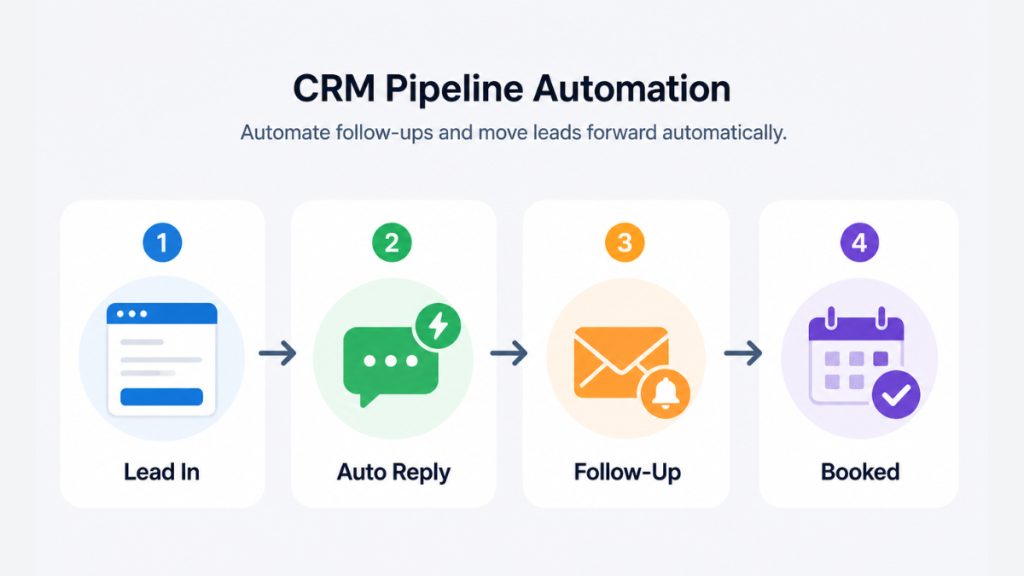
A new enquiry arrives through the website contact form at 9pm on a Tuesday. Within seconds, the CRM sends an automated SMS: “Thanks for getting in touch. We will give you a call tomorrow morning to discuss your requirements.” The lead is added to Stage 1 automatically. A task is created for the following morning assigned to the relevant team member.
The call happens the next day. The team member logs the outcome in the CRM and moves the lead to Stage 3 when the quote goes out. If the lead does not respond within 48 hours, an automated follow-up email fires. If there is still no response after another 24 hours, an SMS goes out. If the lead books, the pipeline moves them to Stage 5 and triggers a confirmation message and a calendar reminder.
None of this requires anyone to remember to send a message. The system runs the process. The team handles the conversations.
For businesses that deal with high enquiry volumes, this is transformative. A plumbing business receiving 30 enquiries a week cannot manually follow up with every single one at the right time. Automation ensures every lead receives the same consistent treatment regardless of how busy the team is.
This is what we cover in more depth in our guide to automatic lead follow-up systems, which walks through how to build a follow-up sequence that runs without manual effort.
What Are the 4 Types of CRM Systems?
Understanding the four types of CRM helps you choose the right platform for pipeline management.
Operational CRM focuses on automating sales, marketing, and customer service processes. This is the type most small businesses need. GoHighLevel and Pipedrive are operational CRMs. They manage contacts, run pipelines, trigger automated follow-ups, and track every interaction.
Analytical CRM focuses on data analysis and reporting. These systems process large volumes of customer data to identify trends, forecast revenue, and measure performance. They are more common in larger businesses with dedicated data teams.
Collaborative CRM focuses on sharing customer information across departments. Sales, marketing, and support teams all access the same data. This is more relevant for mid-size and enterprise businesses where multiple teams are involved in the customer journey.
Strategic CRM takes a long-term view of customer relationships, focusing on retention and lifetime value rather than individual transactions. It is less about closing deals and more about building lasting customer relationships.
For most small service businesses, an operational CRM is the right starting point. It handles the pipeline, automates follow-ups, and tracks every lead without requiring a dedicated team to manage it.
How to Choose a CRM with Pipeline Management
The right CRM depends on how much automation your business needs, what your budget is, and how quickly you want to get up and running.
GoHighLevel
GoHighLevel is the strongest option for service businesses that want CRM pipeline management, automated follow-ups, SMS, email, and appointment booking all in a single platform. It is built specifically for businesses that deal with inbound enquiries and need a complete system rather than separate tools for each function.
The pipeline in GoHighLevel is fully customisable. You can create as many stages as you need, set automation triggers at each stage, and connect the pipeline to your website forms, booking calendar, and messaging tools. When a lead moves from one stage to the next, the system can automatically send a message, assign a task, or update a contact record.
For service businesses managing consistent enquiry volumes, GoHighLevel removes most of the manual work from the follow-up process. Our GoHighLevel pricing breakdown covers what each plan includes and what it costs in both the UK and US.
Pipedrive
Pipedrive is built around visual pipeline management. Its kanban-style interface makes it straightforward to see where every deal sits and drag leads between stages. It is a good choice for businesses that primarily need deal tracking without the complexity of full marketing automation.
Pipedrive includes basic automation on higher plans, email integration, and reporting tools. It works best for businesses with a dedicated sales process rather than businesses relying heavily on inbound marketing. Our Pipedrive pricing UK guide covers current plan costs and what is included at each tier.
HubSpot
HubSpot offers a free CRM with a basic pipeline view, contact management, and deal tracking. It is a reasonable starting point for businesses that are new to CRM and want to get familiar with pipeline management before investing in a paid platform. The limitation is that automation features sit behind paid plans that scale in cost significantly as you add contacts and features.
For a full comparison of platforms, our best CRM for small business guide compares the main options across features, pricing, and ease of use.
CRM Pipeline Metrics Worth Tracking
Once your pipeline is set up and running, the data it generates tells you whether your sales process is working. These are the five metrics that matter most for service businesses:
Enquiry to quote conversion rate – what percentage of new enquiries result in a quote being sent. If this is low, the problem is likely in the initial contact or qualification stage.
Quote to close conversion rate – what percentage of quotes sent result in a confirmed booking. This is usually where the biggest improvement is available, and where automated follow-up makes the most difference.
Average time in pipeline – how long it takes from first enquiry to a closed outcome. A longer average time usually indicates a follow-up problem at one of the middle stages.
Lead drop-off by stage – which stage loses the most leads. This is the most actionable metric because it tells you exactly where to focus your improvement efforts.
Total pipeline value – the combined estimated value of all active opportunities currently in the pipeline. This gives you a rough forecast of near-term revenue.
Tracking these metrics does not require complex reporting. Most CRM platforms display them automatically on a dashboard. The goal is to review them monthly and identify which stage needs attention.
For a closer look at how lead tracking connects to follow-up strategy, our guide on lead follow-up systems covers how to structure the process from first contact through to close.
Common CRM Pipeline Mistakes to Avoid
Too many stages. If your pipeline has more stages than your team can remember without looking, they will stop updating it consistently. Five or six stages is enough for most service businesses.
No automation on follow-up. A pipeline that relies on someone manually sending every follow-up message will break the moment the team gets busy with existing jobs. Automation is not optional if you want consistent results.
Not recording lost deals. Every lost lead contains information. If you do not record why an opportunity was lost, you cannot identify patterns or fix the problem. Make it a habit to log a reason for every lost deal.
Letting leads sit too long at one stage. Set a maximum number of days a lead should stay at each stage. If it exceeds that, the CRM should flag it automatically or trigger a review task.
Not keeping the pipeline clean. Stale leads that were never properly closed distort your pipeline data and make it harder to see what is actually active. Review and clean the pipeline weekly.
Final Thoughts
CRM pipeline management gives service businesses the structure and visibility to stop losing leads after the first contact. The pipeline organises the opportunity. Automation handles the follow-up. Together they create a consistent system that converts enquiries into revenue without relying on memory or manual effort.
For businesses currently managing leads through a spreadsheet, a notes app, or a group chat, moving to a structured CRM pipeline is usually the single biggest improvement available. It does not require a large team or a complex setup. A five-stage pipeline, connected to basic automation, changes the result immediately.
The platforms that make this easiest for service businesses are GoHighLevel for all-in-one automation, Pipedrive for straightforward deal tracking, and HubSpot as a free starting point. The right choice depends on how much automation your business needs and how quickly you want results.
FAQ
What is CRM pipeline management? CRM pipeline management is the process of tracking leads through defined stages of a sales process, from first enquiry to closed deal, using software that organises every opportunity and triggers follow-up actions automatically.
What is CRM and pipeline management? CRM is the software that stores contact data and records interactions. Pipeline management is the process of moving those contacts through defined sales stages. Most modern CRM platforms combine both in a single system.
What is pipeline management in sales? Pipeline management in sales is the practice of tracking every active sales opportunity through defined stages from first contact to closed deal. It helps businesses forecast revenue, prioritise follow-ups, and identify where leads are dropping out of the process.
What does pipeline mean in a company? A pipeline represents all the active sales opportunities a business is currently working on, organised by how far along each one is in the sales process.
What are the 5 stages of a CRM pipeline? For service businesses the five practical stages are new enquiry, contacted, quote sent, follow-up, and closed. Each stage has specific actions the CRM tracks or automates.
What are the 4 types of CRM systems? The four types are operational, analytical, collaborative, and strategic. Most small service businesses need an operational CRM, which focuses on automating sales processes and managing pipelines.
How many pipeline stages should a small business use? Between four and six. More than that creates complexity that reduces consistent use across the team.
How to use pipeline CRM day to day? Open the pipeline each morning, check for leads that have been sitting at the same stage too long, review any overnight automation activity, and log any manually received enquiries. This takes around ten minutes. The CRM handles the rest through automation.
What is a business pipeline? A business pipeline is the complete sequence of stages a potential customer moves through from first contact to becoming a paying client, tracked and managed through CRM software.
Suggested Reads
Automatic Lead Follow-Up System – how to build a follow-up sequence that runs without manual effort
Best CRM for Small Business – platform comparison for businesses starting out with CRM
Pipedrive Pricing UK – current plan costs and what is included at each tier
GoHighLevel Pricing UK and US – full breakdown of GHL plans and features
Lead Follow-Up System – how to structure your follow-up process from first contact to close