
Running a service business usually means juggling enquiries, quotes, bookings, and follow-ups every day. That’s why choosing the right CRM for service businesses has become one of the most important decisions for companies that rely on leads, calls, and repeat customers.
Instead of managing everything through spreadsheets, email threads, or missed calls, a CRM centralises your entire customer journey in one place. Leads get captured automatically, conversations stay organised, and follow-ups happen without manual work.
If you’re still exploring the basics of CRM systems, it helps to understand What a CRM for Small Business actually does before choosing software.
This guide explains how a CRM for service businesses works, what features matter most, and which platforms are worth considering in 2026.
Quick Summary
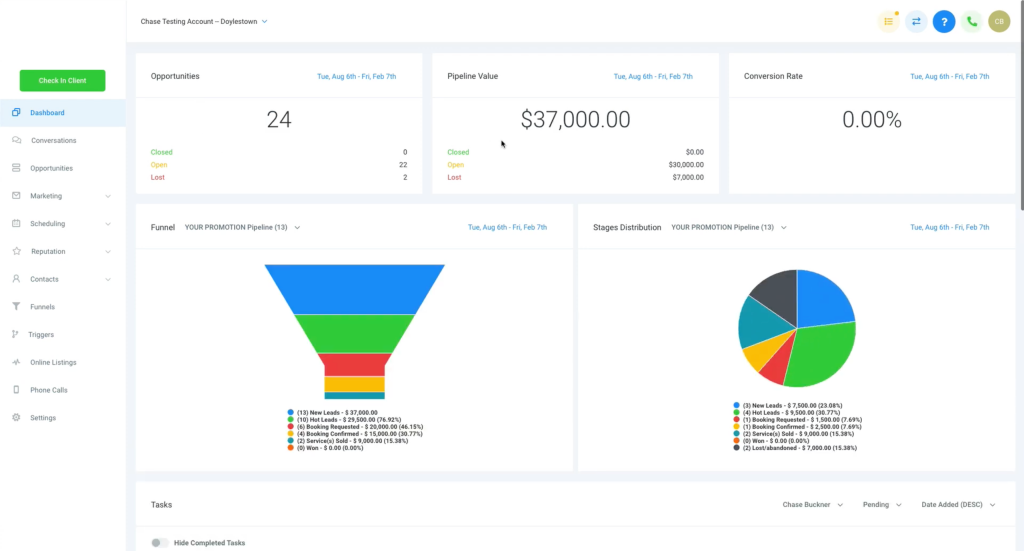
A CRM for service businesses helps organise leads, automate follow-ups, and track customers from first enquiry to completed job. Instead of losing opportunities in email or spreadsheets, everything stays inside one dashboard.
Service businesses benefit from CRM systems because they handle large volumes of calls, form enquiries, and repeat clients. A CRM keeps this organised while automating routine tasks.
Many modern platforms combine CRM, marketing automation, and booking systems in one place. This removes the need for multiple tools and reduces the risk of missed leads.
Automation features such as missed-call text back, email reminders, and pipeline tracking are particularly valuable for businesses that rely on enquiries turning into bookings.
Choosing the right CRM for service businesses depends on business size, automation needs, and whether you want simple lead tracking or a full marketing system.
Why Service Businesses Need a CRM
Service businesses operate very differently from product-based companies. Most customers start their journey with a phone call, website enquiry, or online booking request.
Without a CRM, those leads quickly become difficult to track.
A typical scenario looks like this:
A potential customer calls. The business owner misses the call because they’re working on a job. The caller leaves no voicemail and moves on to the next company.
That lost enquiry could easily have been worth hundreds or thousands.
A good CRM for service businesses prevents this by capturing every enquiry and triggering automatic responses.
For example, systems can send a text message instantly when a call is missed, turning missed opportunities into conversations. This is why automation features like the missed call text back system are becoming popular with local businesses.
Over time, this kind of automation can significantly increase bookings without increasing marketing spend.
Key Features a CRM for Service Businesses Should Have
Not every CRM platform is designed for service-based companies. Many tools focus only on contact management or email marketing.
Service businesses usually need more practical functionality.
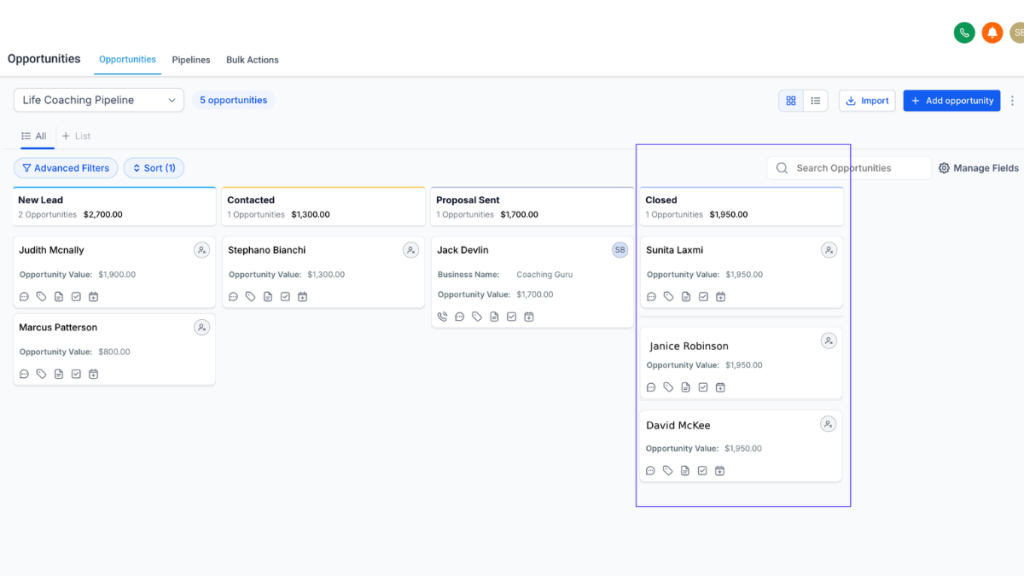
Lead capture and pipeline tracking
Every enquiry should automatically appear in the CRM pipeline. This allows business owners to see exactly where each lead is in the sales process.
Pipelines make it easy to move contacts through stages such as enquiry, quote sent, booking confirmed, or job completed.
Automated follow-ups
Most customers don’t book immediately.
A CRM for service businesses can automatically send follow-up emails or texts to increase conversion rates. These reminders often make the difference between a lost lead and a confirmed job.
Appointment booking
Scheduling tools allow customers to book appointments directly online.
Instead of going back and forth over email, customers simply choose an available time slot.
Communication history
Every conversation, email, call note, and message stays attached to the contact record. This allows staff members to quickly understand a customer’s history.
Marketing automation
Modern CRMs combine customer management with marketing automation tools. If you’re comparing automation platforms, it helps to see how different systems work in Best CRM With Automation for Small Businesses.
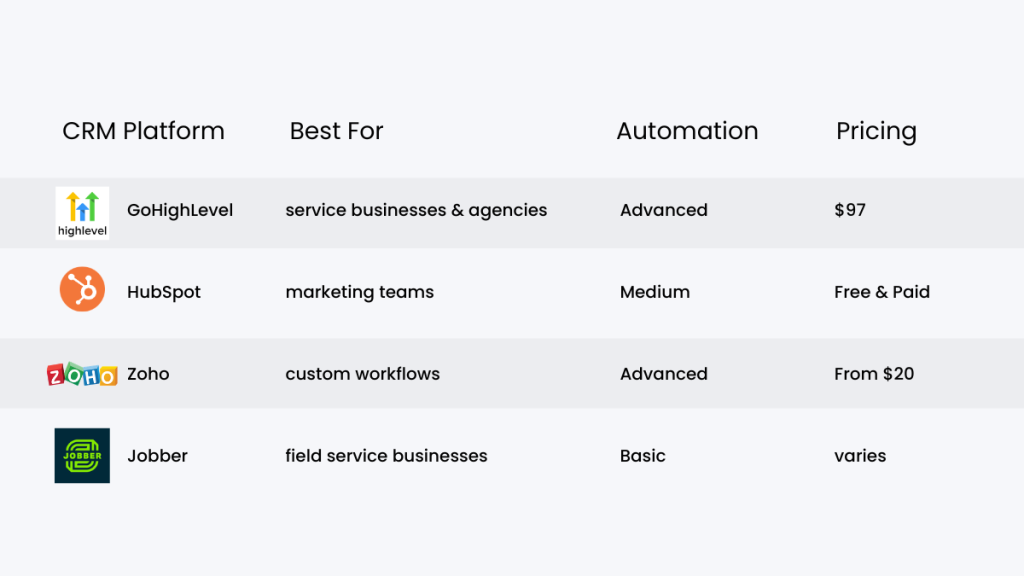
Popular CRM Platforms for Service Businesses
The market for CRM tools has expanded rapidly over the last few years. Many platforms offer similar features but target different types of users.
GoHighLevel
GoHighLevel has become popular with agencies and service businesses because it combines CRM, marketing automation, funnels, and messaging in one platform.
Instead of using separate tools for email marketing, pipeline tracking, and SMS automation, everything runs inside one dashboard.
For businesses handling high lead volumes, automation workflows can significantly improve response speed.
HubSpot CRM
HubSpot offers a well-known free CRM with paid upgrades for marketing and automation features.
It works well for companies focused on email marketing and content marketing, but many service businesses eventually upgrade to paid plans once they need automation.
You can see a deeper comparison between platforms in GoHighLevel vs HubSpot.
Zoho CRM
Zoho CRM offers extensive customisation and integrations, making it popular with companies that need complex workflows.
However, the interface can feel complicated for small service businesses that simply want to track leads and automate follow-ups.
Field-service specific CRMs
Some tools specialise in industries such as plumbing, HVAC, or electrical work. These often include job scheduling and dispatch management alongside CRM functionality.
How CRM Automation Improves Lead Conversion
Speed is one of the biggest factors in converting service enquiries into paying customers. Research on lead response time shows that businesses dramatically increase their chances of connecting with new leads when they respond within minutes rather than hours.
This is where a CRM for service businesses becomes powerful.
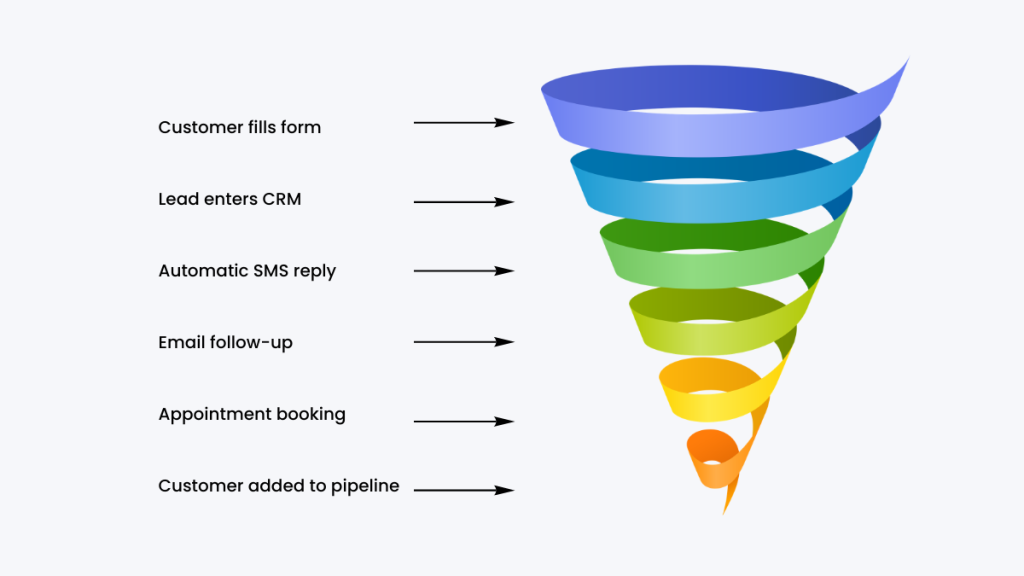
Automation allows companies to respond instantly even when staff members are busy.
Examples include:
• automatic SMS replies to new enquiries
• appointment confirmation emails
• follow-up reminders after quotes are sent
• review requests after completed jobs
Over time, these automated workflows create a smoother customer experience and increase the likelihood of repeat business.
Choosing the Right CRM for Your Service Business
The best CRM for service businesses depends on several factors.
Business size
Small service companies may only need a simple CRM that captures enquiries and tracks customers.
Larger companies with teams often require more advanced automation and reporting tools.
Marketing needs
Some businesses rely heavily on advertising, landing pages, and email marketing. In those cases, platforms that combine CRM and marketing automation can simplify the tech stack.
If you’re comparing different options, the guide on CRM Options for Small Business explains how different systems are structured.
Automation requirements
Businesses receiving dozens of enquiries per week will benefit more from automation workflows.
This reduces manual follow-ups and improves response times.
Final Thoughts
Choosing the right CRM for service businesses can dramatically improve how enquiries, bookings, and follow-ups are managed.
Instead of losing leads or chasing customers manually, businesses gain a structured system that tracks every interaction.
Automation features such as instant responses, pipeline tracking, and appointment booking can turn a simple CRM into a complete customer management system.
If your business depends on enquiries turning into jobs, investing in the right CRM for service businesses can quickly pay for itself.
FAQ
What is a CRM for service businesses?
A CRM for service businesses is software that helps track enquiries, manage customers, automate follow-ups, and organise communication in one place.
Do small service businesses really need a CRM?
Even small businesses benefit from CRM systems because they prevent missed leads and automate follow-ups. This improves booking rates and customer organisation.
Can a CRM automate follow-ups?
Yes. Many CRM platforms allow automatic email, SMS, and reminder sequences after enquiries or quotes.
Is GoHighLevel good for service businesses?
GoHighLevel is popular with service businesses because it combines CRM, automation, funnel building, and messaging in one system.
Suggested Reads
Best CRM for Lead Generation
Types of CRM for Small Business
Best CRM With Automation for Small Businesses
GoHighLevel Hidden Costs