
Most people comparing a lead tracking spreadsheet vs CRM aren’t choosing between tools.
They’re trying to fix a problem.
Leads are coming in… but nothing feels organised. Follow-ups slip. Notes are scattered. And you’re not sure what’s actually converting.
So the real question isn’t “which tool is better?”
It’s:
what system actually works as you grow
Quick Summary
| Area | Spreadsheet | CRM |
|---|---|---|
| Setup | Instant | Requires setup |
| Ease of use | Very simple | Moderate learning curve |
| Tracking | Manual | Automated + structured |
| Follow-up | Easy to forget | Built-in reminders |
| Scalability | Breaks quickly | Scales with volume |
| Best for | Beginners | Growing businesses |
Early Software Overview (Top Tools)
Before breaking this down, here are your real options.
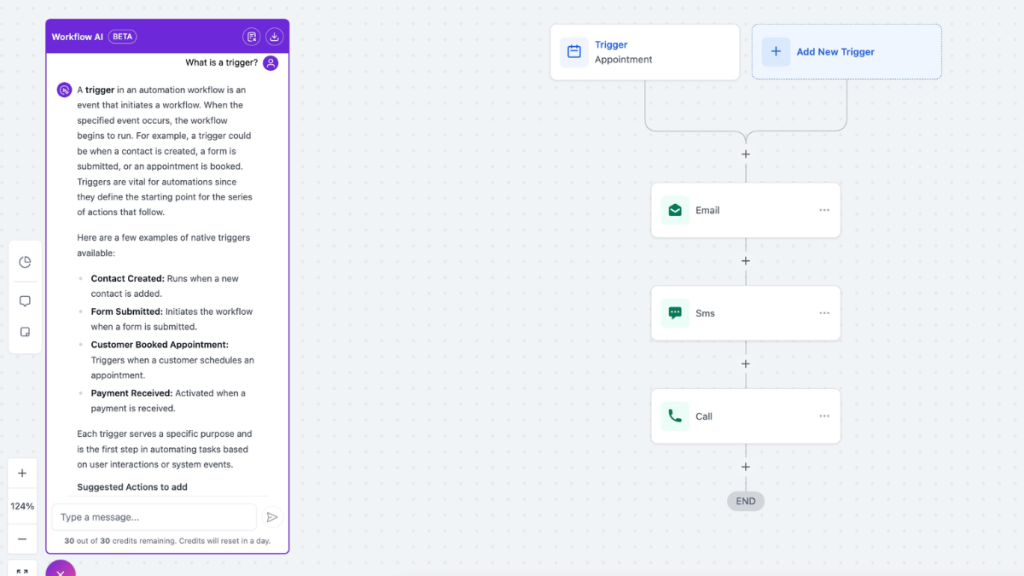
GoHighLevel is built for businesses that want one system to capture, track, and follow up automatically.
HubSpot CRM is a lighter option if you want structure without going fully into automation.
ClickFunnels focuses on lead generation, not full lead management, but it fits if your issue is getting leads in.
You don’t need all of these right now.
But you need to understand where each one fits.
Why This Decision Matters More Than You Think
Most businesses don’t fail because they lack leads.
They fail because they don’t manage them properly.
Leads come in from different channels and then:
- no clear tracking
- inconsistent follow-up
- no visibility of pipeline
According to Salesforce, businesses that use structured CRM systems significantly improve conversion rates because they remove guesswork.
That’s the difference between:
hoping leads convert and actually managing them
What a Lead Tracking Spreadsheet vs CRM Actually Means
This comparison isn’t about tools.
It’s about how you run your system.
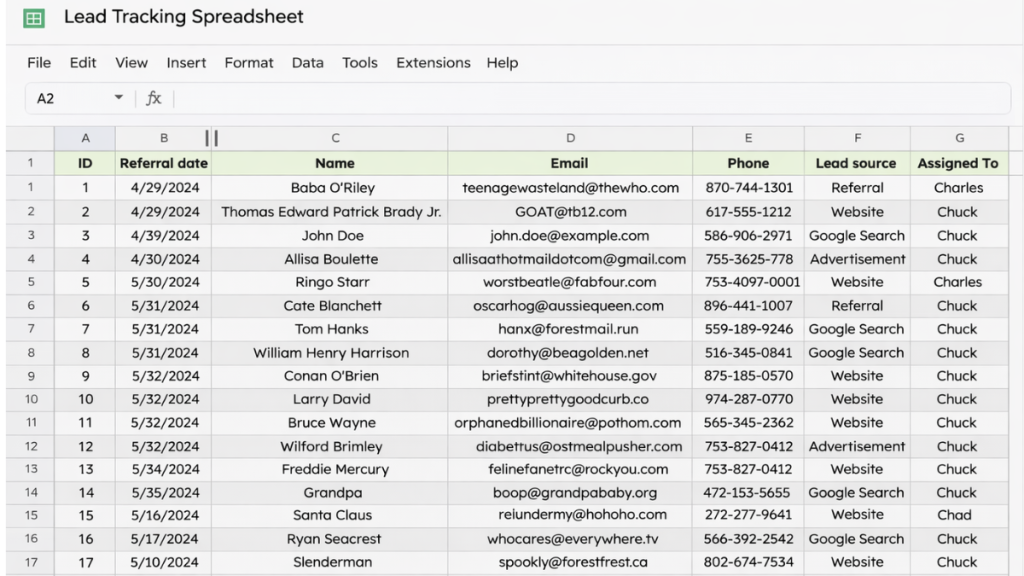
Spreadsheet = Manual System
A spreadsheet is:
- flexible
- simple
- easy to start
You create columns like:
- name
- contact details
- status
- next action
And you manage everything yourself.
This works… at the start.
The Hidden Cost of Using a Lead Tracking Spreadsheet
A lead tracking spreadsheet doesn’t fail all at once.
It fails quietly.
Follow-ups get delayed.
Leads go cold.
Opportunities disappear without you noticing.
And over time, this adds up to lost revenue you can’t track.
When you’re relying on a spreadsheet:
leads don’t get followed up on time
conversations get lost between tabs, emails, and messages
there’s no clear visibility of your pipeline
you can’t see what’s actually converting
Over time, this leads to something most businesses don’t realise.
You’re not losing leads because of traffic.
You’re losing them because your system can’t keep up.
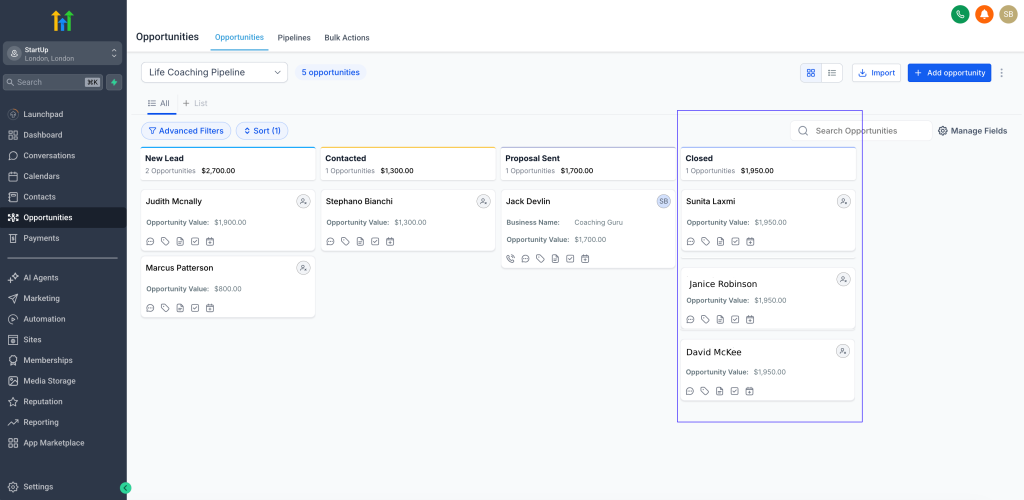
CRM = Systemised Process
A CRM is not just a database.
It’s a system that:
- tracks every lead
- organises your pipeline
- reminds you to follow up
- automates communication
If you’ve read best CRM with automation for small businesses, you’ll recognise this shift from manual to structured systems.
The Real Difference, System vs Effort
Here’s the truth most articles miss.
A spreadsheet relies on:
you remembering everything
A CRM relies on:
the system handling it
That’s the real difference.
Real-World Example
A service business tracks leads in a spreadsheet.
At first:
- they log every lead
- they follow up manually
Then they get busier.
Now:
- follow-ups are missed
- leads go cold
- conversions drop
They switch to a CRM.
Now:
- leads are tracked automatically
- reminders are triggered
- follow-ups happen consistently
Same leads.
Different system.
Better results.
When a Spreadsheet Works (And When It Doesn’t)
A spreadsheet is enough if:
- you have low lead volume
- you’re just starting
- you can manually manage follow-ups
But here’s the turning point.
A lead tracking spreadsheet vs CRM decision becomes obvious when:
- leads increase
- follow-ups become inconsistent
- you lose track of conversations
This is where spreadsheets break.
The Exact Moment You Should Switch to a CRM
You don’t need a CRM on day one.
But you do need one when:
you’re handling more than 10–15 leads per week
you’re forgetting follow-ups
you’re checking multiple places to track conversations
you don’t know your conversion rate
This is where the lead tracking spreadsheet vs CRM decision becomes clear.
At this point, staying manual is costing you more than upgrading.
Where a CRM Changes Everything
This is the moment most businesses realise the problem isn’t lead generation.
It’s lead management.
A CRM fixes the exact problems spreadsheets create.
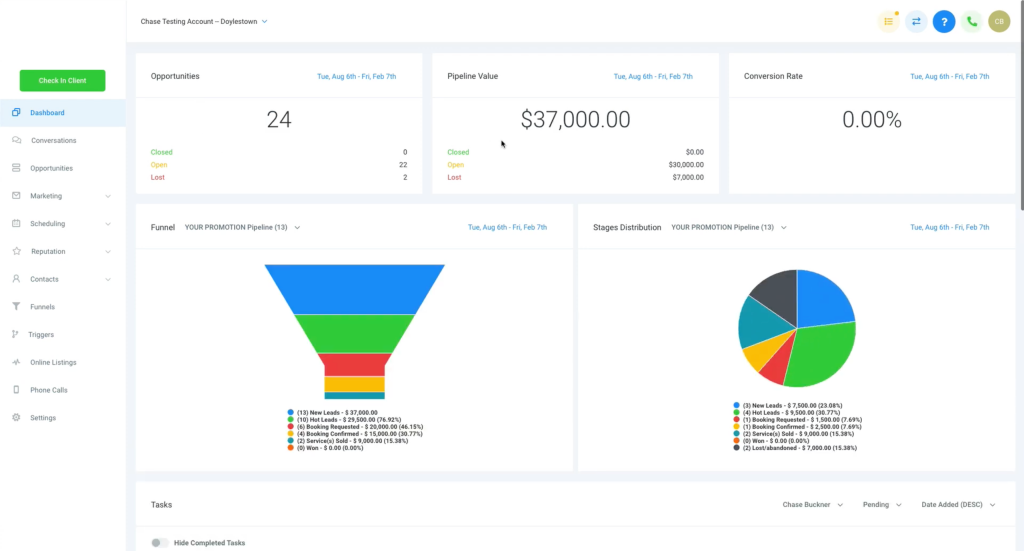
You get:
- pipeline visibility
- automated reminders
- consistent follow-up
- better conversion tracking
This is why tools compared in GoHighLevel vs ClickFunnels start becoming relevant once manual systems stop working.
Software Comparison Table
| System | Best For | Automation Features | Pricing |
|---|---|---|---|
| Spreadsheet | Beginners | None | Free |
| HubSpot CRM | Simple structure | Email tracking, reminders | Free–$50+ |
| GoHighLevel | Full automation system | Pipeline + SMS + email automation | $97+ |
Spreadsheet vs CRM in Real Use
They switch because they have to.
How to Decide (This Is the Only Part That Matters)
A spreadsheet works if you’re disciplined.
A CRM works even when you’re busy.
That’s the difference.
With a spreadsheet, everything depends on you remembering.
With a CRM, the system handles the process for you.
That’s why businesses don’t switch because they want to.
Stop thinking tools.
Think stage.
Use a spreadsheet if:
- you need something quick
- you’re managing a few leads
Use HubSpot if:
- you want structure without complexity
Use GoHighLevel if:
- you want a complete system
- you’re scaling
- you want automation
This is the natural progression.
The System Behind Better Conversions
A working system looks like this:
Lead captured → added to system → contacted → followed up → moved through pipeline → closed
This structure is the foundation of any effective lead tracking spreadsheet vs CRM decision.
The difference is:
manual vs automated execution.
When a Simple CRM Isn’t Enough Anymore
At this stage, using a spreadsheet or basic CRM isn’t just inefficient.
It’s actively costing you conversions.It’s the system that replaces manual effort entirely.
A basic CRM gives you structure.
But it still relies on you doing the work.
Following up manually.
Sending messages.
Moving leads through the pipeline.
This is where most businesses hit the next ceiling.
They don’t just need a CRM.
They need a system that:
responds instantly
follows up automatically
tracks every interaction
That’s where platforms like GoHighLevel come in.
It’s not just a CRM.
Final Thoughts
A spreadsheet works when things are simple.
A CRM works when things start growing.
But automation is what keeps everything consistent.
And the moment your system can’t keep up…
your leads stop turning into customers.
FAQ
Is a spreadsheet enough for lead tracking?
Yes, but only at low volume. Once leads increase, it becomes difficult to manage follow-ups consistently.
What does a CRM do that a spreadsheet can’t?
A CRM automates tracking, reminders, and follow-up, reducing the risk of losing leads.
When should I switch from spreadsheet to CRM?
When you start missing follow-ups, losing track of leads, or handling more volume than you can manage manually.
Which is better for small businesses?
Spreadsheets are better for starting. CRMs are better for scaling.
Suggested Reads
If you want to understand full system setups, see best automation tools for virtual assistants.
You can also explore GoHighLevel pricing explained to understand costs and features.
For alternative platforms, best GoHighLevel alternatives breaks down other options.