
Affiliate links – I earn a commission if you sign up through this page, at no extra cost to you. That’s exactly why the weaknesses below aren’t softened. If GoHighLevel isn’t right for your business, I’d rather you know before you start a trial
If you’re manually replying to leads, you’re already behind.
Not because your offer is bad or your service is wrong. Because by the time you see the notification and type a reply, the lead has already submitted two more enquiry forms and is waiting to see who responds first.
This guide explains how to respond to leads instantly using automation – the exact system UK service businesses use to capture every enquiry, send a response within seconds, and follow up automatically while they’re on a job.
Key Takeaways
- Leads are 100x more likely to be contacted if you respond within 5 minutes versus 30 minutes – yet the average business takes 42 hours to reply
- 63% of businesses never respond to inbound leads at all – making automation an immediate competitive advantage
- Responding within 1 minute produces 391% higher conversions than responding after 2 minutes
- The system has five steps: capture, engage, qualify, convert, and recover – all automated after initial setup
- GoHighLevel is the tool that handles all five steps natively – you can test the full system during the 14-day free trial before committing to a paid plan.
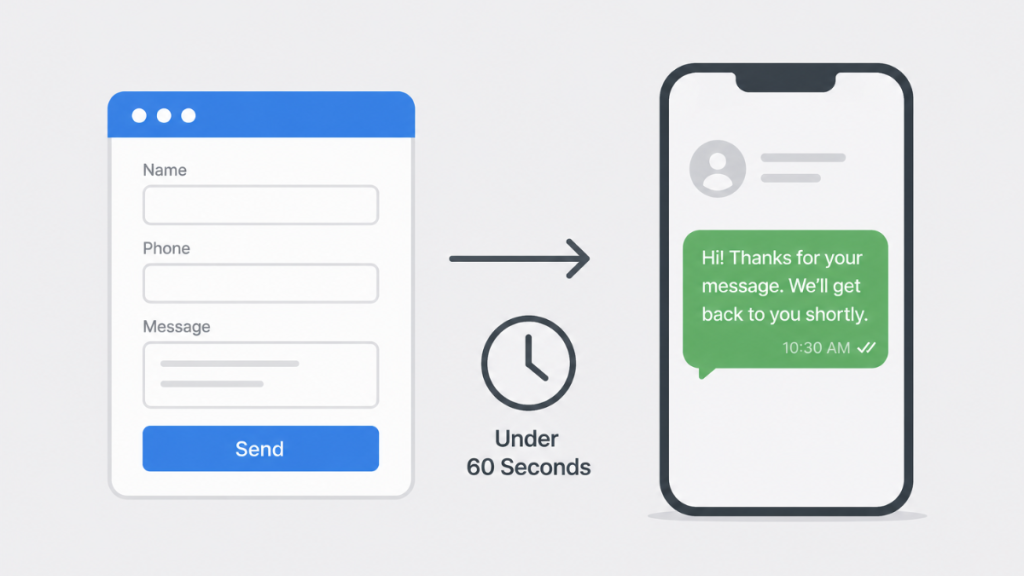
You’re not losing leads because of bad marketing.
You’re losing them because you’re too slow to respond.
Get the system that responds to every enquiry automatically – even when you’re on a job.
Why Timing Is the Only Thing That Matters at First Contact
When someone fills in your contact form or calls your number, their intent is at its absolute peak right at that moment.
They have a problem. They’re actively looking for someone to fix it. They haven’t committed to anyone yet.
That window doesn’t stay open. Here’s what actually happens in the minutes after a lead makes contact:
0-5 minutes: Lead submits the form. Interest is high. They’re still on your website or just put their phone down. A response now feels immediate and professional.
5-30 minutes: They’ve moved on to other tabs. They may have submitted enquiries to two or three other businesses. They’re comparing whoever replies first.
30-120 minutes: They’re distracted. The urgency they felt when they searched for you has reduced. A response now requires them to remember why they enquired.
24 hours: In most cases, the decision has already been made. They’ve booked with whoever responded earliest, or they’ve lost the immediate need and moved on.
This is intent decay – and it’s why the business that responds in 30 seconds consistently beats the better business that responds in 30 minutes.
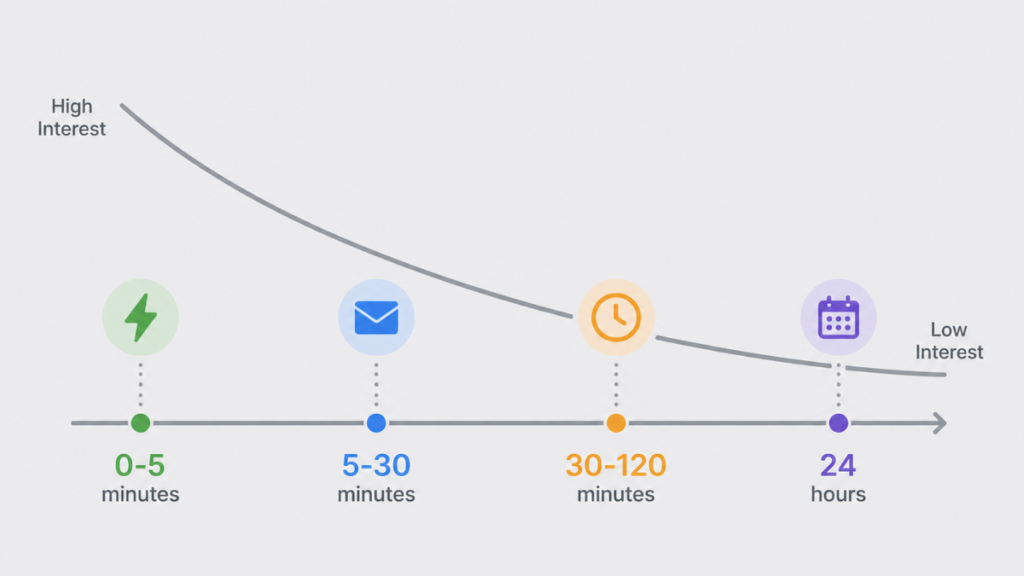
The data backs this up consistently. Leads are 100x more likely to be contacted when you respond within 5 minutes versus 30 minutes. Teams responding within 1 minute see 391% higher conversions than those responding after 2 minutes. And 63% of businesses never respond at all – which means if you respond within seconds, you’re already ahead of the majority of your competition before you’ve said a single word.
For the full data breakdown, see lead response time for small business.
Why Manual Replies Will Always Lose This Race
Most UK service businesses handle leads like this:
A form comes in. It lands in an email inbox. The owner sees it when they’re next free – maybe an hour later, maybe that evening. They reply when they have a moment. If the lead doesn’t respond, they follow up once, maybe twice, and then move on.
That process breaks in three specific places for anyone working on-site.
Speed. A plumber under a sink, an electrician in a loft, or a cleaner between appointments cannot check their inbox every five minutes. By the time a manual reply goes out, the window has closed.
Consistency. Manual follow-up depends on memory and availability. When you’re busy – which is most of the time – leads get one message and nothing more. Most conversions happen after the third or fourth touchpoint, not the first.
Visibility. Without a pipeline, you can’t see which leads are warm, which went cold, or which ones are worth chasing. Leads disappear without explanation and the business assumes the enquiry wasn’t serious.
Automation removes all three of these failure points. The system responds whether you’re on a job, driving, or unavailable. The follow-up runs automatically. Every lead is tracked in a pipeline.
The Instant Response Loop: Five Steps That Run Without You
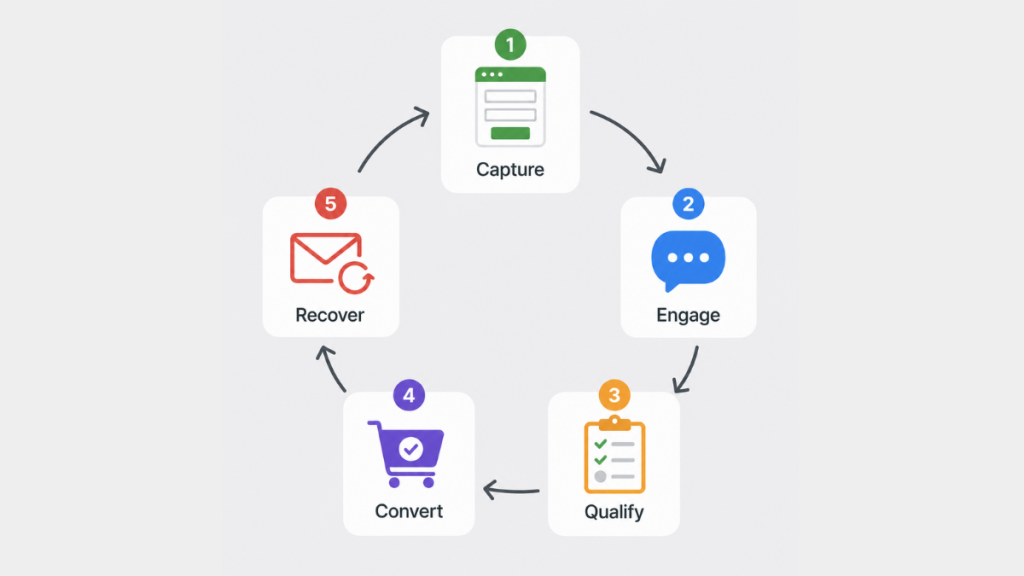
Here’s the complete system from the moment a lead makes contact to the moment they book – or drop off.
Step 1 – Capture (0-10 seconds)
A lead submits a form, calls and gets no answer, or sends a message through your website. The CRM detects it within seconds and creates a contact record automatically. A notification goes to your phone so you know the lead arrived.
If leads land in your email inbox rather than a CRM, you don’t have a system – you have a delay with an extra step in it.
Step 2 – Engage (0-60 seconds)
An automated SMS goes out before the lead has had a chance to contact the next business:
“Hi, just saw your enquiry – thanks for getting in touch. Are you looking for help this week or just getting prices?”
This works because it feels human, arrives while their interest is still high, and is easy to reply to. A closed question with two options removes the friction of figuring out what to say back.
For UK service businesses, SMS is the right first channel. Email has roughly 20% open rates. SMS has 98%, with most messages read within three minutes of arrival.
For businesses that want responses to feel more conversational, GoHighLevel’s Conversation AI can handle the first exchange automatically. It reads the lead’s message, generates a relevant reply, and continues the conversation until a human needs to step in. At $0.02 per message pay-as-you-go it adds minimal cost for most UK sole traders. See the GoHighLevel AI Agent guide for how to set it up.
Step 3 – Qualify (2-10 minutes)
When they reply, a follow-up message identifies their intent:
“Got it – do you want a quick call to discuss, or would a price estimate by text work better?”
This does two things at once. It moves the conversation forward and it filters serious leads from those just browsing. You’re not manually reading every message – the system handles the first two exchanges automatically.
Step 4 – Convert (same session)
Once the lead has indicated intent, a booking link or a specific call prompt goes out automatically. The goal is to secure commitment while they’re still in the conversation – before they get distracted or a competitor follows up.
The faster you move from engagement to booking, the higher your close rate. Every hour of delay between first contact and commitment is a percentage point of conversion you’re losing.
Step 5 – Recover (Days 1-3)
Most leads don’t convert on first contact. For those who don’t reply to the initial message, an automated follow-up sequence runs over the next 48-72 hours.
Day 1 – SMS: “Just checking this came through – happy to give you a quick price if that’s useful?” Day 2 – Email: value message about your service and what the customer can expect Day 3 – SMS: “Last message from me – if timing isn’t right just reply and I’ll leave you alone”
This is where a significant proportion of conversions actually happen. Most businesses never run this step – they send one message, get no response, and assume the lead is dead.
For the messaging strategy behind each of these touchpoints, see lead follow up strategy for small business.
How to Set This Up in GoHighLevel (UK)
GoHighLevel is the tool that handles all five steps natively – instant SMS, automated follow-up sequences, pipeline tracking, and booking integration – without needing multiple tools connected together.
Here’s the basic setup path:
Web form response (Step 2):
- In GHL, go to Automation > Workflows
- Create a new workflow with trigger: Form Submitted
- Add action: Send SMS – write your Step 2 message
- Set delay to 0 minutes – fires immediately on submission
- Save and test with a real form submission
Missed call response:
- Go to Settings > Phone System > Voice
- Find Missed Call Text Back and toggle on
- Write your message (keep under 160 characters)
- Save – test by calling your GHL number and letting it ring out
Follow-up sequence (Step 5):
- In Workflows, add a Wait step after the initial SMS
- Add Day 1 SMS, Day 2 Email, Day 3 SMS with appropriate delays
- Add a condition: if lead replies, stop the sequence
- If they book, add a pipeline stage update that also stops the sequence
UK note: Make sure your phone number begins +44. UK businesses do not need A2P 10DLC registration – that is a US carrier requirement. SMS delivers correctly across EE, O2, Vodafone, and Three.
Total setup time: 2-3 hours for the complete system. The missed call text-back alone takes under 15 minutes.
For a full breakdown of what GoHighLevel costs for a UK sole trader including SMS usage, see GoHighLevel UK pricing.
What This System Produces
When the instant response loop is running properly, three things change quickly.
The first response happens every time. It doesn’t matter if the enquiry comes in at 9pm on a Sunday or during a busy job on a Thursday afternoon. The system responds within 60 seconds regardless of your availability.
Leads that would have gone cold stay warm. The follow-up sequence runs automatically. Leads that don’t respond immediately get a second and third message on the right days without you doing anything.
You can see where enquiries are stalling. The pipeline shows every lead, its current stage, and how long it’s been sitting there. When something has been in “Quote sent” for four days without moving, that’s your signal to make a personal call.
None of this requires more leads. It requires catching the ones already arriving before they move on to whoever responds first.
FAQ
How do I respond to leads instantly if I’m on a job? Automation handles it. When a lead submits a form or calls and gets no answer, the system sends an SMS within 60 seconds automatically. You don’t need to be available – the response goes out regardless of what you’re doing.
What’s the best first message to send? Keep it under 160 characters, make it feel human, and end with an easy-to-answer question. “Hi, just saw your enquiry – are you looking for help this week or just getting prices?” works well because it gives the lead two options and requires minimal effort to reply.
Does this work for missed calls as well as form submissions? Yes. GoHighLevel handles both. Missed call text-back fires within seconds of a call going unanswered. Form submission automation fires the moment the form is submitted. Both can run simultaneously.
How many follow-ups should I send if the lead doesn’t reply? A minimum of three over three days is a solid starting point. Most businesses stop after one. Research consistently shows that a significant proportion of conversions happen after the second or third touchpoint, not the first.
What if I don’t use GoHighLevel? HubSpot handles email automation on paid plans but doesn’t include SMS natively. Pipedrive is strong on pipeline visibility but needs third-party tools for SMS automation. For UK service businesses that need instant SMS response without stitching together multiple tools, GoHighLevel is the most complete single-platform solution. See best CRM for small business UK for a full comparison.
Suggested Reads
Lead Response Time for Small Business → The data behind why response speed is the single biggest conversion lever
Missed Call Text-Back System → How to automatically respond to missed calls within seconds
Automatic Lead Follow-Up System → The exact messages to send at each touchpoint with ready-to-use templates
Best CRM for Small Business UK → Full platform comparison with GBP pricing for UK service businesses
Best GoHighLevel Alternatives (2026) → How GoHighLevel compares to other platforms for UK service businesses