
Most businesses think they’ve set up a system to capture leads automatically.
They’ve got a form. Maybe a landing page. Notifications turned on.
But here’s what’s actually happening:
Leads are coming in…
and disappearing before you ever speak to them.
Not because your offer is weak.
Because your system breaks in the first 60 seconds.
According to HubSpot, response speed directly impacts conversion rates. But here’s the part most people miss:
If your system doesn’t react instantly, the lead never becomes a conversation.
If your current setup doesn’t capture and respond instantly, platforms like GoHighLevel
let you automate the entire process in one place.
Quick Summary
| Situation | What’s Actually Happening | What Fixes It |
|---|---|---|
| You rely on forms | Leads submit but get no response | Instant SMS + CRM trigger |
| You check notifications | Response delay kills intent | Automation workflows |
| You send one reply | No follow-up = lost leads | Multi-step sequence |
| You miss enquiries | No system running 24/7 | Always-on automation |
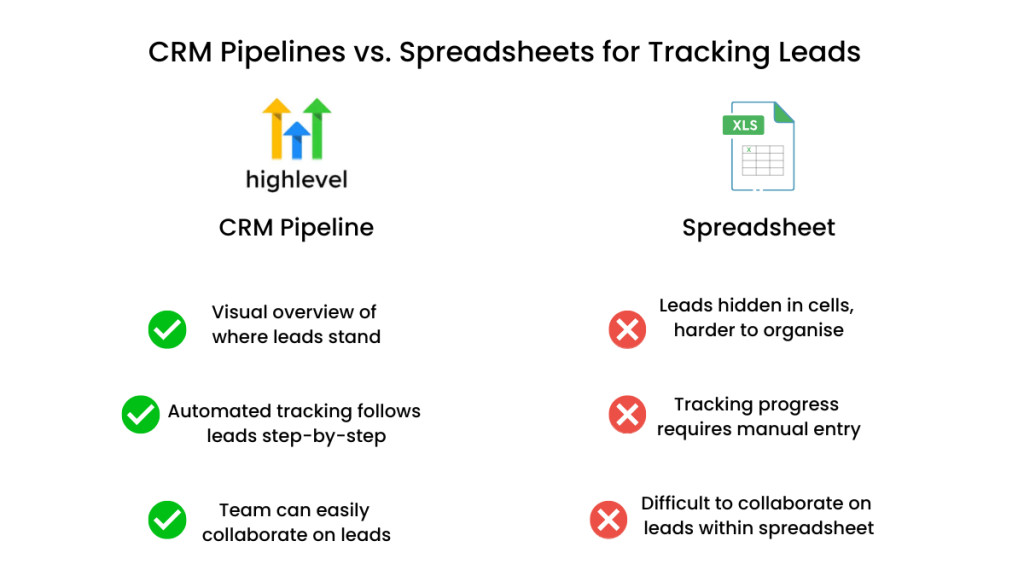
| You track manually | Leads get lost | Pipeline tracking |
The Direction Most People Miss
You don’t have a lead capture problem.
You have a lead handling gap.
- GoHighLevel → for capturing, responding, and tracking leads automatically
- ClickFunnels → for generating leads, not managing them
- HubSpot → for structured CRM, not instant engagement
Capturing leads without reacting instantly is the same as losing them.
The 60-Second Capture Window (What Actually Matters)
This is the part most articles skip.
When a lead submits a form, you have a very short window to capture their attention.
Call it the 60-Second Capture Window.
Here’s what happens inside it:
- The lead is still actively thinking about their problem
- They are comparing options in real time
- They are expecting a response
Now here’s what breaks most systems:
- no confirmation message
- no immediate response
- no next step
That creates uncertainty.
And uncertainty kills conversion faster than price ever will.
What Actually Happens When a Lead Comes In
Let’s strip this down to reality.
Your lead doesn’t:
- submit a form
- sit and wait
- hope you reply
They:
- open multiple tabs
- send multiple enquiries
- check who replies first
Then they choose based on speed, not quality.
If you don’t capture leads automatically and respond instantly, you’re not competing.
You’re arriving late.
Why Your Current Approach Is Failing
Let’s be specific.
Your system probably relies on:
- email notifications
- manual replies
- remembering to follow up
That fails because:
- You introduce delay
Even 10–30 minutes is enough for the lead to move on. - You create inconsistency
Some leads get quick replies. Others don’t. - You lose visibility
You don’t know what stage each lead is at.
You’re running a reactive system in a real-time environment.
You’re Not Losing Leads… You’re Losing Timing
Most businesses think leads disappear randomly.
They don’t.
They convert somewhere else.
And the deciding factor is almost never price, features, or reputation.
It’s timing.
When a lead fills out your form, they’re not committing to you.
They’re starting a search.
In that moment, they are:
- actively comparing options
- still emotionally engaged in the problem
- expecting a response
That window is short.
Sometimes minutes.
If your system doesn’t respond instantly, the lead doesn’t “cool off”…
they redirect their attention to whoever replies first.
This is where most businesses get it wrong.
They believe:
- “We’ll reply later”
- “We’ll catch them tomorrow”
- “If they’re serious, they’ll wait”
They won’t.
Because from the lead’s perspective, silence feels like:
- disinterest
- unprofessionalism
- or simply being ignored
So they move on.
Not because you were worse.
Because you were slower.
This is why capturing leads automatically isn’t just about collecting data.
It’s about reacting inside the moment where intent is highest.
Miss that moment, and you’re not managing leads…
You’re watching them convert somewhere else.
Most Businesses Don’t Actually Need More Leads
This is where people get it wrong.
They think:
“We need more traffic”
But what they actually need is:
to stop losing the leads they already have
More leads don’t fix a broken system.
They just make the losses harder to notice.
The System That Lets You Capture Leads Automatically
To fix this, you need a system that works without you.
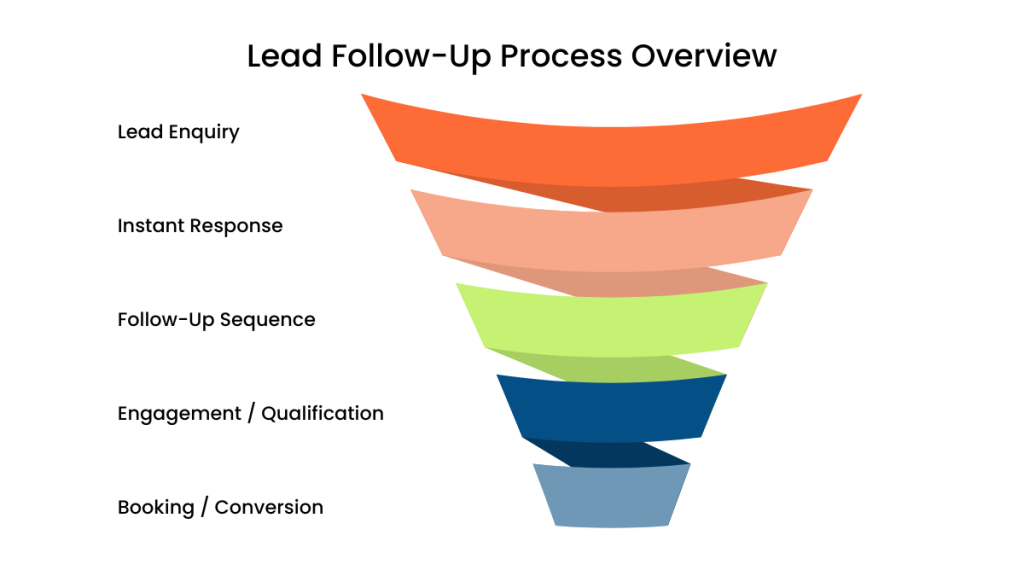
Call it the Instant Capture Loop.
Step 1: Capture (0–5 seconds)
- Channel: form / ad / call
- Purpose: store lead instantly
If the lead isn’t captured immediately, it doesn’t exist in your system.
Step 2: Engage (0–60 seconds)
- Channel: SMS + email
- Purpose: confirm and start conversation
Example SMS:
“Hey Sarah, just saw your enquiry. Are you looking for help now or just exploring?”
This removes uncertainty and invites reply.
Step 3: Qualify (2–10 minutes)
- Channel: SMS
- Purpose: identify intent
“Do you want pricing or a quick call?”
Now you’re prioritising real opportunities.
Step 4: Convert (same session)
- Channel: booking link
- Purpose: secure commitment
The faster you move here, the higher your conversion rate.
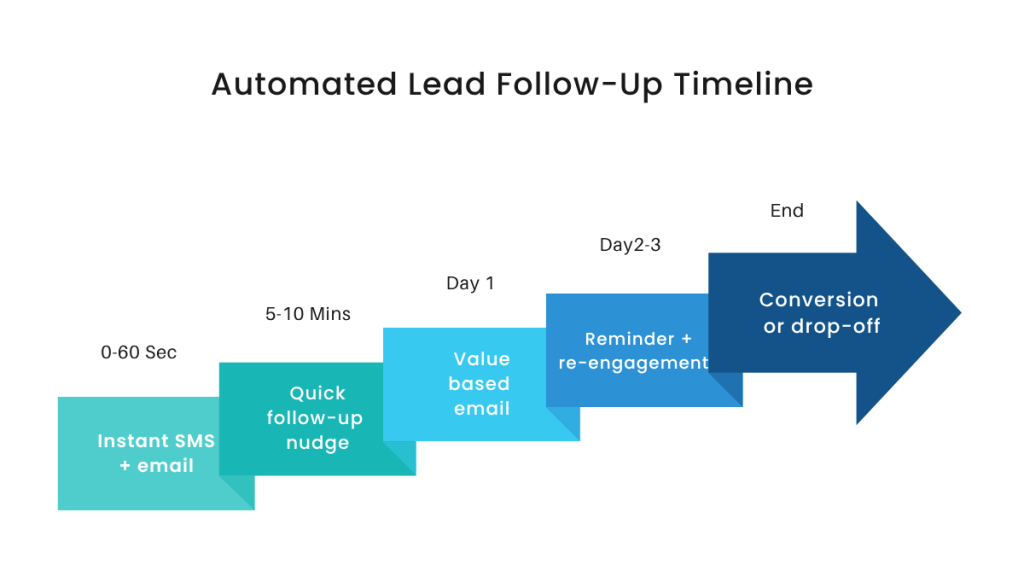
Step 5: Recover (Day 1–3)
- Channel: SMS + email
- Purpose: re-engage
According to industry data, a large portion of conversions happen after follow-up, not the first message.
Most businesses never reach this stage.
If this isn’t automated, you don’t have lead capture. You have lead leakage.
Real-World Example (Where This Changes Everything)
A small service business runs ads.
Before:
- Lead submits form
- No response
- Lead books competitor
After:
- Lead submits form
- CRM captures instantly
- SMS sent within seconds
- Lead replies within minutes
- Booking link sent
- Call booked same day
Same traffic. Higher conversion.
This is exactly the type of system marketers like Jordan Platten focus on when scaling service businesses.
Comparison: Best Tools to Capture Leads Automatically
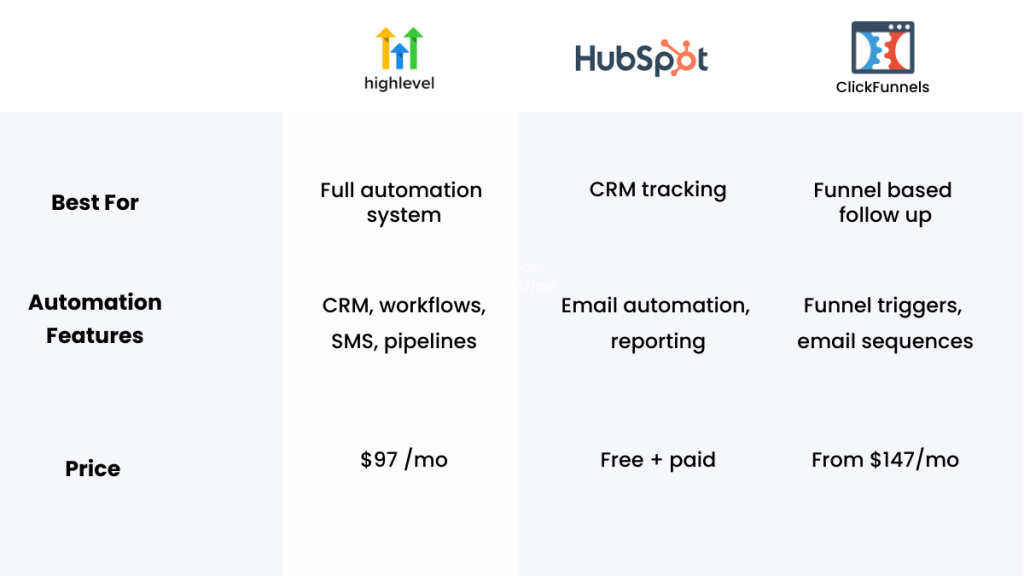
| Platform | Best For | Automation Features | Pricing |
|---|---|---|---|
| GoHighLevel | Full automation system | SMS, email, workflows, CRM | From $97/mo |
| ClickFunnels | Lead generation funnels | Basic follow-up | From $97/mo |
| HubSpot | CRM management | Email + pipeline tracking | Free → paid |
Most businesses don’t choose the wrong tool because of features.
They choose wrong because it doesn’t match how fast leads behave.
Where Most Businesses Still Go Wrong
They install tools…
…but don’t build systems.
They:
- create forms
- connect email
- stop
That’s not automation. That’s delay with extra steps.
Internal Reads That Make This Work
If you’re trying to build a complete system, understanding how a CRM with automation for small businesses works will make this clearer.
If you’re missing phone enquiries, the logic behind a missed call text back system shows how to capture leads you never answered.
And if you’re comparing platforms, best GoHighLevel alternatives will help you choose properly.
Decision: What Should You Use?
- Use GoHighLevel if you want to capture leads automatically and respond instantly
- Use ClickFunnels if your focus is generating leads
- Use HubSpot if you need structured CRM processes
If your problem is missed leads, automation matters more than features.
If your system still relies on manual replies, switching to an automated platform like GoHighLevel removes delays immediately.
Bringing It All Together
To capture leads automatically, you need:
- instant capture
- instant response
- structured follow-up
- pipeline tracking
Anything less creates gaps where leads disappear.
Before You Decide (Tool Reinforcement)
At this point:
- GoHighLevel → best for complete automation
- ClickFunnels → best for lead generation
- HubSpot → best for CRM
The right tool is the one that removes manual work and delay.
Final Thought
You don’t lose leads because you don’t have them.
You lose them because your system doesn’t act fast enough.
If you want to fix this properly, start by building a simple automated system that captures and responds instantly.
FAQ
Why aren’t my forms converting leads?
Because there’s no instant response or follow-up. Leads don’t wait.
What does capturing leads automatically mean?
It means leads are stored, responded to, and tracked instantly without manual input.
Do I need automation tools for this?
Yes. Without automation, response delays are unavoidable.
What’s the biggest mistake?
Thinking a form alone is enough.
Suggested Reads
If you want to build this properly, start by understanding how a CRM with automation for small businesses works.
Then look at how a missed call text back system captures leads you would otherwise lose.
And if you’re comparing tools, best GoHighLevel alternatives will help you decide.