
Affiliate links – I earn a commission if you sign up through this page, at no extra cost to you. That’s exactly why the weaknesses below aren’t softened. If GoHighLevel isn’t right for your business, I’d rather you know before you start a trial
The GoHighLevel AI Employee is HighLevel’s bundle of AI tools: a chatbot that replies to leads, a voice agent that answers calls, plus review replies, content generation and workflow helpers. Almost every guide to it is written for agencies reselling AI to clients. This one is written for the person who runs a business and wants to know what it costs them each month, and whether they need it at all.
Short version: HighLevel sells it as $50 or $97 per location per month, or as pay-per-use with no monthly fee. On HighLevel’s published rates, a small business with modest call and chat volume often pays less on pay-per-use than on either subscription.
Method note: every price below comes from HighLevel’s own help pages, checked on 24 October 2026. The worked examples are my arithmetic from those published rates, not measured bills from a live account.
Key Takeaways
- Three ways to pay: Pay-Per-Use ($0 a month, billed per use), Growth ($50 per location per month) and Unlimited ($97 per location per month). All sit on top of your HighLevel plan.
- Voice costs from $0.06 a minute: the voice engine is $0.045 a minute and the cheapest voice adds $0.015, before AI model tokens and phone charges.
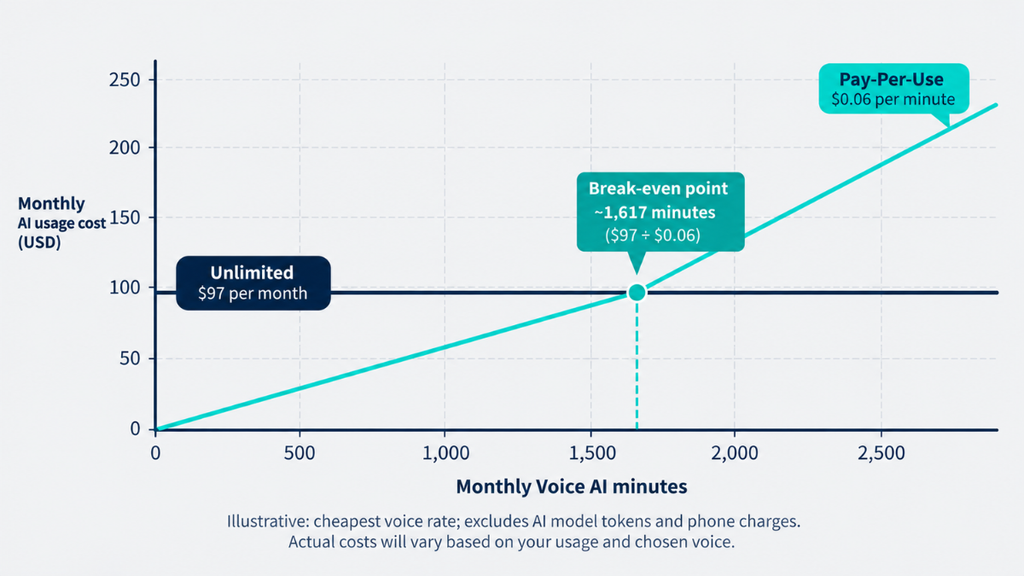
- Unlimited only wins at high volume: on the cheapest voice, it breaks even at roughly 1,600 call minutes a month.
- Phone and SMS are extra on every plan: the AI plan does not cover call or text charges.
- “Unlimited” has a fair-use limit: HighLevel does not publish a number for it.
- Skip it if you have fewer than a few dozen calls or chats a month, or no process for what happens after the AI books a lead.
- Location: directly under the Key Takeaways box
- File name: gohighlevel-ai-employee-hero.webp
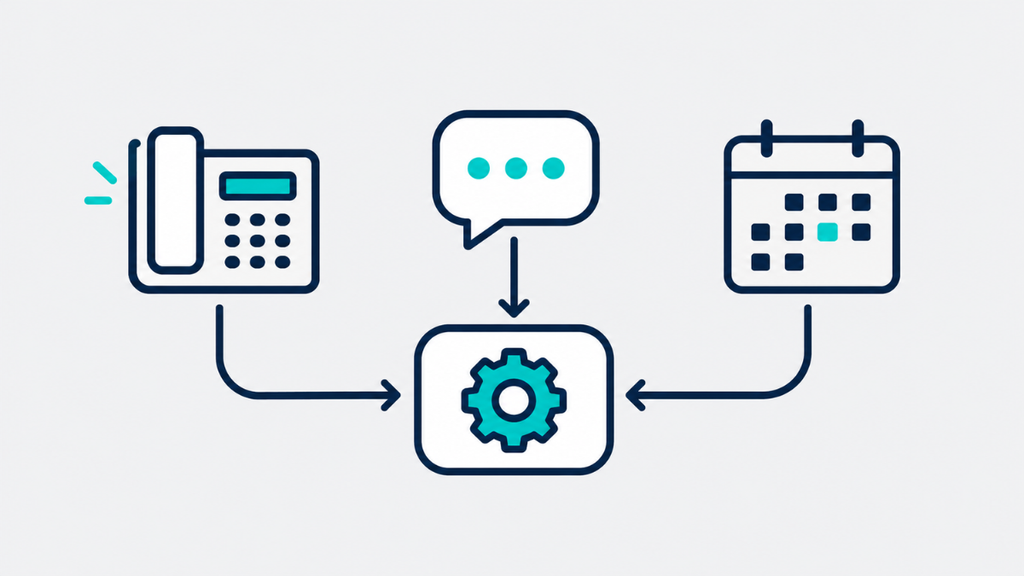
- Alt tag: Flat illustration of a phone, chat bubble and calendar connected by arrows, representing the GoHighLevel AI Employee
- Prompt: Flat illustration on a light grey background, clean and minimal. A desk phone icon, a chat bubble icon and a calendar icon arranged in a row and joined by simple arrows leading into a single rounded rectangle labelled with a small gear icon. No people, no figures, no colours, line and shape style only.
What Is the GoHighLevel AI Employee?
Despite the name, the GoHighLevel AI Employee is not one product. It is HighLevel’s label for a group of AI features that share a pricing plan. HighLevel’s help documentation lists these as part of it or working alongside it:
| Tool | What it does | How it’s billed on Pay-Per-Use |
|---|---|---|
| Conversation AI | Replies to leads by text, chat, email and social messages | AI model token cost |
| Voice AI | Answers or makes phone calls | Voice engine + voice + AI model, per minute |
| Reviews AI | Drafts replies to Google reviews | $0.01 per reply sent |
| Content AI | Writes text and makes images | $0.063 per image, $0.0945 per 1,000 words |
| Workflow AI | Adds AI steps inside automations | $0.01 per premium action |
| Funnel and Website AI | Builds pages from a prompt | Free, up to 1,000 prompts a day per location |
| Email AI and Knowledge Base | Email drafting and the knowledge store that agents read from | Included on all plans, subject to fair use |
Agent Studio, the builder for custom AI agents, is separate: HighLevel bills it per use on every plan and does not include it in any subscription. AI Studio, the website and app builder, is a different product. On Growth and Unlimited its usage is included, measured in five-hour windows with a limit per plan (Unlimited gets three times Growth’s usage), and on Pay-Per-Use it is billed at token cost.
HighLevel keeps adding to this. In the last two weeks its changelog added working-hours and off-hours replies for Conversation AI agents, noise cancellation for Voice AI, and Facebook comment replies for managed agents.
GoHighLevel AI Employee Pricing: The Three Plans
HighLevel’s AI pricing article sets out three plans, all in US dollars.
| Pay-Per-Use | Growth | Unlimited | |
|---|---|---|---|
| Monthly fee | $0 | $50 per location | $97 per location |
| Conversation AI | Token cost | 1,000 responses, then token cost | Unlimited, fair use |
| Voice AI | Per-minute cost | 100 minutes, then pay-per-use rates | Unlimited, fair use |
| Reviews AI and Content AI | Per use | Unlimited, fair use | Unlimited, fair use |
| Managed agents | Token cost | 100 runs a month | 1,000 runs a month |
Three details matter that most pages skip:
- It is per enabled location. Each sub-account you switch it on for is billed separately.
- Phone System charges apply on every plan. HighLevel states that call and text charges are billed separately regardless of plan. For the text side, see my breakdown of GoHighLevel SMS costs.
- Fair use is not defined. The pricing article says Unlimited is “subject to fair use” and gives no numeric cap. Any page quoting a specific cap is guessing.
Voice AI rates
Voice is where the money goes, so here are HighLevel’s published rates:
- Voice engine: $0.045 a minute.
- Voice (text-to-speech): $0.015 a minute with OpenAI or Cartesia voices, $0.035 with ElevenLabs V2.5, $0.170 with ElevenLabs V3.
- AI model: billed on top by tokens, at rates such as $0.40 per million input tokens for GPT-4.1 Mini or $1.25 for GPT-5.
- Speech-to-speech: $0.10 a minute all in with Google’s Gemini model, $0.20 with OpenAI’s realtime model.
So the cheapest voice agent costs $0.06 a minute before model tokens and phone charges, and $0.08 with ElevenLabs V2.5. You will see older guides quoting $0.13 a minute. That figure comes from HighLevel’s January 2025 launch post and is out of date.
Conversation AI rates
Chat replies are billed on AI model tokens, not per message. HighLevel lists, per million tokens, input and output: GPT-5 $1.25 and $10.00, GPT-5 Mini $0.25 and $2.00, GPT-4.1 $2.00 and $8.00, GPT-4.1 Mini $0.40 and $1.60. The older “$0.02 a message” figure still circulating is from the 2025 launch.
What a Small Business Actually Pays
Here are three scenarios worked from HighLevel’s published rates. They are illustrations of the arithmetic, not real client bills. Every figure excludes phone and SMS charges, and the voice figures exclude AI model tokens, which stay small for short calls but depend on the model you choose.
Scenario 1: A missed-call receptionist. A trades or clinic business gets 150 calls a month, averaging 2.5 minutes. That is 375 minutes.
- Pay-Per-Use: 375 x $0.06 = $22.50
- Growth: $50, with 100 minutes included. The other 275 minutes cost $16.50, so $66.50
- Unlimited: $97
Scenario 2: Text and chat replies only. 2,000 AI replies a month. I assumed each reply reads about 2,000 tokens (the conversation plus the knowledge base) and writes about 200.
- On GPT-5 Mini: about $0.0009 a reply, so roughly $1.80 a month.
- On GPT-4.1: about $0.0056 a reply, so roughly $11 a month.
- Growth’s 1,000 included responses are worth about $1 to $6 on those numbers.
Scenario 3: A busy call line. 1,800 minutes a month, which is about 720 calls at 2.5 minutes.
- Pay-Per-Use: 1,800 x $0.06 = $108
- Unlimited: $97
The pattern is plain. On voice alone, Unlimited beats Pay-Per-Use at about 1,617 minutes a month on the cheapest voice, or about 1,212 minutes with ElevenLabs V2.5. Below that, you pay more for the subscription than for the usage. These break-even points assume the cheapest voices and leave out AI model tokens and phone charges. Tokens are billed on top under Pay-Per-Use, so the true break-even is somewhat lower. Phone charges are the same on every plan, so they do not change which plan wins. Growth is the hardest to justify: on scenarios 1 and 2 the included allowances are worth roughly $7 to $12, against a $50 fee. It makes more sense only if you also use the managed-agent runs or want unlimited Reviews AI and Content AI.
For a typical single-location business, a total bill in scenario 1 looks like your HighLevel plan plus about $22.50 of usage plus phone charges. On a $97 Starter plan, that is roughly $120 before phone charges, or about £113 including UK VAT at £0.79 per dollar and 20% VAT, the same method as my GoHighLevel pricing guide. Your own bill will move with the exchange rate.
- Location: directly under the scenarios section
- File name: gohighlevel-ai-employee-plan-breakeven.webp
- Alt tag: Flat diagram comparing Pay-Per-Use, Growth and Unlimited AI Employee plans against monthly call minutes
- Prompt: Flat illustration on a light grey background, clean and minimal. A horizontal axis marked with small tick marks for call minutes, with three simple outlined cards above it: one with a small coin icon, one with a stack icon, one with an infinity symbol. A thin line rising from the coin card crosses a flat line from the infinity card at a marked point. No people, no figures, no colours, line and shape style only.
Which Plan Should You Choose?
- Start on Pay-Per-Use if you are testing it, run one location, or handle fewer than about 1,200 call minutes a month. There is no monthly fee, so a bad month of experiments costs a few dollars.
- Choose Unlimited once your voice minutes pass roughly 1,200 to 1,600 a month, or when you run several locations with steady call volume and want a fixed cost.
- Choose Growth only if the managed-agent runs or unlimited review and content tools matter to you. On voice and chat alone it rarely pays for itself.
Want to test HighLevel before committing? Start the 30-day HighLevel trial and check which AI features are available in your account. Phone and SMS charges may apply.
If you are an agency, one more rule applies: HighLevel states you must be on the $497 a month plan to rebill AI Employee usage to clients.
Calls, Texts and Consent
This is the part nearly every guide skips, and it is where a small business can get into trouble. The rules differ by country, so treat this as a checklist of questions, not legal advice.
- Tell people it’s an AI. Say so at the start of a call or chat. Transparency rules such as the UK and EU GDPR expect you to be clear about how personal data is handled.
- Recording and transcripts. An AI call agent usually records or transcribes. Add a short notice at the start of the call, and check your local rules on recording consent.
- Marketing texts need consent. Replying to someone who contacted you is one thing. Sending promotional texts is another, and consent rules apply in the UK (PECR) and the US (TCPA).
- Don’t let it improvise. An AI agent will answer what its knowledge base says and sometimes more. Keep prices, medical advice and promises out of its remit unless you have written them in.
- Know where customer data goes. Conversations pass through AI model providers. Read HighLevel’s data terms before you put regulated information, such as health details, through it.
Who Should Skip the GoHighLevel AI Employee
Skip it, for now, if:
- You get very few calls or chats. Under a few dozen a month, a simple missed-call text-back and a good booking link will do the same job at near zero cost.
- You have no follow-up process. An AI that books a lead into an empty calendar still loses the job. Fix the process first, as covered in my guide to lead follow-up systems.
- You only need job management. Tools like Jobber include their own AI receptionist add-on, listed at $29 a month on Jobber’s pricing page when I checked on 12 October 2026. See my comparison of Jobber CRM and HighLevel.
- You are not already using HighLevel. The AI Employee is an add-on to a HighLevel plan, not a standalone product.
Recommended: Start With the Trial
If you want to see the GoHighLevel AI Employee working before you spend anything, set up a HighLevel account and start on Pay-Per-Use, which has no monthly fee. I could not find HighLevel stating which AI plans can be switched on during the trial, so use Pay-Per-Use to test chat and calls, and check the AI plan setting in your sub-account.
The 30-day HighLevel bootcamp trial is my default link. It starts on the Starter plan, the subscription cost is not charged during the trial, and communication surcharges such as phone and SMS may apply.
If a sale is running, check my GoHighLevel discount guide first, because there is no coupon code and the timing of sales matters.
- Location: directly under the Recommended section
- File name: gohighlevel-ai-employee-missed-call-flow.webp
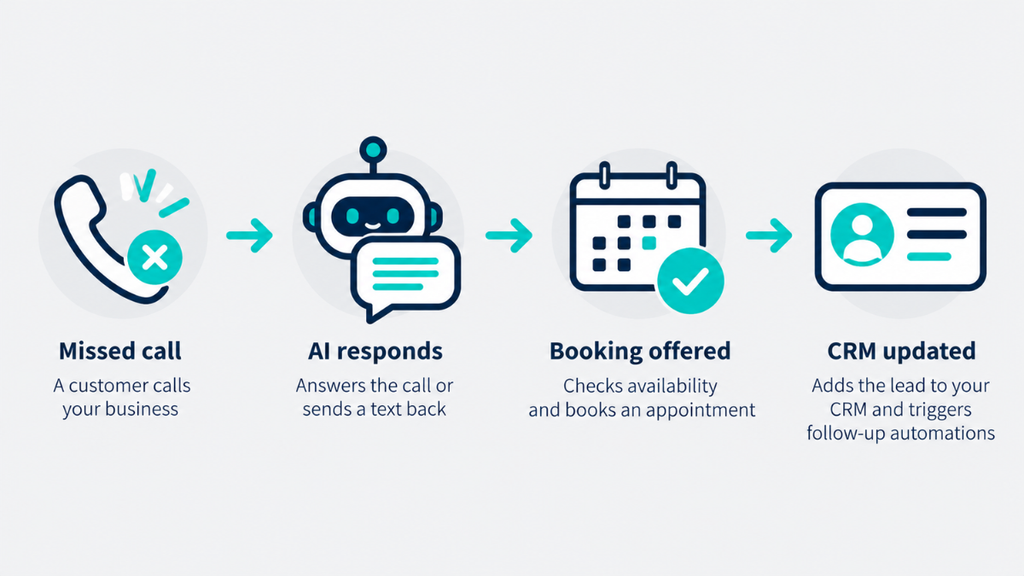
- Alt tag: Flowchart of a missed call handled by an AI agent that books an appointment and updates the CRM
- Prompt: Flat illustration on a light grey background, clean and minimal. A left-to-right flowchart: a phone icon with a small missed-call mark, an arrow to a rounded rectangle with a speech-bubble icon, an arrow to a calendar icon, and a final arrow to a contact-card icon. No people, no figures, no colours, line and shape style only.
Already on HighLevel and want it set up properly? I configure the account, one pipeline and one core automation, such as missed-call text-back or lead follow-up, for a fixed £347, with optional ongoing support. Details are on my HighLevel consultant page.
Final Verdict
The GoHighLevel AI Employee is worth it when you already have enough calls and chats for an AI to take real work off you, and a process to catch what it books. For most single-location businesses the sensible route is HighLevel’s pay-per-use pricing, then a move to Unlimited once voice minutes climb past roughly 1,200 to 1,600 a month. The $50 Growth plan rarely makes sense on its own numbers.
Treat the AI as an extra layer on a working lead process, not a replacement for one. For the wider picture of how HighLevel’s AI tools connect, see my GoHighLevel AI agent guide, and for the add-on costs that catch people out, my hidden costs guide.
FAQ
How much does the GoHighLevel AI Employee cost?
HighLevel lists three options: Pay-Per-Use with no monthly fee, Growth at $50 per location per month, and Unlimited at $97 per location per month. These sit on top of your HighLevel plan, and phone and SMS charges are billed separately. Voice calls start at about $0.06 a minute before AI model tokens.
Is the GoHighLevel AI Employee free?
No. Pay-Per-Use has no monthly fee, but you pay for each use. Some tools are free within limits: Funnel and Website AI is free up to 1,000 prompts a day per location, and Email AI and the Knowledge Base are included on all plans, subject to fair use.
Is Unlimited really unlimited?
HighLevel describes it as “unlimited, subject to fair use” and does not publish a number. Expect normal business use to be fine, and ask HighLevel support before you plan around very high volumes.
Can it answer phone calls?
Yes, through Voice AI, which can take inbound calls, make outbound calls and run on website widgets. Phone System charges apply on top of the AI cost.
What happens when Growth runs out of usage?
Per HighLevel’s pricing article, usage beyond Growth’s allowances, such as the 100 voice minutes or 1,000 Conversation AI responses, is billed at Pay-Per-Use rates.
Do I need an agency account to use it?
No. It is enabled per location on a normal account. You only need the $497 a month agency plan to rebill AI usage to clients.
Is the AI Employee the same as AI Studio or Agent Studio?
No. AI Studio builds websites and apps from prompts, and Agent Studio builds custom AI agents. Agent Studio is billed per use on every plan. AI Studio usage is included in Growth and Unlimited, measured in five-hour windows with a limit per plan (Unlimited gets three times Growth’s usage), and billed at token cost on Pay-Per-Use.
Suggested Reads
GoHighLevel Cost 2026 → what the platform really costs per month
GoHighLevel SMS Cost → text and call charges the AI plan doesn’t cover
GoHighLevel Hidden Costs → the add-on charges that catch people out
GoHighLevel AI Agent → how HighLevel’s AI agents fit together
Jobber CRM vs HighLevel → when a job-management tool is enough
GoHighLevel Discount → the real ways to save, with no coupon code