
Affiliate links – I earn a commission if you sign up through this page, at no extra cost to you. That’s exactly why the weaknesses below aren’t softened. If GoHighLevel isn’t right for your business, I’d rather you know before you start a trial
The monthly subscription fee is just the beginning. CRM pricing hidden costs are why many small businesses end up paying 20 – 40% more than expected, not because they chose the wrong tool, but because nobody told them what was actually on the invoice.
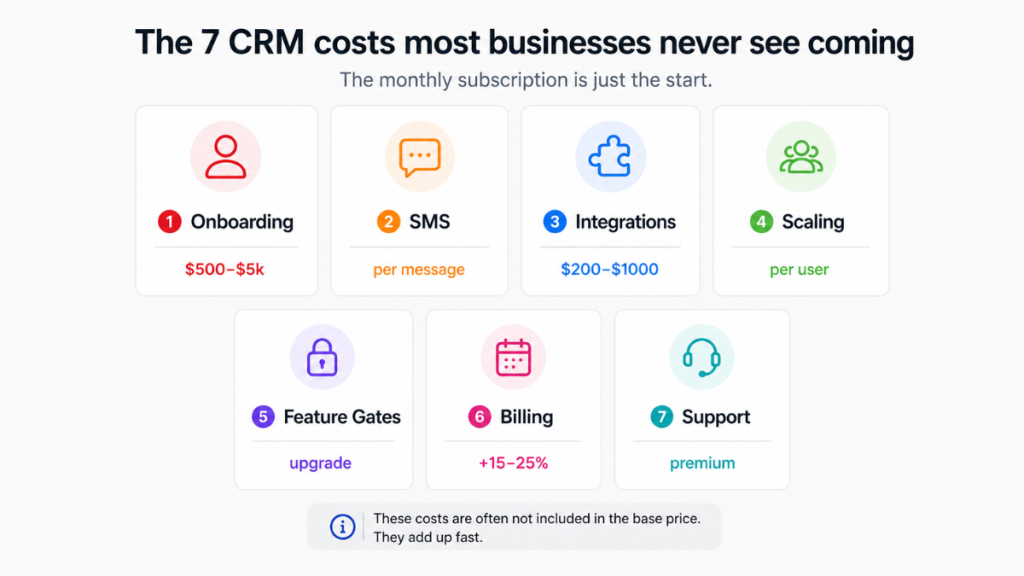
This article breaks down every cost you need to factor in before committing to a CRM – including the ones vendors bury in the small print.
Key takeaways
- Businesses underestimate total CRM costs by 20–40% due to add-ons, integrations and scaling (industry pricing research, Flowii 2026)
- Onboarding and training alone can cost $500–$5,000 depending on team size (SaasCRMHub 2026)
- API calls and integrations can add $200–$1,000/month on top of your base subscription (SaasCRMHub 2026)
- HubSpot charges a mandatory $1,500 onboarding fee for Professional tier – non-negotiable at sign-up (verified March 2026)
- Monthly billing adds 15–25% extra vs annual billing across all major platforms
- GoHighLevel’s flat-rate model bundles most of these costs into one price – making it more predictable for small businesses
Why CRM Pricing Is Never What It Looks Like
Most CRM comparison articles show you a table of monthly per-user costs and call it done. That’s useful for roughly 60% of the actual cost. The rest is hiding in onboarding fees, SMS charges, integration costs, storage limits, and feature gates that only reveal themselves after you’ve signed up.
As a software tester, I’ve seen this pattern repeatedly, the advertised price is the entry point, not the total cost. Before you commit to any platform, you need to understand what the total monthly cost really looks like. See our full CRM pricing 2026 breakdown for a platform-by-platform comparison.
The 7 Hidden CRM Costs Most Businesses Miss
1. Onboarding and Setup Fees
This is the most common shock for small businesses, and the one most often hidden until checkout.
Many CRMs charge mandatory onboarding fees before you can access the platform properly. HubSpot’s Professional tier requires a $1,500 onboarding fee that is non-negotiable at sign-up. Enterprise tier runs $3,500–$7,000. These aren’t optional extras, they’re gatekeeping your access to the features you’re actually paying for.
Across the industry, onboarding and training costs typically run $500–$5,000 depending on team size and platform complexity. If you’re migrating from spreadsheets or another CRM, add data migration costs on top, complex migrations with data cleansing can run into thousands.
2. SMS and Phone Charges
This one catches almost every small business off guard – especially those using GoHighLevel, HubSpot, or ActiveCampaign for automated follow-up.
SMS isn’t included in your base subscription. It’s charged per message, per month, on top of your plan. On GoHighLevel, SMS, phone calls, voicemail drops, and emails are all usage-based via their LC Phone system. The cost is low per message, but it adds up quickly if you’re running automated follow-up sequences across a full pipeline.
Before you commit to any CRM that includes SMS automation, ask specifically: what is the per-message cost, is there a monthly minimum, and what does a typical month of automated follow-up actually cost at your lead volume? Our GoHighLevel pricing UK & US breakdown covers this in full detail including real SMS cost examples.
3. Per-User Costs That Scale Fast
The advertised price is almost always per user, per month. What looks like £15/month becomes £75/month the moment you have a team of five. Add annual billing to lock in the rate, and you’ve committed to £900 before you’ve sent a single automated email.
Most platforms also tier their features by user count, meaning the features you actually need (automation, reporting, pipeline management) often require a higher per-user tier than the entry price suggests. You end up paying for the mid-tier plan across every seat, not just the one or two power users who need the advanced features.
Check our CRM packages for small businesses guide for a breakdown of what each tier actually unlocks.
4. Integration Costs
Your CRM needs to talk to your email platform, your calendar, your forms, your payment processor, and potentially your accounting software. Some of those integrations are native and free. Many aren’t.
API calls and third-party integrations can add $200–$1,000 per month on top of your base subscription depending on the platforms you’re connecting and the volume of data being synced. Zapier or Make workflows add their own monthly cost on top of that.
If you’re running a small business with 5–10 tools in your stack, this cost is worth mapping out before you sign up, not after.
5. Feature Gates
This is perhaps the most frustrating hidden cost: the features you need are in the plan above the one you bought.
Email automation, advanced reporting, pipeline customisation, and lead scoring are all commonly locked behind mid or high-tier plans. You sign up for the starter plan because the price looks right, then discover within 30 days that the thing you actually needed, usually automation – requires an upgrade.
Always map your must-have features to the specific plan tier before committing. Our CRM software pricing guide breaks down which features appear at which tier across the major platforms.
6. Monthly vs Annual Billing
Choosing monthly billing over annual adds 15–25% to your cost across every major CRM platform. That’s not a small difference – on a £50/user/month platform with 5 users, it’s an extra £750–£1,500 per year just for the flexibility of not committing annually.
Most businesses default to monthly billing when they’re testing a new platform. That’s sensible for the first month. But many stay on monthly billing indefinitely without realising the cost difference. Annual billing almost always makes sense once you’ve confirmed the platform works for your team.
7. Support and Maintenance Costs
Free CRMs and entry-tier plans typically come with community support, knowledge bases, and chat bots. If you need a human, especially if something breaks during a busy period, premium support packages can cost $100+ per user per year.
On platforms like Salesforce, faster support response times cost 30% of your net licence fees. For a small business that isn’t running a dedicated IT team, this is a cost worth factoring in – particularly during onboarding and initial setup.
If you’re still deciding which CRM to use, I’ve broken down the best options here: best CRM for small business.
What Does a CRM Actually Cost Per Month? (Real Scenarios)
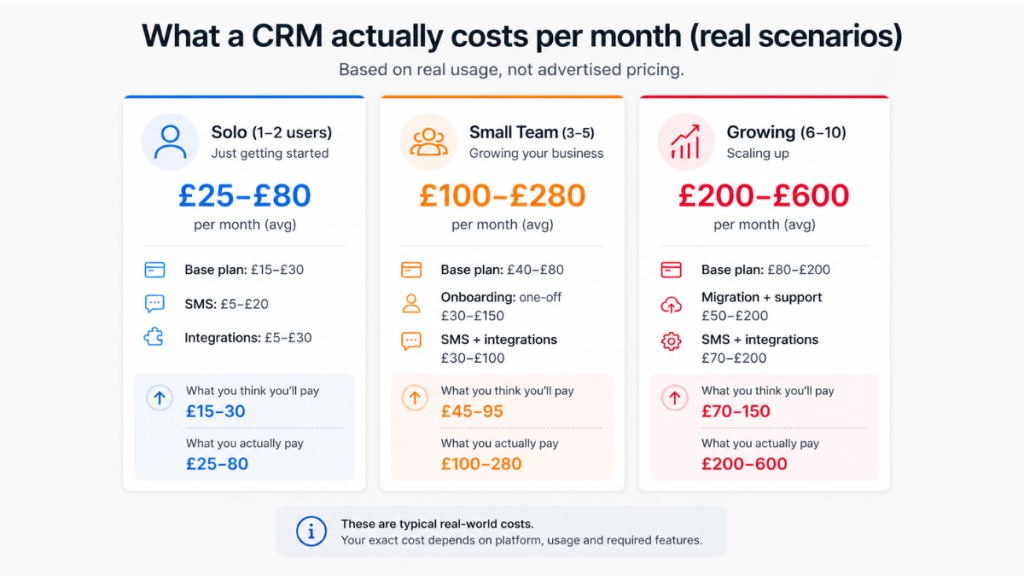
Here’s what total CRM cost actually looks like across different team sizes, based on verified 2026 pricing data:
Solo operator / 1–2 users Base plan: £15–£30/month SMS and phone usage: £10–£30/month Integrations: £0–£20/month Real monthly cost: £25–£80/month
Small team / 3–5 users Base plan: £45–£150/month Onboarding (one-off): £400–£1,200 SMS and integrations: £30–£80/month Real monthly cost (year 1): £100–£280/month equivalent
Growing business / 6–10 users Base plan: £90–£300/month Onboarding and migration: £800–£3,000 SMS, integrations, premium support: £80–£200/month Real monthly cost (year 1): £200–£600/month equivalent
The jump from “what it says on the pricing page” to “what you actually pay” is where most businesses get caught out. See our best free CRM for small business guide if you’re at the earlier stage and want to test before committing to paid.
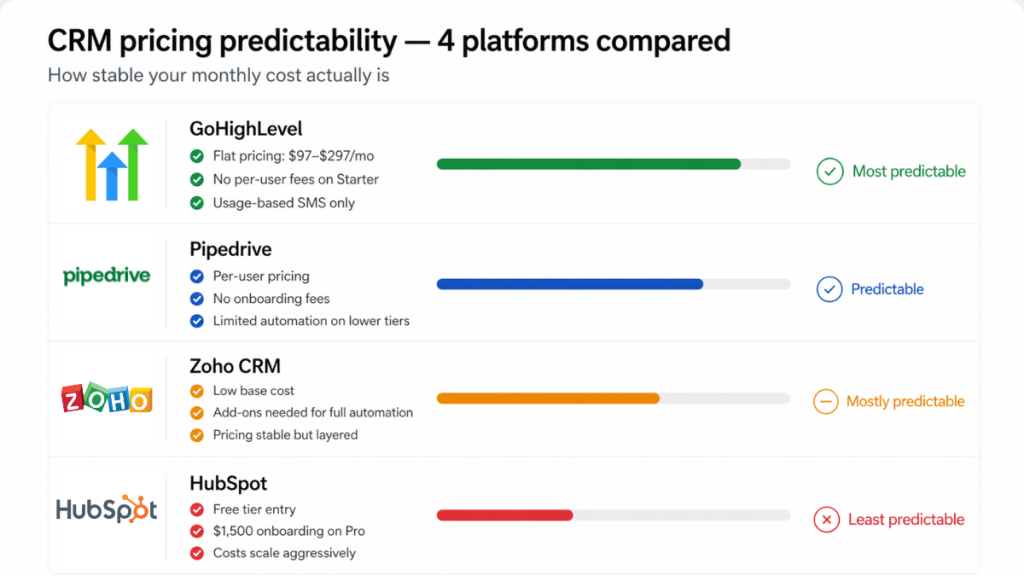
This is where pricing models start to matter – because not all CRMs structure costs the same way.
Which CRM Has the Most Predictable Pricing?
Based on our testing, predictability comes down to one question: does the platform charge a flat rate or a usage-based rate for the things you’ll use daily?
GoHighLevel – flat monthly rate ($97 Starter / $297 Unlimited) covers CRM, pipelines, automation, funnels, email, and calendars. SMS and phone are usage-based on top, but everything else is included. No per-user costs on the Starter plan. For small businesses running automated follow-up, it’s the most predictable total cost we’ve tested. See the full GoHighLevel hidden costs breakdown for the complete picture.
HubSpot – generous free tier, but the paid tiers jump sharply and the mandatory onboarding fees make the Professional plan expensive to enter. Best for businesses that need the marketing-sales integration and have budget for the onboarding cost.
Pipedrive – clean per-user pricing with no hidden onboarding fees. Good for sales-focused teams who don’t need heavy automation. See our Pipedrive review UK for a full breakdown.
Zoho CRM – consistently the most affordable per-user option. Pricing has been stable since 2023 and the Professional plan includes features that cost significantly more on HubSpot.
Not sure which platform fits your setup? Our best CRM for small business UK guide compares all four side by side.
Ready to see GoHighLevel’s pricing in full – including what it replaces and what it costs in GBP?
See GoHighLevel Pricing UK & US →
Summary
CRM pricing hidden costs are the reason most businesses end up paying significantly more than they expected. Onboarding fees, SMS charges, integration costs, feature gates, and per-user scaling all add up, often before you’ve had a chance to properly evaluate whether the platform is working.
The fix is simple: map your total cost of ownership before you sign up, not after. Know which features you need, which tier they sit in, what your SMS usage will look like, and whether you’re committing to annual or monthly billing.
If predictable pricing matters to you, GoHighLevel’s flat-rate model removes most of these variables, making it easier to know exactly what you’re paying and why.
FAQs
What are the most common CRM pricing hidden costs? The most commonly missed CRM pricing hidden costs are onboarding fees, SMS and phone usage charges, integration costs, feature gates that lock key features behind higher tiers, and the price difference between monthly and annual billing. Together these can add 20–40% to your expected total cost.
Does HubSpot have hidden fees? Yes – HubSpot’s most significant hidden cost is the mandatory onboarding fee. The Professional tier requires a $1,500 onboarding fee that cannot be waived at sign-up. Enterprise runs $3,500–$7,000. These are in addition to the monthly per-user subscription cost.
Is GoHighLevel cheaper than HubSpot overall? For most small businesses, yes. GoHighLevel’s flat-rate pricing covers CRM, automation, funnels, email, and pipelines in one subscription with no per-user costs on the Starter plan and no mandatory onboarding fee. HubSpot’s free tier is useful for testing but the Professional tier becomes expensive quickly once onboarding fees are factored in. See our full GoHighLevel vs HubSpot comparison for a detailed breakdown.
How much does CRM cost for a small business per month in reality? A solo operator can expect to pay £25–£80/month in total once SMS and integrations are included. A small team of 3–5 users typically pays £100–£280/month equivalent in year one once onboarding is factored in. These figures are significantly higher than the advertised per-user base price suggests.
Is free CRM actually free? Free CRM tiers are genuinely useful for testing and early-stage businesses but almost always have feature limitations that require upgrading within 6–12 months. Storage caps, automation limits, and lack of reporting are the most common triggers for upgrade. See our best free CRM for small business guide for which free tiers are worth starting with.
Suggested Reads
CRM Pricing 2026: What You Should Actually Expect to Pay → platform-by-platform cost breakdown for small businesses
GoHighLevel Pricing UK & US → real costs in GBP including SMS and phone fees
GoHighLevel Hidden Costs → everything GoHighLevel charges beyond the base plan explained
Best CRM for Small Business UK → side-by-side comparison of the top platforms on pricing and features