
Affiliate links – I earn a commission if you sign up through this page, at no extra cost to you. That’s exactly why the weaknesses below aren’t softened. If GoHighLevel isn’t right for your business, I’d rather you know before you start a trial
Most businesses don’t have a lead problem. They have a response problem. And understanding why businesses lose leads is the first step to actually fixing it — not by spending more on ads, but by building a system that works.
If you’ve ever wondered where your enquiries went, why your conversion rate feels lower than it should, or why leads seem to go cold for no reason — this article is for you.
Key takeaways
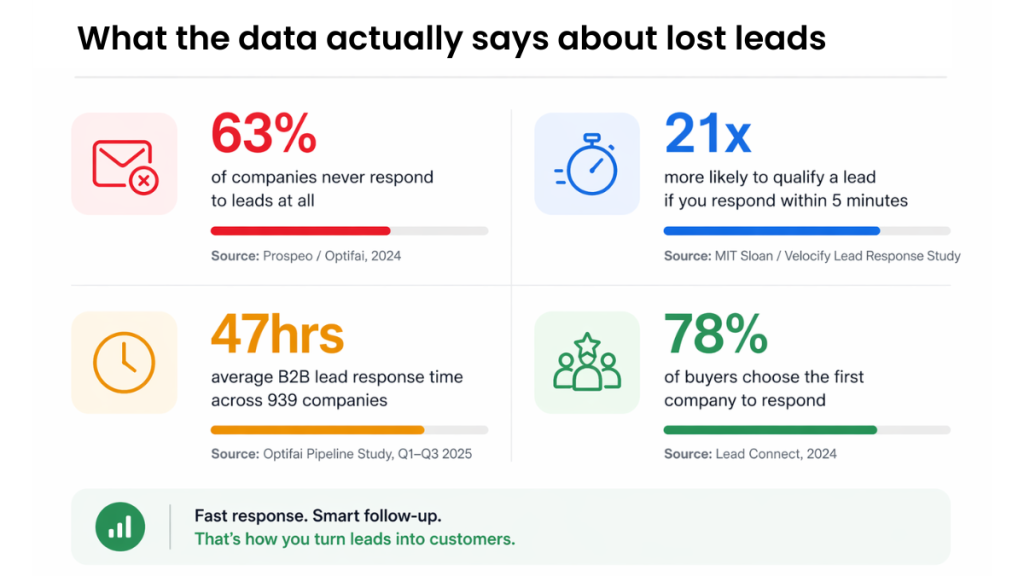
- 63% of companies never respond to leads at all (Optifai, 2024)
- The 4 main reasons businesses lose leads are slow response, no follow-up, fragmented tools, and no tracking
- Responding within 5 minutes makes you 21x more likely to qualify a lead (MIT Sloan / Velocify)
- A CRM fixes all four failure points — but only when used as an active system, not a contact database
- The goal is to automate response, systemise follow-up, and track every lead from arrival to decision
You’re not losing leads because of bad marketing.
You’re losing them because you’re too slow to respond.
Get the system that responds to every enquiry automatically – even when you’re on a job.
The Real Reason Leads Disappear
Here’s the uncomfortable truth: the majority of lost leads weren’t bad leads. They were good leads that hit a broken system.
Research consistently shows that nearly three-quarters of all internet leads are wasted — not because the marketing failed, but because the follow-up did. Leads don’t disappear because they changed their mind. They disappear because no one got back to them fast enough, consistently enough, or with enough relevance.
The businesses winning right now aren’t the ones generating the most leads. They’re the ones converting the highest percentage of the leads they already have.
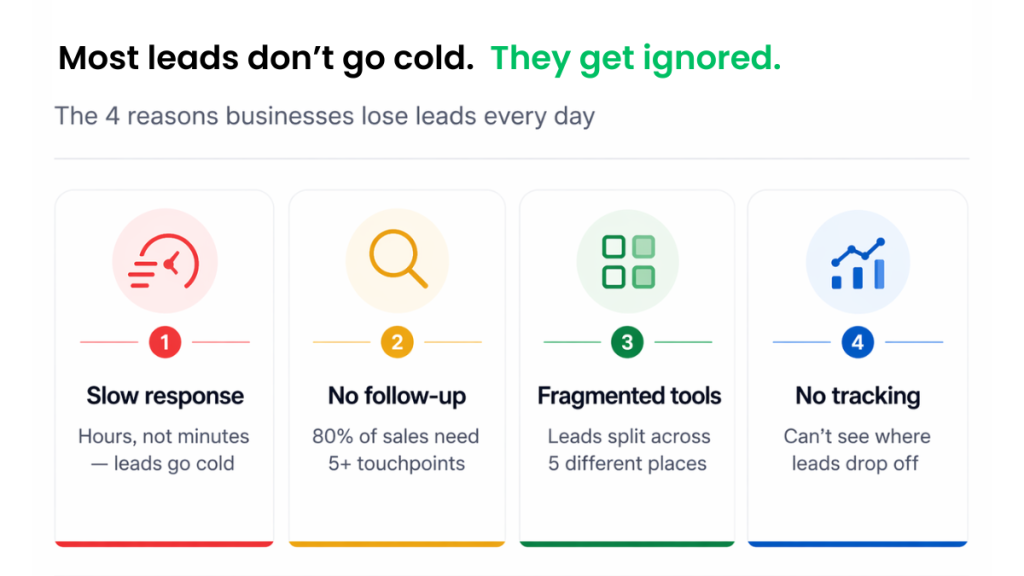
4 Reasons Why Businesses Lose Leads
Reason 1: Slow Response Time
Speed is the single biggest factor in whether a lead converts — and most businesses are terrible at it.
Studies show that businesses responding within five minutes are 100x more likely to convert than those who wait. Yet the average response time across small businesses runs into hours, sometimes days. By that point, your lead has already filled out a competitor’s form.
It’s not that teams are lazy. It’s that without automation, speed at scale is impossible. Someone has to see the notification, stop what they’re doing, craft a reply, and send it. That chain of events fails constantly.
Reason 2: No Follow-Up System
Most businesses give up after one or two attempts. The data says that’s a mistake.
Around 80% of sales require five or more touchpoints before a decision is made. If you’re sending one follow-up email and then moving on, you’re leaving the majority of your potential revenue on the table. Most leads need to be nurtured — not chased, but consistently and helpfully reminded that you exist and that you can solve their problem.
Without a structured lead follow-up system, this never happens reliably. CRM automation is what makes consistent follow-up possible without it depending on a person remembering to do it.
Reason 3: Leads Scattered Across Tools
A lead comes in via your website form. Another one messages you on Facebook. Someone emails directly. A third fills in a landing page from a paid ad. They all go to different places, get handled by different people (or no one), and fall through the cracks entirely.
This is one of the most common reasons why businesses lose leads — not negligence, but fragmentation. When your contact data lives in five different places, nothing works together, and the most valuable buying signals get missed entirely.
Reason 4: No Tracking or Visibility
If you can’t see where leads are in your pipeline, you can’t manage them. You can’t identify where they’re dropping off. You can’t tell which source is producing the best quality enquiries. You’re essentially flying blind.
Without tracking, you keep investing in the same broken process — because you have no way of knowing it’s broken.
What This Actually Costs You
It’s easy to dismiss a lost lead as a one-off. But stack them up and the picture changes.
For appointment-based businesses and high-ticket service providers especially, one lost lead per week could represent thousands of pounds in annual revenue. And when you factor in what a CRM actually costs versus what you’re losing, the maths usually isn’t close.
| Lead volume per week | Lost to slow response (50%) | Average job value | Monthly revenue lost |
|---|---|---|---|
| 5 leads | 2-3 | £250 | £1,000-£1,500 |
| 10 leads | 5 | £250 | £2,500 |
| 20 leads | 10 | £250 | £5,000 |
What Actually Fixes It
Before jumping to tools, understand what you actually need: a system that captures every lead the moment it arrives, responds immediately, and follows up automatically until a decision is made.
That system has four components:
- A single place for all incoming leads — regardless of source
- An instant automated response — so no lead ever sits waiting
- A structured follow-up sequence — that runs without manual input
- Pipeline tracking — so you can see every lead, at every stage
This is exactly what a CRM is designed to do. Not as a contact database. As an active lead management system. You can test this setup with a GoHighLevel 14-day free trial before committing to a paid plan.
What a Proper Lead System Looks Like
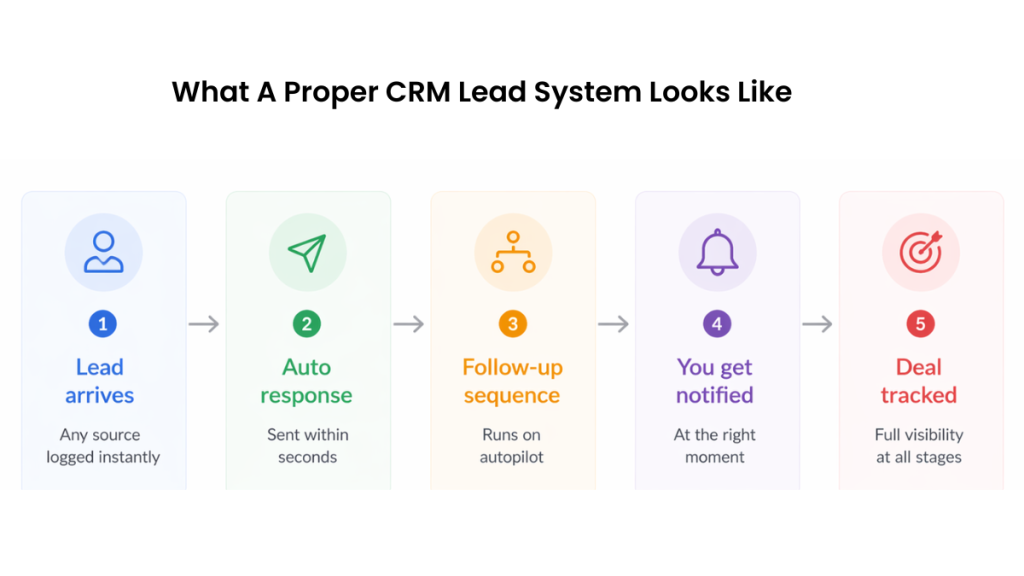
Here’s how it works when it’s set up correctly:
Lead comes in → immediately logged in your CRM, regardless of whether it arrived via form, ad, email, or social.
Instant response sent → an automated reply goes out within seconds. Not a generic “thanks for your enquiry” — a personalised message that sets expectations, confirms receipt, and signals what happens next.
Follow-up sequence begins → over the following days, the CRM sends a series of relevant, timed messages. Educational content, case studies, a soft call to action. The lead is being nurtured, not harassed.
You get notified at the right moment → when the lead engages (opens an email, clicks a link, revisits your site), your CRM flags it and tells you to call.
Everything is tracked → you can see every lead, where they came from, what stage they’re at, and what your conversion rate is across each source.
It’s simple in theory — but without the right system behind it, it doesn’t work in practice.
→ See how to build an automated lead follow-up system that actually works
Which CRM Actually Does This Properly?
Not all CRMs handle this equally. Some are built for large enterprise sales teams and are overkill for small businesses. Others are so stripped back they don’t have the automation capabilities you actually need.
The platforms worth considering for small businesses and service providers are the ones that combine pipeline management, automated follow-up, and lead tracking in a single interface — without requiring a developer to set them up. GoHighLevel, for example, is built specifically around this workflow — you can see a full breakdown of GoHighLevel pricing if you want to understand what it costs versus what it replaces.
Not sure which CRM actually fixes this properly? See our full breakdown of the best CRM tools for small business in 2026 — including which one fits your setup.
Summary
The reason why businesses lose leads almost never comes down to lead quality. It comes down to what happens after the lead arrives. Slow responses, absent follow-up, fragmented tools, and no visibility over your pipeline — these are the four failure points that cost businesses revenue every single day.
A CRM fixes all four — but only if it’s set up as a live system, not a filing cabinet. The goal is to automate the response, systemise the follow-up, and give yourself the tracking to see exactly where your pipeline is leaking.
Fix the system first. Then invest in more leads.
FAQs
Why are businesses losing leads in the first place? The most common reason why businesses lose leads is response time. Studies show that leads are 100x more likely to convert when contacted within five minutes — but most businesses take hours to respond. Combined with little or no follow-up, the majority of enquiries simply go cold before anyone makes a serious attempt to convert them.
How many follow-ups should I send before giving up on a lead? Most sales require at least five touchpoints before a decision is made. If you’re sending one or two follow-ups and then stopping, you’re giving up too early on the majority of your leads. A structured CRM sequence removes the need to remember this — it runs automatically until the lead responds or opts out.
Does a CRM actually improve lead conversion? Yes — when it’s used as an active management tool rather than just a contact database. CRMs that automate response, follow-up, and pipeline tracking consistently produce higher conversion rates from the same volume of leads, because fewer opportunities fall through the cracks.
What’s the difference between a lead management problem and a lead generation problem? Lead generation is about getting people into your pipeline. Lead management is about what happens once they’re in it. Most businesses blame generation when conversion is low — but the actual problem is almost always in the management. Fix the system before spending more on traffic.
Which CRM is best for small businesses trying to fix lead loss? It depends on your business type, budget, and existing tools. See our CRM comparison page for a side-by-side breakdown of the platforms we’ve tested — including automation capabilities, pricing, and which type of business each one suits best.
What percentage of leads are never followed up? Research shows that 63% of companies never respond to inbound leads at all. Of those that do respond, most stop after one or two attempts. Since 80% of sales require five or more touchpoints, the majority of leads that do get a response are still abandoned too early.
How do you recover lost leads? The most effective way to recover lost leads is a structured re-engagement sequence. Send a low-pressure message acknowledging the gap – “just checking if you’re still looking for help with this” – followed by a final closing message that leaves the door open. GoHighLevel’s automated sequences handle this without any manual effort. Leads that went cold often respond to a day 5 or day 7 message when earlier messages got no reply.
Suggested Reads
Automatic Lead Follow-Up System → The complete system for capturing and converting leads automatically
CRM Automation Software → How automation removes the manual work from lead management
GoHighLevel Pricing (2026) → Real costs broken down so you know what you’re committing to
GoHighLevel vs HubSpot (2026) → Side-by-side comparison of the two most popular options
Best CRM for Small Business UK → Full platform comparison for small businesses