
Affiliate links – I earn a commission if you sign up through this page, at no extra cost to you. That’s exactly why the weaknesses below aren’t softened. If GoHighLevel isn’t right for your business, I’d rather you know before you start a trial
CRM workflow automation is the system that makes sure every lead gets handled the same way, every time, without you manually doing anything.
For a service business – a salon, clinic, cleaning company, consultant, or trades business – that consistency is what separates businesses that convert enquiries from ones that lose them. When your follow-up depends on whether you remembered to reply, or how busy the day was, leads disappear quietly and you never know why.
CRM workflow automation removes that variable entirely. A lead comes in. The workflow fires. The response goes out within seconds. The follow-up sequence runs automatically over the next several days. The pipeline updates. You get notified only when human input is actually needed.
This guide covers what CRM workflow automation actually is, what workflows to build first, and which platforms handle it best for service businesses in 2026.
Key Takeaways
- CRM workflow automation triggers automatic actions when specific events happen – form submissions, missed calls, email opens, pipeline stage changes
- The first workflow every service business should build is the instant response – a lead that gets a reply within 60 seconds is significantly more likely to convert than one that waits hours
- Most businesses that lose leads don’t lose them because of poor service – they lose them because follow-up was slow or inconsistent
- AI-powered workflow automation in 2026 goes beyond fixed sequences – it adapts responses based on what the lead says and does
- GoHighLevel, ActiveCampaign and HubSpot are the strongest platforms for CRM workflow automation – each suited to different types of service businesses
- Start with one workflow built properly rather than five workflows built poorly
What CRM Workflow Automation Actually Means
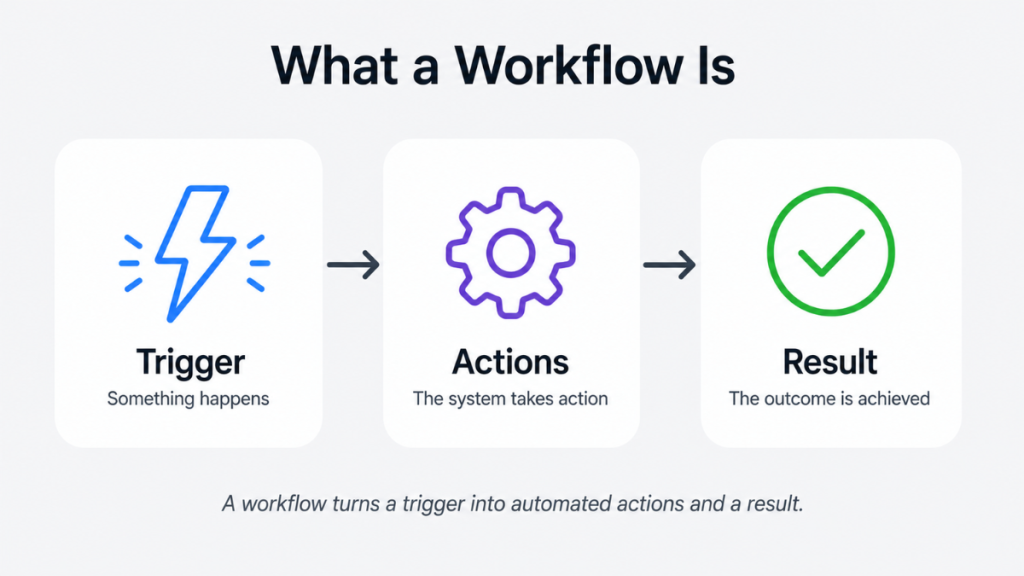
A workflow is a set of automated actions triggered by a specific event inside your CRM. The trigger could be anything – a form submission, a missed call, a tag being added to a contact, a lead opening an email, or a deal moving to a new pipeline stage. When the trigger fires, the workflow executes a predefined sequence of actions without anyone doing anything manually.
For a service business the most important triggers are inbound ones. Someone fills in your contact form. Someone calls and you miss it. Someone messages you through Google Business Profile. Someone books and then cancels. Each of these should trigger a different workflow, and each workflow should handle the next steps automatically.
The difference between CRM workflow automation and just sending emails is that workflows react to what the lead does. If they reply to your first message, the follow-up stops. If they click the booking link but don’t complete the booking, a different message fires. If they go quiet for five days, a final nudge goes out. The system is responsive, not just sequential.
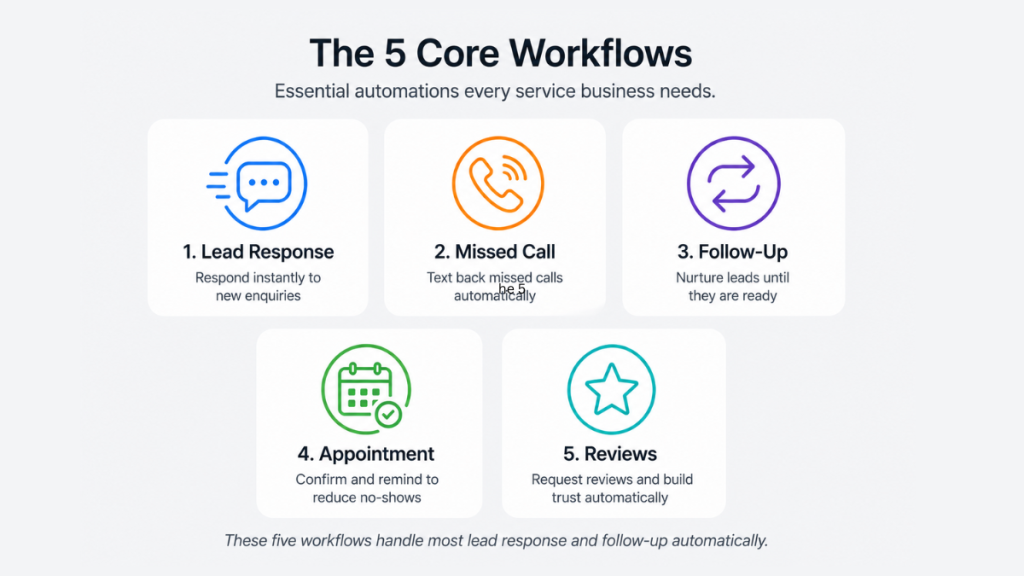
The Five Workflows Every Service Business Should Build
These are the automations that make the most immediate difference to lead conversion for inbound service businesses. Build them in this order.
Workflow 1 – Instant Enquiry Response
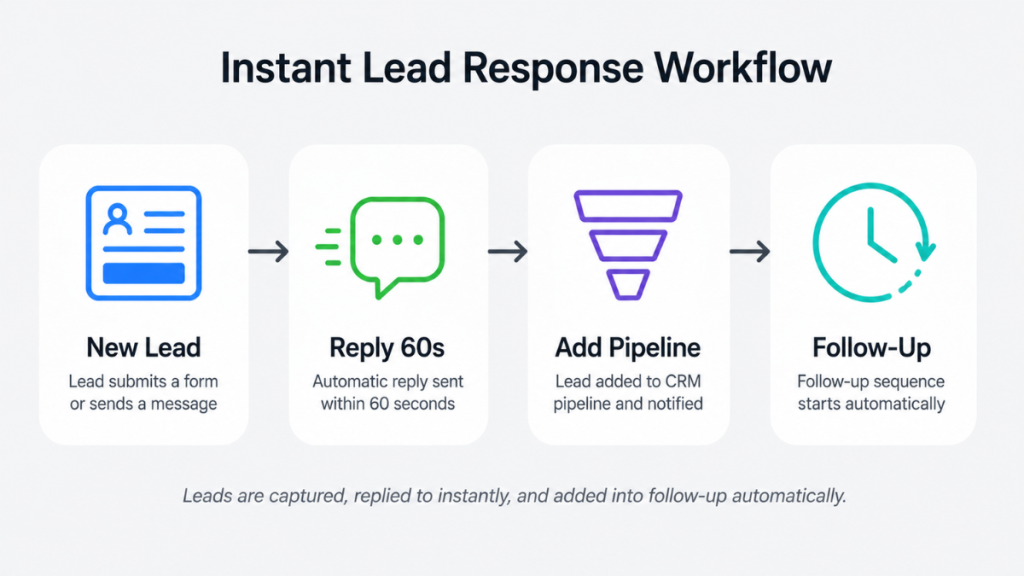
This is the most important workflow on your site. Every second between a lead submitting a form and receiving a response reduces the chance of conversion.
Trigger: Form submitted on website or landing page
Actions:
- Send SMS within 60 seconds: “Hi, thanks for getting in touch – we’ve received your enquiry and will be back to you shortly. If you’d like to book directly, here’s the link: [booking link]”
- Send confirmation email: subject line “We’ve got your enquiry – here’s what happens next”
- Add lead to pipeline at New Enquiry stage
- Notify you or your team via SMS or email
- Start follow-up sequence if no reply within 24 hours
Why it matters: Most service businesses reply hours later. The ones that reply within 60 seconds win the majority of those leads. This workflow closes that gap entirely.
Workflow 2 – Missed Call Text-Back
For any service business taking inbound calls, this is the highest ROI automation available. When a call goes unanswered, a lead disappears unless something brings them back into the conversation immediately.
Trigger: Inbound call goes unanswered
Actions:
- Send SMS within 15 seconds: “Sorry we missed your call – we’re probably with a client. Let us know what you need and we’ll get back to you shortly.”
- Add contact to CRM if not already there
- Start follow-up sequence if no reply within 2 hours
Why it matters: Most callers don’t leave voicemails and don’t call back. This workflow intercepts them before they move on to a competitor.
Workflow 3 – Follow-Up Sequence
A single response is rarely enough to convert a lead. Most service business leads need several touchpoints before they book. This workflow runs those touchpoints automatically.
Trigger: Lead entered at New Enquiry stage with no booking confirmed
Actions:
- Day 0: Instant response (covered in Workflow 1)
- Day 1 email: “Just checking in – did you get a chance to look at our availability? We’d love to help.”
- Day 2 SMS: “Still here if you need us – reply here or use this link to grab a time that suits you: [booking link]”
- Day 4 email: “We have a few slots coming up this week – happy to hold one for you if timing works.”
- Day 7 final message: “Last follow-up from us – if the timing isn’t right just yet, no worries. We’ll be here when you’re ready.”
- Stop all follow-up the moment the lead replies or books
Why it matters: Research consistently shows the majority of conversions happen after the third or fourth touchpoint. Most businesses send one message and stop. This workflow runs the full sequence without you remembering to do anything.
Workflow 4 – Appointment Confirmation and Reminder
Once a lead books, the job isn’t done. No-shows are expensive for service businesses. This workflow reduces them.
Trigger: Appointment booked in calendar
Actions:
- Immediate confirmation email and SMS with appointment details
- 24-hour reminder SMS: “Just a reminder – you have an appointment with us tomorrow at [time]. Reply YES to confirm or let us know if you need to reschedule.”
- 1-hour reminder SMS: “See you soon – your appointment is at [time] today.”
- If no confirmation received: trigger internal notification for manual follow-up
Why it matters: No-show rates drop significantly with reminder automation. For service businesses where a missed appointment means lost revenue and a wasted slot, this workflow pays for itself quickly.
Workflow 5 – Review Request
After a completed appointment or job, asking for a review manually is easy to forget. This workflow makes it automatic.
Trigger: Appointment or job marked as complete in pipeline
Actions:
- Wait 2 hours after completion
- Send SMS: “Thanks for choosing us today – if you have a moment, we’d really appreciate a Google review. It takes less than a minute: [Google review link]”
- If no review left within 3 days: send one follow-up email with the same request
Why it matters: Most happy customers don’t leave reviews unless prompted immediately after a positive experience. Reviews drive Google ranking and new enquiries – this workflow compounds over time.
How AI is Changing CRM Workflow Automation in 2026
Traditional workflow automation sends fixed messages in a fixed sequence. AI-powered workflow automation goes further – it adapts based on what the lead says and does.
In 2026 the strongest CRM platforms now combine workflow automation with AI conversation handling. Instead of a fixed SMS firing and waiting for you to reply manually, the AI continues the conversation – answering questions, handling objections, and guiding the lead toward booking without human involvement.
For a service business this matters because the moment a lead replies to your automated message, the value of the conversation spikes. AI keeps that conversation alive 24 hours a day, seven days a week, without anyone monitoring an inbox.
GoHighLevel’s Conversation AI is the strongest implementation of this for service businesses. When a lead replies to a missed call text-back or a follow-up message, the AI takes over the conversation automatically – qualifying the lead, answering questions about services and pricing, and directing them to book.
Best Platforms for CRM Workflow Automation in 2026
GoHighLevel
The strongest all-in-one option for service businesses needing workflow automation that combines CRM, SMS, email, missed call handling, booking and AI conversation in one platform. Workflows are built visually with clear trigger and action logic. The missed call text-back and AI conversation features are native – no integrations needed.
Honest trade-offs: Learning curve is real. Usage fees for SMS and AI are billed on top of the subscription. Not built for job scheduling or invoicing.
Worth knowing: the workflow builder now includes version history with one-click restore — browse up to 10 saved versions or 30 days of history and roll back a misbehaving workflow without rebuilding it. Newer trigger options include website visit tracking, invoice events, and automatic no-show detection for booked appointments.
Starting price: $97/month plus usage fees
ActiveCampaign
The strongest option for email-driven workflow automation. The workflow builder is one of the most capable available for creating complex multi-step sequences with behavioural triggers, conditional logic and segmentation. Less suited for SMS-heavy or missed call follow-up workflows.
Honest trade-offs: Not an all-in-one platform. Still need separate tools for booking and SMS automation. Better for longer nurture cycles than instant inbound response.
Starting price: $15/month
HubSpot
Strong workflow automation available on paid tiers. The visual workflow builder is one of the most intuitive on the market. Free plan is useful for basic pipeline management but workflow automation requires paid plans.
Honest trade-offs: Real workflow automation isn’t available until Professional at £780/month — Starter only offers simple automation, not the multi-step sequences most service businesses need. That’s a much bigger jump than the headline £18/month suggests. SMS automation not available on lower plans. Better for larger teams with dedicated marketing functions than solo service business operators.
Starting price: Free for basic CRM, £18/month per seat for Starter (limited automation), £780/month for Professional (full Workflows automation)
Zoho CRM
Solid workflow automation at a lower price point. Workflow rules, lead assignment, email triggers and pipeline automation all available on paid plans. The Zoho ecosystem is an advantage if you already use other Zoho tools.
Honest trade-offs: Email marketing automation requires the separate Zoho Campaigns app. Interface more complex than some alternatives. SMS automation limited compared to all-in-one platforms.
Starting price: $14/user/month
CRM Workflow Automation Platform Comparison
| Platform | Best For | SMS Workflows | AI Conversation | Starting Price |
|---|---|---|---|---|
| GoHighLevel | Inbound service businesses | Yes – native | Yes – native | $97/month |
| ActiveCampaign | Email-driven sequences | Limited | No | $15/month |
| HubSpot | Larger teams, broader marketing | Paid tiers only | Basic | Free / £18+ |
| Zoho CRM | Affordable workflow automation | Via integrations | Zia AI | $14/user |
What Makes a Good CRM Workflow
A workflow that works is not complicated. The most effective ones for service businesses are simple, fast and stop automatically when the lead converts.
Good workflows have a clear trigger, a relevant first action within 60 seconds, sensible timing between steps, a condition that stops the sequence when the lead replies or books, and a pipeline update so you can always see where every lead stands.
Most businesses overbuild their first workflows and underbuild their triggers. Start with Workflow 1 and Workflow 2 from the list above. Get those working properly. Then add the others one at a time once you’ve seen how the system behaves with real leads.
The biggest mistake is building five workflows on day one and none of them working correctly. One properly configured instant response workflow will do more for your conversion rate than five complex sequences that fire at the wrong time or send to the wrong contacts.
When CRM Workflow Automation Is Worth the Setup Time
If you get more than a handful of inbound enquiries per week and you’re not responding to all of them within minutes, workflow automation is worth setting up now. The setup time for the five workflows above ranges from a few hours to a full day depending on the platform. That time investment recovers itself within the first week for most service businesses.
If you only get two or three leads per week and respond to all of them manually within minutes, basic workflow automation is helpful but not urgent. Focus on the missed call text-back first – that one fires in situations where you genuinely can’t respond, not just when you choose not to.
For full details on GoHighLevel’s workflow builder and missed call text-back setup, see the GoHighLevel missed call text back guide and the GoHighLevel for local service businesses guide.
FAQ
What is CRM workflow automation? CRM workflow automation uses triggers and actions inside a CRM to automatically handle tasks like responding to leads, sending follow-ups, updating pipeline stages and booking reminders – without manual input at each step.
What should the first CRM workflow be? For service businesses, the instant enquiry response workflow is the most important to build first. Every lead that submits a form or makes contact should receive an automated reply within 60 seconds.
How many workflows does a service business need? Start with two – instant response and missed call text-back. Once those are working correctly, add the follow-up sequence, appointment reminder and review request workflows. Five solid workflows covers the full lead lifecycle for most service businesses.
Does CRM workflow automation work for small service businesses? Yes – small service businesses benefit most because they can’t afford to have someone monitoring enquiries all day. Automation handles the initial response and follow-up consistently without any additional staff.
What is the difference between CRM workflow automation and AI automation? Traditional workflow automation sends fixed messages in a fixed sequence. AI automation adapts based on what the lead says – continuing conversations, answering questions and guiding leads toward booking without human involvement.
Which CRM has the best workflow automation for service businesses? GoHighLevel is the strongest fit for inbound service businesses because it combines SMS, email, missed call handling and AI conversation automation in one platform without needing additional integrations.
Suggested Reads
Automated Lead Follow Up System – the full follow-up system that works alongside CRM workflow automation
GoHighLevel Missed Call Text Back – how to set up the highest ROI automation for service businesses
CRM Automation Software – full platform comparison for service businesses choosing CRM automation software
GoHighLevel for Local Service Businesses – how GoHighLevel works for trades and service businesses
GoHighLevel Pricing UK – full cost breakdown including SMS and workflow usage fees