
Most small businesses don’t lose leads because of bad marketing.
They lose them because there’s no system to track what happens after someone shows interest.
Leads come in from forms, calls, or messages… and then nothing happens properly. No structure. No visibility. No follow-up tracking.
That’s exactly why people search for the best lead management software for small businesses.
Quick Summary
- Lead management software helps you track every lead from first contact to sale
- Most businesses lose leads due to poor organisation, not lack of traffic
- A clear pipeline shows exactly where every opportunity sits
Why Most Small Businesses Lose Leads
It’s rarely a traffic problem.
It’s a system problem.
Leads come in from forms, calls, or messages, but nothing happens properly after that. They sit in inboxes, get forgotten, or are followed up too late. Over time, no one really knows what stage each lead is in or who’s responsible for it.
That’s exactly what’s covered in how to organise leads for small business. Without a clear structure, things start slipping through the cracks fast.
And once lead volume increases, manual tracking stops working altogether.
What Lead Management Software Actually Does
At its core, lead management software is simple.
It gives you three things: visibility, structure, and tracking.
Visibility means you can see every lead in one place instead of scattered across emails, notes, or spreadsheets.
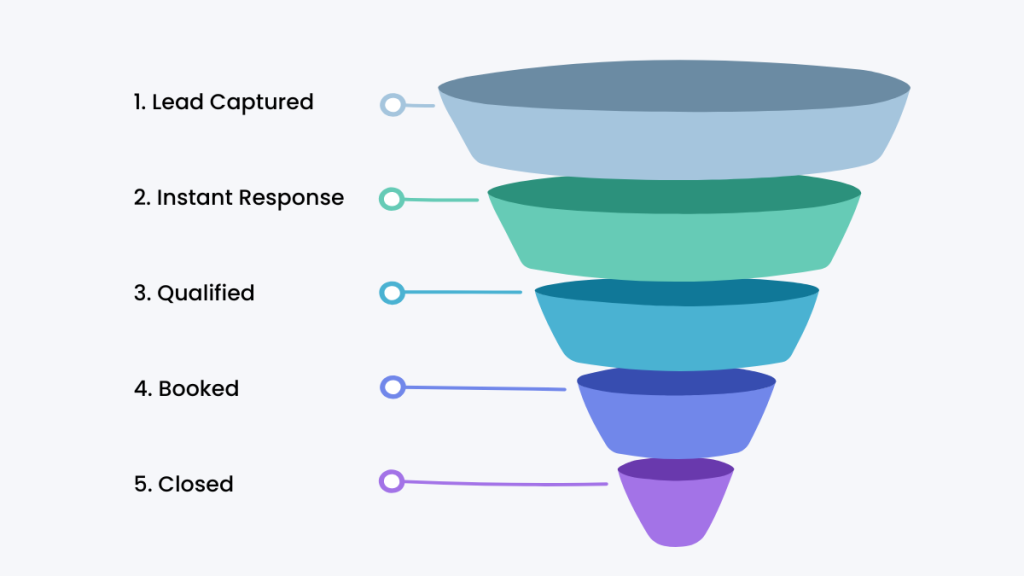
Structure gives each lead a clear path, moving through stages like new, contacted, qualified, and closed.
And tracking ensures you always know what’s been done, what hasn’t, and what needs to happen next.
This is where systems like CRM pipeline management become critical. They turn scattered leads into a clear, manageable process.
Features That Actually Matter
Most tools overload you with features.
But for lead management, only a few matter:
- Lead capture (everything in one place)
- Pipeline tracking (clear stages)
- Activity history (who did what)
- Notes and organisation
If a tool does these well, it works.
Everything else is secondary.
Best Lead Management Software for Small Businesses
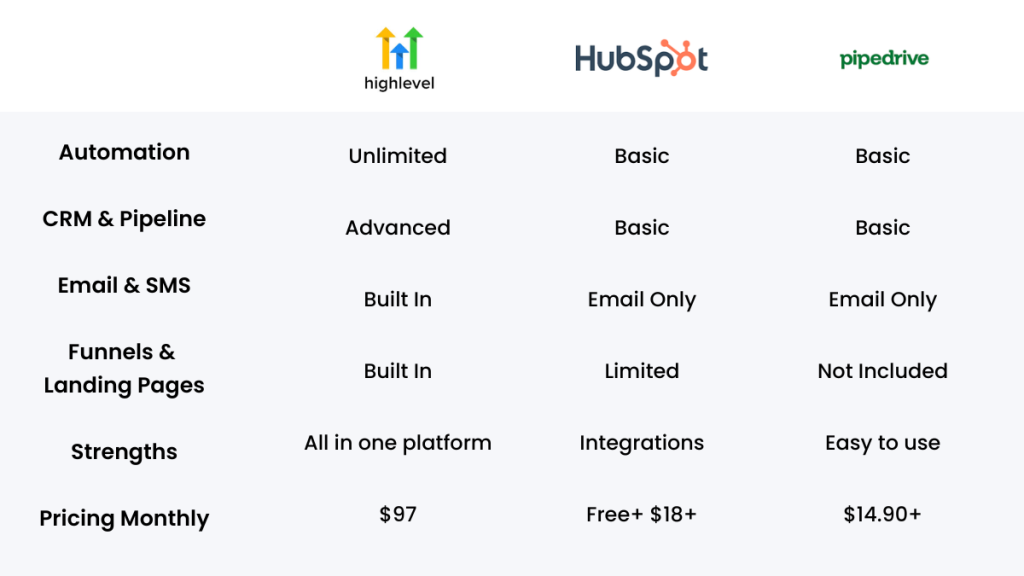
Here’s a simple comparison of tools that actually fit small businesses.
| Tool | Best For | Key Strength |
|---|---|---|
| GoHighLevel | All-in-one system | Combines tracking with full business system |
| HubSpot | Beginners | Easy interface with free plan |
| Pipedrive | Sales teams | Strong visual pipelines |
| Zoho CRM | Budget users | Flexible and affordable |
Tool Breakdown (What They’re Actually Like)
GoHighLevel (Best All-in-One System)
GoHighLevel isn’t just a lead management tool. It’s a full system.
Instead of tracking leads in one place and managing everything else separately, it brings your pipeline, communication, and follow-up into one platform. That’s what makes it powerful.
But it also means it’s not the simplest option.
- Best for: businesses that want one system to manage leads, follow-ups, and customer journeys
- Avoid if: you only need basic lead tracking or want something quick to set up
If you’re planning to grow and want full control over your pipeline, this is one of the strongest options available.
HubSpot (Best for Simplicity)
HubSpot is the easiest place to start.
It’s clean, intuitive, and gives you a basic pipeline without much setup. If you’ve never used a CRM before, it feels familiar almost immediately.
The trade-off is that it becomes limiting as you grow.
- Best for: beginners who want a simple way to track leads
- Avoid if: you need deeper control, automation, or plan to scale
It’s a good starting point, but not always a long-term solution.
Pipedrive (Best for Pipeline Visibility)
Pipedrive is built around one thing: visibility.
Everything revolves around your pipeline, which makes it very easy to see where deals are, what’s moving, and what’s stuck. It’s simple, but that simplicity is also its limitation.
- Best for: businesses focused on tracking deals through a clear pipeline
- Avoid if: you need an all-in-one system or advanced automation
It does one job well, but doesn’t try to do everything.
Zoho CRM (Best Budget Option)
Zoho gives you a lot of flexibility for the price.
You can customise how your system works, which makes it appealing if you’re trying to build something specific without paying premium pricing.
The downside is usability.
- Best for: budget-conscious businesses that want flexibility
- Avoid if: you want something simple and easy to use
It’s powerful, but not always the most intuitive.
Lead Management Software vs Spreadsheets
This is where most businesses hesitate.
Spreadsheets feel easy at first.
But they break when:
- lead volume increases
- multiple people are involved
- follow-ups get missed
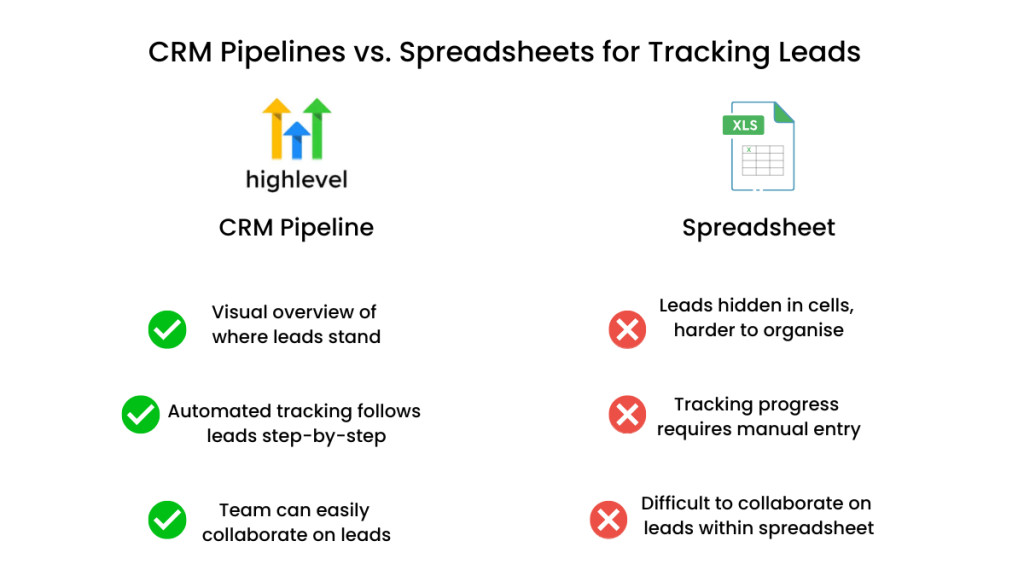
This is exactly why comparisons like lead tracking spreadsheet vs CRM exist — one is manual, the other is a system.
CRMs give you:
- structure
- visibility
- accountability
How to Choose the Right Tool
Choosing the right lead management software isn’t about finding the most features.
It’s about matching the tool to how your business actually operates.
If you’re only handling a small number of leads and just need visibility, a simple CRM like HubSpot or Pipedrive is enough. You don’t need complexity at that stage.
As your lead volume grows, structure becomes more important. You need a clear pipeline, consistent tracking, and a system that shows you exactly what’s happening at each stage.
That’s where more structured tools start to make sense.
And if you’re managing multiple channels, follow-ups, and customer journeys, using separate tools quickly becomes inefficient. At that point, an all-in-one system like GoHighLevel becomes the better option.
The mistake most businesses make is choosing based on features instead of fit.
- If you need simple tracking → choose a lightweight CRM
- If you need visibility and structure → choose a pipeline-focused tool
- If you want everything in one place → choose an all-in-one system
The right choice isn’t the most powerful tool.
It’s the one that matches your current stage without overcomplicating your workflow.
Who This Is NOT For
You don’t need lead management software if your setup is still very simple.
If you’re only getting a handful of leads each month, it’s usually easy to keep track of everything manually. You might still be managing conversations in your inbox, using a basic spreadsheet, or just handling things yourself without much structure.
And at that stage, that’s completely fine.
A full system only becomes necessary when leads start slipping through the cracks or your process becomes harder to manage.
FAQ
What is the best lead management software for small businesses?
It depends on your needs. GoHighLevel is strong for all-in-one systems, while HubSpot is simpler for beginners.
Is lead management software the same as CRM?
Lead management is part of CRM. CRM includes broader features like automation and customer tracking.
When should I stop using spreadsheets?
When leads start slipping through or you lose visibility.
Do I need automation for lead management?
Not always. Basic tracking is often enough at early stages.
Suggested Reads
- Best small business CRM software
- CRM pipeline management
- How to organise leads
- Lead follow-up software
Final Thoughts
The difference between businesses that grow and those that stall usually isn’t marketing.
It’s whether they can track and manage leads properly.
Most small businesses don’t have a lead problem.
They have a system problem.
If you can’t see where your leads are, you can’t manage them. And if you can’t manage them, you can’t improve your results.
The best lead management software for small businesses doesn’t just organise leads.
It gives you control over your pipeline — and that’s what turns missed opportunities into consistent revenue.