
Affiliate links – I earn a commission if you sign up through this page, at no extra cost to you. That’s exactly why the weaknesses below aren’t softened. If GoHighLevel isn’t right for your business, I’d rather you know before you start a trial
If you are searching for how to track leads without CRM, you are probably not trying to avoid systems. You are trying to avoid complexity. You do not want pipelines, workflows, and monthly subscription fees when you are just trying to stop losing enquiries between jobs.
That is a reasonable place to start. A simple manual system is better than no system. But it has a ceiling, and most service businesses hit it faster than they expect. This guide covers how to set up a manual lead tracking system that actually works, and the clear signs that tell you when it is time to move on.
Key Takeaways
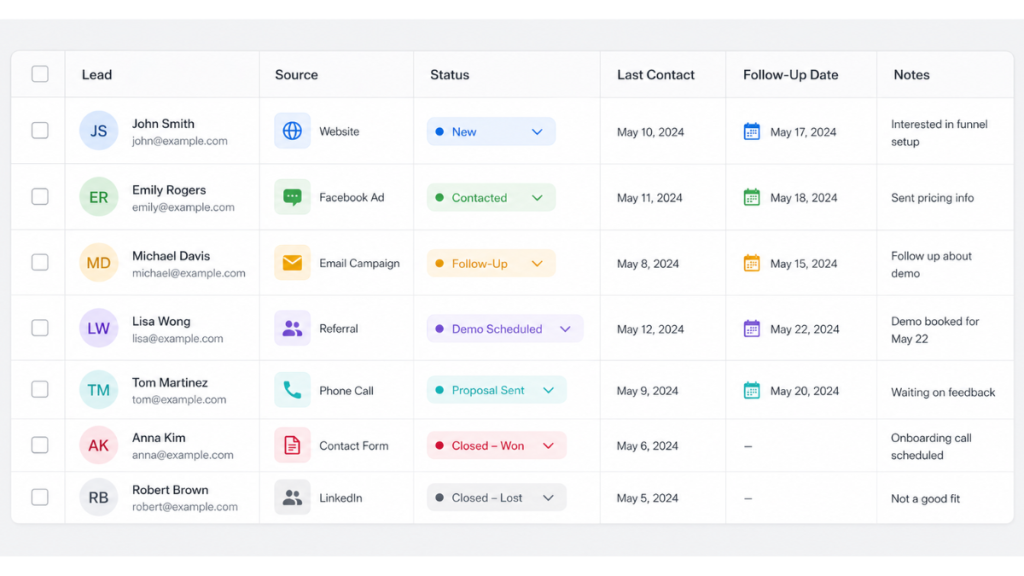
- You can track leads without CRM using a structured spreadsheet with five key columns
- The system works until lead volume increases or follow-ups start getting missed consistently
- Manual tracking fails at the follow-up stage first, that is where most leads are lost
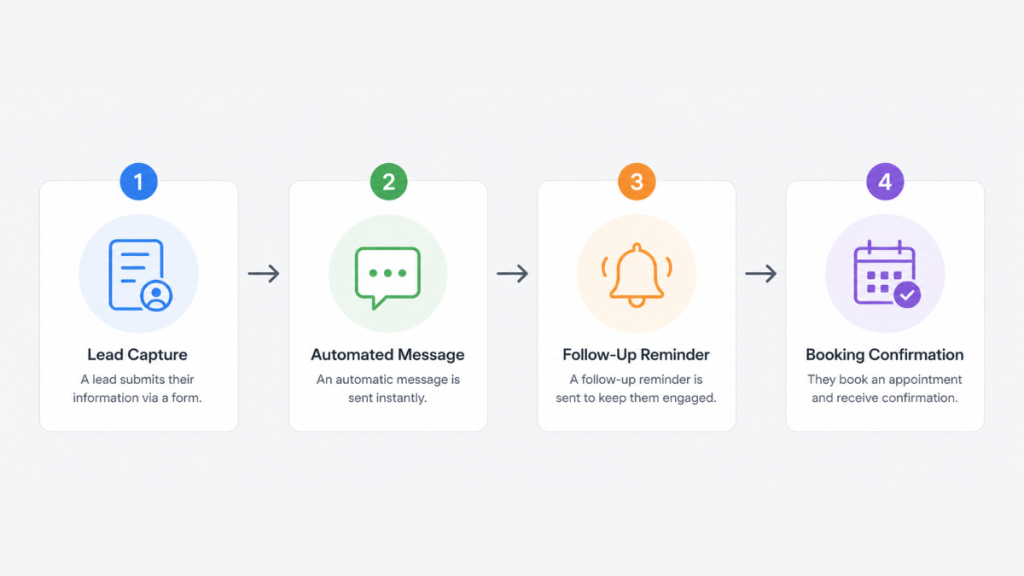
- GoHighLevel automates the entire process from lead capture to follow-up to booking from $97 per month
- HubSpot’s free CRM is a useful middle step between spreadsheets and full automation
- Research shows the average CRM returns $8.71 for every $1 invested
Why Lead Tracking Fails Without a System
Most service businesses do not lose leads because they are bad at their work. They lose them because there is no structure around what happens after a lead arrives.
The typical setup looks like this. Enquiries come in through email, WhatsApp, phone, and web forms. Each one lives in a different place. There is no single view of who has been contacted, who needs following up, and who has gone cold. When things get busy, the follow-ups stop. Leads that were genuinely interested do not hear back and book with whoever responded first.
This is not an effort problem. It is a structure problem. And the fix does not have to be expensive or complicated, at least not to start.
How to Track Leads Without CRM: A Simple System That Works
The goal is to create one place where every lead lives, with enough structure to track progress and trigger follow-ups without relying on memory.
Step 1: Centralise everything in one place
Pick one tool and use only that. Google Sheets works. Excel works. Airtable works if you want something slightly more visual. The tool matters less than the commitment to using only one. Every lead, regardless of where it came from, goes into the same place.
Step 2: Track five columns only
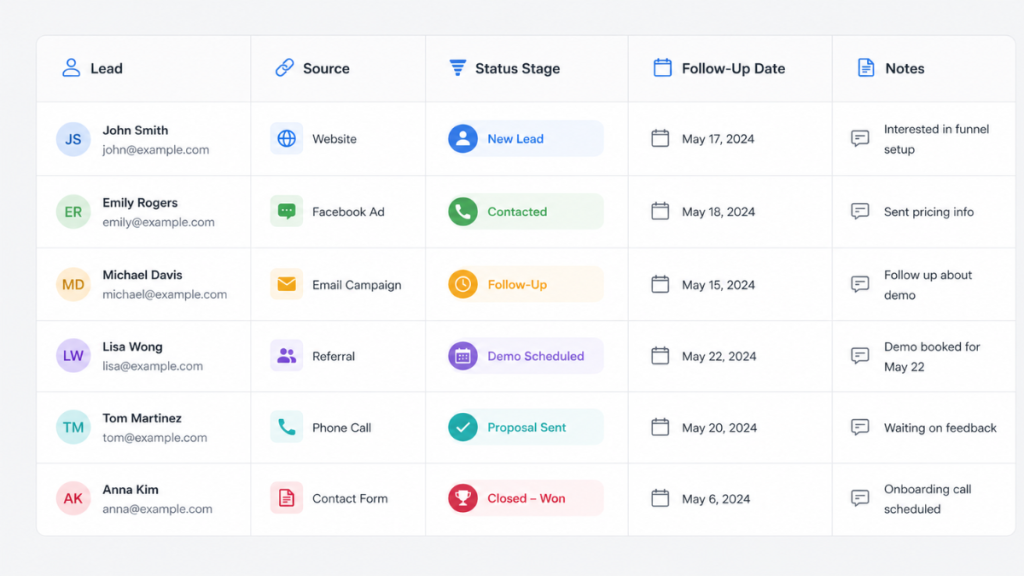
Do not overcomplicate this. You need five pieces of information per lead: name, contact details, where the lead came from, current status, and the date of last contact. Anything beyond that becomes noise that makes the system harder to maintain.
Step 3: Use five simple status stages
Your system needs movement. Use: New, Contacted, Interested, Booked, and Closed. This mirrors the logic of a CRM pipeline without the software. Every lead should be in one of those five stages at all times.
Step 4: Add a next action column
This is the step most people skip and the reason most manual systems fail. Every lead needs a specific next action recorded alongside it, not a vague note but a concrete task with a date. Call Thursday. Send quote Friday. Follow up Monday. Without this column the system becomes a record of what has happened rather than a guide to what needs to happen next.
Where This System Breaks
A manual tracking system works, but only up to a point. Most service businesses hit the ceiling in one of three ways.
Follow-ups get missed when things get busy. The system depends entirely on you remembering to check the spreadsheet, update statuses, and act on next actions. When you are deep in work, that does not happen.
Lead volume outgrows the system. A spreadsheet with 10 leads is manageable. A spreadsheet with 60 leads across different stages and follow-up dates becomes a maintenance burden that competes with actually running the business.
The system relies on memory for context. A spreadsheet tells you the status of a lead but not the detail of the last conversation. When you pick up a lead after a week you are working from incomplete information.
These are not reasons to abandon the system before you need to. They are the signals that tell you it is time to move on.
This is where a lead follow up system becomes essential rather than optional.
When to Stop Tracking Leads Without a CRM
Three situations indicate the manual system has reached its limit.
You are consistently missing follow-ups. If leads are going cold not because they lost interest but because follow-up did not happen, the system is failing. This is the most common and most costly breaking point.
You cannot remember the status of leads without checking. If you need to spend time re-reading old messages to understand where a lead stands, the system is costing more time than it saves.
You are getting more than 15 to 20 active leads at any one time. At that volume the cognitive load of manual tracking becomes significant enough to affect the quality of follow-up and the quality of your actual work.
When any of these apply, the right move is not a bigger spreadsheet. It is automation.
The Next Step: From Manual Tracking to Automated Follow-Up
The transition from manual to automated does not have to be a big leap. There are two sensible steps depending on where you are.
HubSpot free CRM is a useful middle ground if you want to move off spreadsheets without committing to a paid platform. It gives you a visual pipeline, contact tracking, and basic email automation. You still manage follow-ups but the structure is cleaner and it costs nothing to start.
GoHighLevel is the right move when you want the system to handle follow-up without you. When a lead comes in, GoHighLevel responds automatically within seconds, moves the lead into a pipeline, and sends follow-up messages on day one, day two, and day three if there is no response. You only get involved when the lead is ready to book.
The missed call text back feature recovers leads from missed calls automatically within seconds, keeping conversations alive that would otherwise go cold. For the full cost breakdown see the GoHighLevel pricing guide.
For a full platform comparison see the GoHighLevel vs ClickFunnels guide.
Comparison: Manual vs Automated Lead Tracking
| Method | Best For | Follow-Up | Cost |
|---|---|---|---|
| Spreadsheet | Getting started, low volume | Manual | Free |
| HubSpot Free | Moving off spreadsheets | Semi-manual | Free |
| GoHighLevel | Consistent lead volume, full automation | Automated | From $97/month |
Final Verdict
Learning how to track leads without CRM is a sensible starting point for any service business not ready for software. A structured spreadsheet with clear stages and a next action column is significantly better than inbox chaos and scattered notes.
But it is not the end goal. Manual systems fail at the follow-up stage and that is where most leads are lost. When you start missing follow-ups consistently the right fix is not more discipline. It is a system that does the follow-up for you.
GoHighLevel is the most complete solution for service businesses at this stage, handling capture, response, follow-up, and booking in one platform without manual input.
FAQ
How do you track leads without CRM? Use a single spreadsheet with five columns: name, contact details, lead source, status, and last contact date. Add a next action column with specific follow-up tasks and dates. Keep status stages simple: New, Contacted, Interested, Booked, Closed. The key is consistency, every lead goes into the same place regardless of where it came from.
Is a spreadsheet good enough for tracking leads? For low lead volumes, yes. A structured spreadsheet works well up to around 15 to 20 active leads. Beyond that, the manual effort of updating statuses and remembering follow-ups becomes significant enough to cause leads to slip through. At that point a CRM with automation is the more effective solution.
When should I switch from a spreadsheet to a CRM? When you start missing follow-ups consistently, when you cannot remember the status of leads without re-reading old messages, or when active lead volume consistently exceeds 15 to 20 at a time. Any of those signals indicate the manual system has reached its limit.
What is the easiest CRM to switch to from a spreadsheet? HubSpot’s free CRM is the simplest transition. It gives you a visual pipeline and basic contact tracking without a subscription cost. For service businesses that need automated follow-up including SMS and missed call recovery, GoHighLevel is the stronger long-term option.
How much does GoHighLevel cost? GoHighLevel’s Starter plan is $97 per month.
Suggested Reads
Best CRM for Small Business – full comparison of CRM options for service businesses once you are ready to move beyond manual tracking
GoHighLevel Missed Call Text Back – how to recover leads from missed calls automatically within seconds
GoHighLevel Pricing Guide – full cost breakdown including all usage fees
Lead Follow Up System – how to build a complete automated follow-up sequence once you move beyond manual tracking
GoHighLevel Free Trial Guide – what to set up and test in the first 30 days