
Affiliate links – I earn a commission if you sign up through this page, at no extra cost to you. That’s exactly why the weaknesses below aren’t softened. If GoHighLevel isn’t right for your business, I’d rather you know before you start a trial
Most small businesses don’t lose leads because of bad marketing.
They lose them because there’s no system to catch what happens after someone shows interest.
A lead submits your contact form, sends a message, or calls and gets your voicemail. If your process depends on you noticing that and responding quickly enough, you’re already losing jobs to competitors who have automated that window.
Lead management software for small business is the tool that closes that gap – capturing every enquiry, tracking it through a pipeline, and following up automatically until the lead converts or goes cold.
This guide covers what to look for, which platforms actually work for small service businesses, and how to choose based on where your business is right now.
Key Takeaways
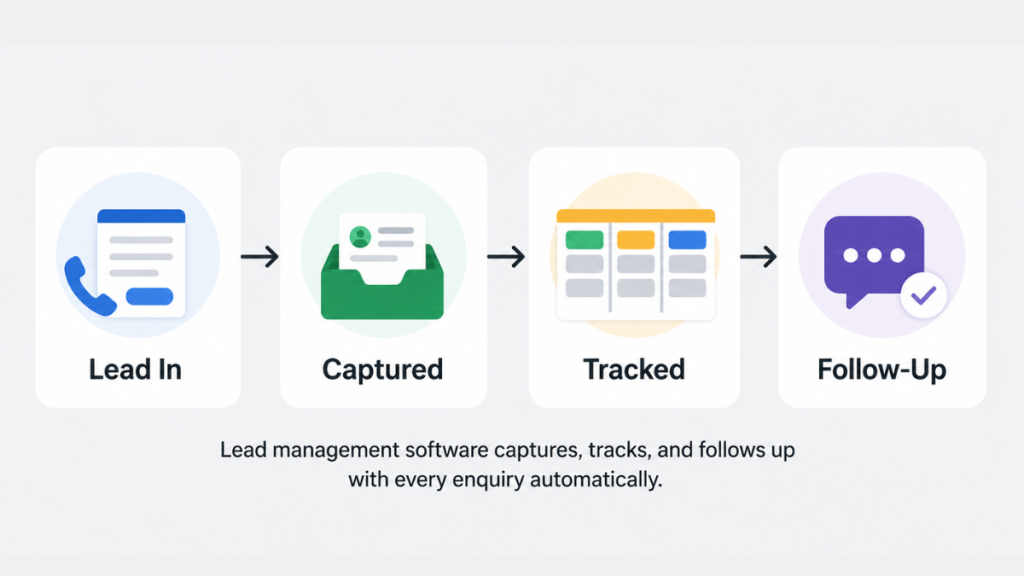
- Lead management software captures, tracks, and follows up with enquiries automatically – replacing inbox management and memory-based follow-up
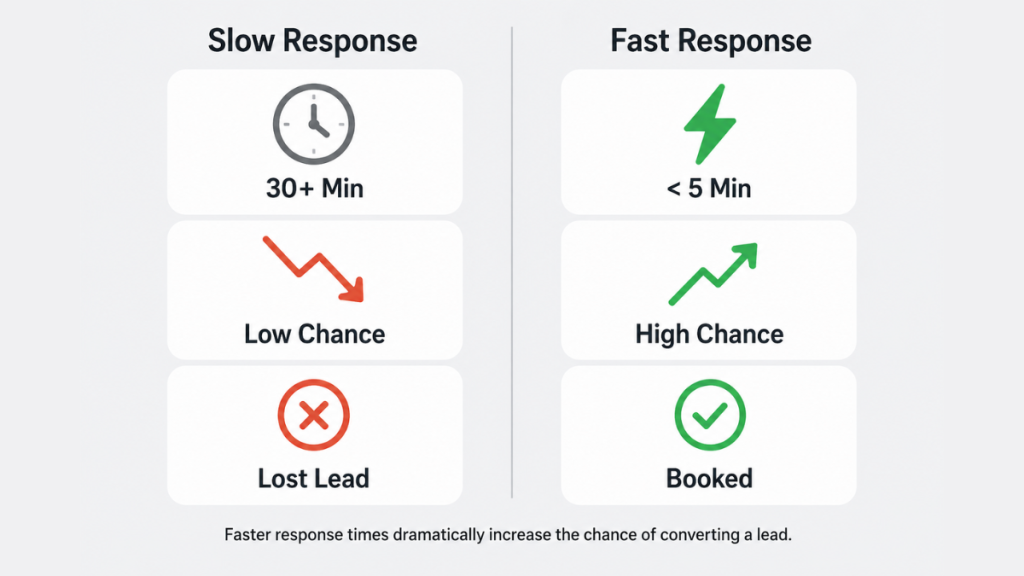
- MIT research found leads contacted within 5 minutes are 21x more likely to be qualified than those contacted after 30 minutes – making speed the single biggest conversion lever for small businesses
- Only 7% of businesses respond to a form submission within 5 minutes – which means automation alone puts you ahead of most competitors
- The right tool depends on your stage: simple tracking, pipeline visibility, or full automation are different needs requiring different tools
- For service businesses that need instant response, automated follow-up, and pipeline tracking without stitching together multiple tools, GoHighLevel is the most complete option
Why Lead Management Software Matters for Small Businesses
The numbers on lead response time are stark.
MIT research found that leads contacted within 5 minutes are 21x more likely to be qualified than those contacted after 30 minutes. After an hour, the odds drop by another 10x. And yet the average business takes over 29 hours to respond to an inbound enquiry – with 63% never responding at all.
For small service businesses, this isn’t abstract. It’s the difference between winning and losing a job to whoever called back first.
A plumber, electrician, cleaner, or therapist taking enquiries through a website form has a window of a few minutes to respond before that lead starts looking elsewhere. Manual follow-up – checking emails when you’re next free, replying when you have time – closes that window on most leads before you even know they arrived.
Lead management software for small business solves this in three ways. It captures the lead automatically from every channel. It triggers an instant response without you being involved. And it runs a follow-up sequence over the following days so leads don’t go cold between your first response and their decision.
That’s not about working harder. It’s about removing the gaps that exist in every manual process.
What Lead Management Software Actually Does
The term gets used loosely, so it’s worth being precise about what a proper system includes.
Lead capture brings every enquiry into one place automatically. Whether a lead comes through a website form, a missed call, a Facebook message, or a direct email, it lands in the CRM without manual entry. Nothing gets missed because it arrived on the wrong channel.
Pipeline tracking gives every lead a status and a stage. Instead of trying to remember who you’ve spoken to and who’s still waiting on a quote, you can see at a glance which leads are new, which have been contacted, and which are stalled. When a lead hasn’t moved in three days, the system flags it.
Automated follow-up runs a message sequence without you touching it. An SMS goes out within 60 seconds of a form submission. A follow-up email goes out the next day. A reminder goes out on day three. The sequence runs whether you’re on a job, in a meeting, or asleep.
For a full breakdown of how instant response works in practice, see lead management system for service businesses.
Activity history keeps a record of every interaction with every lead. No more guessing whether you already sent someone a quote or trying to remember what was said on the last call.
Together these four things replace the scattered inbox, spreadsheet, and sticky-note system that most small businesses are running on.
What to Look For in Lead Management Software for Small Business
Not every CRM is built for small service businesses. Enterprise platforms like Salesforce are powerful but require dedicated administrators and months of setup. Most small businesses need something that works from day one without a consultant.
Four features matter most for a small service business:
Instant automated response. When a lead submits a form, the first response needs to go out within 60 seconds – not when you next check your inbox. This requires built-in SMS and email automation triggered by form submission, not a manual step.
Pipeline with clear stages. You need to see where every lead sits without opening emails. New enquiry, contacted, quote sent, follow-up, booked or lost. Simple stages work better than complex scoring systems for most small businesses.
Multi-channel lead capture. Leads arrive through websites, phone calls, social media, and direct messages. A system that only captures website form submissions misses a large proportion of enquiries.
Follow-up sequences that run automatically. One manual follow-up is not a system. A proper sequence runs 5 to 7 touchpoints over the first week without any manual effort after setup.
Secondary features worth considering as you grow: booking integrations, review request automation, and reporting on which lead sources convert best. But if the four core features above aren’t solid, everything else is secondary.
Best Lead Management Software for Small Business: Platform Comparison
| Platform | Instant SMS | Auto Follow-Up | Pipeline Tracking | Starting Price | Best For |
|---|---|---|---|---|---|
| GoHighLevel | Yes | Yes | Yes | $97/month | Complete system in one place |
| HubSpot | No (paid add-on) | Limited (free tier) | Yes | Free / $20+ per user | Simple tracking and visibility |
| Pipedrive | No | Basic | Yes | From $14/user/month | Sales pipeline focus |
| ActiveCampaign | No | Yes | Basic | From $39/month | Email sequence automation |
| Zoho CRM | No | Yes | Yes | From $14/user/month | Budget-friendly all-rounder |
| Keap | Yes | Yes | Yes | From $249/month | Service businesses with larger budgets |
Tool Breakdown: Honest Assessment for Service Businesses
GoHighLevel – Best All-in-One for Service Businesses
GoHighLevel was built for businesses that need marketing automation and CRM in one platform without stitching together separate tools.
For a service business, the relevant capabilities are: form submissions trigger instant SMS and email automatically, follow-up sequences run for as long as you set them, every lead enters a visual pipeline, and missed calls can trigger an automatic text-back so no enquiry goes cold.
The learning curve is real. GoHighLevel takes longer to set up than HubSpot or Pipedrive because there’s significantly more to configure. But once it’s running, it handles the entire follow-up process without ongoing manual effort.
At $97 per month for the Starter plan, it’s not the cheapest option – but it replaces three or four tools that would cost more separately.
Best for: service businesses that want instant response, automated follow-up, and pipeline tracking without managing multiple platforms.
Worth knowing: the 14-day free trial gives enough time to test the core lead capture and follow-up functionality before committing.
For missed call automation specifically, see missed call text back for small business
For a full breakdown of what’s included, see GoHighLevel pricing explained.
HubSpot – Best Starting Point for Beginners
HubSpot’s free CRM is the most common starting point for small businesses that haven’t used lead management software before. The pipeline is visual and easy to set up, contact management is clean, and the interface is genuinely beginner-friendly.
The limitation is automation. The free tier gives you basic deal tracking but very limited automated follow-up. SMS isn’t included without a paid add-on. For businesses where lead volume is low and you’re primarily just wanting visibility over who’s in your pipeline, HubSpot free works well. For businesses where speed of response and automated follow-up are priorities, you’ll quickly hit the ceiling.
Best for: businesses starting out with CRM who want simplicity and don’t yet need automation.
Worth knowing: paid plans start at $20 per user per month and the gap between free and paid is significant in terms of automation capability.
For a full side-by-side platform comparison, see best CRM for small business.
Pipedrive – Best for Sales Pipeline Visibility
Pipedrive is built around one thing: a clean, visual pipeline. If your main need is seeing where deals are and what needs action next, it does this exceptionally well. The interface is one of the clearest in the category.
Where it falls short for service businesses is automation. Pipedrive doesn’t include native SMS, follow-up sequences are basic, and getting lead capture from multiple channels requires integrations. It’s a strong pipeline management tool that works best when combined with a separate automation platform.
Best for: businesses with a clear sales process that primarily need deal tracking and won’t rely on automated follow-up.
ActiveCampaign – Best for Email Sequence Automation
ActiveCampaign is primarily an email marketing platform that has expanded into CRM. Its automation capabilities for email sequences are strong – you can build complex conditional sequences triggered by lead behaviour.
What it doesn’t do well is serve as a standalone lead management system for a service business. There’s no native SMS, the CRM pipeline is basic, and it works best as part of a wider tool stack rather than a sole solution.
Best for: businesses with an existing CRM who want to add strong email automation on top.
Zoho CRM – Best Budget Option
Zoho gives significant functionality for the price, with lead scoring, pipeline tracking, and workflow automation available on paid plans. It’s part of a broader ecosystem of Zoho tools that integrate with each other, which makes it appealing if you’re already using Zoho for other business functions.
The trade-off is usability. The interface feels older than Pipedrive or HubSpot, and setting up automation requires more configuration time than the other platforms in this list. For a budget-conscious business willing to invest setup time, it’s solid value.
Best for: budget-focused businesses who want flexibility and don’t mind a steeper setup process.
How to Choose the Right Tool Based on Your Stage
The most common mistake when choosing lead management software for small business is picking based on features rather than fit. Here’s a clearer framework. For a deeper look at how pipelines are structured, see CRM lead management.
If you’re just starting out and need basic visibility: HubSpot free or Pipedrive Lite gives you a pipeline and contact management without cost. Start here if your lead volume is manageable and your primary need is just having a place to track who you’ve spoken to.
If you’re losing leads and need speed and consistency: This is the scenario where automation matters most. If enquiries are arriving and going cold before you respond, or follow-up is inconsistent because you’re too busy, you need a tool with built-in instant response and automated sequences. GoHighLevel is the most complete option for this. Keap is an alternative if budget allows.
If you have a pipeline tool but need better follow-up: ActiveCampaign alongside an existing CRM handles email sequence automation well. This works if you already have Pipedrive or HubSpot and want to add a proper nurturing layer.
If budget is the primary constraint: Zoho CRM on a paid plan gives the most functionality per pound/dollar spent. The setup investment is higher but the ongoing cost is lower than GoHighLevel.
The honest assessment is that most small service businesses searching for lead management software are in the second category – leads are arriving but the process is too slow and inconsistent to convert them reliably. For that specific problem, GoHighLevel is the most direct solution.
What Good Lead Management Produces
When the right lead management software for small business is in place and properly configured, the change is measurable.
Response time drops to under 60 seconds because the first SMS and email go out automatically. Leads that would have gone cold while you were on a job get an immediate acknowledgment. The conversation starts while interest is high.
Follow-up becomes consistent because the sequence runs regardless of how busy you are. Every lead gets the same professional process whether they enquire on a Tuesday morning or a Friday evening.
Visibility changes how you manage your pipeline. When you can see which stage leads are stalling at – whether it’s the first response, the quote stage, or the follow-up – you can fix the specific problem instead of guessing why conversion is low.
The businesses winning more jobs in competitive markets aren’t necessarily spending more on marketing. They’re catching the enquiries they’re already getting and converting them before competitors do.
FAQ
What is lead management software for small business? Lead management software for small business is a tool that captures enquiries from every channel, tracks them through a pipeline, and follows up automatically. It replaces the combination of inboxes, spreadsheets, and manual reminders that most small businesses use to manage leads.
How quickly should a small business respond to leads? Within 5 minutes is the target, with under 60 seconds being the competitive benchmark in 2026. MIT research found leads contacted within 5 minutes are 21x more likely to be qualified than those contacted after 30 minutes. Automated SMS triggered by form submission is the only reliable way to hit this consistently.
Do I need CRM software or lead management software? For most small businesses these are effectively the same thing. CRM is the broader tool; lead management is the process that sits on top of it. The key is whether the tool captures leads automatically, tracks them in a pipeline, and triggers follow-up without manual effort.
What is the best free lead management software for small business? HubSpot’s free CRM is the strongest free option for basic pipeline tracking and contact management. It doesn’t solve the response speed problem on its own, but as a starting point for businesses that primarily need visibility it works well.
When should I upgrade from a free CRM to a paid lead management tool? When leads are arriving and not converting consistently, and you can identify that slow response or inconsistent follow-up is the cause. At that point the cost of a paid tool is typically recovered from one or two additional jobs per month.
Is GoHighLevel suitable for a very small service business? Yes, provided you’re willing to invest time in the initial setup. The platform is designed for businesses that want one system rather than multiple tools. The learning curve is real but the outcome – instant response, automated follow-up, and full pipeline visibility – directly addresses the most common reasons small service businesses lose leads.
Suggested Reads
CRM Lead Management: How Service Businesses Track and Convert Leads – How to structure your full lead management process from capture to conversion
Lead Management System for Service Businesses – Building the system that catches every enquiry automatically
How to Stop Losing Leads From Your Website – Why leads go cold after submitting a form and what fixes it
Best CRM for Small Business – Full platform comparison to find the right fit for your setup