
Most small businesses don’t start with a CRM. They start with spreadsheets, inboxes, sticky notes, and “I’ll remember to follow up later.”
That works… until it doesn’t.
Once leads start coming in consistently, things break fast. Messages get missed, follow-ups slip, and opportunities disappear without you even realising it.
At that point, many businesses switch to an all-in-one CRM to bring everything into one place. Platforms like GoHighLevel are often used to track leads, automate follow-ups, and manage conversations without relying on scattered tools.
That’s exactly where a CRM for small business becomes essential.
This guide breaks down what a CRM actually is, how it works in real situations, and when you realistically need one, without overcomplicating it.
When Do You Actually Need a CRM?
When Does a Small Business Need a CRM?
You probably need a CRM once enquiries start coming in consistently and you no longer have a clear way to track them. This usually shows up as relying on memory or inbox searches to follow up, forgetting to reply to leads, or not being able to quickly see who needs chasing.
For most small businesses, this tipping point happens somewhere between 10 and 30 active leads per month. Below that, manual systems can still work. Above that, things start slipping, and that’s where a CRM becomes necessary rather than optional.ary.
Quick Summary, CRM For Small Business
| Topic | What You Need to Know |
|---|---|
| What is a CRM? | A system that stores leads, tracks conversations, and helps you follow up consistently instead of relying on memory |
| Do small businesses need a CRM? | Yes, once enquiries become consistent and you can’t easily track or follow up with every lead |
| CRM vs spreadsheets | Spreadsheets store information, but CRMs actively help you manage leads and close deals |
| Key benefit | Clear visibility of your pipeline so you always know who to contact and what needs action |
| When to start using one | Typically when you’re handling 10–30 active leads and follow-ups start slipping |
| Best option for small businesses | A CRM with built-in automation so follow-ups and lead tracking don’t rely on manual work |
Why Small Businesses Use CRM Systems
Most small businesses don’t adopt a CRM because they want more software.
They adopt one because things start breaking.
At the beginning, it’s manageable. A few enquiries here and there, messages handled manually, and follow-ups done when there’s time.
But as soon as leads become consistent, the cracks start to show.
Messages get missed. Follow-ups get delayed. Conversations are spread across email, phone, and social platforms with no clear structure.
That’s when a CRM becomes less about organisation and more about control.
Instead of reacting to leads, you’re managing them with a system. You know exactly who needs a response, where each opportunity stands, and what actions need to happen next.
For most small businesses, that shift is what actually drives more conversions, not just better organisation.
How a CRM Actually Works for a Small Business
Most CRM explanations sound technical, but in practice, it’s just a structured way to manage leads and conversations.
When a new lead comes in, whether that’s from your website, a Facebook ad, a phone call, or a message, it gets stored in one place with their details and enquiry.
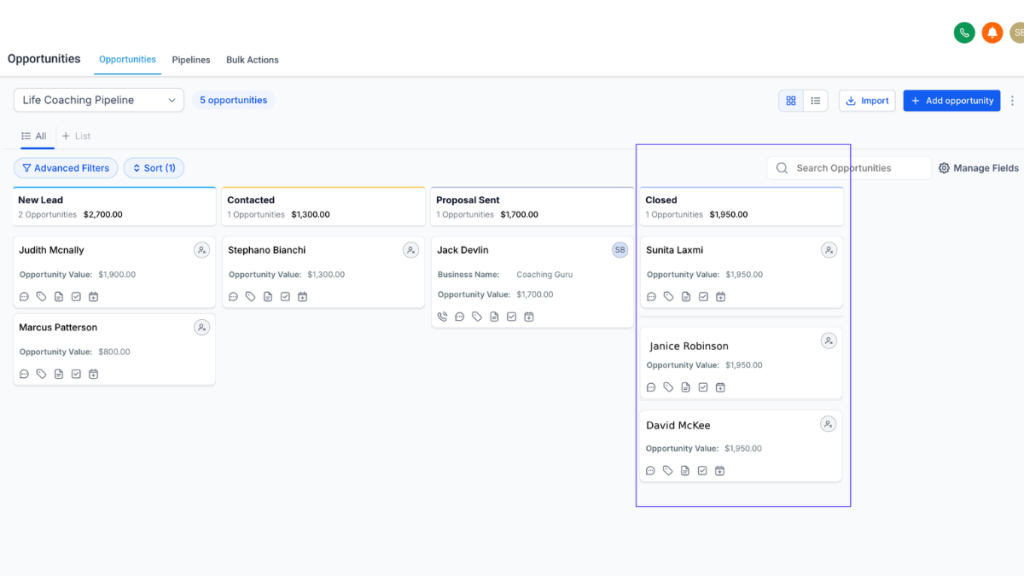
Instead of sitting in your inbox or getting lost across different apps, everything is organised inside a simple pipeline. That pipeline represents the stages a lead moves through, from the first enquiry to becoming a paying customer or being marked as lost.
As conversations progress, you update their position in that pipeline. You’re not guessing where things stand or relying on memory. You can see it instantly.
At the same time, every interaction is tracked. Messages, calls, notes, and updates all stay attached to that contact, so you always have full context without digging through emails or chats.
This is where a CRM starts to make a real difference.
Instead of manually remembering to follow up, the system helps you stay consistent. You can set reminders, trigger follow-up messages, or automate simple responses so leads don’t go cold.
At any point, you can open your dashboard and immediately see who needs a reply, which deals are active, and where each opportunity sits in your process.
That level of visibility is what most small businesses are missing before they start using a CRM.
CRM vs Spreadsheets for Small Business (What Actually Changes)
A lot of small businesses start by tracking leads in a spreadsheet.
At first, it works.
You add names, phone numbers, maybe a few notes, and it feels organised enough.
The problem is that spreadsheets only store information. They don’t help you manage it.
As soon as your leads increase, things start slipping.
You forget to follow up. You lose track of conversations. You have no clear view of who needs attention today.
And because nothing is automated, everything relies on memory.
This is where a CRM becomes a completely different system.
Instead of just storing data, a CRM actively helps you manage relationships.
You can see your entire pipeline visually, not just rows in a sheet.
You can track every message, call, and update in one place.
You can set reminders or automate follow-ups so nothing gets missed.
And most importantly, you always know what needs to happen next.
That’s the key difference.
A spreadsheet is passive.
A CRM is active.
One helps you keep records.
The other helps you close deals.
Types of CRM Tools for Small Businesses
Different CRM platforms are designed for different business models.
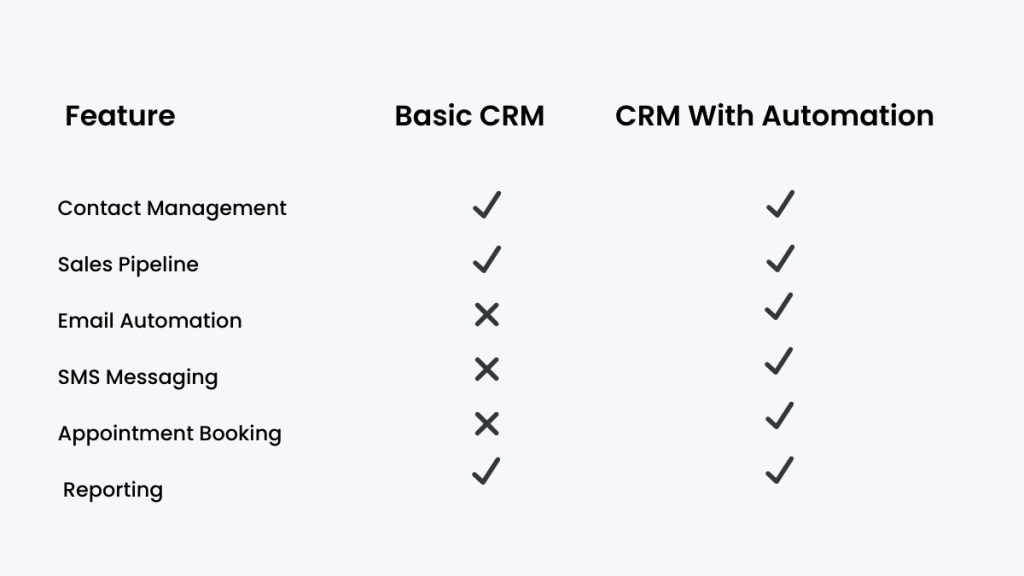
Some tools focus primarily on sales pipelines and lead tracking, while others include built-in marketing automation, messaging systems, and appointment booking.
Businesses comparing options often start with a guide like Best Small Business CRM Software (2026), which breaks down the most widely used platforms and what they’re best suited for.
Some systems are built specifically for agencies and service businesses that rely heavily on lead generation and follow-up. Others are designed for ecommerce stores where the focus is on managing products, orders, and inventory.
For example, platforms like GoHighLevel are designed specifically for service-based businesses and agencies that need both a CRM and built-in automation, rather than just a basic system for storing contacts.
If you’re comparing platforms across different business models, our guide on Shopify vs GoHighLevel explains how these systems differ depending on whether you run an online store or a service-based business.
When a Small Business Should Start Using a CRM
Many businesses wait too long before implementing a CRM.
If a company receives regular enquiries, manages multiple customers or struggles to keep track of follow-ups, a CRM can significantly improve organisation.
Once a CRM is implemented, businesses often find that customer communication becomes more consistent and opportunities are easier to manage.
Automation also reduces repetitive administrative work.
CRM pricing varies depending on features and automation tools. Businesses that rely heavily on automation often use dedicated platforms, which we cover in Best Marketing Automation Software for Small Businesses.
Features That Actually Matter in a CRM for Small Business
Most CRM tools list dozens of features, but for a small business, only a few actually make a difference.
If a CRM doesn’t help you stay organised and follow up consistently, the rest doesn’t matter.
Here are the features that genuinely move the needle.
Contact management is the foundation.
Every lead and customer should be stored in one place with their full history. That means you can see past conversations, notes, and activity without digging through emails or messages.
Pipeline tracking is what gives you visibility.
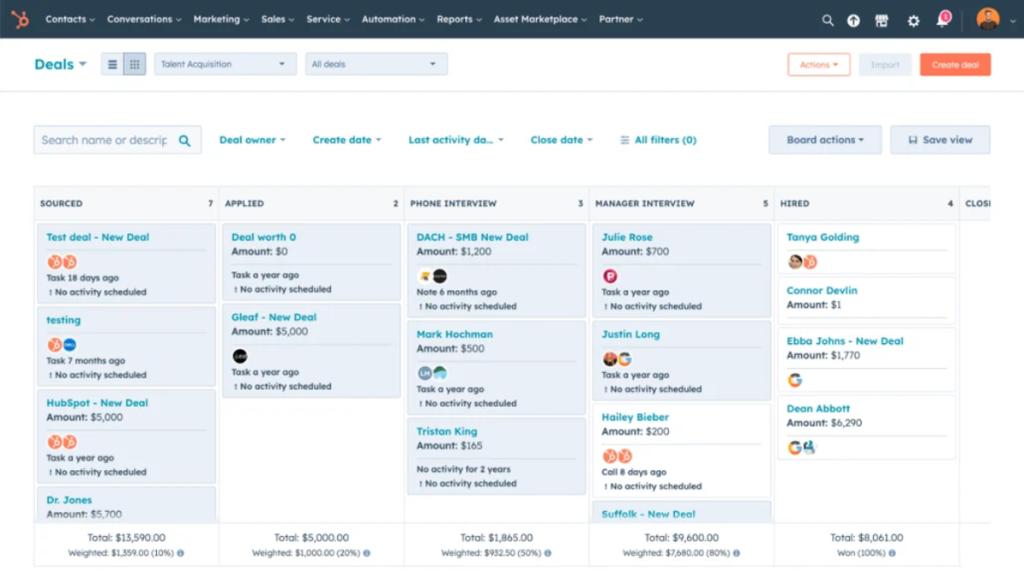
Instead of guessing where things stand, you can see every lead laid out across stages like enquiry, quoted, or closed. This makes it obvious what needs attention and what’s progressing.
Automation is where a CRM becomes powerful.
This includes follow-up messages, reminders, and basic workflows that run without you manually doing everything. Even simple automation can save hours and prevent missed opportunities.
Communication tracking keeps everything connected.
Emails, SMS, calls, and notes should all sit under one contact. You don’t want conversations scattered across platforms.
If a CRM doesn’t improve how quickly and consistently you follow up, it’s not solving the real problem.
Example Use Case for Service Businesses
A local service business might receive 10 to 20 enquiries each week from a mix of phone calls, website forms, and messages.
Before using a CRM, those leads are handled manually. Some get quick responses, others are delayed, and a few are missed completely. There’s no clear system, just a mix of inboxes and memory.
Over time, this leads to inconsistent follow-up and lost opportunities, even if demand is steady.
After introducing a CRM, every enquiry is captured automatically and placed into a structured pipeline. Each lead is tracked from the first contact through to the final outcome.
Follow-ups become consistent because they’re either scheduled or automated. Nothing relies on memory anymore.
Instead of guessing what needs attention, the business owner can open a dashboard and immediately see which leads need a reply, which deals are active, and where revenue is coming from.
That’s the practical difference a CRM makes day to day.
Is CRM Software Worth It for Small Businesses?
For most growing businesses the answer is yes.
Most businesses don’t lose money because they lack leads.
They lose money because they don’t follow up fast enough.
Even a simple CRM provides visibility over leads, conversations and opportunities.
Instead of relying on memory or scattered notes, businesses gain a structured system that helps them manage customer relationships more effectively.
Over time this organisation often translates into higher conversion rates and better customer experience.
If you’re currently relying on memory, spreadsheets, or scattered messages to manage leads, you’re not alone.
That’s exactly where most small businesses start.
But once enquiries become consistent, those systems quietly break. Leads get missed, follow-ups slow down, and opportunities slip through without you noticing.
A CRM fixes that by giving you one place to track everything and a system to follow up properly.
That’s where the real difference comes from.
FAQ
What does CRM stand for?
CRM stands for Customer Relationship Management. It refers to systems that help businesses organise customer information, communication and sales activity.
Do small businesses really need a CRM?
Many small businesses benefit from a CRM once they begin receiving regular enquiries. It helps ensure leads are tracked and follow-ups are not missed.
What is the easiest CRM for beginners?
Beginner-friendly CRM platforms usually focus on simple contact management and automation. Some systems combine CRM, messaging and marketing tools into a single interface.
How much does CRM software cost?
CRM pricing varies widely. Some platforms offer free plans while others charge monthly subscriptions depending on features and number of users.
Final Thoughts
A CRM for small business is not just about organisation.
It’s about conversion.
If you’re managing leads through inboxes, spreadsheets or memory, you’re already losing opportunities.
A CRM gives you a system.
It helps you track leads, follow up consistently, and see what’s actually converting.
That’s what allows small businesses to grow without things breaking behind the scenes.
Related CRM Guides
Best CRM for Virtual Assistants
→ niche-specific, strong internal relevance
Best CRM With Automation for Small Businesses
→ directly supports this article’s intent
Best Small Business CRM Software
→ broader comparison (good for SEO cluster)
GoHighLevel Pricing Explained
→ BOFU money page (important for conversions)