
CRM automation tools help businesses automatically respond to leads, track customer interactions, and move prospects through the sales pipeline without manual work. Instead of manually sending emails, scheduling follow-ups, or updating deal stages, automation rules inside a CRM system trigger these actions automatically.
In simple terms, CRM automation tools are platforms that automate sales and marketing processes using workflows, triggers, and customer data stored inside the CRM. These systems are widely used by businesses that generate leads online and need fast follow-up.
Many companies researching automation platforms also start by understanding how pipelines work, which is why our guide to CRM Pipeline Management explains how businesses track leads through the sales process.
Platforms like GoHighLevel combine CRM pipelines, automation workflows, and marketing tools in one system, which is why they are often considered when businesses want a full automation platform.
Quick Summary
| Topic | Key Takeaway |
|---|---|
| What CRM automation does | Automates follow-ups, lead tracking, and customer communication |
| Best for | Businesses generating leads online |
| Key features | Email automation, pipelines, SMS, reporting |
| Typical pricing | $50–$300/month depending on features |
| Best all-in-one tool | GoHighLevel combines CRM + marketing automation |
The Real Problem with Manual Follow Ups
Most small businesses don’t lose leads because they lack traffic.
They lose leads because follow-ups don’t happen fast enough.
- enquiries sit unanswered
- leads forget they even reached out
- competitors respond first
- sales opportunities disappear
CRM automation tools solve this by removing manual follow-up completely.
What Are CRM Automation Tools?
CRM automation tools are software platforms that automate tasks inside customer relationship management systems.
Instead of manually responding to every lead or updating customer records, automation rules perform these actions automatically.
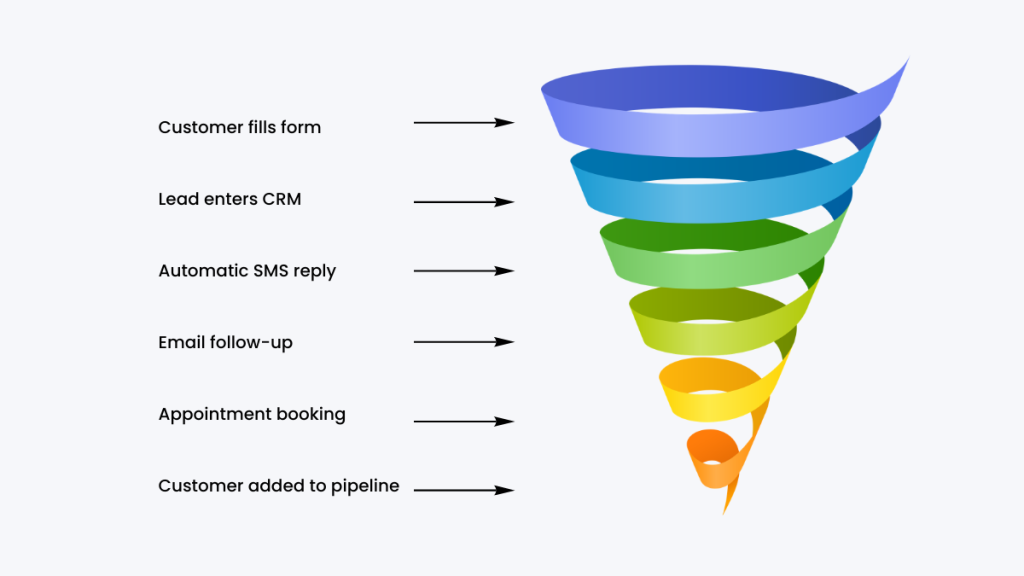
For example, when a visitor submits a website form, the CRM can instantly send a confirmation email, assign a follow-up task to a salesperson, and move the lead into the correct pipeline stage.
Automation is especially powerful when combined with lead capture systems. Businesses researching these systems often begin with tools explained in our guide to Best CRM for Lead Generation.
According to research from HubSpot, businesses that automate repetitive sales tasks can significantly improve efficiency and response speed.
Why Businesses Use CRM Automation Tools
Automation tools help businesses reduce repetitive work while improving consistency in customer communication.
Manual follow-ups often lead to delays or missed leads. Automation solves this problem by responding instantly whenever a lead takes action.
For example, automation workflows can:
Send welcome emails when someone subscribes
Trigger SMS reminders for appointments
Move leads into different pipeline stages
Notify sales teams about new opportunities
Businesses that implement automated follow-ups often see higher conversion rates because leads receive faster responses.
Automation workflows are explained in more detail in our guide to CRM workflow automation, which shows how automated follow-ups work in real CRM systems.
Best CRM Automation Tools in 2026
There are dozens of CRM automation platforms, but most small businesses only need a few core capabilities: lead tracking, automation workflows, and pipeline visibility.
Below are some of the most widely used CRM automation tools, each suited to different types of businesses.
GoHighLevel
Best for automation-driven service businesses.
GoHighLevel combines CRM, email marketing, SMS automation, funnels, and pipeline tracking in one system.
This makes it especially useful for businesses generating leads online where fast follow-up directly impacts revenue.
A typical workflow might include:
- lead captured from a landing page
- automated SMS sent instantly
- follow-up email sequence triggered
- lead moved into a pipeline
- appointment booked automatically
The biggest advantage is replacing multiple tools with one platform. The downside is that it can take time to learn if you’re new to CRM systems.
HubSpot CRM
Best for beginners and small teams.
HubSpot offers a free CRM with built-in automation features, making it a common starting point for small businesses.
It includes:
- contact management
- deal pipelines
- email tracking
- basic automation workflows
HubSpot is easy to use and integrates well with other tools. However, advanced automation and marketing features require paid plans, which can become expensive as your business grows.
ActiveCampaign
Best for email marketing automation.
ActiveCampaign focuses heavily on automation workflows, particularly email sequences and customer journeys.
It allows businesses to:
- build advanced automation funnels
- segment audiences
- track customer behaviour
- trigger personalised campaigns
This makes it ideal for businesses that rely on email marketing. The limitation is that it’s less focused on full CRM pipeline management compared to all-in-one platforms.
Zoho CRM
Best for affordability and flexibility.
Zoho CRM offers a balance between cost and functionality. It includes automation features, reporting, and integrations at a lower price point than many competitors.
Key features include:
- workflow automation
- sales pipelines
- analytics dashboards
- integrations with Zoho apps
Zoho works well for growing businesses but can feel slightly complex due to its customisation options.
Pipedrive
Best for sales-focused teams.
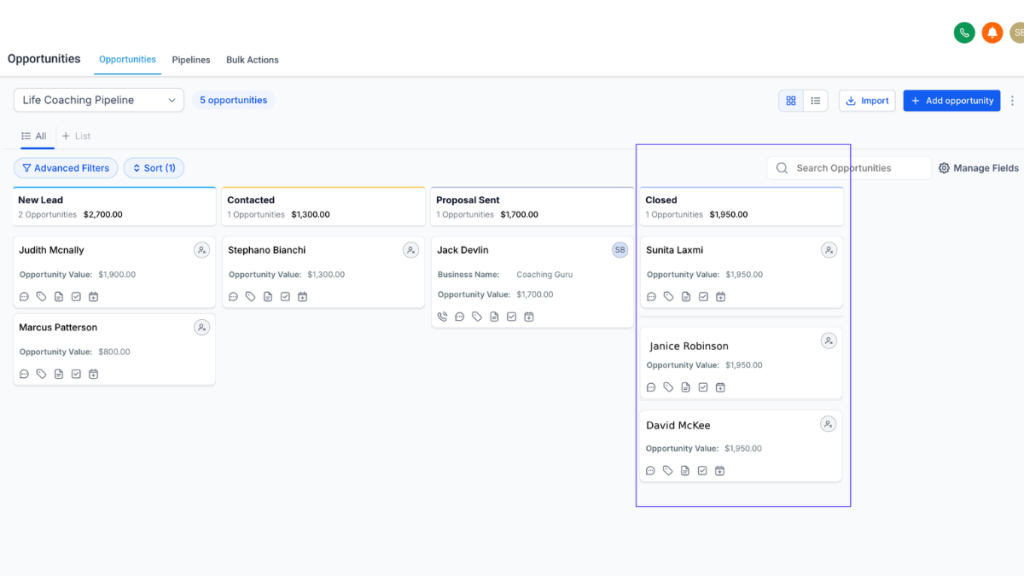
Pipedrive is designed around visual sales pipelines, making it easy to track deals and manage opportunities.
Automation features include:
- activity reminders
- deal stage automation
- workflow triggers
It’s very simple to use, but its automation capabilities are more limited compared to marketing-focused platforms.
Best CRM Automation Tools Comparison
| Platform | Best For | Automation | Pricing |
|---|---|---|---|
| GoHighLevel | All-in-one CRM and marketing automation | Advanced workflow automation | From $97/month |
| HubSpot | Enterprise marketing and sales teams | Advanced automation | Free plan, paid tiers |
| ActiveCampaign | Email marketing automation | Strong automation builder | From $39/month |
| Zoho CRM | Affordable CRM for small businesses | Moderate automation | From $14/user |
| Pipedrive | Sales pipeline management | Basic automation | From $14.90/user |
How to Choose the Right CRM Automation Platform
Choosing the right CRM automation tool depends on how a business generates leads and manages sales.
Small businesses often start with basic automation features that send follow-up emails and track deals inside a pipeline.
Larger teams may require advanced workflow automation, marketing integrations, and analytics.
Many businesses evaluating CRM platforms also compare full marketing systems such as those discussed in our article comparing GoHighLevel vs ClickFunnels.
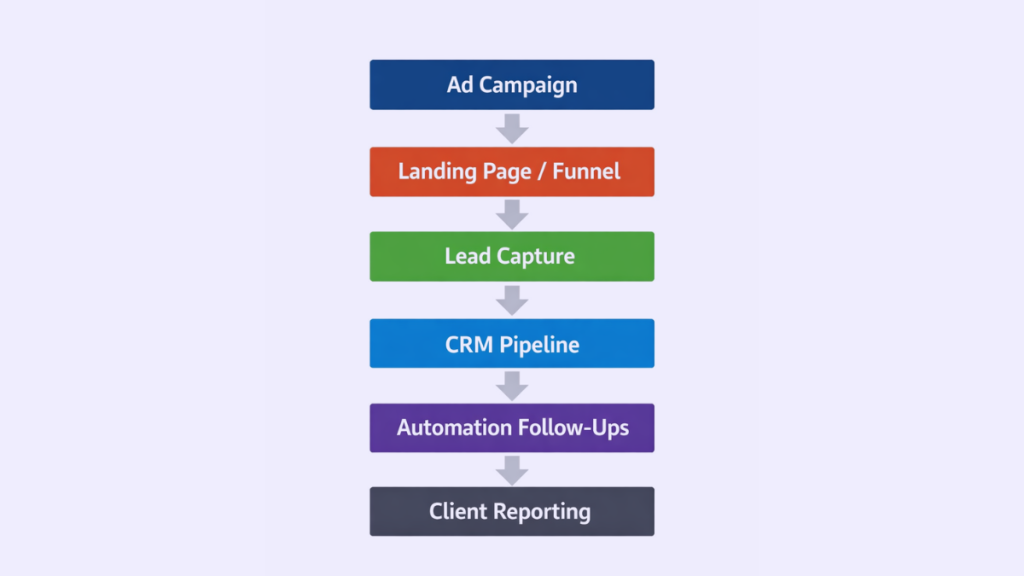
Automation platforms that combine marketing tools with CRM pipelines can replace several separate systems.
Platforms like GoHighLevel are designed specifically for automation-driven businesses that want CRM pipelines, marketing automation, and lead tracking in one platform.
Common Automation Features in CRM Systems
Most CRM automation tools include a set of core workflow features that allow businesses to automate lead follow-ups, pipeline updates, and marketing campaigns.
Automation workflows trigger actions when specific events occur.
Lead scoring helps prioritize prospects who are most likely to convert.
Email and SMS automation allow businesses to follow up instantly after a lead submits a form or books a call.
Pipeline automation moves deals through different stages automatically.
Many CRM automation systems also combine automation with reporting tools that track conversion rates and sales performance.
Businesses researching CRM tools often explore pricing differences between these systems, which is why our breakdown of CRM software pricing explains what businesses actually pay.
Conclusion
CRM automation tools are no longer optional for businesses that rely on lead generation.
Without automation, follow-ups become inconsistent, leads go cold, and revenue opportunities are lost.
The right platform doesn’t just organise contacts. It actively drives your sales process.
For simple needs, tools like HubSpot or Zoho can work.
But for businesses generating consistent leads and needing fast response times, automation-first platforms provide a clear advantage.
FAQ
What are CRM automation tools?
CRM automation tools are software platforms that automatically handle tasks such as sending emails, assigning leads, updating pipelines, and triggering follow-ups based on customer activity.
Which CRM has the best automation features?
Several CRM platforms offer strong automation features, including GoHighLevel, HubSpot, and ActiveCampaign. The best option depends on the size of the business and required marketing tools.
Do small businesses need CRM automation?
Yes. Even small businesses benefit from automation because it ensures leads receive quick responses and follow-ups without requiring manual effort.
Can CRM automation replace marketing software?
Some platforms combine CRM and marketing automation in one system. These tools allow businesses to manage leads, email marketing, and automation workflows without separate software.
Suggested Reads
If you’re researching how leads move through the sales process, our guide to CRM Pipeline Management explains how businesses track prospects from first contact to closed deals.
Businesses focused on capturing leads from websites or landing pages should also read our breakdown of Best CRM for Lead Generation, which explores platforms designed for lead capture and automated follow-ups.
If you are comparing automation systems with marketing platforms, our comparison of GoHighLevel vs ClickFunnels explains how these tools differ for funnels, automation, and lead management.
For a deeper understanding of costs, our article on CRM software pricing explains how CRM platforms structure subscription pricing and hidden fees.