
Affiliate links – I earn a commission if you sign up through this page, at no extra cost to you. That’s exactly why the weaknesses below aren’t softened. If GoHighLevel isn’t right for your business, I’d rather you know before you start a trial
Spreadsheet vs CRM for Lead Tracking: Which One Actually Works?
The spreadsheet vs CRM lead tracking debate is one most service businesses have to face eventually.
If your spreadsheet depends on you remembering every follow-up, it is only a matter of time before leads slip through.
Not because spreadsheets are bad. Because spreadsheets rely on you remembering.
And when you are busy – on a job, with a customer, driving between sites – you do not remember.
A lead calls. You cannot answer. You mean to call back. Three days pass. They have already booked someone else.
That is not a sales problem. That is a system problem.
This page will help you decide when to fix it – and what to fix it with.
Key Takeaways
- A spreadsheet is fine if you handle a small number of leads and update it consistently.
- A CRM becomes necessary when missed calls, slow replies, quote follow-ups, or multiple lead sources start costing you jobs.
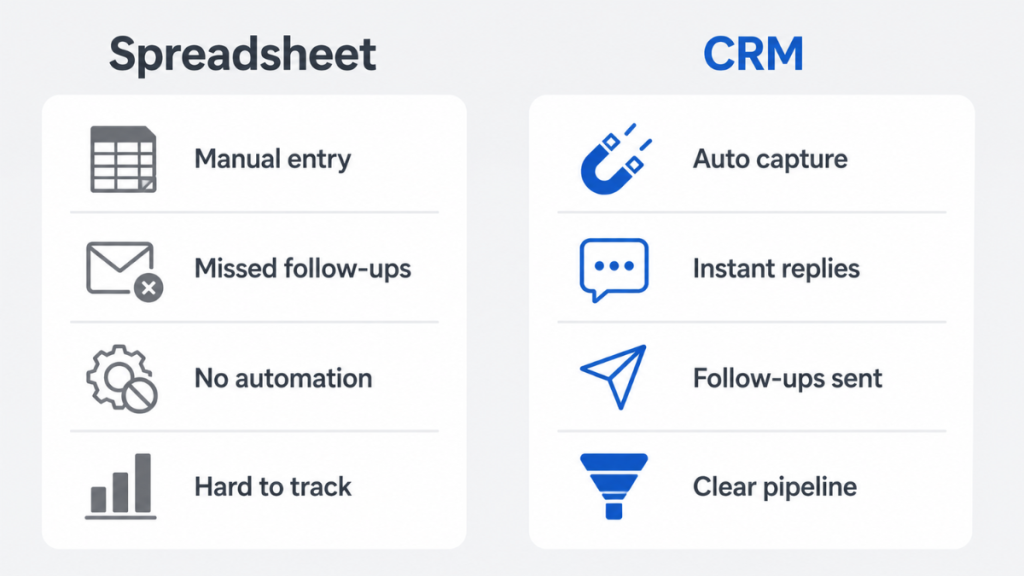
- The biggest difference is automation. A spreadsheet stores lead data. A CRM can capture, remind, respond, and follow up.
- For UK service businesses, GoHighLevel is the strongest option when missed-call replies, SMS follow-up, booking, and pipeline tracking all need to work together.
- If you only need a simple visual pipeline, Pipedrive may be enough. If you need a free starting point, HubSpot is the safer low-budget option.
If the real problem is missed calls, slow replies, and forgotten follow-ups, a spreadsheet will not fix it. HighLevel’s 30-day trial plus live Bootcamp is the easiest way to test whether a CRM-based follow-up system fits your business.
What Is Lead Tracking and Why Does It Matter?
This guide settles the spreadsheet vs CRM lead tracking question for UK service businesses specifically.
Lead tracking is the process of recording where every potential customer comes from, what stage they are at, and what needs to happen next to convert them into a paying job or booking.
Without a lead tracking system of some kind, enquiries arrive and disappear. You respond to some and forget others. Quotes go out and are never followed up. A potential customer calls twice, gets no response, and books a competitor.
This is not a traffic problem. It is a system problem.
According to research cited across multiple sales studies, Multiple sales studies show the same pattern: faster response usually means higher conversion, especially when the customer is contacting more than one local business. In competitive local markets – where a homeowner needs an electrician, a cleaner, or a landscaper and will call three businesses in a row – speed of response often determines who wins the job, not price or reputation.
The question is not whether to track leads. The question is whether a spreadsheet or a CRM is the right tool to do it.
For more context on how lead management fits into a complete sales system see our guide to lead management systems for service businesses.
What a Lead Tracking Spreadsheet Actually Is
A lead tracking spreadsheet is a manually maintained file – usually in Google Sheets or Microsoft Excel – where you record enquiries, contact details, follow-up dates, and deal status.
A typical spreadsheet has columns for:
- Name and contact details
- Where the lead came from
- Date of enquiry
- What was discussed
- Quote sent yes or no
- Follow-up date
- Status – open, won, lost
It is simple. It costs nothing. Most people already know how to use it.
For a service business just starting to grow, a spreadsheet is a completely reasonable starting point.
The limitations only become obvious once volume increases or the business owner gets too busy to update it consistently.
What a CRM for Lead Tracking Actually Is
A CRM – Customer Relationship Management system – is software built specifically to capture, organise, and follow up on leads without relying on manual effort.
Unlike a spreadsheet where everything depends on someone remembering to update a row, a CRM:
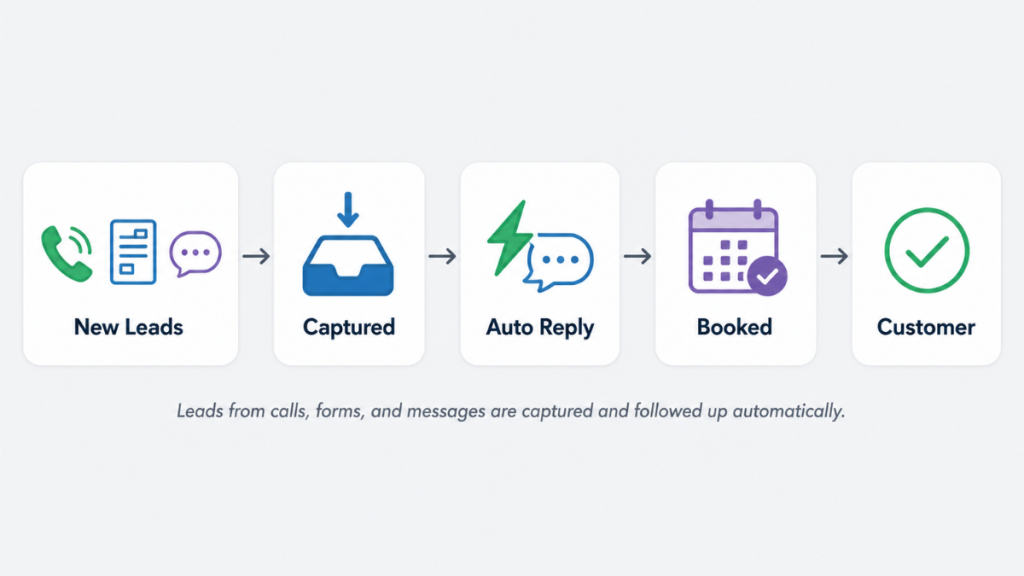
- Captures leads automatically from forms, calls, and messages
- Organises every enquiry into a visual pipeline
- Triggers follow-up reminders or automated messages
- Logs every interaction in one place
- Shows exactly where every lead stands in real time
The shift from spreadsheet to CRM is not just a software change. It is a system change. Instead of the business owner being the system, the software becomes the system.
This matters most for service businesses where the owner is also doing the work. A plumber on a job cannot update a spreadsheet. A cleaner between appointments cannot chase a quote manually. A CRM handles this automatically in the background.
See how automated lead follow-up systems work in practice for UK service businesses.
Spreadsheet vs CRM Lead Tracking – The Honest Comparison
| Area | Spreadsheet | CRM | What it means in real life |
|---|---|---|---|
| Setup time | Instant | Hours to days depending on platform | Lower barrier to start, but CRM pays back quickly |
| Cost | Free | From £0 to £97+ per month | HubSpot free tier removes the cost barrier |
| Ease of use | Very simple | Moderate learning curve | Spreadsheet wins on day one, CRM wins long term |
| Lead capture | Manual | Automatic from forms, calls, messages | Less admin, fewer lost enquiries |
| Follow-up | Manual | Automated reminders or sequences | Quotes do not rely on memory |
| Response speed | Depends on someone checking | Instant automated response possible | Missed calls can still turn into conversations |
| Pipeline visibility | Only as good as last update | Real time always | Easier to see what needs action today |
| Scalability | Breaks quickly as volume grows | Built to scale | Spreadsheet becomes the bottleneck when you get busier |
| GDPR compliance | Depends on storage and sharing | Built-in data controls | Safer for storing UK customer data |
| Best for | Under 10 leads per week, one person | Growing volume, consistent follow-up, automation | Switch when follow-ups start getting missed |
If your leads are not being followed up automatically right now, your spreadsheet is already costing you money. Every unanswered call and delayed reply is a job that went to a competitor.
If the real problem is missed calls, slow replies, and forgotten follow-ups, a spreadsheet will not fix it. HighLevel’s 30-day trial plus live Bootcamp is the easiest way to test whether a CRM-based follow-up system fits your business.
The Real Problems With Using a Spreadsheet for Lead Tracking
A lead tracking spreadsheet does not fail all at once. It fails quietly.
Problem 1: It relies on you remembering
A spreadsheet does not send you a reminder when a quote has been outstanding for a week. It does not alert you when a lead has gone cold. It does not follow up automatically when nobody has responded.
Everything depends on you opening the file and checking it. When you are busy – which is exactly when leads are coming in fastest – the spreadsheet is the last thing you check.
Problem 2: It cannot respond instantly
Research consistently shows that speed of response is the single biggest factor in lead conversion. A lead who enquires online and gets a reply within five minutes is dramatically more likely to convert than one who waits two hours.
A spreadsheet cannot send an automatic acknowledgement. It cannot text a missed caller within seconds. It cannot start a follow-up sequence the moment a form is submitted.
For a UK service business owner who is physically on a job when an enquiry comes in, a spreadsheet means the lead waits until you are available. In competitive local markets, that wait costs jobs.
Problem 3: It does not scale
A spreadsheet is manageable at ten leads per week for one person. At twenty leads per week it starts to feel stretched. At thirty it breaks.
Multiple lead sources – Google ads, website forms, missed calls, referrals, social media – create multiple places to update. Leads get missed. Rows get forgotten. The spreadsheet becomes something you dread opening rather than a tool that helps.
Problem 4: No visibility without manual effort
With a spreadsheet, understanding your pipeline requires manually counting rows, filtering columns, and calculating conversion rates. This takes time and only ever reflects the state of the data at the last update.
A CRM shows you pipeline value, conversion rates, and lead sources in real time without any manual calculation.
Problem 5: GDPR risk
Storing customer contact details in a Google Sheet shared across a team creates GDPR compliance risks that many small UK businesses are not aware of. A CRM with proper data controls, audit logs, and data processing agreements is a significantly safer way to store customer information.
When a Spreadsheet Is Still the Right Choice
Not every business needs a CRM immediately. A spreadsheet is genuinely sufficient when:
- You are handling fewer than 10 leads per week
- You are the only person managing leads
- Your sales process is simple – enquiry, quote, yes or no
- You have time to check and update the spreadsheet consistently
- You are just starting out and want to understand your lead flow before investing in software
If all of these apply, start with a well-structured Google Sheet. It costs nothing, gets you into the habit of tracking leads, and gives you enough data to understand your conversion rate before committing to a paid platform.
The spreadsheet is not the enemy. Staying on a spreadsheet after you have outgrown it is.
The Exact Signs You Have Outgrown a Spreadsheet
This is the moment the spreadsheet vs CRM lead tracking decision becomes obvious. You have outgrown a spreadsheet when:
You are missing follow-ups. A quote went out two weeks ago and you forgot to chase it. A lead called twice and you meant to ring back. A form submission arrived on a Friday afternoon and was not followed up until Tuesday.
Leads are going cold. You know there are enquiries in the pipeline but you are not sure which ones are still warm. You spend ten minutes scrolling through rows trying to work out what needs attention.
You are getting busier. The volume of leads is increasing but your system cannot keep up. More leads are slipping through because there is more to track manually.
You do not know your conversion rate. If someone asked you right now what percentage of your leads convert to paid work, could you answer instantly? If not, your tracking system is not working.
You have more than one lead source. Website forms, missed calls, Facebook messages, referrals, and Google ads all create leads in different places. A spreadsheet cannot capture all of these automatically.
You are responding too slowly. If a lead contacts you at 7pm and you do not respond until 9am the next day, a competitor has already booked the job. A CRM with automation responds instantly regardless of when the enquiry arrives.
As one study found, Sales research consistently shows that leads left without contact for several weeks rarely convert. The longer the gap, the lower the chance of winning the job. A spreadsheet cannot prevent this. An automated follow-up sequence can.
See our guide to lead response time for small businesses for the full picture on why response speed is the biggest revenue lever most service businesses are ignoring.
If the real problem is missed calls, slow replies, and forgotten follow-ups, a spreadsheet will not fix it. HighLevel’s 30-day trial plus live Bootcamp is the easiest way to test whether a CRM-based follow-up system fits your business.
Spreadsheet vs CRM – A Real Service Business Example
Here is how the spreadsheet vs CRM lead tracking difference plays out in practice for a typical UK service business.
Using a spreadsheet:
A potential customer fills in a website enquiry form at 6:30pm on a Tuesday. The business owner is finishing a job and does not check the form until Wednesday morning. By then the customer has already booked a competitor who called back within the hour.
Meanwhile three other leads from last week are sitting in the spreadsheet with no follow-up. Two have already gone cold. One is still potentially warm but nobody has contacted them.
The business owner spends twenty minutes on Wednesday morning going through the spreadsheet, trying to work out which leads are still worth chasing and which have moved on.
Using a CRM:
The same enquiry comes in at 6:30pm. The CRM captures it automatically and sends an instant acknowledgement text: “Thanks for getting in touch. We will call you first thing tomorrow morning to discuss your job.”
The next morning the CRM shows the business owner their full pipeline – three warm leads, two quotes outstanding, one follow-up due today. Everything is in one place and prioritised automatically.
The business owner makes three calls, books two jobs, and sends one quote. No time wasted trying to remember what needs attention.
Same leads. Different system. Dramatically different results.
This is the core difference in the spreadsheet vs CRM lead tracking debate. It is not about the tool. It is about whether the system works when you are too busy to run it manually.
Which CRM Is Best for UK Service Businesses Moving Off Spreadsheets?
For most UK service businesses this is the clearest upgrade from a spreadsheet. One platform replaces the manual tracking, the follow-up reminders, and the missed call problem in one go.
GoHighLevel – best when missed calls and follow-ups are the problem
GoHighLevel makes the most sense when the spreadsheet is not just untidy, but actively costing you enquiries. If leads come from phone calls, forms, Facebook, website chat, or booking pages, HighLevel can pull those enquiries into one pipeline and trigger follow-up automatically.
The missed call text back feature alone recovers leads that a spreadsheet would lose entirely. When a potential customer calls and you cannot answer, GoHighLevel sends an automatic text within seconds. The conversation is captured. A follow-up sequence starts. Nothing is lost.
This is not the best choice if you only want a simple contact list. It is worth considering when follow-up speed is the thing costing you money.
UK pricing: from approximately £75-£80/month (Starter plan at $97/month). Usage fees for SMS and email apply on top. See our full GoHighLevel pricing UK guide for the complete cost breakdown.
If the real problem is missed calls, slow replies, and forgotten follow-ups, a spreadsheet will not fix it. HighLevel’s 30-day trial plus live Bootcamp is the easiest way to test whether a CRM-based follow-up system fits your business.
Pipedrive – Best for simple visual pipeline
Pipedrive is the easiest step up from a spreadsheet. The visual pipeline looks familiar – deals move across stages just like you would update a status column in a spreadsheet, but with reminders, email integration, and mobile access built in.
For service businesses that want structure without complexity, Pipedrive gets teams productive within a day.
UK pricing: from £12.50/user/month. 14-day free trial available. See our Pipedrive review UK for full details.
HubSpot – Best free starting point
HubSpot’s free CRM is the most natural step up from a spreadsheet for businesses with no budget for software. Unlimited contacts, basic pipeline, email tracking, and meeting links at zero cost.
The limitation is that automation – the feature that actually fixes the missed follow-up problem – requires paid plans starting at £12/user/month for basic sequences.
For a broader comparison of CRM options see our guide to the best CRM for small business UK.
The Simplest Rule
Use a spreadsheet if you need a record.
Use a CRM if you need action.
A spreadsheet records what happened. A CRM helps make sure the next thing happens.
That is the real difference. If your only problem is organisation, a spreadsheet may be enough. If your problem is speed, follow-up, missed calls, or lead source chaos, you need a CRM.
How to Move From a Spreadsheet to a CRM Without Losing Your Data
Moving from a spreadsheet to a CRM does not have to be complicated. Most platforms import directly from a CSV file which is what your Google Sheet or Excel file exports to.
Here is the process:
Step 1 – Clean your spreadsheet first Before importing, remove duplicate rows, standardise your column headers, and make sure every contact has at least a name and a phone number or email address. Importing messy data creates a messy CRM.
Step 2 – Export as CSV In Google Sheets go to File > Download > Comma Separated Values. In Excel go to File > Save As and select CSV format.
Step 3 – Import into your CRM Every platform on this list has a CSV import function. Map your spreadsheet columns to the CRM fields – name to name, phone to phone, status to pipeline stage.
Step 4 – Set up your pipeline stages Before adding leads, set up the stages that reflect your actual sales process. For a service business this might be: New Enquiry > Quote Sent > Follow Up > Won > Lost.
Step 5 – Set up your first automation Start with one automation before anything else. The most valuable for a service business is an automatic response to new enquiries – either an email acknowledgement or an SMS confirmation that the enquiry has been received and will be followed up by a specific time.
This single automation immediately solves the biggest problem a spreadsheet cannot fix – instant response.
This is also where the HighLevel Bootcamp offer is useful. The software is powerful, but the setup matters. If you are moving from a spreadsheet, use the 30-day trial period to build one simple system first: capture the lead, send the first response, create the follow-up reminder, and move the lead through the pipeline. Do not try to build everything at once.
Most small businesses complete this migration in 2-4 weeks including setting up basic automations and getting comfortable with the new system.
If anything on this page sounds familiar – missed follow-ups, cold leads, no pipeline visibility – the spreadsheet is the problem. The fix is straightforward.
If the real problem is missed calls, slow replies, and forgotten follow-ups, a spreadsheet will not fix it. HighLevel’s 30-day trial plus live Bootcamp is the easiest way to test whether a CRM-based follow-up system fits your business.
Frequently Asked Questions
Is a spreadsheet enough for lead tracking? The spreadsheet vs CRM lead tracking decision depends on your lead volume. A spreadsheet is enough when you are managing fewer than 10 leads per week as a single person and have the discipline to update it consistently. Once lead volume grows, follow-ups start being missed, or you need faster response times, a CRM becomes necessary. The switching point is usually when the spreadsheet starts feeling like a burden rather than a tool.
What does a CRM do that a spreadsheet cannot? A CRM automates lead capture from multiple sources, triggers instant responses to new enquiries, sends follow-up sequences automatically, and shows you real-time pipeline visibility without manual calculation. The biggest difference for service businesses is speed of response – a CRM can text a missed caller within seconds. A spreadsheet cannot do anything automatically.
When should I switch from a spreadsheet to a CRM? Switch when you are consistently missing follow-ups, when leads are going cold before you contact them, when you handle more than 10-15 new enquiries per week, or when you cannot tell someone your conversion rate without spending time manually calculating it. For UK service businesses the trigger is usually getting busier – the spreadsheet breaks exactly when you need it most.
Which CRM is best for a small UK service business moving off spreadsheets? GoHighLevel for businesses that need full automation – missed call recovery, SMS sequences, and booking in one system. Pipedrive for businesses that want a simple visual pipeline similar to a spreadsheet but with reminders and email integration. HubSpot free for businesses with no CRM budget who want to start organising their pipeline. See our full best CRM for lead automation guide for a detailed comparison.
Can I track leads in Google Sheets instead of a CRM? Yes. Google Sheets is a perfectly good starting point for tracking leads when volume is low. The limitation is that Google Sheets cannot automate follow-up, cannot send instant responses to new enquiries, and cannot update itself when a lead calls or submits a form. As volume grows, manual tracking in Google Sheets becomes the bottleneck in your sales process. A CRM removes that bottleneck by handling the tracking automatically.
How long does it take to migrate from a spreadsheet to a CRM? Most service businesses complete the migration in 2-4 weeks. This includes exporting your spreadsheet data, importing it into the CRM, setting up pipeline stages, and configuring your first automation. The most time-consuming part is usually the initial setup and learning the new platform rather than the data migration itself.
Is a CRM worth it for a one-person service business? Yes – arguably more so than for a larger team. A one-person business has no backup when leads are missed. A CRM acts as the system that catches everything even when the business owner is physically on a job and cannot respond manually. GoHighLevel’s missed call text back feature is specifically valuable here – it ensures every caller gets an instant response even when you cannot answer.
Suggested Reads
Lead Follow-Up System for Small Businesses → how to build a follow-up process that runs without manual effort
Best CRM for Lead Automation (2026) → platforms compared for automating lead capture and follow-up
Lead Response Time for Small Businesses → why speed of response is the single biggest conversion lever
GoHighLevel Pricing UK and US (2026) → full GBP cost breakdown including SMS and usage fees
Best CRM for Small Business UK → broader comparison if you are still deciding which platform to use