
Affiliate links – I earn a commission if you sign up through this page, at no extra cost to you. That’s exactly why the weaknesses below aren’t softened. If GoHighLevel isn’t right for your business, I’d rather you know before you start a trial
If you’re still tracking customers in a spreadsheet, you already know it’s not working properly. Leads slip through. Follow-ups get forgotten. You can’t tell at a glance who needs attention and who’s already been handled.
The best CRM for organising customer data for a small business isn’t necessarily the one with the most features. It’s the one that gives you a single, reliable place where every contact, conversation, and next step lives – and stays organised without constant manual effort.
This guide covers what good customer data organisation actually looks like, when to move off spreadsheets, which CRM platforms handle it best for small businesses in 2026, and how to structure your data from day one so it stays useful as you grow.
Key Takeaways
- A CRM organises customer data by giving every contact a central record, an interaction history, a pipeline stage, and tags – replacing scattered inboxes, notes, and spreadsheets
- Spreadsheets work up to around 50 active contacts with one person managing them – beyond that, data quality degrades and leads start falling through
- For UK small businesses, GDPR compliance is an additional reason to move to a proper CRM – storing customer data in shared spreadsheets creates consent and data handling risks
- The best CRM for organising customer data depends on whether you primarily need contact management, pipeline tracking, or automated follow-up – these are different needs
- GoHighLevel is the strongest option for service businesses that need contact management and automated follow-up in one place; Capsule CRM and HubSpot are better for businesses that primarily need clean data organisation without automation
What “Organising Customer Data” Actually Means
Before choosing a tool, it helps to be clear on what organised customer data looks like in practice.
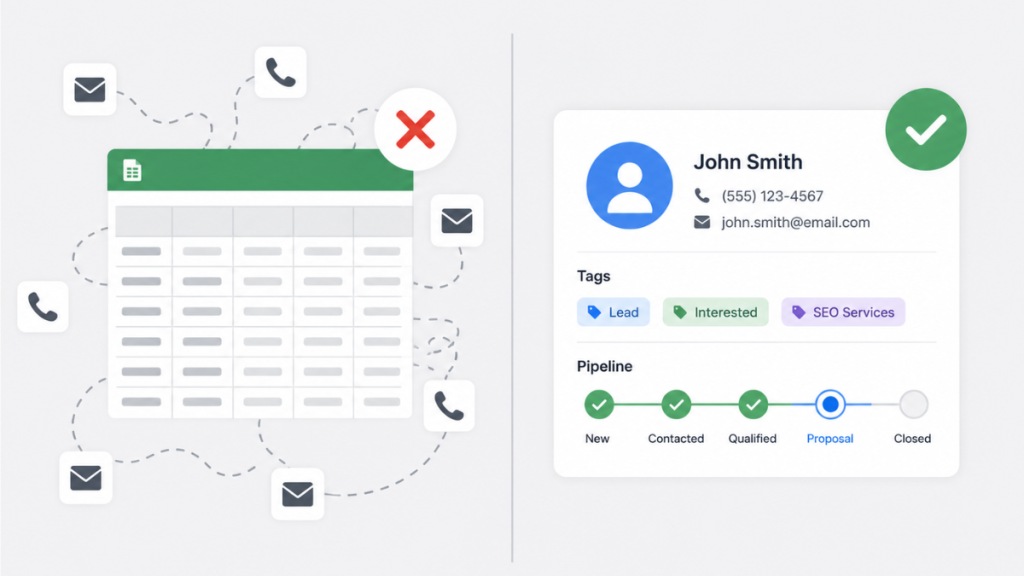
Disorganised customer data looks like this: contact details in your phone, conversation history in your email inbox, quotes in a separate folder, notes from calls written somewhere else, and a rough idea of where each person is in your process based on memory. When you need to follow up with someone, you’re reconstructing the story from scratch every time.
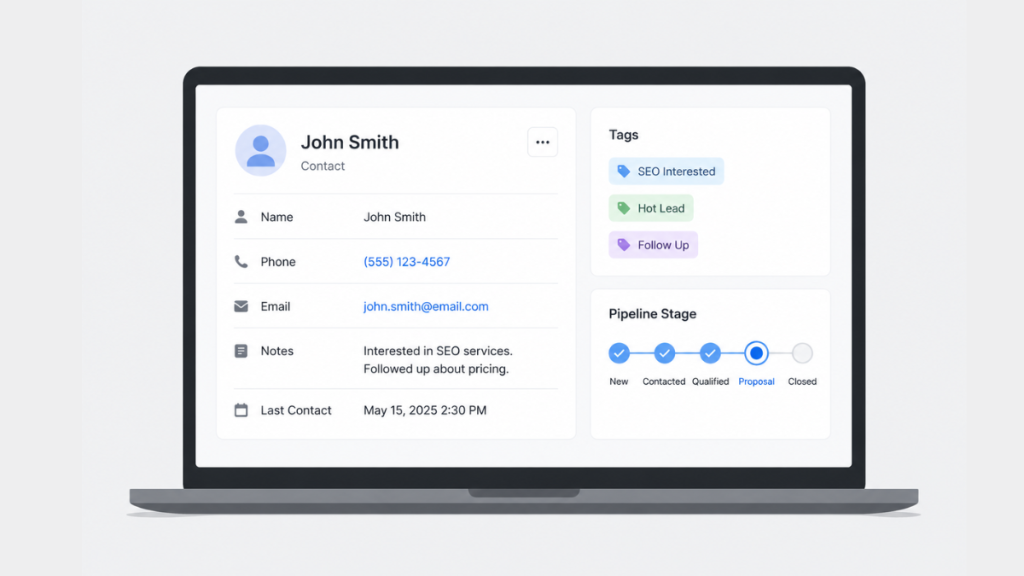
Organised customer data looks like this: every contact has a single record that contains their details, every communication, every note, every document, and their current status in your process. You can open any record and immediately understand where things stand without searching through anything.
A CRM creates that second state. Not by being complex – by being the single place where everything lands automatically.
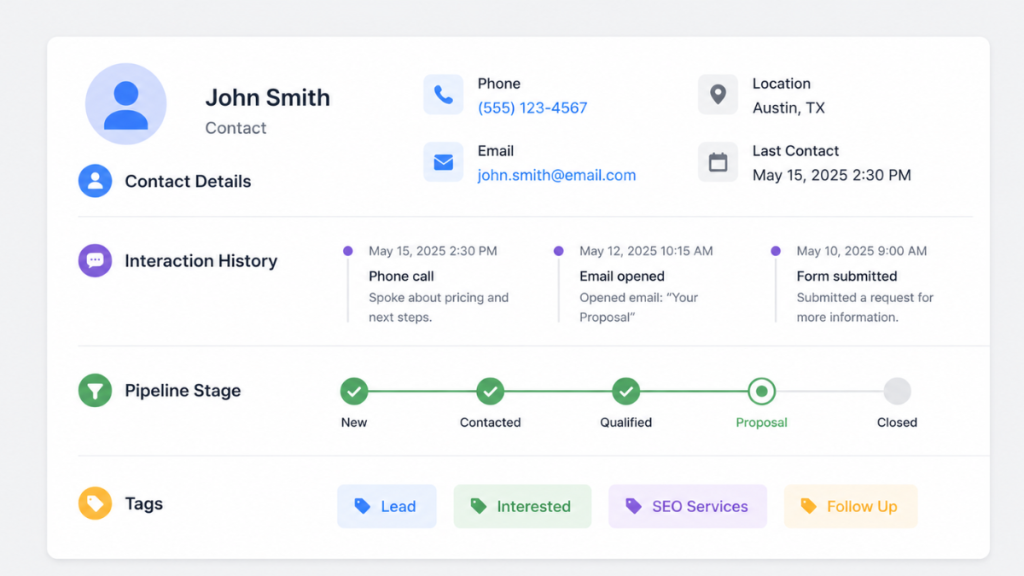
For a small service business, the core of well-organised customer data is four things:
Contact record. Name, phone, email, address, source (how they found you), and any custom fields relevant to your business. Everything in one place per person.
Interaction history. Every SMS, email, call, and note attached to the contact record automatically. You open the record and see the full conversation without checking your inbox.
Pipeline stage. Where is this person in your process right now? New enquiry, quote sent, booked, completed, follow-up needed. One clear status per contact.
Tags. Flexible labels that let you segment contacts without complex category structures. “Plumbing” “High Value” “Needs Callback” “Website Enquiry” – simple labels that let you filter your database instantly.
When these four things are in place, your customer data is organised. When any of them is missing, gaps appear.
When Spreadsheets Stop Working
Spreadsheets are a reasonable starting point. They’re free, familiar, and flexible. For a very early-stage business with a handful of contacts and one person managing everything, a spreadsheet works.
The problem is a spreadsheet can only store what you manually enter. It doesn’t capture the call you took on your phone, the email reply you sent from Gmail, or the note you made on a job. Those details stay scattered across inboxes, calendars, and memory – and your spreadsheet becomes a partial record rather than a reliable one.
Here are the specific triggers that signal a spreadsheet has stopped working:
You have more than 50 active contacts. Below this number, one person can roughly keep track of who needs what. Above it, things start falling through without a system.
More than one person needs access to the same data. Spreadsheets don’t handle collaborative editing well – version conflicts, overwriting, and missing updates are constant problems.
You’re losing track of follow-ups. If leads go quiet and you’re not sure whether you followed up or not, the spreadsheet isn’t surfacing what needs action.
You can’t answer basic questions quickly. How many active enquiries do you have? How many quotes are outstanding? Who hasn’t been contacted in two weeks? If answering these requires manual counting, you’ve outgrown the spreadsheet.
You’re dealing with UK GDPR. Storing customer names, phone numbers, and email addresses in a shared spreadsheet creates data handling risks. A proper CRM provides audit trails, consent management, and structured data storage that a spreadsheet can’t match.
Most small UK service businesses hit these triggers somewhere between 30 and 100 contacts – often sooner than they expect.
How to Structure Customer Data in a CRM
Getting the structure right from the start saves significant time later. Here’s what to set up before you start importing contacts.
Pipeline stages
Keep these simple. For most service businesses, five stages is enough:
- New Enquiry
- Contacted
- Quote Sent
- Booked
- Complete / Closed
Resist the urge to create ten stages. Every extra stage is a decision to make every time you update a record. Simple stages get used consistently. Complex ones get ignored.
Tags
Create tags for the things you’ll actually want to filter by:
- Lead source (Website, Google, Checkatrade, Referral, Social)
- Service type (Plumbing, Electrical, Cleaning – whatever applies to your business)
- Status indicators (Needs Callback, High Value, Waiting on Quote)
Don’t create every tag upfront – add them as you need them. Five well-used tags are more valuable than twenty that nobody maintains.
Custom fields
Add fields for information specific to your business that standard contact records don’t include. A plumber might add “property type” and “job type”. A salon might add “preferred stylist” and “last appointment date”. Keep it to the fields you’ll actually use – every unused field adds visual noise.
Contact sources
Always record where a contact came from. After three months, this data tells you which channels are producing real enquiries – and it’s impossible to reconstruct retrospectively if you didn’t capture it at the time.
For a deeper look at structuring a full lead management process on top of this foundation, see lead management system for service business.
How to Migrate From a Spreadsheet to a CRM
Most CRM platforms accept CSV imports. The process is straightforward:
Before You Migrate: Audit Your Existing Data
Run through this checklist before importing anything into a CRM. Importing messy data creates a messy CRM – clean it first.
- Remove duplicates – search for the same name or phone number appearing more than once. Keep the most complete record, delete the rest
- Standardise phone numbers – make sure all UK numbers are in the same format. Either 07700 900000 or +447700900000 – pick one and apply it throughout
- Standardise email addresses – all lowercase, remove any spaces or typos
- Check for missing data – identify contacts with no phone number or no email. Decide whether to find the missing information or remove the contact entirely
- Remove inactive contacts – anyone you haven’t interacted with in over 12 months and have no reason to contact again. Importing dead contacts clutters your CRM from day one
- Identify your lead source – if you know where each contact came from, add a source column before importing. This data is impossible to reconstruct later
- Check GDPR basis – confirm you have a lawful basis to store and contact each person. If you’re unsure about anyone, remove them rather than importing without a clear basis
Step 1 – Clean your spreadsheet first. Remove duplicates, standardise formats (phone numbers all in the same format, emails all lowercase), and fill in missing fields where you can. Importing messy data creates a messy CRM.
Step 2 – Map your columns. Every CRM import asks you to match your spreadsheet columns to CRM fields. Spend five minutes on this rather than rushing – a mismatch means data ends up in the wrong place.
Step 3 – Import a small test batch first. Import 10-20 contacts and check the records look correct before importing everything. Fixing a bad import of 200 contacts is significantly more painful than fixing 20.
Step 4 – Add tags and pipeline stages to imported contacts. Imported contacts usually arrive without a pipeline stage or tags. Spend time setting these before you start working from the CRM.
Step 5 – Archive the spreadsheet, don’t delete it. Keep the original as a backup for 30 days. Once you’ve confirmed the CRM import is correct and you’re working from it consistently, the spreadsheet becomes redundant.
Total time for a clean migration of 100-200 contacts: 2-3 hours.
Best CRM for Organising Customer Data: Platform Comparison
| Platform | Contact Management | Pipeline Tracking | Automated Follow-Up | UK Pricing | Best For |
|---|---|---|---|---|---|
| GoHighLevel | Excellent | Excellent | Yes – native | From ~£79/month | Service businesses needing contact management and automation |
| HubSpot | Excellent | Good | Limited (free) | Free / from ~£15/user | Businesses needing clean data management with a free starting point |
| Capsule CRM | Excellent | Good | Basic | Free / from ~£15/user | UK businesses wanting simple, clean contact organisation |
| Pipedrive | Good | Excellent | Basic | From ~£12/user | Sales-focused businesses prioritising pipeline visibility |
| Zoho CRM | Good | Good | Yes (complex setup) | Free / from ~£11/user | Budget-conscious businesses needing flexibility |
Tool Breakdown: Which One Fits Your Situation
GoHighLevel – Best for Service Businesses Needing Automation Alongside Organisation
GoHighLevel handles contact management well – every contact gets a full record with interaction history, tags, pipeline stages, and custom fields. But where it stands out against the other tools is that organised data isn’t the end of the process – it’s the beginning of the automated follow-up.
When a new contact arrives, GoHighLevel can automatically tag them based on source, place them in the right pipeline stage, and trigger a follow-up sequence. Your data stays organised not because you maintain it manually, but because the system updates it automatically as leads progress.
For a UK plumber, electrician, or service business that wants contact management and automated follow-up without managing two separate tools, this is the most complete single-platform solution.
The honest limitation: GoHighLevel has more features than a business that purely needs contact organisation will use. If automation isn’t part of the goal, simpler tools like Capsule or HubSpot are less overwhelming.
Best for: UK service businesses that want organised customer data connected directly to automated lead follow-up.
HubSpot – Best Free Starting Point for Data Organisation
HubSpot’s free CRM is the strongest free option for contact management. The contact records are clean and detailed, interaction history syncs automatically from Gmail and Outlook, and the pipeline view is intuitive.
The data organisation tools on the free tier are genuinely good – custom fields, filtering, segmentation, and a complete interaction timeline all work without paying anything.
Where it falls short for service businesses is automation. Follow-up sequences and workflow triggers require paid plans. For businesses that primarily need a place to organise customer data cleanly and are comfortable handling follow-up manually, HubSpot free is a solid choice.
Best for: Businesses starting out who need clean contact management at no cost and aren’t yet ready for automation.
Capsule CRM – Best for Simple UK-Native Data Organisation
Capsule is a UK-built CRM designed specifically for small businesses that want clean contact management without complexity. Its data organisation capabilities are particularly strong – duplicate detection, structured contact records, complete interaction timelines, and integrations with Gmail, Outlook, Xero, and Mailchimp.
For a business whose primary need is a reliable customer data hub rather than a lead automation system, Capsule is the cleanest option on this list. Setup is measured in hours rather than days, and the interface is genuinely less cluttered than HubSpot or GoHighLevel.
The limitation is automation depth. Follow-up sequences and automated SMS are not part of Capsule’s core offering. It organises data well but doesn’t act on it automatically.
Best for: UK professional services, consultants, and small teams that primarily need clean contact management and fast adoption.
Pipedrive – Best for Pipeline-Focused Businesses
Pipedrive’s contact management is solid but its real strength is pipeline visibility. The visual Kanban pipeline is the clearest deal-tracking interface in the category – drag-and-drop, intuitive, and genuinely easy to maintain.
For businesses where the primary data organisation challenge is tracking deals through a sales process rather than managing a large contact database, Pipedrive’s structure fits well.
Where it falls short: automation requires third-party tools, SMS follow-up isn’t native, and contact record depth is less rich than HubSpot or Capsule.
Best for: Sales-focused businesses that primarily need to see where every deal sits in the pipeline.
Zoho CRM – Best Budget Option
Zoho offers a free tier for up to three users and a wide feature set at the lowest paid price point. Contact management, pipeline tracking, and workflow automation are all available – the trade-off is a steeper setup curve and an interface that feels less intuitive than the other options.
For a budget-conscious business willing to invest configuration time, Zoho provides significant functionality per pound spent. For a business that needs to be operational quickly without technical setup, one of the simpler tools is a better fit.
Best for: Budget-conscious businesses willing to invest setup time for a feature-rich platform.
The Right Choice Based on Your Situation
If you need clean contact organisation and don’t yet need automation: Start with HubSpot free or Capsule CRM free tier. Both give you structured contact records, pipeline tracking, and interaction history at no cost.
If you need contact organisation and automated follow-up in one place: GoHighLevel is the most complete option. Your data stays organised because the system updates it as leads progress through automated sequences.
If pipeline visibility is your primary need: Pipedrive gives you the clearest deal-tracking interface in the category.
If budget is the primary constraint: Zoho CRM’s paid plans offer the most functionality per pound, and the free tier covers basic needs for up to three users.
If you’re a UK business that needs simplicity above all else: Capsule CRM is built for the UK market, has clean data management tools, and is typically operational within a few hours of setup.
For a full comparison of UK pricing across these platforms including GBP costs, see best CRM for small business UK.
A Note on GDPR and Customer Data
UK businesses storing customer personal data have specific obligations under UK GDPR. A CRM makes compliance significantly easier than a spreadsheet, but it’s worth knowing what to look for.
All platforms listed here are GDPR compliant in terms of data processing agreements and security standards. When you sign up, you’re entering a data processing relationship where the CRM provider acts as processor and you remain the controller.
Practically, this means:
- Store only the data you need and have consent to hold
- Be able to demonstrate where data came from (source field)
- Be able to delete a contact’s data on request – all platforms listed here support this
- Ensure any data transferred outside the UK/EU is covered by appropriate safeguards
The Capsule CRM and HubSpot UK documentation both include specific GDPR guidance. GoHighLevel processes data under standard contractual clauses for non-EU transfers.
For legal advice specific to your business, consult a qualified professional – this is general guidance only.
FAQ
What is the best CRM for organising customer data for a small business? It depends on your primary need. For clean contact management with a free starting point, HubSpot or Capsule CRM work well. For service businesses that need contact management connected to automated follow-up, GoHighLevel is the most complete single-platform option. For pipeline-focused businesses, Pipedrive is the strongest choice.
When should I stop using a spreadsheet for customer data? When you have more than 50 active contacts, more than one person needs access, you’re regularly losing track of follow-ups, or you can’t quickly answer basic questions about your pipeline. Most UK small businesses hit these triggers between 30 and 100 contacts.
How long does it take to migrate from a spreadsheet to a CRM? For a clean spreadsheet of 100-200 contacts, expect 2-3 hours including cleaning the data, importing, and setting up tags and pipeline stages. The time investment is worth it once – the CRM then maintains itself as new contacts are added automatically.
Do I need GDPR consent to store customer data in a CRM? You need a lawful basis to process personal data – this is usually either consent or legitimate interest for existing customers. A CRM makes it easier to manage and demonstrate your lawful basis, record where data came from, and fulfil deletion requests. All platforms listed here are UK GDPR compliant in terms of their own data processing.
Is GoHighLevel good for organising customer data? Yes – contact records, interaction history, tags, pipeline stages, and custom fields are all well-implemented. The additional advantage over purely organisational tools is that organised data connects directly to automated follow-up, so leads don’t fall through between the data being captured and the follow-up being sent.
What data should I capture for every customer in a CRM? At minimum: name, phone, email, how they found you (source), and current pipeline stage. Add service type, property type, or other business-specific fields relevant to your work. Capturing source from day one is especially valuable – it tells you which channels produce real business after a few months.
Suggested Reads
Best CRM for Small Business UK → Full platform comparison with GBP pricing for UK service businesses
Lead Management System for Service Business → How to structure the full lead process from capture to conversion
CRM Pipeline Management → How to structure your pipeline so no lead gets missed
Spreadsheet vs CRM for Lead Tracking → A detailed comparison of when each approach works and when to switch